


VCF 9.1 creates a familiar operational trap: a platform team can complete a release-note review and still not be ready to upgrade.
The reason is that support changes do not arrive as one clean class of event. Some capabilities remain functional but are deprecated. Some hardware operates under restricted support. Some components have already been removed. Other configurations remain active until an upgrade precheck identifies them as blockers.
Those conditions require different responses.
A deprecated feature needs an owner and an exit plan. A restricted device needs a risk decision. A removed component needs remediation before the change window. An upgrade-blocking configuration needs to be discovered and cleared before the first production workflow begins.
The useful question is therefore not simply, “What did Broadcom deprecate?”
The better questions are:
- What can stop the upgrade?
- What could silently break after the upgrade?
- What needs a funded migration project rather than a change-window task?
- What evidence must be attached to the upgrade decision?
- Which assumptions from earlier VCF releases are no longer valid?
This guide turns the VCF 9.1 support changes into an operational readiness model for architects, administrators, lifecycle owners, and infrastructure teams.
Technical validation note: Product and hardware status was checked against Broadcom guidance through July 13, 2026. Hardware compatibility, support policy, and upgrade requirements can change between planning and execution. Revalidate the relevant knowledge base articles, compatibility entries, and OEM guidance immediately before the production change.
Executive Summary
VCF 9.1 should be treated as an architecture transition, not only as a version upgrade.
The most important operational takeaways are:
- Deprecated does not mean unsupported today. It means the migration clock has started.
- Removed or end-of-life hardware can be a hard stop. It can block installation or leave storage and networking devices unavailable after an upgrade.
- Some configurations create immediate upgrade risk. IPFIX placement, older lifecycle models, and obsolete management-plane assumptions deserve early validation.
- Other changes can break operational visibility. Secure syslog, vCLS monitoring, and legacy Operations for Logs content require explicit testing.
- Storage changes need migration programs. vVols, vSAN OSA hybrid configurations, Host Cache, and large NFS-backed FCD environments cannot be handled as release-note cleanup.
- Static compatibility spreadsheets are unsafe. Broadcom changed some CPU classifications after VCF 9.1 became available, demonstrating why current evidence matters.
- Every finding needs an owner, target state, due date, validation method, and fallback. “Reviewed” is not a useful lifecycle status.
Deprecation Is Not the Same as Removal
One of the easiest ways to misread a product support notice is to treat every listed item as equally urgent.
They are not.
| Status | What It Means | Likely Upgrade Effect | Required Response |
|---|---|---|---|
| Deprecated | The capability remains available but is expected to be removed later | Usually does not block the current release | Create a funded migration plan and stop building new dependencies |
| Restricted hardware | The device may still operate, but support and future fixes are constrained | Upgrade may succeed, but operational exposure remains | Validate the exact device, driver, firmware, server model, and OEM position |
| Discontinued or end of life | The capability or device is no longer supported and may be absent | Installation can be blocked or hardware may not be recognized | Replace, redesign, or remove before the production upgrade |
| Upgrade-blocking configuration | The configuration can still be active in the source environment but is rejected by the target workflow | Precheck or upgrade can fail | Remove or transform the configuration before entering the change window |
| Service-impacting change | The upgrade completes, but monitoring, automation, identity, or operations behave differently | Platform comes online with degraded operations | Test dependent workflows and update runbooks before approval |
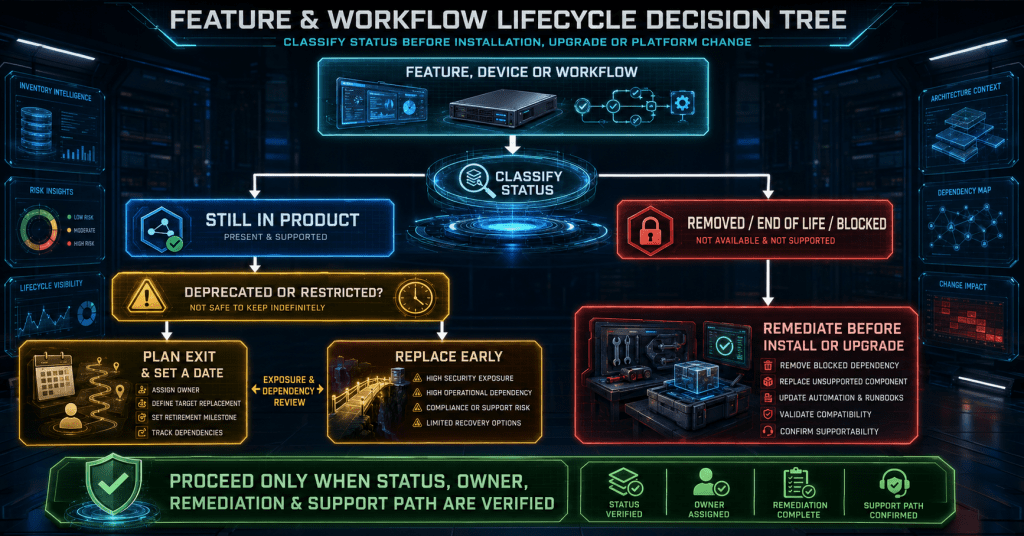
The first design decision is therefore classification.
The diagram below shows why a simple yes-or-no deprecation checklist is not enough.

What matters in this model is the response path. A deprecated feature creates planned work. A discontinued device creates immediate work. A configuration that blocks an upgrade creates prerequisite work.
Putting all three into one generic “accepted risk” category is how late surprises enter a maintenance window.
The Operational Change Map
The VCF 9.1 changes cross multiple ownership boundaries. That is one reason they are easy to underestimate.
| Domain | Examples of Change | Practical Consequence | Likely Owner |
|---|---|---|---|
| Host system storage | USB or SD boot, non-persistent OSDATA, small system devices | Host rebuild or hardware remediation may be required | Compute and hardware teams |
| Processor and I/O compatibility | Deprecated CPUs, restricted NICs, discontinued devices | Installation block, loss of connectivity, or constrained support | Hardware, compute, and network teams |
| Storage services | vVols, vSAN OSA hybrid, Host Cache, large NFS-backed FCD use | Migration planning, policy translation, and capacity validation | Storage and virtualization teams |
| Network telemetry | IPFIX placement, secure syslog, SHA-1 dependencies | Upgrade blockers or loss of operational visibility | Network, security, and operations teams |
| Host configuration | Host Profiles, lifecycle baselines, Auto Deploy workflows | Shift toward image-based and desired-state operations | Platform engineering and lifecycle teams |
| Identity and cluster services | ELM, Integrated Windows Authentication, vCLS | Identity redesign and revised monitoring assumptions | Identity and virtualization teams |
| Management plane | Fleet Management appliance, lifecycle services, licensing | New component boundaries and upgrade sequence | VCF platform owners |
| Operations tooling | Legacy content packs and custom integrations | Dashboard, alert, and automation migration | Monitoring and operations teams |
This is not one platform owner’s checklist.
It is a coordinated backlog that touches architecture, hardware, identity, storage, networking, observability, security, automation, and change governance.
The Changes Most Likely to Derail the Upgrade
Not every deprecated item has to be fully migrated before VCF 9.1. The first pass should focus on conditions that can stop the upgrade or make the resulting platform operationally unsafe.
IPFIX Configurations
IPFIX configurations associated with distributed-switch uplink port groups, link aggregation groups, and certain port-level override policies are on the deprecated path.
The immediate concern is not simply future removal. Active IPFIX placement on affected uplinks or LACP-related paths can interfere with the vCenter upgrade workflow.
Before approving the change:
- Inventory every VDS with IPFIX enabled.
- Identify whether collection is configured at the distributed port group, uplink, LAG, or port-override level.
- Confirm which monitoring or security tools consume the exported data.
- Remove or redesign unsupported placements.
- Test that the replacement still provides the flow visibility required by operations and security.
Do not remove telemetry merely to make a precheck pass. The target design must preserve the operational outcome.
End-of-Life Processors and Devices
Processor and PCI device compatibility should be treated as an evidence exercise, not a model-name exercise.
A server can appear broadly compatible while containing a network or storage controller whose support state has changed. An end-of-life device may no longer bind to a driver after upgrade. That can leave the host without the storage or networking path required to complete recovery.
The required evidence should include:
- Exact server manufacturer and model
- BIOS and firmware level
- Processor family and stepping where relevant
- PCI vendor and device identifiers
- Driver and firmware combination
- Current Broadcom Compatibility Guide result
- Current OEM support position
- Date on which the evidence was collected
A green result from an old spreadsheet is not current evidence.
Lifecycle Baselines
The vSphere 9 lifecycle model expects image-managed clusters. Older baseline and baseline-group workflows are no longer the strategic operating model and cannot be treated as a permanent bridge.
Before VCF 9.1:
- Determine which clusters are image-managed and which still rely on legacy baselines.
- Validate vendor add-ons and component overrides.
- Reconcile desired images with the hardware support evidence.
- Test image compliance and remediation.
- Update automation that calls older lifecycle endpoints or expects baseline objects.
Lifecycle conversion should not be attempted for the first time during the same window as the platform upgrade.
Management-Plane Assumptions
The standalone Fleet Management appliance used in the earlier VCF 9 architecture is not part of the VCF 9.1 bill of materials.
Fleet Lifecycle and SDDC Lifecycle capabilities move into the Kubernetes-based VCF Management Services architecture. Older tooling can interpret the missing appliance binary as a download or repository failure when the real issue is that the architecture has changed.
This is a planning issue, not a file-retrieval issue.
Use the VCF 9.1 generation of download and lifecycle tools, and validate the documented component sequence before staging the production change.
System Storage Needs a Durable Target
VCF 9.1 deprecates several host system-storage patterns for removal in a future major release. These include USB or SD boot media, hosts without persistent OSDATA, system storage below the documented capacity threshold, and APIs associated with relocating system-storage locations.
The operational message is straightforward:
A host that still boots today is not automatically aligned with the next platform design.
Small or removable boot devices were common in earlier vSphere deployments because the hypervisor footprint was modest and much of the runtime state could be redirected. Modern lifecycle, logging, crash analysis, configuration persistence, and remediation workflows require a more durable system-storage design.
The readiness assessment should capture:
- Physical boot-device type
- Device capacity and endurance
- OSDATA placement and persistence
- Scratch configuration
- Core-dump location
- Logging destinations
- OEM-supported replacement options
- Whether remediation requires reinstall, repartitioning, or complete host replacement
The target will often be a persistent M.2, BOSS, SATA, SAS, or NVMe device supported by the server manufacturer and Broadcom compatibility guidance.
The exact answer depends on the platform. The design principle does not: system state must survive lifecycle operations reliably.
Hardware Compatibility Needs a Time-Stamped Evidence Pack
CPU support is one of the strongest reasons not to reproduce a static compatibility list inside an upgrade runbook.
Broadcom’s current guidance separates processor families into supported, deprecated, and discontinued states. Deprecated processors can remain supported within the documented release lifecycle, but warnings and future removal should be expected. Discontinued processors can be blocked by the installer.
Two current examples demonstrate the nuance:
- AMD EPYC 7002 and 7Fx2 processors appear in the deprecated table for VCF 9.x rather than the discontinued table.
- Broadcom revised the status of Intel Skylake-SP systems on July 4, 2026. They can operate in Deprecated Mode for the VCF 9.1.x release train under the documented conditions, but that runway does not extend beyond VCF 9.1.x.
Neither statement proves that every server containing those processors is supported.
The exact server model still needs a valid compatibility entry, and the OEM must support the required firmware and driver combination. Platform teams should therefore attach the live compatibility result to the change record rather than relying on a processor-family summary.
The same discipline applies to I/O devices.
A restricted device can still be claimed by a driver, but feature development and defect remediation are constrained. An end-of-life device can be removed from the product entirely. When that happens, the practical outcome may be missing vmnics, inaccessible storage, or an upgrade that cannot proceed.
Hardware should be classified into three operational groups:
| Group | Decision |
|---|---|
| Supported with current evidence | Proceed, retaining the compatibility and OEM evidence |
| Deprecated or restricted | Proceed only with an approved exit date, risk owner, and replacement plan |
| Discontinued or end of life | Remediate before the production upgrade |
This prevents “technically booted” from being mistaken for “operationally supportable.”
Storage Deprecations Need Migration Owners
Storage changes in VCF 9.1 should be divided into immediate support constraints and longer migration programs.
vSphere Virtual Volumes
vVols are not simply removed from VCF 9.1.
Broadcom has announced full discontinuation in VCF and VVF 9.3.0. That makes VCF 9.1 a migration runway, not a reason to defer planning.
A usable vVols exit assessment should include:
- Storage arrays and VASA providers
- Storage policy assignments
- Replication and disaster-recovery integration
- Snapshot behavior
- Backup-product dependencies
- Encryption and compliance requirements
- Capacity available on the target datastore design
- Workload mobility method
- Validation and rollback approach
The migration target might be vSAN, VMFS, NFS, or another supported architecture. The correct choice depends on workload behavior and platform strategy.
The important action is to assign the migration now. Waiting until the removal release turns an architecture project into an emergency capacity and data-movement exercise.
vSAN OSA Hybrid Configurations
Hybrid configurations using the original vSAN architecture remain on the deprecated path.
This does not automatically mean every environment must be converted during the VCF 9.1 change. It does mean the next hardware refresh should not blindly reproduce the existing design.
The assessment should compare:
- Remaining lifecycle of the current hosts and storage devices
- Eligibility for vSAN Express Storage Architecture
- Workload latency and capacity requirements
- Failure-domain design
- Data-migration method
- Operational tooling and skill impact
- Whether an alternative storage architecture is more appropriate
A deprecation notice is often the point at which a hardware refresh and a platform redesign should become one coordinated program.
First Class Disks on Large NFS Environments
FCD and improved virtual disk use on an NFS version 3 datastore shared by more than 128 ESX 9.1 hosts is not supported.
This can affect environments where Kubernetes, cloud-native storage integration, backup tooling, or automation creates disk objects without traditional virtual-machine ownership.
Inventory should therefore include more than ordinary VMDKs. Identify:
- FCD inventory
- Container and Kubernetes dependencies
- Datastore host-mount counts
- Backup integrations
- Orphaned disk objects
- Automation that creates or attaches independent disk resources
A datastore that looks ordinary in the virtual-machine inventory may still contain an unsupported object pattern.
Host Cache
Host Cache is also on the deprecated path.
Do not assume another memory technology is a direct replacement. Memory tiering, local flash, guest-level caching, application caching, and additional physical memory solve different problems and introduce different failure behavior.
Before removing Host Cache, determine why it was enabled, which workloads rely on it, and what performance condition it was compensating for.
Network Telemetry and Secure Logging Need Cleanup
Several VCF 9.1 changes affect the operational visibility surrounding the platform.
Secure Syslog
VCF 9.1 blocks the use of unencrypted port 514 for syslog sent to vCenter. The supported direction is TLS-protected transport using port 1514.
This is specifically about logging to vCenter. It should not be misread as a universal statement about every syslog collector in the environment.
The change plan should still validate:
- Collector certificates and trust chain
- Firewall policy
- DNS and time synchronization
- Installation scripts
- Configuration management templates
- Alerting and retention
- Evidence that messages arrive after the upgrade
Scripted deployment workflows using the older syslog.ext.port option need to be updated to the TLS-oriented syslog.ext.tls.port configuration.
A successful upgrade with missing logs is not a successful operational outcome.
SHA-1 Dependencies
Remaining SHA-1 dependencies are deprecated for future removal.
The discovery pass should cover certificates, signing workflows, older integrations, automation libraries, appliances, and any external system that negotiates legacy cryptography.
Do not limit the search to vCenter certificates. The dependency may exist in an integration connecting to the platform rather than in the platform itself.
Distributed-Switch Terminology
The deprecation of a standard operating mode associated with the distributed switch should not be interpreted as the removal of the vSphere Standard Switch.
These are different constructs.
This distinction matters because ambiguous wording can generate unnecessary redesign work. Record the exact switch type, operating mode, NSX relationship, and target behavior before assigning remediation.
Network Adapters
Restricted and end-of-life NICs need to be assessed using the same evidence model as processors and storage controllers.
The key questions are:
- Will the target ESX image still contain a driver?
- Is the exact PCI device recognized?
- Does the OEM support the required firmware?
- Will all uplinks, LAGs, VLANs, and vmkernel paths return after remediation?
- Can the host be recovered if management networking does not return?
For network hardware, rollback instructions must exist outside the management path that may fail.
Configuration Management Is Moving Toward Desired State
Host Profiles remain available in the VCF 9.1 era, but they are deprecated. The strategic successor is vSphere Configuration Profiles.
This is more than a user-interface replacement.
Configuration Profiles align host configuration with a cluster-level desired-state model. That model fits image-managed lifecycle operations more naturally than a collection of attached profiles, profile answers, exceptions, and remediation sequences.
A controlled transition should:
- Identify all attached Host Profiles.
- Export or document the settings they enforce.
- Separate platform-wide policy from host-specific values.
- Map settings into Configuration Profiles.
- Validate compliance reporting.
- Test remediation against maintenance-mode and workload requirements.
- Update scripts that query or manipulate Host Profile objects.
- Retire duplicate configuration logic from build scripts.
The target is not simply “the same configuration in a new screen.”
The target is one authoritative desired state that can be validated and remediated consistently.
Auto Deploy Workflows
Stateless and stateless-cached Auto Deploy patterns are also on the deprecated path.
Broadcom’s current zero-touch direction combines modern firmware-based bootstrapping, image management, and Configuration Profiles. That does not make every existing Auto Deploy design obsolete overnight, but it does change where new engineering effort should be invested.
Document the full provisioning chain:
- DHCP and network bootstrap
- Firmware boot behavior
- Image selection
- Host identity
- Configuration assignment
- Cluster membership
- Certificate handling
- Failure recovery
- Rebuild time
A provisioning process is only zero touch when failure recovery is also understood.
Upgrade Suspension
The suspend-to-memory option used during certain ESX upgrade workflows is deprecated.
Capacity planning should assume that hosts may require evacuation, maintenance mode, reboot, or powered-off workload handling. Preserve a tested fallback even where live patching or other reduced-disruption mechanisms are available.
Identity and Cluster Services Need New Assumptions
Identity and cluster-service changes are especially dangerous when old monitoring logic interprets the new state as a failure.
Enhanced Linked Mode
Enhanced Linked Mode is deprecated.
For VCF convergence paths using VCF Single Sign-On, an existing ELM topology may be a dependency that must be split, migrated, or redesigned. The correct method depends on whether the environment is moving into VCF or operating under a different vSphere Foundation model.
Do not apply VCF identity guidance blindly to every vSphere topology.
The assessment should document:
- SSO domains
- Linked vCenter instances
- Identity sources
- Global permissions
- Solution users and certificates
- Cross-vCenter automation
- Backup and recovery implications
- Target ownership boundary
ELM should be treated as an architecture dependency, not just an identity checkbox.
Integrated Windows Authentication
Integrated Windows Authentication was already removed from the vSphere 9 generation.
Remaining environments should use a supported identity approach such as Active Directory over LDAPS or identity federation, according to the target architecture and security requirements.
The important validation is not merely that interactive login works. Service accounts, automation, API access, group resolution, permissions, emergency access, and recovery procedures must also be tested.
vSphere Cluster Services
In vCenter 9.1, vCLS is deactivated by default and cannot be reactivated.
DRS and HA no longer depend on the presence of vCLS virtual machines as they did in earlier designs. That means the absence of those VMs is expected behavior, not evidence of a failed cluster service.
Update:
- Monitoring rules that expect vCLS VMs
- Backup exclusions
- Capacity reports
- Automation that identifies or protects the VMs
- Operational runbooks
- Health-check scripts
- Documentation used by service desks and escalation teams
A platform upgrade should not generate permanent false alarms because monitoring was designed around an obsolete implementation detail.
The Management Plane Is Consolidating
The VCF 9.1 upgrade is also a management-plane transition.
The earlier standalone Fleet Management appliance is replaced by services running within VCF Management Services. Fleet Lifecycle and SDDC Lifecycle become service capabilities rather than responsibilities of the former dedicated appliance.
This has several practical effects:
- The expected bill of materials changes.
- The upgrade sequence becomes more important.
- Older download tools may search for a component that is intentionally absent.
- Identity and licensing services must be planned as target-state dependencies.
- Operational ownership moves from an appliance-centric model toward a service-centric model.
- Monitoring should target service health and workflow completion, not only appliance availability.
Legacy Operations for Logs content packs also need attention as the platform moves toward management packs. Dashboards, alerts, extracted fields, and custom integrations should be tested rather than assumed to migrate automatically.
The management-plane upgrade should answer a simple question:
Who owns a lifecycle action after the upgrade, and which service actually executes it?
If the answer still refers to an appliance that no longer exists, the operating model is not ready.
A Practical Readiness Workflow
A useful deprecation review moves from inventory to evidence. It should not finish at discovery.

The important feature in this workflow is the revalidation loop. A finding is not closed merely because a task was performed. The target state must be checked against current support guidance and tested against the real operating model.
Discovery pass
Collect host boot media, OSDATA placement, CPU families, PCI devices, driver and firmware versions, cluster lifecycle mode, Host Profiles, vVols usage, vSAN architecture, ELM relationships, IPFIX settings, syslog targets, content packs, automation dependencies, and management-plane components.
Classification pass
Place each finding into one of four queues:
- Upgrade blocker
- Service-impacting change
- Supported but deprecated dependency
- Restricted or future hardware risk
This prevents long-term migration work from obscuring an immediate prerequisite.
Remediation pass
Assign a named owner and define the target state. “Virtualization team” is not a named owner. Record the person or accountable technical role that must provide evidence.
Test pass
Validate more than platform availability. Test logging, backup, DRS, HA, vMotion, storage access, lifecycle compliance, identity, certificates, automation, dashboards, alerts, download workflows, and recovery procedures.
Revalidation pass
Recheck Broadcom documentation, compatibility data, OEM guidance, and any knowledge base article that changed during planning. Record the date and result.
Approval pass
Attach the evidence to the change record. Approval should be based on demonstrated readiness rather than confidence that the team can troubleshoot during the window.
Common Misreadings That Create Late Surprises
| Assumption | Operational Reality | Better Action |
|---|---|---|
| Deprecated means unsupported immediately | Many deprecated capabilities remain supported in the current release | Plan the exit without creating unnecessary emergency work |
| A successful precheck proves hardware support | Prechecks cannot replace current compatibility and OEM evidence | Validate the exact server, CPU, PCI device, driver, and firmware |
| vVols are already gone in VCF 9.1 | Full discontinuation is planned for a later release | Use the current runway to design and test migration |
| Missing vCLS VMs indicate broken DRS or HA | vCLS VMs are no longer required for those services in the vSphere 9 generation | Update monitoring and runbooks |
| Distributed-switch deprecation means vSphere Standard Switch is removed | The terms refer to different networking constructs | Document the exact switch and operating mode |
| A missing Fleet Management binary indicates a failed download | The standalone appliance is no longer part of the target architecture | Use current tools and follow the documented component sequence |
| Logging can be repaired after the upgrade | Secure transport changes can leave operations blind during recovery | Validate logging before approving the change |
| Existing automation will continue because the UI still looks familiar | APIs, object models, and ownership boundaries can change independently of the UI | Test every lifecycle and configuration workflow |
What Belongs in the Change Record
The change record should make each architectural decision visible.
| Control Area | Required Evidence | Accountable Owner | Exit Criterion |
|---|---|---|---|
| Hardware compatibility | Current compatibility results, OEM confirmation, firmware and driver matrix | Compute or hardware owner | Every host has a supported or formally accepted state |
| System storage | Boot and OSDATA inventory, target design, rebuild method | Compute platform owner | No unidentified or unplanned deprecated boot dependency |
| Storage services | vVols, vSAN, FCD, Host Cache assessment | Storage owner | Migration runway and validation plan approved |
| Network telemetry | IPFIX, syslog, switch mode, NIC assessment | Network and operations owners | No blocker and monitoring remains functional |
| Lifecycle management | Image state, add-ons, Configuration Profile plan | Lifecycle owner | Target clusters remediate successfully in testing |
| Identity | ELM, SSO, identity source, permissions, recovery evidence | Identity owner | Interactive and non-interactive access validated |
| Management services | Component sequence, service ownership, download tooling | VCF platform owner | Target management workflows complete successfully |
| Fallback | Restore, rebuild, support escalation, decision points | Change owner | Go or no-go criteria and recovery path approved |
This converts the deprecation review from a release-note acknowledgment into an executable control system.
Conclusion
VCF 9.1 deprecations are not a miscellaneous list of old features.
They are signals about where VMware Cloud Foundation is moving: persistent host storage, image-managed lifecycle operations, desired-state configuration, secure telemetry, service-based fleet management, modern identity, and stricter hardware boundaries.
Some changes require immediate remediation. Others provide migration runway. A few mainly require monitoring and automation to stop expecting an implementation that no longer exists.
The practical response is the same in every case: classify the change, assign an owner, define the target state, test the operational impact, and attach current evidence to the upgrade decision.
Do not wait for a future release to turn a deprecated dependency into an emergency.
A well-run VCF upgrade window should feel uneventful. That happens when the architecture decisions, compatibility checks, migration plans, and fallback paths were completed before the window opened.
External Reference Links
Broadcom VCF Product Support Notes
Primary release support source for system storage, IPFIX, SHA-1, secure syslog, vCLS, FCD and IVD limits, and continuing legacy deprecations.
Broadcom CPU Support Deprecation and Discontinuation Guidance
Defines supported, deprecated, and discontinued CPU states and provides the current processor-family tables.
Broadcom CPU System Support Update
Documents the July 4, 2026 revision for Intel Skylake-SP systems in VCF 9.1.x and explains the documented deprecated-mode conditions.
Broadcom Deprecated and End-of-Life Device Guidance
Explains the difference between restricted and end-of-life devices and the possible networking or storage impact after an ESX upgrade.
Broadcom vVols Deprecation Notice
Documents the vVols deprecation timeline and full discontinuation planned for VCF and VVF 9.3.0.
Transitioning to vSphere Configuration Profiles
Explains the movement from Host Profiles toward cluster-level Configuration Profiles and image-managed lifecycle operations.
What Is New with vSphere in VCF 9.1
Provides additional context for Configuration Profiles, desired-state management, and current provisioning capabilities.
Broadcom vCLS Operational Guidance
Explains the reduced dependency on vCLS for DRS and HA in the vSphere 9 generation.
Broadcom VCF Upgrade Sequence Guidance
Documents the component sequence, VCF Management Services dependencies, licensing considerations, and management-plane transition.
Broadcom Fleet Manager Binary Guidance
Explains why the former standalone Fleet Management appliance is absent from the VCF 9.1 bill of materials.
Broadcom Identity and ELM Guidance
Provides context for VCF Single Sign-On, Enhanced Linked Mode, and differences between VCF and VVF identity paths.
Independent Article That Prompted the Topic
Used for topic discovery and comparison only. The structure, analysis, wording, operational model, and recommendations in this draft were developed independently, with version-sensitive claims checked against Broadcom sources.
