

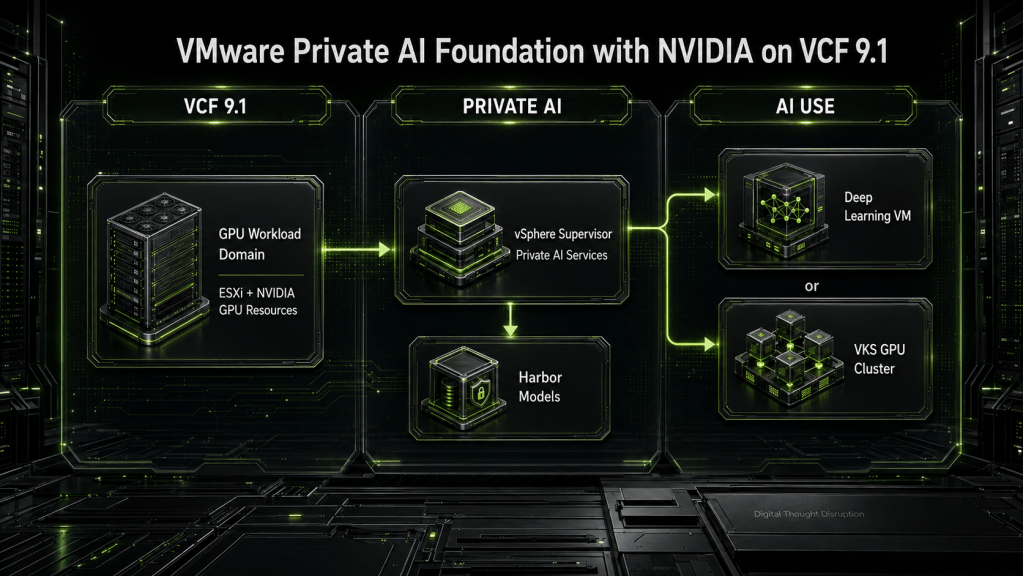


TL;DR
Deploying VMware Private AI Foundation with NVIDIA on VCF 9.1 is not a single-product installation. It is an integrated platform deployment spanning the VCF workload domain, GPU-enabled ESXi hosts, NVIDIA drivers and licensing, vSphere Supervisor, namespaces, Private AI Services, Harbor, identity, networking, certificates, and the AI consumption model.
The most important design decision happens before Private AI Services is installed: determine whether users need individually managed Deep Learning VMs, cloud-native VKS clusters, or both. That decision influences GPU allocation, networking, storage, automation, lifecycle management, and recovery.
For environments that require VCF Automation, multi-tenancy, self-service networking, and governed AI catalogs, design the Supervisor around VCF Networking with VPC from the beginning. Moving later from VDS-based Supervisor networking to VPC networking is a redeployment boundary, not a routine configuration change.
Introduction
VMware Private AI Foundation with NVIDIA brings enterprise AI workloads into the same operational framework used to manage VMware Cloud Foundation. That is valuable because most organizations do not need another isolated AI island. They need GPU infrastructure that fits existing practices for identity, networking, storage, lifecycle management, security, and support.
The challenge is that the solution crosses several administrative boundaries.
The VCF team owns the workload domain and Supervisor. The virtualization team owns ESXi hosts and GPU allocation. The platform team may own VKS and namespaces. The security team owns certificates, registry policy, and identity. Data science teams consume Deep Learning VMs, Kubernetes clusters, models, notebooks, and inference endpoints.
A successful deployment therefore depends less on completing an installation wizard and more on making those boundaries explicit.
This deep dive provides an implementation path for VMware Private AI Foundation with NVIDIA on VCF 9.1. It covers the infrastructure foundation, Supervisor architecture, Private AI Services, Harbor model distribution, Deep Learning VM and VKS consumption models, validation, lifecycle dependencies, and realistic recovery boundaries.
Deployment Scope and Assumptions
This design assumes the following baseline:
- VMware Cloud Foundation 9.1 is deployed and healthy.
- AI workloads will run in a workload domain rather than the management domain.
- The target ESXi cluster contains supported NVIDIA GPU hardware.
- The GPU, server platform, firmware, ESXi build, NVIDIA host driver, guest driver, and licensing combination has been validated against current support matrices.
- vSphere Supervisor will provide the platform control layer.
- Harbor will provide controlled storage and distribution for platform artifacts and approved models.
- Private AI Services will be installed at the Supervisor level and activated for selected namespaces.
- AI consumers will use Deep Learning VMs, VKS clusters with GPU workers, or both.
- DNS, time synchronization, certificate authorities, identity providers, and load-balancing services are available before platform installation.
- Production AI data, notebooks, models, and vector databases will not rely solely on ephemeral VM or container storage.
This is an architecture and implementation guide, not a replacement for the exact version-specific procedures in Broadcom and NVIDIA documentation. Names of service definitions, packages, images, and configuration objects can change between releases.
Understand the Platform Before Deploying It
VMware Private AI Foundation with NVIDIA is the overall solution. Private AI Services is one of the platform services operating within that solution.
The deployment can be understood as five cooperating layers:
- VCF infrastructure: Workload domains, clusters, ESXi hosts, networking, storage, lifecycle management, and identity integration.
- NVIDIA acceleration: Physical GPUs, host drivers, guest drivers, vGPU profiles or direct device assignment, licensing, and GPU telemetry.
- Supervisor services: Kubernetes control-plane functions, namespaces, resource policy, service operators, and workload APIs.
- AI platform services: Model Gallery, Model Runtime, data indexing, agent capabilities, API access, and related Private AI Services functions.
- AI consumption: Deep Learning VMs, VKS clusters, notebooks, model endpoints, applications, and automation pipelines.
Private AI Services does not replace the infrastructure underneath it. It automates and governs the creation of AI services on top of that infrastructure.
Reference Architecture and Ownership Boundaries
The following architecture shows the major components and where the most important ownership boundaries sit.
The diagram highlights three principles.
First, the Supervisor and Private AI Services are control layers. The actual GPU compute remains on ESXi hosts and inside workload VMs.
Second, Harbor is part of the production delivery path. It is not merely a convenient place to cache container images.
Third, enterprise services such as DNS, certificates, identity, and time synchronization are direct dependencies. Treating them as afterthoughts is one of the fastest ways to create an unreliable platform.
Recommended Ownership Model
| Capability | Accountable owner | Primary responsibilities |
|---|---|---|
| VCF workload domain | VCF platform team | Workload-domain health, cluster design, capacity, storage, networking, lifecycle |
| GPU-enabled ESXi hosts | Virtualization and hardware teams | Firmware, BIOS, ESXi image, NVIDIA host driver, device health, maintenance |
| NVIDIA licensing | Platform or licensing team | License service, entitlements, client configuration, expiration monitoring |
| Supervisor | VCF platform team | Control-plane sizing, networking mode, namespaces, service installation |
| VCF Automation | Cloud platform team | Organizations, projects, catalogs, policies, entitlements, self-service |
| Private AI Services | AI platform team | Service configuration, namespace activation, model services, platform updates |
| VKS clusters | Kubernetes platform team | Cluster classes, GPU workers, GPU Operator, policies, observability |
| Deep Learning VMs | AI platform and consumer teams | Images, VM classes, notebooks, frameworks, persistent user data |
| Harbor | Platform engineering or DevSecOps | Projects, RBAC, certificates, retention, replication, backup, scanning |
| Model approval | AI governance and security | Provenance, licenses, validation, promotion, acceptable-use controls |
| Application endpoints | Application or MLOps team | Deployment, testing, scaling, monitoring, rollback, service ownership |
The exact names of the teams matter less than ensuring every capability has an accountable owner.
Choose the AI Consumption Model First
Private AI Foundation supports more than one workload model. Do not deploy every capability simply because it is available.
Start with the way users need to consume the platform.
Deep Learning VMs
A Deep Learning VM is usually the fastest path for individual experimentation, notebook development, model evaluation, and framework-based work.
It is appropriate when the user needs:
- A familiar virtual machine operating model
- Interactive shell or notebook access
- Preinstalled AI and machine-learning frameworks
- Direct control over Python environments and local tools
- A dedicated GPU allocation
- Rapid experimentation without operating a Kubernetes cluster
The operational risk is that the VM can become a pet. Researchers may install packages manually, store notebooks locally, download models directly, and create an environment that cannot be reproduced.
For production use, the VM should be treated as rebuildable. Store notebooks, data, source code, environment definitions, and model artifacts outside the VM. Changes made only inside a deployed Deep Learning VM may disappear when the deployment is deleted or replaced.
VKS Clusters with GPU Workers
VKS is the stronger fit for repeatable, cloud-native AI services.
Use it when the workload requires:
- Containerized training or inference
- Multiple cooperating services
- Horizontal scaling
- Declarative deployment
- CI/CD or GitOps workflows
- Kubernetes scheduling and policy
- NVIDIA GPU Operator integration
- Production inference endpoints
- Shared platform services such as monitoring, ingress, secrets, and policy enforcement
VKS introduces more moving parts. Worker images, Kubernetes versions, GPU Operator components, container runtimes, network policies, storage classes, and workload manifests all become part of the lifecycle chain.
Deep Learning VM and VKS Comparison
| Decision area | Deep Learning VM | VKS cluster |
|---|---|---|
| Best fit | Individual development and experimentation | Shared or production AI services |
| User experience | Familiar VM, shell, IDE, or notebook | Kubernetes API, pipelines, and manifests |
| Deployment unit | Virtual machine | Pods, services, operators, and clusters |
| Scaling | Primarily vertical or additional VMs | Horizontal and declarative |
| GPU delivery | vGPU profile or assigned device | GPU-capable worker VMs and Kubernetes resources |
| Reproducibility | Depends on image and automation discipline | Strong when manifests and images are version controlled |
| Operational complexity | Lower initial complexity | Higher platform complexity |
| Recovery model | Rebuild VM and reattach external state | Reconcile cluster and restore persistent state |
| Strongest use case | Exploration, development, isolated testing | Inference, shared services, MLOps, production applications |
A mature platform commonly provides both. The mistake is allowing both paths to evolve without common governance for models, identities, networking, registries, telemetry, and lifecycle management.
Prepare the VCF Workload Domain
The AI workload domain is the infrastructure boundary that protects both the management plane and the GPU environment.
A dedicated domain is not mandatory for every lab, but it is the preferred production pattern when GPU workloads have materially different capacity, maintenance, security, and lifecycle requirements.
Validate the VCF Bill of Materials
Before adding AI services, confirm that the workload domain is running a supported VCF 9.1 bill of materials.
Validate:
- SDDC Manager inventory and health
- vCenter and ESXi versions
- VCF Networking components when used
- vSAN or external storage compatibility
- Supervisor prerequisites
- VCF Automation integration prerequisites
- Target Private AI Services version
- Deep Learning VM image version
- VKS release and worker-image support
- NVIDIA host and guest driver compatibility
Do not treat “VCF 9.1” as sufficient compatibility evidence. Patch levels and driver releases can materially change the supported combinations.
Design the GPU Cluster
The GPU cluster should be designed around the AI workload profile, not around the number of GPUs that happened to be purchased.
Collect the following requirements:
- Required GPU memory per workload
- Concurrent training and inference demand
- vGPU sharing requirements
- Exclusive-device requirements
- Expected model sizes
- CPU-to-GPU ratios
- Host memory requirements
- Local and shared storage throughput
- East-west network throughput
- Maintenance and failover capacity
- Growth over the next hardware lifecycle
At least one GPU host should remain available for maintenance or workload recovery where availability requirements justify it. A cluster with every GPU permanently allocated has no practical maintenance margin.
Validate the Hardware and Firmware
Confirm the entire server platform, not only the GPU model.
Review:
- Server hardware compatibility
- Supported PCIe topology
- GPU power and cooling requirements
- BIOS and firmware versions
- IOMMU and virtualization settings
- Above 4G decoding when required
- SR-IOV settings when required by the selected design
- GPU mode and partitioning support
- Network adapter compatibility
- NUMA alignment for large GPU workloads
Firmware drift across otherwise identical GPU hosts can produce difficult placement and stability problems. Include firmware baselines in the same compliance process used for ESXi.
Manage the NVIDIA Host Driver as Part of the ESXi Image
Avoid treating the NVIDIA host driver as an informal post-installation package.
Where supported by the chosen deployment model, include the driver or component in the desired vSphere Lifecycle Manager image. This produces a repeatable host baseline and makes drift visible.
The following must remain compatible:
A platform upgrade is not complete when ESXi reports healthy. It is complete when a representative AI workload has successfully consumed the GPU and passed validation.
Select the GPU Allocation Method
The allocation model affects performance, mobility, scheduling, and operations.
vGPU profiles allow a physical GPU to be divided into supported profiles. This is useful for environments that need controlled sharing and predictable per-workload GPU memory.
Direct device assignment gives a workload more direct access to the GPU. It can be appropriate for workloads that need exclusive devices or the highest supported performance, but it can reduce mobility and create stricter placement constraints.
MIG-backed resources, where supported by the selected GPU and software stack, create hardware-partitioned GPU instances. MIG should be treated as a separate design decision because profile changes affect capacity planning, scheduling, and active workloads.
Do not mix allocation models casually across hosts in the same placement pool. The scheduler must be able to find compatible devices, profiles, drivers, and host capacity.
Design the Supervisor and Namespace Architecture
The vSphere Supervisor provides the control plane through which Private AI Services and AI workloads are managed.
This is not simply a Kubernetes feature toggle. Its networking model, control-plane size, namespace structure, and service dependencies influence almost every later platform decision.
Choose VPC or VDS Networking Deliberately
VCF 9.1 supports Supervisor architectures based on VCF Networking with VPC or vSphere Distributed Switch networking.
The decision should be driven by the required consumption model.
| Requirement | Supervisor with VCF Networking and VPC | Supervisor with VDS |
|---|---|---|
| VCF Automation consumption | Supported and expected for the documented multi-tenant model | Manual consumption path |
| Self-service networking | Strong fit | Limited and administrator-driven |
| Multi-tenancy | Integrated organizations, projects, namespaces, and VPCs | Primarily namespace and infrastructure administration |
| Network policy | VPC and distributed policy capabilities | VLAN and external network controls |
| Load balancing | Foundation Load Balancer or Avi options, depending on design | External load-balancing integration required |
| Operational footprint | More platform components and network design | Simpler initial topology |
| Long-term self-service platform | Preferred | Better for constrained or manually managed environments |
The documented VCF Automation consumption model depends on Supervisor networking with VPC. Without VCF Automation, administrators can still activate and operate Private AI Services using the VCF consumption CLI, Kubernetes manifests, and the Private AI Services interface, but they lose the same integrated self-service infrastructure experience.
This choice is a recovery boundary. Moving from VDS-based Supervisor networking to VPC networking in VCF 9.1 requires planned Supervisor redeployment. It should not be placed on a “we will fix it later” list.
Size the Supervisor for the Target Platform
Supervisor sizing should account for:
- Number of namespaces
- Number of VKS clusters
- Private AI Services components
- Concurrent reconciliation activity
- Data-indexing workloads
- API activity
- Expected growth
- Availability requirements
Plan conservatively because the control-plane size can be increased, but reducing an oversized control plane is not the same routine operation.
Create a Namespace Strategy
Namespaces should reflect ownership, security, quota, and lifecycle boundaries.
Useful patterns include:
Organization
  |
  +-- Development
  |     +-- Team A AI namespace
  |     +-- Team B AI namespace
  |
  +-- Test
  |     +-- Shared validation namespace
  |
  +-- Production
        +-- Application 1 inference namespace
        +-- Application 2 RAG namespace
Avoid placing unrelated development and production services in one namespace merely to reduce administrative work.
For each namespace, define:
- Responsible team
- Environment classification
- CPU and memory limits
- GPU quota
- Allowed VM classes
- Allowed storage policies
- Allowed networks
- Registry access
- Identity groups
- Secret-management process
- Logging and retention requirements
- Data classification
- Deletion and recovery policy
Namespaces are governance objects, not folders.
Design Harbor as a Production Service
Harbor sits in the artifact path between software producers, model curators, the AI platform, and runtime workloads.
A registry outage can prevent new VKS workers, services, models, or inference endpoints from starting. A registry compromise can introduce unapproved code or models into the AI environment.
Treat Harbor as Tier 1 platform infrastructure when production workloads depend on it.
Separate Artifact Types and Trust Levels
A practical project design might include:
| Harbor project | Intended content |
|---|---|
platform-images |
Approved infrastructure and service images |
gpu-components |
GPU Operator and related platform artifacts |
dlvm-content |
Approved Deep Learning VM supporting artifacts |
model-quarantine |
Newly acquired or unvalidated models |
model-approved |
Reviewed and approved production models |
team-development |
Team-owned development images and models |
production-apps |
Signed production application images |
Do not allow external models to move directly from an internet source into a production model gallery.
A safer promotion flow is:
Apply Registry Controls
Recommended controls include:
- Project-level RBAC
- Separate robot or service accounts
- Short-lived credentials where supported
- Image and artifact scanning
- Model provenance records
- Immutable production tags
- Digest-based deployment
- Signature or attestation policy
- Retention rules
- Replication to a recovery registry
- Audit logging
- Storage-capacity monitoring
- Certificate-expiration monitoring
- Backup of the registry database and artifact storage
Traditional container vulnerability scanning alone does not validate a model. Model promotion should also consider licensing, origin, supported framework, serialization format, expected behavior, embedded code risk, and data-governance constraints.
Plan for Large Model Artifacts
Models can be much larger than standard application images.
Capacity planning must include:
- Initial model size
- Multiple versions
- Quantized variants
- Framework-specific formats
- Development and production copies
- Replication overhead
- Temporary upload space
- Retention windows
- Backup capacity
- Restore bandwidth
A Harbor deployment sized only for container images can become a bottleneck once multiple large language models and embedding models are introduced.
Prepare Networking, DNS, Certificates, and Identity
Most failed deployments are not caused by the GPU. They are caused by dependencies around the GPU.
Build an Endpoint Inventory
Create an endpoint register before installation.
| Endpoint or service | Consumers | Required control |
|---|---|---|
| SDDC Manager and vCenter | Platform administrators and automation | Administrative DNS, certificates, restricted access |
| Supervisor API | Administrators, automation, VKS operations | Load balancing, DNS, trusted certificate |
| Private AI Services endpoints | AI users and applications | Ingress, DNS, certificates, authentication |
| Harbor | ESXi-adjacent services, VMs, VKS workers, administrators | Trusted CA, RBAC, adequate bandwidth |
| Identity provider | VCF Automation, platform services, users | OIDC or supported federation, group mapping |
| NVIDIA licensing | GPU-enabled guest workloads | Reliable reachability and monitoring |
| External repositories or mirrors | Platform deployment components | Controlled egress or internal mirrors |
| External PostgreSQL or vector services | RAG and data-indexing services | TLS, authentication, backup, latency monitoring |
| DNS and NTP | All components | Redundancy and consistent configuration |
The exact set of endpoints depends on whether the environment is connected, restricted, or fully disconnected.
Use Predictable DNS
Forward and reverse DNS should be validated for all critical platform endpoints before installation.
Check from more than one network location:
nslookup harbor.ai.example
nslookup supervisor-api.ai.example
nslookup private-ai.ai.example
nslookup identity.ai.example
A successful lookup from an administrator workstation does not prove that VKS workers, Supervisor components, or Deep Learning VMs can resolve the same records.
Establish Certificate Trust
Use certificates with complete chains and correct subject alternative names. Import the issuing CA chain into every component that must trust Harbor or another private endpoint.
A basic inspection can be performed with:
openssl s_client \
  -connect harbor.ai.example:443 \
  -servername harbor.ai.example \
  -showcerts
Verify:
- The endpoint presents the intended certificate
- The certificate includes the requested FQDN
- The complete intermediate chain is present
- The root or intermediate CA is trusted by the client
- Expiration monitoring is configured
- Rotation procedures have been tested
Disabling certificate validation to complete an installation is not a deployment solution. It creates a hidden day-two dependency that usually reappears during upgrades or node replacement.
Map Enterprise Identity to Platform Roles
Define group-based access before onboarding users.
A practical model separates:
- VCF infrastructure administrators
- Supervisor administrators
- VCF Automation organization administrators
- Project administrators
- AI platform operators
- Model approvers
- Data scientists
- Application deployers
- Read-only auditors
Avoid granting broad platform administration to AI consumers simply because finer-grained roles have not yet been designed.
Install Private AI Services
Private AI Services follows a two-level operating model.
At the Supervisor level, the service operator and supporting definitions are installed and managed by platform administrators.
At the namespace level, an organization administrator or authorized AI platform operator activates and configures the service for a specific tenant or project.
Supervisor-Level Installation
The infrastructure administrator should:
- Confirm the target Supervisor is healthy.
- Confirm required service artifacts are available from approved registries or internal mirrors.
- Configure registry authentication.
- Import the CA trust bundle required for Harbor and other private endpoints.
- Register or install the Private AI Services definition on the Supervisor.
- Verify that the service operator is running.
- Confirm that service resources can be made available to namespaces.
- Record the installed service version and artifact digests.
Do not continue to namespace activation while the Supervisor-level operator is degraded or unable to reach its required artifact sources.
Namespace-Level Activation
For each approved namespace:
- Apply the namespace storage, network, CPU, memory, and GPU policies.
- Assign the required identity groups and permissions.
- Configure Harbor endpoints and credentials.
- Configure NVIDIA credentials or secrets required by the selected services.
- Add trusted CA material.
- Configure external data services when required.
- Activate Private AI Services through the selected consumption path.
- Observe the service reconciliation process.
- Validate platform pods and endpoints.
- Test model acquisition, validation, and deployment.
In a VCF Automation deployment, much of this can be presented through organizations, projects, catalogs, policies, and guided provisioning. In a manually administered environment, operators use the VCF consumption CLI, Kubernetes manifests, and kubectl.
The interface is different, but the underlying requirements are the same.
Finalize Deep Learning VM and VKS Capabilities
Private AI Services alone does not make every workload type ready for use. The supporting images, drivers, packages, and blueprints must also be prepared.
Deep Learning VM Readiness
Validate:
- Approved Deep Learning VM image is available
- VM class provides adequate CPU and memory
- GPU profile is exposed to the namespace
- NVIDIA guest driver is compatible with the host driver
- Licensing is functional
- Storage policy is available
- User-data persistence is defined
- Package repositories or internal mirrors are reachable
- Harbor certificate chain is trusted
- Blueprint or catalog version is recorded
Deploy a test VM and confirm:
nvidia-smi
Successful output should show the expected GPU or vGPU profile, driver version, memory, utilization, and licensing state where applicable.
Then validate the actual framework, not only the driver. Run a small supported CUDA, PyTorch, or TensorFlow workload that allocates GPU memory and completes a calculation.
VKS GPU Cluster Readiness
Validate:
- Supported VKS release
- Supported worker image
- GPU-capable VM class
- Namespace GPU quota
- NVIDIA GPU Operator artifacts
- Container registry access
- Storage classes
- Ingress and load balancing
- Network policy
- Observability components
- Supported upgrade path
After the cluster is created, inspect GPU resources:
kubectl get nodes \
  -o custom-columns=NAME:.metadata.name,GPU:.status.allocatable.nvidia\.com/gpu
Inspect platform components and events:
kubectl get pods -A

kubectl get events -A \
  --sort-by=.lastTimestamp
The cluster is not ready merely because the control plane is healthy. At least one test pod must request a GPU, start successfully, execute a GPU workload, and release the resource cleanly.
Publish Governed AI Catalog Items
VCF Automation can present ready-to-use catalog items such as:
- Deep Learning VM workstations
- AI Kubernetes clusters with GPU workers
- GPU-enabled inference services
- Approved platform patterns
- Team-specific AI environments
Catalog items should be versioned just like application artifacts.
For every published version, record:
- Blueprint version
- Deep Learning VM or VKS version
- VM classes
- GPU profile
- Network selection
- Storage policy
- Registry dependencies
- Secret references
- Certificate dependencies
- Owner
- Test results
- Rollback version
Do not edit the only production blueprint in place. Create a draft version, test it in a non-production project, validate the resulting workload, and then promote it.
Follow a Controlled Deployment Sequence
The full dependency order should remain visible throughout implementation.
Compatibility Gate
Do not begin until the component matrix has been reviewed and signed off.
The matrix should include:
- Server model and firmware
- GPU model
- ESXi release and build
- NVIDIA host driver
- vGPU or direct-assignment mode
- Guest driver
- Deep Learning VM image
- VKS release
- GPU Operator version
- Private AI Services version
- VCF Automation version
- Harbor version
- Load-balancer components
Infrastructure Gate
The workload domain must pass:
- VCF health checks
- vSAN or storage health
- Network connectivity testing
- DNS testing
- NTP testing
- Host compliance
- GPU hardware validation
- Capacity validation
- Maintenance-capacity review
Platform Gate
The Supervisor and namespaces must pass:
- Control-plane health
- API reachability
- Load-balancer health
- Namespace creation
- Storage-policy assignment
- Network assignment
- GPU quota assignment
- Identity and entitlement testing
- Registry trust testing
AI Service Gate
Private AI Services must pass:
- Operator health
- Namespace reconciliation
- Platform pod readiness
- Harbor authentication
- Model Gallery access
- Model validation
- Model upload
- Endpoint deployment
- Endpoint authentication
- Inference testing
- Telemetry collection
Each gate creates an evidence boundary. If model deployment fails, the team should know whether infrastructure, Supervisor, registry, service, or workload validation last succeeded.
Validate the Complete Deployment
Validation should proceed from the lowest layer to the user-facing service.
Infrastructure Validation
Confirm:
- All workload-domain components are healthy
- GPU hosts are compliant with the desired image
- Physical GPUs are detected
- No critical hardware alerts exist
- Storage policies are available
- Required network segments and routes are active
- DNS and NTP are consistent
- Spare GPU capacity exists where required
Deep Learning VM Validation
Confirm:
- VM provisioning completes
- The selected GPU profile is attached
- Guest driver loads
- NVIDIA licensing succeeds
nvidia-smireports the expected device- Frameworks detect the GPU
- Notebook and user data are persisted externally
- Harbor content can be accessed
- Logs and metrics are collected
VKS Validation
Confirm:
- Cluster creation completes
- Worker nodes become ready
- GPU Operator components are healthy
- GPU resources appear as allocatable
- A GPU-requesting pod is scheduled
- The workload completes successfully
- Logs and metrics include GPU data
- Node replacement can be performed
- Scaling behavior is understood
- Persistent storage survives workload recreation
Private AI Services Validation
Confirm:
- Supervisor-level operator is healthy
- Namespace service configuration reaches a ready state
- Platform interface is reachable
- Identity and permissions work as designed
- Model Gallery can reach approved Harbor projects
- A model can be validated and promoted
- An approved model can be deployed
- An inference request returns a valid response
- Application and infrastructure telemetry can be correlated
- The endpoint can be removed and recreated from declared configuration
Evidence to Retain
Capture:
- Component and version matrix
- VCF health output
- Host compliance results
- GPU inventory
- Driver and licensing state
- Supervisor status
- Namespace policies and quotas
- Private AI Services status
- Harbor project and policy configuration
- Model digest and provenance
- VKS GPU allocation output
- Deep Learning VM validation output
- Test inference result
- Logs from failed and successful deployments
- Recovery and rebuild test results
This evidence becomes the baseline for upgrades and support escalations.
Operate the Platform After Deployment
Day-two operations must cover the entire dependency chain, not only Private AI Services.
Capacity and Placement
Monitor:
- Physical GPU utilization
- GPU memory usage
- GPU temperature and power
- vGPU profile availability
- Pending GPU workload requests
- Host CPU and memory contention
- VKS worker capacity
- Namespace quotas
- Storage consumption
- Harbor capacity
- Model-cache growth
- Network throughput
- Load-balancer connections
Low GPU utilization does not always mean excess capacity. The workload may be blocked by CPU preprocessing, storage throughput, network transfer, small batches, or application serialization.
Catalog and Blueprint Lifecycle
Maintain separate states for:
- Draft
- Test
- Approved
- Published
- Deprecated
- Retired
Before publishing a new version, deploy it into a validation project and test the complete outcome. That includes GPU access, package installation, registry trust, identity, storage, and application functionality.
Certificate and Secret Rotation
Maintain an inventory of:
- Harbor certificates
- Supervisor and ingress certificates
- Identity-provider certificates
- Robot-account credentials
- Registry secrets
- NVIDIA licensing configuration
- Database credentials
- Application API secrets
Test rotation in a non-production namespace before production. A certificate replacement may require trust-bundle updates in existing Deep Learning VMs, VKS nodes, operators, and application containers.
Model Governance
Models should move through a controlled lifecycle:
Track the model digest rather than relying only on a mutable name or tag. Retain the evaluation results, approval record, model license, source, framework requirements, deployment configuration, and rollback target.
Upgrade Planning
Treat the stack as a compatibility set.
A useful planning order is:
- Identify the target VCF and ESXi baseline.
- Identify compatible GPU firmware and host driver.
- Identify compatible guest drivers and GPU Operator versions.
- Identify supported Deep Learning VM and VKS releases.
- Identify the matching Private AI Services release.
- Validate Harbor and external-service compatibility.
- Test catalog items and representative models.
- Execute the vendor-supported production sequence.
- Validate from the user-facing endpoint back down through the stack.
The supported upgrade order for a particular release must come from current release documentation. Do not assume that the planning hierarchy is automatically the execution order.
Define Recovery and Rollback Boundaries
Private AI Foundation does not have a single rollback button.
Each layer contains different state and must have its own recovery method.
| Boundary | State to protect | Preferred recovery approach |
|---|---|---|
| VCF management components | Inventory, workload-domain state, configuration | Supported VCF backup and recovery procedures |
| ESXi GPU hosts | Desired image, firmware, drivers, configuration | Reapply approved host baseline or remediate through lifecycle tooling |
| NVIDIA driver set | Host and guest compatibility | Roll back as a validated compatibility set |
| Supervisor | Control plane, networking model, services | Supported Supervisor recovery or redeployment procedure |
| VCF Automation | Organizations, projects, blueprints, policies | Version-controlled definitions and platform backup |
| Private AI Services | Service version and namespace configuration | Reinstall operator and reapply declarative configuration |
| Harbor | Database, configuration, projects, artifacts | Database and artifact backup, replication, tested restore |
| External PostgreSQL or vector service | RAG state, metadata, indexes | Database-native backup, replication, and recovery testing |
| Deep Learning VM | OS image and user environment | Rebuild from approved blueprint and restore externalized data |
| VKS cluster | Cluster configuration and workloads | Reconcile from manifests and restore persistent application data |
| Model endpoint | Model digest, runtime configuration, traffic policy | Redeploy previous approved version and restore routing |
| User notebooks and data | Intellectual property and work in progress | External repositories, object storage, shared file services, or backup |
Supervisor Networking Is a Major Boundary
Changing the Supervisor from VDS networking to VPC networking requires planned redeployment in VCF 9.1.
That means teams must preserve or reconstruct:
- Namespace definitions
- Policies and quotas
- Storage assignments
- Network configuration
- Service definitions
- Private AI Services configuration
- Catalog integration
- Secrets and trust bundles
- Workload manifests
- Persistent application data
This is why the network model should be selected according to the target operating model before production workloads are onboarded.
Deep Learning VMs Should Be Rebuildable
A Deep Learning VM is a poor place to hold the only copy of:
- Notebooks
- Training code
- Fine-tuning outputs
- Datasets
- Credentials
- Environment definitions
- Evaluation records
The recovery target should be a newly provisioned VM created from a known blueprint, not an attempt to preserve years of undocumented manual customization.
Harbor Requires Independent Recovery Testing
Protect both the metadata database and artifact storage.
A successful database restore without the underlying model blobs is incomplete. Restoring blobs without consistent metadata can also leave the registry unusable.
Test:
- Registry backup
- Metadata restore
- Artifact restore
- Robot-account recreation
- Certificate replacement
- Project policy restoration
- Model pull after recovery
- Replication failover where implemented
Common Deployment Failure Patterns
GPU Is Not Visible in a Deep Learning VM
Likely causes include:
- Unsupported GPU and ESXi combination
- Missing or incorrect host driver
- Incompatible guest driver
- Incorrect vGPU profile
- No available profile capacity
- VM placed on an incompatible host
- Licensing failure
- BIOS or firmware configuration
- Device assignment conflict
Start with the physical host and work upward. Rebuilding the VM will not fix an unsupported host-driver combination.
VKS Worker Nodes Are Ready but Expose No GPU
Check:
- GPU-capable VM class
- Namespace GPU quota
- Worker-node placement
- NVIDIA GPU Operator health
- Guest driver and container runtime
- Device-plugin pods
- Node labels and allocatable resources
- Host GPU capacity
- Registry access for GPU components
A healthy Kubernetes control plane does not prove that GPU enablement succeeded.
Private AI Services Components Remain Pending
Common causes include:
- Missing storage class
- Insufficient CPU or memory quota
- Missing load-balancer addresses
- Registry authentication failure
- Untrusted Harbor certificate
- DNS failure
- External database unreachable
- Missing secrets
- Network-policy denial
- Image or artifact unavailable
Review pod events and service reconciliation status before changing configuration.
Harbor Authentication or Model Pulls Fail
Check:
- FQDN resolution
- Complete certificate chain
- Project permissions
- Robot-account scope
- Credential expiration
- Proxy configuration
- Artifact retention
- Repository path
- Tag or digest
- Storage capacity
- Replication status
A successful browser login does not prove that a VKS worker or service account can pull the same artifact.
Model Deployment Starts but Never Becomes Ready
Investigate:
- Model size and download time
- GPU memory requirements
- Runtime compatibility
- Container-image availability
- Storage throughput
- Load-balancer configuration
- Health-check thresholds
- Startup timeout
- Quantization format
- GPU profile size
- Runtime logs
- Node placement
Separate “model cannot load” from “endpoint cannot be reached.” They require different evidence and owners.
VCF Automation Catalog Item Fails
Check:
- Supervisor networking model
- Organization and project entitlements
- Namespace assignment
- Cloud-zone mappings
- Storage policy
- Network profile
- Image mappings
- VM class
- GPU-profile availability
- Secret references
- Blueprint version
- Deployment events
Avoid editing the production blueprint until the failure has been reproduced in a test project.
Host Maintenance Cannot Evacuate GPU Workloads
This is usually a capacity or allocation-model problem rather than a maintenance-mode problem.
Review:
- Spare compatible GPU capacity
- Direct device assignment
- vGPU migration support
- Active profile availability
- VM placement rules
- VKS disruption budgets
- Workload shutdown procedures
- Application-level redundancy
Maintenance behavior must be tested before the first production change window.
Practical Deployment Checklist
Infrastructure
- VCF 9.1 workload domain healthy
- GPU servers supported
- Firmware and BIOS standardized
- ESXi and NVIDIA host driver compatible
- NVIDIA licensing available
- Storage performance validated
- Spare GPU capacity planned
- Lifecycle image defined
Supervisor and Consumption
- Supervisor network model selected
- Control plane sized
- Load balancing configured
- VCF Automation dependency understood
- Organizations and projects created
- Namespace model approved
- GPU quotas and VM classes defined
- Identity groups mapped
Platform Services
- Harbor deployed and protected
- Registry projects and RBAC configured
- Model promotion process defined
- Private AI Services installed
- Namespace services activated
- External data services configured
- CA trust bundles imported
- Secrets stored and rotated appropriately
Workloads
- Deep Learning VM blueprint tested
- VKS GPU cluster tested
- Guest GPU validation completed
- GPU pod validation completed
- Approved model uploaded
- Inference endpoint deployed
- Application access tested
- Monitoring and logging verified
Operations and Recovery
- Component matrix recorded
- Upgrade dependencies documented
- Certificate inventory created
- Harbor recovery tested
- External database recovery tested
- DLVM rebuild tested
- VKS reconciliation tested
- Previous model version retained
- Escalation evidence checklist prepared
- Ownership model approved
Conclusion
VMware Private AI Foundation with NVIDIA on VCF 9.1 provides a practical way to operate AI infrastructure through established private-cloud controls. The value is not limited to provisioning a GPU-enabled VM or Kubernetes cluster. The platform can connect infrastructure, namespaces, model distribution, identity, governance, and self-service consumption into one managed operating model.
That value depends on architectural discipline.
Choose the Supervisor networking model before installation. Treat VCF Automation requirements as architecture inputs. Build GPU drivers and licensing into lifecycle management. Separate Deep Learning VM and VKS use cases. Design Harbor as production infrastructure. Externalize user and application state. Validate the complete path from physical GPU to inference endpoint.
Most importantly, define recovery at each platform boundary. The workload domain, Supervisor, Harbor, Private AI Services, VKS clusters, Deep Learning VMs, databases, and model endpoints do not share one recovery mechanism.
When those boundaries are explicit, the platform becomes supportable. Without them, Private AI Foundation can turn into a collection of individually functional components that nobody can upgrade, recover, or operate confidently.
