


VMware Cloud Foundation 9.1 became available on May 12, 2026, as build 25377994. The release covers infrastructure efficiency, Kubernetes operations, private AI, cyber resilience, platform scale, and lifecycle improvements. The headline features are significant, but they are not the whole story. [A]
The more consequential change is architectural.
VCF 9.1 consolidates more fleet lifecycle, software-depot, identity, logging, and operational functions into a common management-services model. It also introduces centralized license services and changes how several existing appliances and integrations fit into the platform.
That means this is not simply an ESX, vCenter, NSX, and vSAN version update. It changes what must be deployed, what should eventually be retired, what network services must be reserved, and where operational ownership belongs.
This article translates the release notes into a practitioner view: what materially changed, what requires design work, and what teams should validate before scheduling an upgrade.
Executive takeaway
VCF 9.1 is best understood as a platform-maturity release rather than a collection of isolated features.
The most important takeaways are:
- VCF Management Services becomes a mandatory platform dependency. Fleet lifecycle, SDDC lifecycle, software-depot functions, Identity Broker services, and log-management capabilities are being brought into a common runtime.
- Infrastructure-efficiency features become more operationally useful. Enhanced NVMe Memory Tiering, improved vSAN compression, global deduplication, and topology-aware scheduling can change density and capacity assumptions.
- The application platform continues to expand. VMware Kubernetes Service gains additional scale and observability, while self-service container delivery, application-stack blueprints, private AI telemetry, and marketplace services become more integrated.
- Maintenance is designed to become less disruptive. Compatible vCenter Quick Patches and ESX Live Patching for TPM-enabled systems can reduce downtime, but neither capability eliminates the need for prechecks and recovery planning.
- Upgrade planning now includes an operating-model transition. IP allocation, DNS, certificates, service migration, appliance retirement, image-based lifecycle management, and team ownership must be resolved before the change window.
- Not every announced capability should be treated as production-ready. Native Object Storage is identified as a technology preview, while some cyber-resilience, compliance, and application capabilities may depend on entitlement, topology, hardware, or additional services. [B][C]
Practitioner view: The release notes should be read as an architecture change record, not merely as a feature catalog.
Scope and assumptions
This analysis focuses on the full VMware Cloud Foundation platform rather than VMware vSphere Foundation or individual standalone products.
Several assumptions should remain visible throughout the planning process:
- Feature availability can depend on VCF edition, subscription entitlement, hardware generation, topology, and the exact component build.
- Technology previews should not become production dependencies unless Broadcom later changes their support status.
- Published performance and cost-reduction percentages are vendor estimates, not guaranteed outcomes.
- Upgrade sequencing may differ for environments using NSX Federation, external identity services, legacy Aria appliances, multiple workload domains, or third-party integrations.
- The current release-notes tree includes component-specific patch information. Change records should capture the precise build and patch level being deployed, not simply “VCF 9.1.”
- Older estates may require an intermediate supported upgrade path. Broadcom’s published workflow specifically calls out VCF 5.2 as the bridge for environments still running VCF 4.x. [A][C]
The release in plain English
The following table separates the visible feature headlines from their likely operational effect.
| Release theme | What changed | Operational consequence |
|---|---|---|
| Management architecture | Common VCF Management Services and centralized License Services | New IP, DNS, lifecycle, recovery, ownership, and appliance-retirement requirements |
| Infrastructure economics | Enhanced memory tiering, vSAN compression, global deduplication, improved capacity visibility | Existing compute and storage sizing models may need to be retested |
| Fleet operations | Larger supported fleets, parallel lifecycle workflows, improved observability | Greater scale is possible, but lifecycle concurrency increases the potential blast radius |
| Application platform | Larger VKS environments, self-service containers, application blueprints, marketplace services | Platform teams can offer broader services without building every integration independently |
| Security and resilience | TPM-compatible live patching, vCenter Quick Patch, encrypted migration acceleration, recovery integrations | More maintenance may occur without full workload evacuation, provided the patch and hardware are eligible |
| Automation and provisioning | Elastic bare-metal provisioning and expanded orchestration | Host deployment can become more repeatable, but network boot and supply-chain controls become more important |
| Product direction | Deprecation notices for legacy boot and system-storage patterns | Hardware remediation may be required before the next major VCF release |
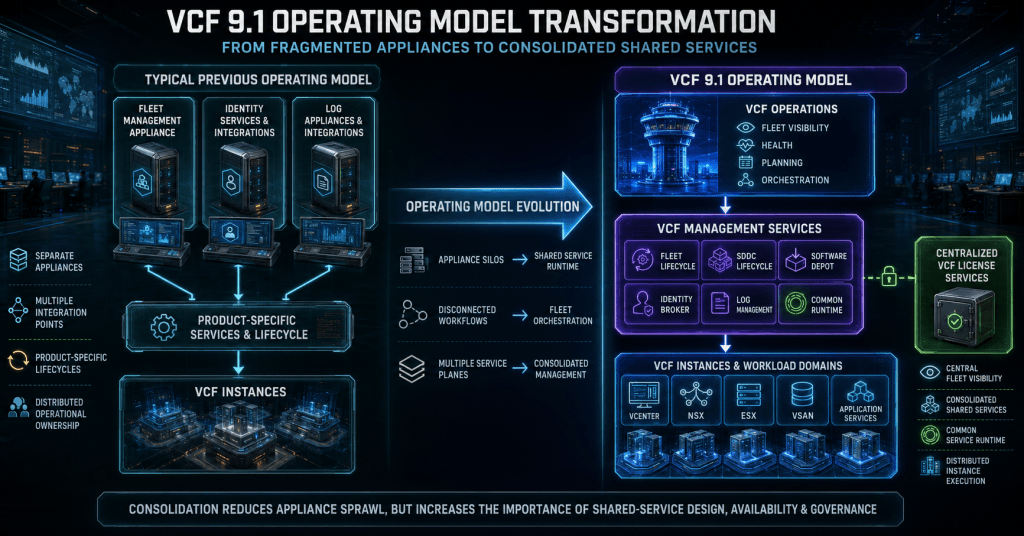
The management plane is the real story
The most important architectural change is the movement toward a shared management-services layer.
The following diagram is intentionally simplified. It shows the operating-model shift rather than every individual appliance or API relationship.

What matters here is not simply appliance reduction. It is dependency concentration.
When lifecycle, depot, identity, and logging services operate through a common management layer, that layer becomes part of the critical path for upgrades and day-two administration. It needs the same level of design attention normally given to vCenter, NSX, or SDDC Manager.
Broadcom’s current upgrade guidance identifies several concrete prerequisites:
- VCF Management Services is mandatory for VCF.
- The deployment requires a minimum pool of twelve management-network IP addresses, with the potential to consume up to thirty addresses.
- The internal service network must be checked for overlap with existing enterprise ranges.
- The default internal range includes
198.18.0.0/15, which may already appear in lab, benchmarking, security, or network-simulation environments. - Centralized License Services requires working forward and reverse DNS records.
- Existing Fleet Management Appliance functions transition into the new lifecycle services.
- External Identity Broker and logging deployments need explicit migration and retirement plans. [C]
These are not installer details to solve during the maintenance window. They are architecture decisions.
| Design question | Why it matters |
|---|---|
| Who owns VCF Management Services? | Fleet and instance teams may otherwise assume the other group owns availability, upgrades, and incident response |
| Where will the required IP pool come from? | Address shortages or firewall delays can block deployment after the core upgrade has started |
| Does the internal service CIDR overlap anything? | Overlap can cause routing, observability, backup, or security-tool conflicts |
| Are forward and reverse DNS working? | License-service deployment and validation depend on correct name resolution |
| How will the common runtime be protected? | Consolidated services create a more important recovery dependency |
| Which old appliances will be retired? | Leaving superseded systems online creates confusion, duplicate telemetry, and operational drift |
| How will logs and identity data transition? | A new endpoint does not automatically preserve historical data, integrations, or access policy |
The practical action is to create a service-level design for VCF Management Services before treating the upgrade as approved.
Infrastructure efficiency changes density assumptions
VCF 9.1 introduces several capabilities intended to extract more useful capacity from existing hardware. These improvements are potentially valuable, but they should trigger new benchmarking rather than immediate consolidation targets.
Memory tiering becomes more practical
Enhanced NVMe Memory Tiering keeps active pages in DRAM while placing colder pages on local NVMe storage. The objective is to increase effective memory capacity and allow higher virtual-machine density without purchasing the same amount of physical DRAM. [B]
That does not mean every workload should be moved to the highest possible memory-tiering ratio.
The result will depend on:
- The active memory working set
- Sensitivity to memory latency
- Local NVMe performance and endurance
- NUMA placement
- CPU oversubscription
- Failure and maintenance behavior
- Monitoring visibility
- The amount of performance variance the application can tolerate
A database with predictable but latency-sensitive memory access is different from a large fleet of intermittently active application servers. Treat memory tiering as an additional design control, not as universally equivalent to DRAM.
A sensible adoption pattern is to baseline representative workloads, enable memory tiering on a controlled cluster, and compare application latency, host contention, and NVMe behavior over a full business cycle.
Storage efficiency becomes easier to consume
VCF 9.1 extends vSAN Express Storage Architecture efficiency with enhanced compression and general availability of global deduplication. The release also supports deduplication alongside vSAN Data-at-Rest Encryption. [D]
There are important topology guardrails:
- Global deduplication is supported on qualifying clusters with between three and sixty-four hosts.
- It is not supported on stretched clusters.
- It is not supported on two-node clusters.
- Disabling the service stops further post-processing, but existing deduplicated data does not instantly return to a non-deduplicated state.
- Capacity reduction will vary substantially according to the data set.
This matters because global deduplication can change more than the usable-capacity calculation. It can influence rebuild expectations, fault-domain discussions, capacity-alert thresholds, and the amount of free space reserved for operational recovery.
Before enabling it, capture:
- Current logical and physical consumption
- Existing compression effectiveness
- Rebuild and resynchronization behavior
- Backup-change rates
- Data-at-rest encryption status
- Failure-domain topology
- Performance during peak write activity
A capacity-saving feature should not be approved only from a dashboard estimate. It should be approved against recovery and performance evidence.
Provisioning and fleet scale continue to expand
VCF 9.1 adds vSphere Elastic Provisioning, allowing supported bare-metal ESX systems to be bootstrapped and configured using network-based imaging. The release also advertises support for fleets of up to five thousand ESX hosts and as many as five hundred Kubernetes clusters per Supervisor. Parallel lifecycle capabilities are intended to reduce the time required to service large fleets. [B]
These are meaningful scale improvements, but larger numbers do not remove operational constraints.
Network boot services, image provenance, firmware alignment, certificate trust, switch configuration, management-address assignment, and host attestation become more important when provisioning is automated. A broken manual build affects one host. A broken automated image or workflow can affect an entire deployment batch.
The same principle applies to parallel lifecycle management: concurrency should be bounded by failure domains and recovery capacity, not simply by the maximum concurrency the interface permits.
The application platform becomes more integrated
VMware Kubernetes Service continues to move closer to being a native consumption layer rather than an adjacent platform that needs to be assembled separately.
The VCF 9.1 release introduces or expands:
- Support for larger VKS environments
- Topology-aware Kubernetes placement
- Improved application and cluster observability
- Enterprise Ubuntu image support
- Simplified container-as-a-service consumption
- Live application-stack blueprints
- Tanzu Marketplace services
- Additional private AI model and GPU telemetry
- Database-as-a-service options for supported workloads [B]
The operational value is modularity.
A platform team can publish standardized application services through the same private-cloud control model used for virtual infrastructure. Developers receive a consumable service, while the infrastructure team retains policy, lifecycle, capacity, and network control.
That does not remove governance work. It moves governance closer to the service definition.
Platform teams still need to decide:
- Which Kubernetes versions are approved
- Which images and registries are trusted
- Who owns cluster upgrades
- How network segmentation is applied
- Which storage classes are available
- How tenant quotas are enforced
- Which add-ons are supported
- How model, GPU, and application telemetry is retained
- Whether marketplace content passes internal security review
Native Object Storage deserves a separate caution. Broadcom identifies it as a technology preview in the VCF 9.1 release family. It may be useful for evaluation and architectural learning, but it should not yet become a production dependency or be treated as a supported replacement for an existing object-storage platform. [B]
Security and resilience target shorter maintenance events
VCF 9.1 continues Broadcom’s effort to reduce the disruption traditionally associated with infrastructure maintenance.
Live patching expands to TPM-enabled systems
ESX Live Patching now supports TPM-enabled hosts for eligible patches. This closes an important practical gap because organizations should not have to choose between hardware-rooted system integrity and less disruptive patching. [F]
Live patching does not mean every ESX update can be applied without maintenance mode or a reboot. Patch eligibility still matters.
An effective runbook should preserve two paths:

The point is not to eliminate the traditional remediation path. It is to use the least disruptive supported path while preserving a tested fallback.
vCenter patching can become less disruptive
For compatible patches, vCenter Quick Patch is designed to reduce vCenter service downtime to approximately zero to five minutes. That can materially improve maintenance-window planning, especially in large estates where management-plane availability affects multiple teams. [F]
The phrase compatible patches is critical. Quick Patch is not a guarantee that every vCenter update will have the same service profile.
Change plans should still document:
- Patch compatibility
- Expected service interruption
- Backup status
- External integration impact
- API-client retry behavior
- Certificate and authentication dependencies
- The fallback path when Quick Patch is unavailable
Recovery and compliance become more integrated
The release also expands the broader resilience model through capabilities such as:
- vSAN-based recovery workflows
- On-premises cyber-recovery patterns
- Continuous compliance controls
- Hardware acceleration for encrypted vMotion on supported Intel platforms
- Self-service lateral-security and load-balancing functions
- Recovery integrations with security partners such as CrowdStrike [B][F]
Some of these capabilities may require additional licensing, supported hardware, or other VCF services. They should be validated against the actual bill of materials and entitlement before they appear in a recovery strategy or compliance commitment.
The upgrade path is an operating-model change
The published upgrade flow makes it clear that VCF 9.1 is not a single-package installation.
The following diagram converts the official sequence into a change-planning model. It is intentionally high level; the exact component sequence must still come from the current upgrade guide and environment-specific prechecks.
Several details deserve attention before this workflow reaches a change-advisory board:
- VCF Operations is mandatory in the VCF 9.x operating model.
- Existing Aria Operations deployments may need to reach the required release before the VCF Operations transition.
- Environments using Cloud Proxies need their integration state validated.
- SDDC Manager is upgraded before VCF Management Services and centralized License Services are deployed.
- Core component upgrades still require supported sequencing across NSX, vCenter, ESX, and related services.
- NSX Federation environments require additional sequence planning.
- vSphere Lifecycle Manager baselines are not supported in the VCF 9.x lifecycle model; clusters must use image-based lifecycle management.
- Additional workload domains can be handled as controlled day-two work after the management-domain transition.
- Legacy appliances should be decommissioned only after functional, data, and integration validation. [C]
This creates a natural separation between platform transition and domain consumption.
The fleet team should own common services, depot access, global lifecycle orchestration, and platform-wide dependencies. Instance or workload-domain teams should own domain readiness, application coordination, cluster remediation, and post-upgrade workload validation.
Without that separation, the organization may have a technically supported platform but no clear owner for the services that now coordinate it.
Release-note cautions that deserve a change ticket
Release-note caveats should be converted into specific change controls rather than left as reading material.
| Release-note issue | Required response |
|---|---|
| Native Object Storage is a technology preview | Keep it out of production service commitments and recovery dependencies |
| Global deduplication has topology limitations | Confirm that the target is neither a stretched nor a two-node cluster |
| Quick Patch and Live Patch depend on eligibility | Preserve the standard maintenance and reboot path as a fallback |
| Management Services requires substantial addressing | Reserve the full IP pool and complete firewall review before deployment |
| Centralized licensing needs forward and reverse DNS | Validate both record types from the deployment network |
| The default internal service range may overlap existing networks | Search routing tables, security tools, backup networks, and labs for conflicts |
| Image-based lifecycle replaces baseline-based remediation | Convert clusters and validate desired images before the upgrade |
| Identity and log services are changing | Build migration, data-retention, integration, and retirement plans |
| Component patches continue after the base release | Record exact builds and recheck known issues immediately before the change |
| Legacy boot patterns are being deprecated | Add hardware remediation to the platform roadmap |
The boot-media warning is particularly important. Broadcom’s product-support notes identify USB and SD boot devices, ESX deployments without persistent storage for OSDATA, and system-storage devices smaller than thirty-two gigabytes as deprecated for the next major release. [G]
That is not an immediate VCF 9.1 removal notice, but it is a clear hardware-planning signal. Organizations still using those designs should identify affected hosts now rather than discovering the constraint during the next platform-refresh project.
Vendor claims need engineering evidence
Broadcom’s announcement includes substantial efficiency and operating-cost claims. These include estimates of up to forty percent lower server costs, thirty-nine percent lower storage total cost of ownership, forty-six percent lower Kubernetes operational costs, faster cluster upgrades, and larger manageable fleets. [H]
Those figures are useful for identifying where to test. They should not be inserted directly into a business case without an environment-specific model.
| Vendor claim area | Evidence the architecture team should collect |
|---|---|
| Lower server cost | Memory working sets, DRAM reduction, NVMe cost and endurance, host density, and application latency |
| Lower storage TCO | Actual deduplication ratio, compression ratio, licensing, rebuild capacity, backup growth, and operational overhead |
| Lower Kubernetes operating cost | Cluster count, administrator effort, upgrade duration, automation coverage, and service-consumption patterns |
| Faster lifecycle operations | Current maintenance duration, bundle staging, task concurrency, failure-domain boundaries, and rollback time |
| Larger fleet capacity | Management-service sizing, API load, observability retention, depot throughput, and supportability |
A proof of value should compare the existing platform against a controlled VCF 9.1 implementation using the organization’s own workloads and operational constraints.
That is the difference between repeating a vendor claim and producing an engineering decision.
A practical readiness checklist
The following checklist can be used as the starting point for an architecture review or upgrade-readiness workshop.
Release baseline
- Capture the current VCF, SDDC Manager, vCenter, NSX, ESX, vSAN, Operations, Automation, Identity Broker, and logging versions.
- Record the exact target build and every selected component patch.
- Archive the release notes, bill of materials, product-support notes, and known-issues pages used for approval.
- Repeat the known-issues review immediately before bundle download and again before execution.
Hardware and compatibility
- Validate every server, controller, network adapter, storage device, firmware package, and driver against the current compatibility guidance.
- Identify USB, SD, undersized, or non-persistent ESX system-storage configurations.
- Review local NVMe endurance before adopting memory tiering.
- Confirm that the intended vSAN topology supports the selected data-reduction features.
Network and DNS
- Reserve the Management Services IP pool.
- Validate the internal service CIDR against all connected and indirectly routed networks.
- Create and test forward and reverse DNS records.
- Confirm firewall access to the software depot, licensing endpoints, management services, and integrated products.
- Document proxy, certificate-inspection, and restricted-egress behavior.
Lifecycle and platform services
- Confirm VCF Operations readiness.
- Validate Cloud Proxy and existing monitoring integrations where applicable.
- Convert legacy vSphere Lifecycle Manager baselines to desired images.
- Review special handling for NSX Federation and edge clusters.
- Verify certificates, service-account passwords, and temporary-address requirements.
- Confirm that the required bundles can be staged with enough storage and within the approved maintenance period.
Recovery and rollback
- Take product-supported backups of each management component.
- Test restoration procedures rather than relying only on successful backup jobs.
- Define stop points between major platform stages.
- Document what can be rolled back, what must be restored, and what requires vendor-assisted recovery.
- Do not assume that virtual-machine snapshots alone provide a complete rollback strategy for platform appliances.
Ownership and operations
- Assign ownership for VCF Management Services and centralized licensing.
- Define the boundary between fleet and instance teams.
- Update monitoring, alert routing, escalation, and on-call documentation.
- Plan the retirement of superseded appliances and integrations.
- Update configuration-management records and architecture diagrams.
- Establish post-upgrade validation criteria for infrastructure and application teams.
Who should move first
VCF 9.1 is likely to be most attractive to organizations already operating VCF 9.0 with image-based lifecycle management, modern boot storage, reliable DNS, tested management backups, and a clearly defined fleet-operations team.
These environments can concentrate on the value of the release:
- Higher infrastructure density
- Better storage efficiency
- Larger Kubernetes and ESX fleet support
- Less disruptive patching
- Integrated cyber-resilience capabilities
- More consistent self-service application delivery
Estates coming from VCF 5.2, multiple Aria appliances, external identity services, NSX Federation, or heavily customized logging integrations should treat the move as a platform-transformation project.
Organizations with USB or SD boot media, overlapping management ranges, fragile DNS, expired certificates, baseline-based lifecycle processes, or untested backups should remediate those conditions before committing to an upgrade date.
The decision is therefore not simply “upgrade” or “do not upgrade.”
The better question is:
Does the environment have the management-plane discipline required to consume what VCF 9.1 provides?
Conclusion
VMware Cloud Foundation 9.1 is a significant release, but its importance is easy to misread.
The visible improvements—memory tiering, global deduplication, larger Kubernetes environments, rapid patching, private AI telemetry, and integrated recovery—make the platform more capable. The deeper change is the continued consolidation of VCF into a unified private-cloud operating model.
VCF Management Services, centralized licensing, mandatory Operations integration, image-based lifecycle management, and the transition away from several standalone service patterns change how the platform must be designed and owned.
For architects, the immediate task is to validate management networking, DNS, identity, logging, lifecycle, and recovery dependencies.
For operators, the task is to convert the release notes into a staged runbook with measurable stop points and post-upgrade evidence.
For technical leaders, the task is to separate vendor estimates from local engineering data and decide whether the organization is ready to operate the consolidated platform—not merely install it.
VCF 9.1 can reduce friction and expand private-cloud capability. Realizing that value depends less on checking feature boxes and more on treating the management plane as production infrastructure.
Reference links
[A] VMware Cloud Foundation 9.1 Release Notes
The official page confirms the May 12, 2026 release date, build 25377994, bill-of-materials scope, linked support notes, and the evolving component-patch structure. (Broadcom TechDocs)
[B] Announcing VCF 9.1: Modern Private Cloud Built for Efficiency and Resilience
The official release overview covers memory tiering, vSAN efficiency, fleet scale, VKS scale, application delivery, object-storage preview status, observability, and resilience capabilities. (VMware Blogs)
[C] Upgrade Sequence and Related Issues for VCF 9.1
This Broadcom knowledge-base article documents the mandatory sequencing, Management Services requirements, IP consumption, internal addressing, licensing DNS requirements, appliance transitions, and related upgrade issues. (knowledge.broadcom.com)
[D] How to Upgrade to VMware Cloud Foundation 9.1
The official upgrade walkthrough covers assessment, Operations readiness, SDDC Manager, Management Services, License Services, core-component sequencing, workload domains, and final validation. (VMware Blogs)
[E] More Capacity with VMware vSAN Compression and Global Deduplication
This engineering overview documents enhanced compression, global-deduplication availability, encryption compatibility, cluster-size support, and topology limitations. (VMware Blogs)
[F] Strengthen Zero Trust Security and Resilience with VCF 9.1
This security overview covers TPM-enabled Live Patching and other resilience changes. The vSphere release overview provides additional patching behavior and configuration context. (VMware Blogs)
[G] VCF Product Support Notes
The product-support notes identify deprecations and support-direction changes, including legacy ESX boot and persistent-system-storage configurations. (Broadcom TechDocs)
[H] Broadcom Announces VMware Cloud Foundation 9.1
