

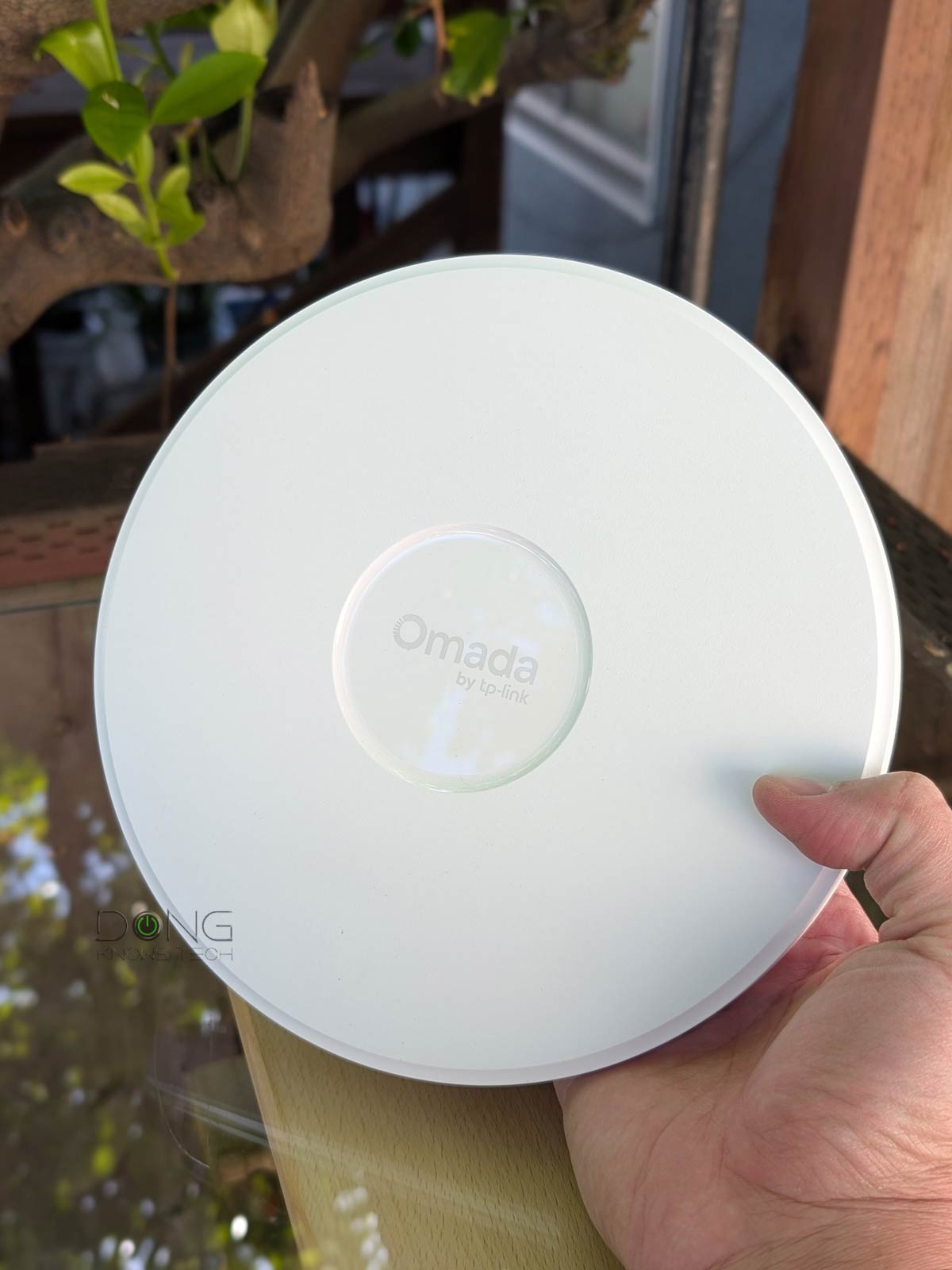

The TP-Link EAP787 BE15000 Ceiling Mount Tri-Band Wi-Fi 7 Access Point—Omada EAP787 for short—is not a step up from the EAP783 that came out over a year ago. Among other things, it features lower hardware specs on the 6GHz band.
However, it’s TP-Link’s first Wi-Fi 7 indoor access point (AP) that’s slated to have Automated Frequency Coordination (AFC), rivaling a handful of AFC-enabled APs on the market, such as Ubiquiti’s Enterprise7. (Prior to this, the EAP772-Outdoor was TP-Link’s very first AP to have this feature.)
Here’s the bottom line: While the new Omada EAP787 doesn’t have the same top-tier bandwidth as the previous EAP783, its affordable $249.99 suggested retail price tag and the potential extra range on the 6GHz band, where applicable, make it an easy recommendation. If you already have a PoE+ (30W) switch or injector, get one today! Or you can get a couple to form a Wi-Fi 7 system.

TP-Link Omada EAP787: AFC is the icing on the top
The Omada EAP787 shares the same pie-like design as other TP-Link Omada Wi-Fi 7 access points. It is round and the same size as the EAP773, making it about 20% narrower than the EAP783.
As a ceiling-mount access point, the EAP787 is quite standard: it features a small status LED on top and a 10Gbps PoE+ port on the underside. There’s also a 12V DC port for a mesh setup. As with most business access points, neither a power adapter nor a PoE injector is included. So, to use the EAP787, you’ll need a PoE+ switch, or you’ll need to get an injector or power adapter on your own.
On the inside, the EAP787 comes with mid-tier dual-stream (2×2) Wi-Fi 7 specs on the 6GHz and 2.4GHz bands, and top-tier 4×4 specs on the 5GHz band, making it the second most powerful Wi-Fi 7 access point from TP-Link to date, after the EAP783.
The table below shows the specs of the EAP787 compared to those of the two previous Omada APs I’ve reviewed and the Ubiquiti E7, the other indoor Wi-Fi 7 access point that features AFC.


Hardware specifications: Omada EAP787 vs. others
 |
|
|
|
|
|---|---|---|---|---|
| Name | Ubiquiti UniFi E7 Access Point | TP-Link Omada EAP787 BE11000 Tri-Band Wi-Fi 7 Wireless Access Point | TP-Link Omada EAP773 BE11000 Tri-Band Wi-Fi 7 Wireless Access Point | TP-Link Omada EAP783 BE22000 Tri-Band Wi-Fi 7 Wireless Access Point |
| Model | E7 | EAP787 | EAP773 | EAP783 |
| Wi-Fi Bandwidth | Tri-band BE21000 | Tri-band BE15000 | Tri-band BE11000 | Tri-band BE22000 |
| 6 GHz Speeds (channel width) |
4×4 BE: Up to 11530 Mbps (20/40/80/160/320MHz) |
2×2 BE: Up to 5760 Mbps (20/40/80/160/320MHz) |
4×4 BE: Up to 11530 Mbps (20/40/80/160/320MHz) |
|
| 5 GHz Speeds (channel width) |
4×4 BE: Up to 8648 Mbps (20/40/80/160/240MHz) |
2×2 BE: Up to 4320 Mbps (20/40/80/160MHz) |
4×4 BE: Up to 8646 Mbps (20/40/80/160/240MHz) |
|
| 2.4 GH Speeds (channel with) |
2×2 BE: Up to 688Mbps (20/40MHz) |
2×2 AX: Up to 574 Mbps (20/40MHz) |
4×4 BE: Up to 1376 Mbps (20/40MHz) |
|
| Broadcasting Power | 23dBm (2.4GHz) 30dBm (5GHz) 24 dBm or 30dBm with AFC (6GHz) |
25 dBm (2.4GHz) 29 dBm (5GHz) 23 dBm (6GHz) |
< 25 dBm (2.4GHz) < 25 dBm (5GHz) < 23 dBm (6GHz) |
<28 dBm (2.4GHz) <28 dBm (5GHz) <28 dBm (6GHz) |
| Number of SSIDs | 8 (single or multiple bands) |
|||
| Automated Frequency Coordination (AFC) |
Yes | Not at launch (to be added via firmware by mid 2026) |
Not at launch (possibly added via future firmware) |
|
| Multi-Link Operation (MLO) |
Yes | |||
| Roaming Standard | 802.11r/k/v | |||
| Backward Compatibility | 802.11/axe/ax/ac/n/g/a/b | |||
| Wi-Fi Coverage (estimate) |
2000 ft² (185 m²) |
2050 ft² (190 m²) | 1500 ft² (140 m2) | 2150 ft² (200 m2) |
| Power over Ethernet (PoE) |
802.11bt (PoE++) | 802.11at (PoE+) | 802.11at (PoE+) | 802.11bt (PoE++) |
| PoE Power Draw | 43W | 29 W | 25.44 W | 39W |
| Injector Included | No | |||
| DC input | None | 12V/2.5A DC | ||
| Adapter Included | N/A | No | ||
| Multi-Gig port | 1 x 10GBASE-T PoE++ (uplink) | 1 x 10GBASE-T PoE+ (uplink) | 1 x 10GBASE-T PoE+ (uplink) 1 x 10GBASE-T (LAN) |
|
| Gigabit Port | 1 x PoE++ (uplink) | None | ||
| Wireless Security Methods | WPA/WPA2/WPA3 | |||
| Access Management | UniFi | L2-isolation/MAC filtering/Rogue AP detection | ||
| Management Options | UniFi mobile app, UniFi controller (Cloud Gateway) |
Local Web UI, Omada Cloud-Based Controller, Omada Local Hardware Controller (OC300 or OC200), Omada Local Software Controller |
||
| Mobile App | UniFf | TP-Link Omada | ||
| Dimensions (W x D x H) |
9.8 x 9.8 x 1.7 in (250 x 250 x 43.5 mm) |
8.7 × 8.7 × 1.3 in (22 × 22 × 3.25 cm) |
11 x 11 x 1.8 in (28 x 28 x 4.65 cm) |
|
| Weight | 4 lb (1.8 kg) | 2 lbs (.9 kg) | 2.92 lbs (1.32 kg) | 3.05 lbs (1384.6g) |
| Operating Environment | Operating Temperature: -30 °C–50 °C (-22 °F–122 °F) Operating Humidity: 5%-95% (noncondensing) |
Operating Temperature: 0 °C–40 °C (32 °F–104 °F) Operating Humidity: 10%–90% (non-condensing) |
||
| Release Date | January 29, 2025 | March 2026 | February 6, 2024 | January 30, 2024 |
| Warranty | 2-year | 5-year | ||
| U.S. Launch Price (compare street prices) |
$499 | $249.99 | 189.99 | $499.99 |


A familiar standard access point of the Omada ecosystem
Like all Omada access points, the EAP787 can serve as a standard standalone access point, adding Wi-Fi 7 to an existing network. In this case, it’s a perfect add-on device for a home or office that only needs a single access point for coverage.
All you have to do is follow the hardware setup of a PoE device:
- Connect it to an existing router via a network cable using a 30W PoE++ port (of a PoE switch or injector), and it’s ready. Then:
- Open its web-based local user interface, accessible via its IP address assigned by the router.
And the rest is self-explanatory. You’ll be able to create up to eight SSIDs per Wi-Fi band, or eight tri-band SSIDs, and customize them to the max to meet your needs.
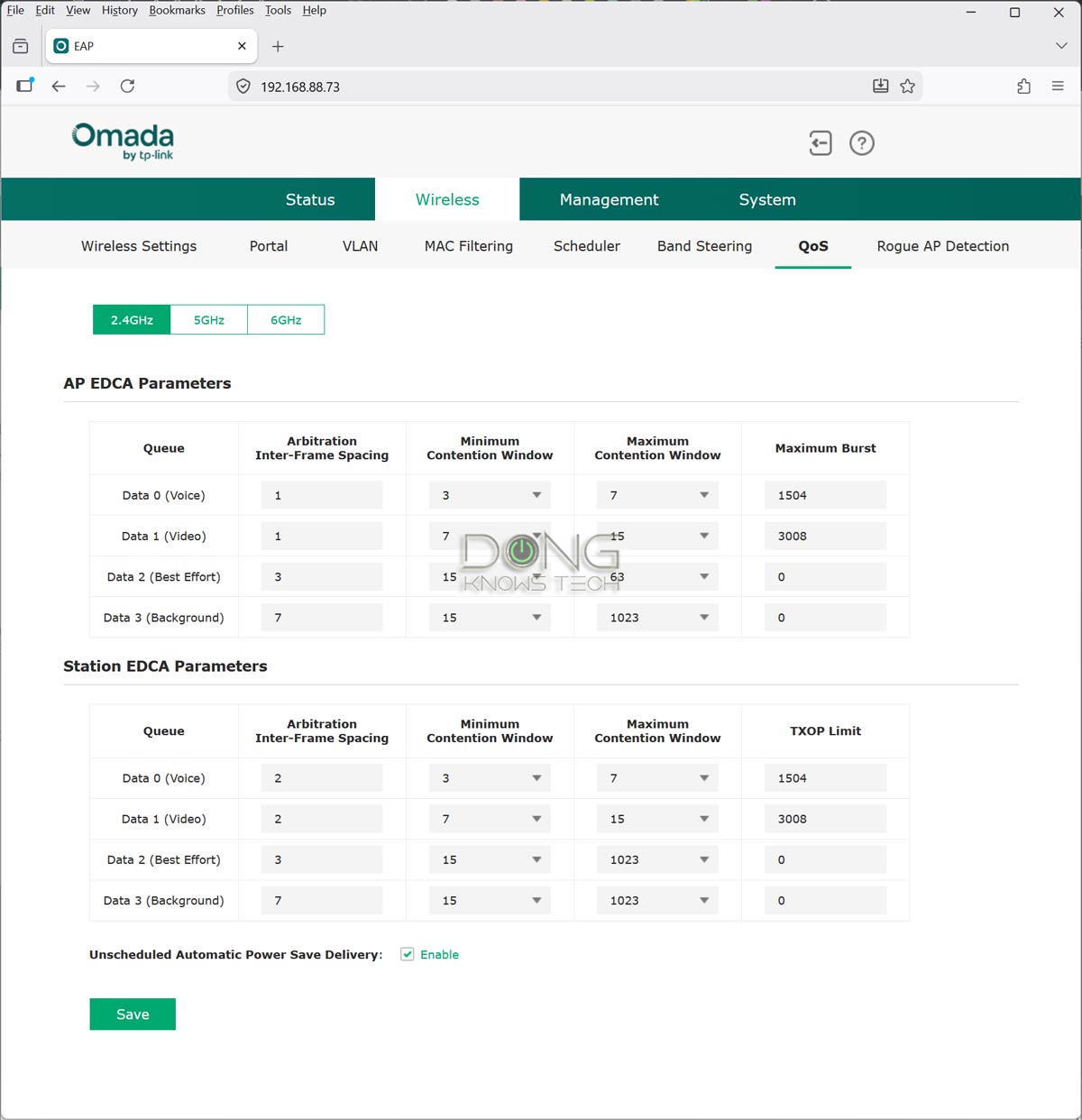
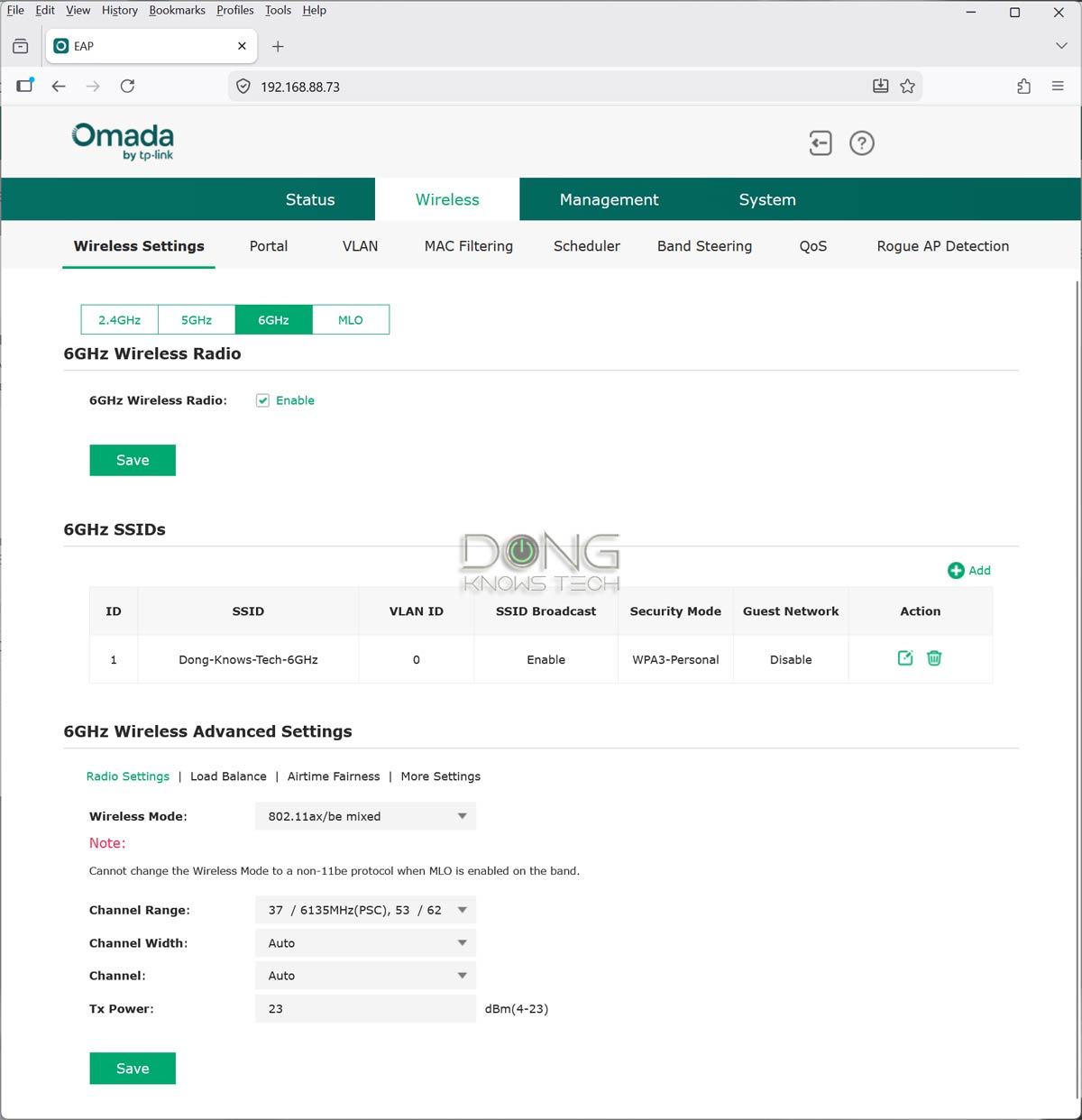
However, the most common use of Omada access points is when you use two or more units to form a Wi-Fi system. In this case, you have a few management options, as I detailed in this post on TP-Link Omada:
In short, if you’ve used a standard access point before, especially one from the Omada family, the EAP787 will be a walk in the park to set up and manage.
TP-Link Omada EAP787’s performance: Excellent performance for the specs
I put the Omada EAP787 through its paces for over a week and was happy with it. The access point proved reliable with extended coverage and steady throughputs. It passed my 3-day stress test without disconnecting once.
It’s worth noting that I tested this when the AFC feature wasn’t yet enabled—TP-Link said it will be added in a future firmware update, but didn’t say exactly when.
AFC is not generally available worldwide, and my previous experience with it confirmed that the feature didn’t improve performance in the 6GHz band, only its range. The point is, AFC wouldn’t change the AP’s performance in my testing method. However, rest assured that wherever and whenever this feature is enabled, you can expect the 6GHz range to be the same as the 5GHz range.
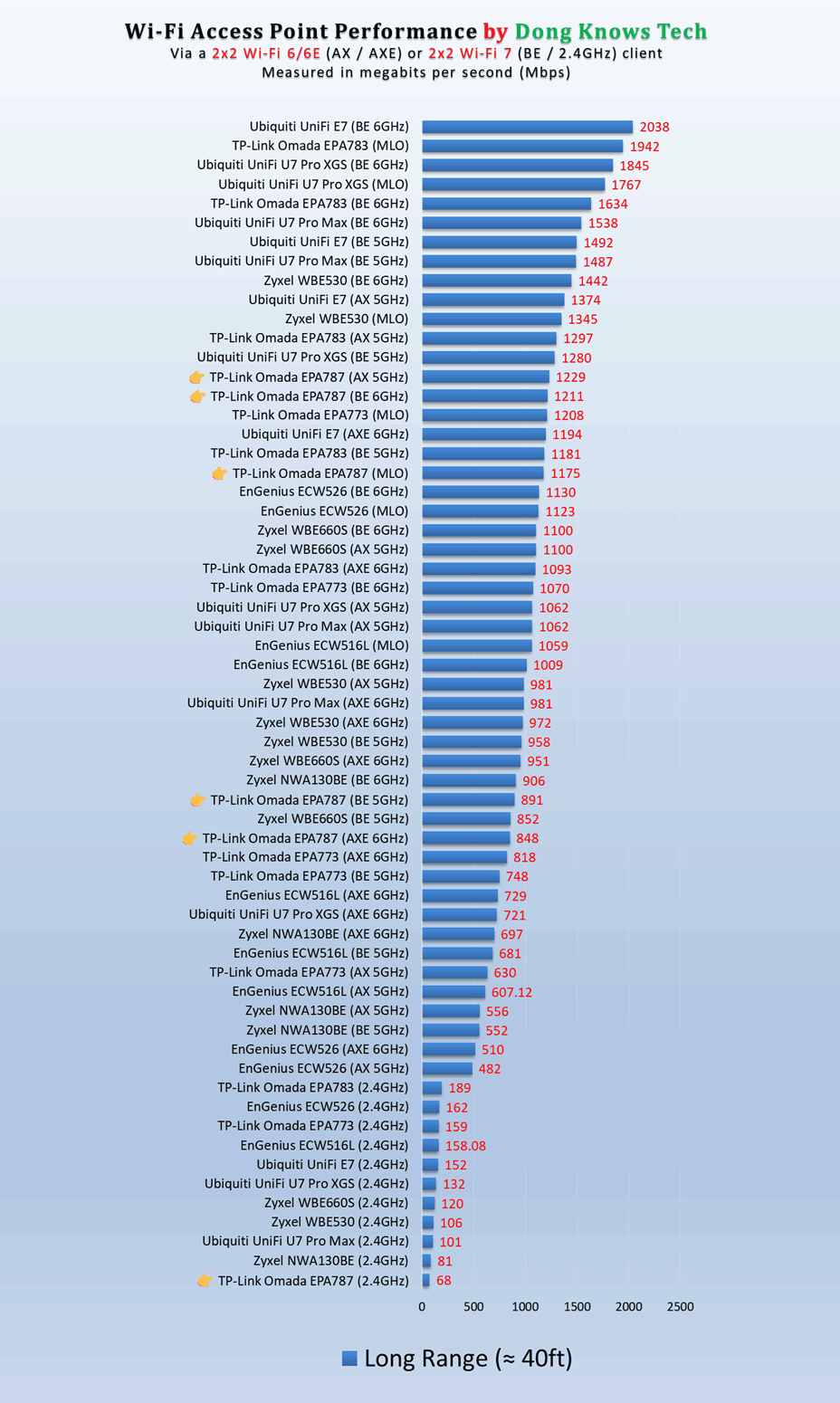
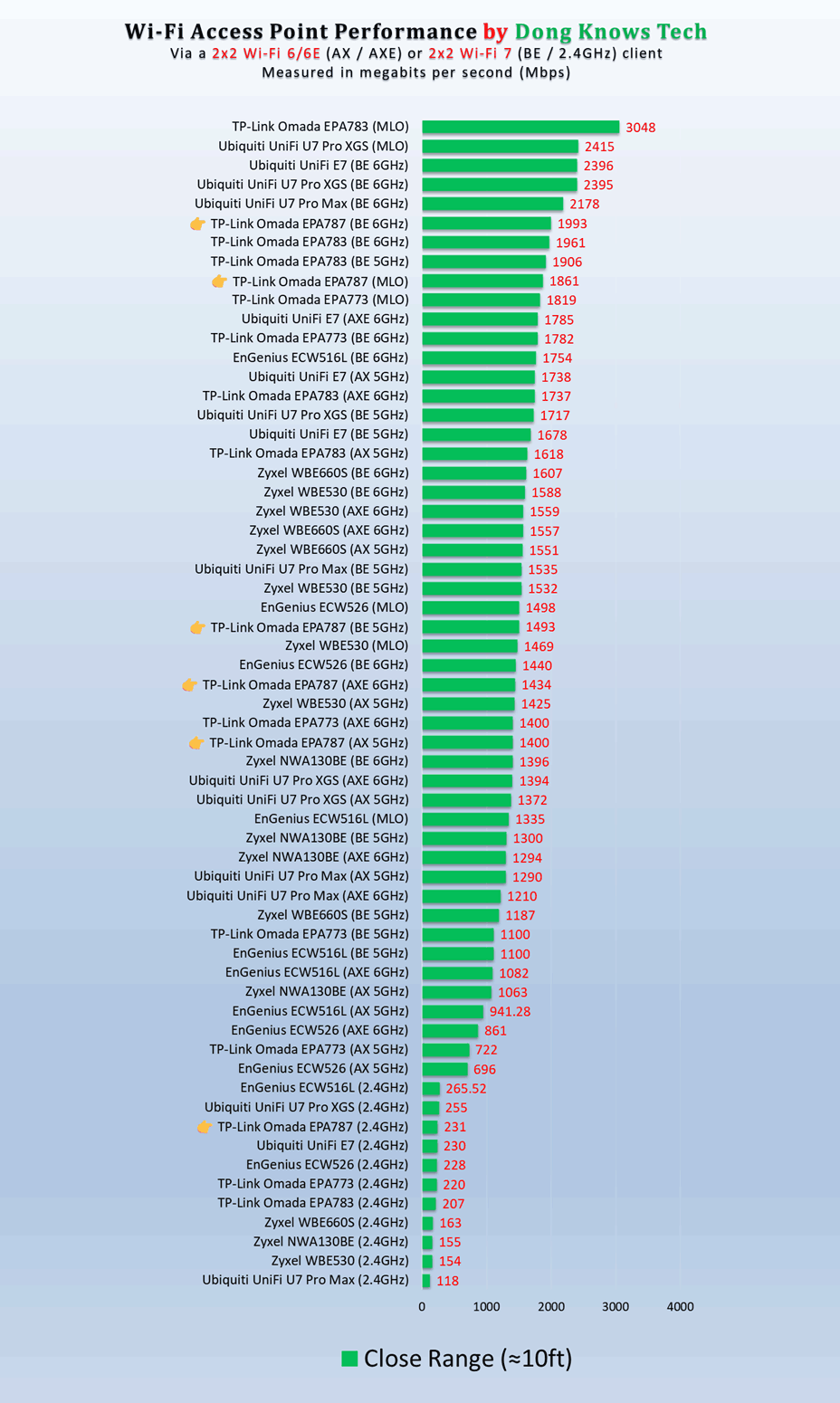
In terms of range, the EAP787 proved excellent, similar to the larger EAP783. While it’s tricky to quantify Wi-Fi coverage, my estimate is that if you have a space of around 2500 ft2 (232 m2) or smaller and can place this access point near the center, it can likely cover every corner. But your mileage will vary.
Like other Omada Wi-Fi 7 access points I’ve tested, the EAP787 didn’t become hot even during operation. It only felt slightly warm to the touch.
Conclusion
The TP-Link Omada EAP787 is an excellent Wi-Fi 7 point in a relatively compact package and will serve you well with or without AFC. If you have a non-Wi-Fi router, get it today and complete that Wi-Fi 7 network you’ve been working on. Or even get a few if you want to build a robust Omada Wi-Fi 7 system.
Alternatively, consider the Ubiquiti E7 if you want to build a UniFi network.
