



TL;DR
VMware Cloud Foundation is not literally an operating system, but the comparison provides a useful architectural mental model. VCF coordinates compute, storage, networking, security, observability, automation, and lifecycle management as parts of an integrated private cloud platform.
The real value is not that vSphere, vSAN, NSX, VCF Operations, and VCF Automation appear in the same product portfolio. The value comes from operating them through a consistent platform model with defined service boundaries, lifecycle controls, security policies, automation workflows, and operational ownership.
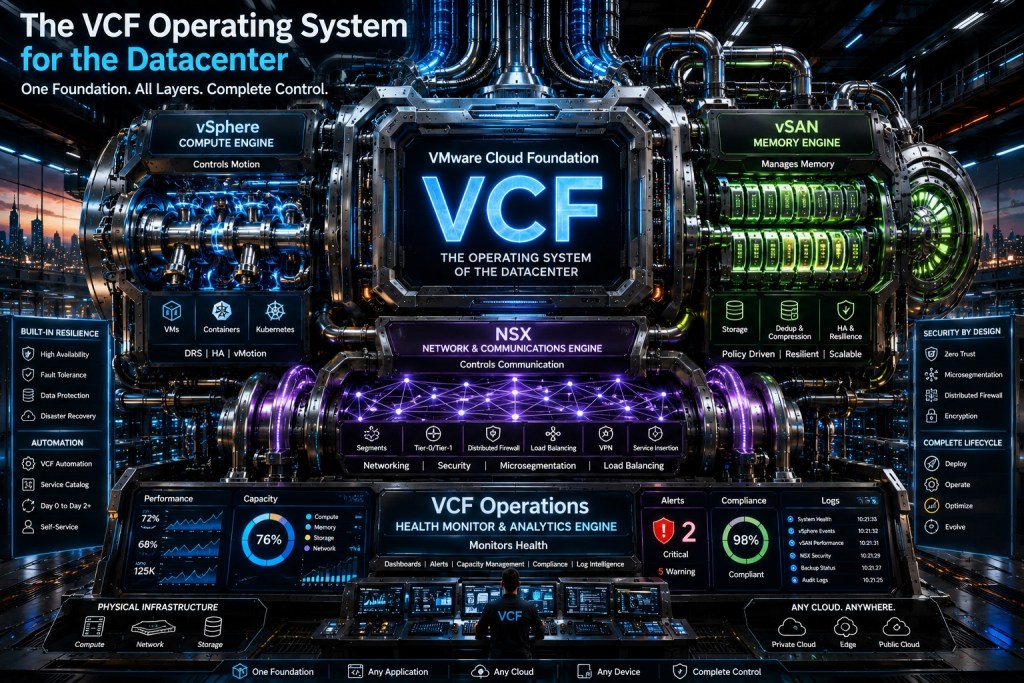
The image captures that integrated vision well, but some of its labels should be interpreted carefully. vSAN is the storage engine, not the memory engine. Load balancing is not automatically delivered by every NSX deployment. Security, resilience, data protection, and disaster recovery remain architectural outcomes that must be deliberately designed and operated.
Introduction
Most enterprise datacenters do not suffer from a shortage of technology. They suffer from a shortage of coordination.
Compute administrators manage clusters. Storage teams manage capacity and protection. Network teams manage routing and segmentation. Automation teams build templates and service catalogs. Operations teams collect alerts, logs, and performance data. Security teams attempt to enforce controls across every layer.
Each team can be effective inside its own boundary while the complete platform remains inconsistent, difficult to govern, and slow to change.
The image behind this article presents VMware Cloud Foundation as the operating system for the datacenter. That metaphor is valuable because an operating system does more than expose individual hardware capabilities. It coordinates resources, establishes control boundaries, enforces policy, presents services to consumers, manages health, and controls change over time.
That is the more useful way to understand VMware Cloud Foundation. It is not simply a bundle containing vSphere, vSAN, NSX, VCF Operations, and VCF Automation. It is a platform model intended to coordinate those capabilities into a private cloud operating environment.
A traditional operating system sits between applications and hardware. It schedules compute, manages memory, controls devices, enforces permissions, exposes services, and monitors system health.
VMware Cloud Foundation works at a different scale. Instead of coordinating the resources inside one server, it coordinates infrastructure capabilities across hosts, clusters, workload domains, management components, sites, and potentially multiple VCF instances.
The metaphor works because VCF addresses several operating-system-like responsibilities:
- It abstracts physical infrastructure into consumable resources.
- It coordinates compute, storage, networking, and security.
- It provides management and lifecycle workflows.
- It exposes services through automation and APIs.
- It collects operational state and diagnostic data.
- It applies policies to infrastructure and workloads.
- It creates a supportable relationship between platform components.
- It provides a foundation for virtual machines, Kubernetes, AI, and application services.
The platform is therefore more than the sum of its product components. Its success depends on how well those components operate together.
Translating the Image into a Practical VCF Model
The image uses an industrial machine to represent the major capabilities inside VMware Cloud Foundation. The following translation turns that visual metaphor into a more precise architectural model.
| Image Concept | Practical VCF Interpretation |
|---|---|
| Central VCF engine | The integrated private cloud platform and operating model |
| vSphere compute engine | Workload execution, scheduling, availability, mobility, and memory management |
| vSAN engine | Policy-driven storage, capacity, performance, protection, and data services |
| NSX communications engine | Network virtualization, routing, segmentation, and distributed security |
| VCF Operations | Health, diagnostics, logs, capacity, compliance, fleet management, and lifecycle visibility |
| VCF Automation | Self-service consumption, projects, policies, catalogs, templates, and orchestration |
| Physical infrastructure | Servers, storage devices, network fabric, accelerators, facilities, and external dependencies |
| Built-in resilience | Coordinated availability, protection, recovery, and operational procedures |
| Security by design | Identity, segmentation, encryption, configuration, evidence, and response controls |
| Complete lifecycle | Deployment, configuration, patching, upgrades, optimization, and retirement |
The table is intentionally careful about the difference between a product capability and an operational outcome. Installing a product does not automatically produce resilience, security, compliance, or a functioning private cloud service.
The VCF Architecture at a Glance
The most important point in the following diagram is that VMware Cloud Foundation is not one giant control plane. It is a coordinated platform made from several systems, each responsible for a defined part of the environment.

The resource layer supplies infrastructure capabilities. The operations layer keeps the environment observable and supportable. The consumption layer turns infrastructure into governed services. The physical layer remains the underlying capacity, performance, and failure boundary.
vSphere Is the Workload Execution Engine
vSphere provides the workload execution foundation inside VCF. It turns physical CPU, memory, networking, and device capacity into managed resources for virtual machines and platform services.
This is why describing vSphere only as a hypervisor understates its role. Within the complete VCF platform, vSphere is responsible for workload placement, resource scheduling, availability behavior, mobility, host lifecycle integration, and access to underlying hardware capabilities.
Capabilities such as Distributed Resource Scheduler, High Availability, Fault Tolerance, and vMotion influence how workloads are balanced, protected, maintained, and moved. These services form part of the platform’s execution behavior rather than existing as isolated administrative features.
The operational implication is that cluster design becomes platform design. Architects must consider:
- Admission control
- Host and rack failure domains
- Workload placement
- Resource reservations and limits
- Maintenance behavior
- Accelerator placement
- Network dependencies
- Management isolation
- Capacity headroom
- Recovery requirements
A cluster may be technically functional while still being poorly designed as a private cloud resource pool.
vSAN Is the Storage Engine, Not the Memory Engine
The image labels vSAN as the memory engine. That description should not be taken literally.
vSAN is the software-defined storage layer within VMware Cloud Foundation. It aggregates storage devices across hosts and presents distributed storage services through the vSphere environment. Storage policies define workload requirements such as protection, placement, availability, and performance behavior.
System memory remains part of the vSphere and ESX compute domain. VCF 9.1 includes memory-related innovations, including NVMe memory tiering in supported designs, but those capabilities should not be assigned to vSAN simply because the image places memory beside the storage layer.
This distinction matters because memory and storage solve different architectural problems:
| Resource | Primary Purpose | Common Design Concerns |
|---|---|---|
| System memory | Active workload execution | Latency, contention, NUMA, reservations, tiering, workload density |
| vSAN storage | Persistent data services | Capacity, protection, performance, rebuilds, fault domains, encryption |
| Backup storage | Recoverable copies | Retention, immutability, isolation, restoration |
| Replicated storage | Service continuity | Replication lag, consistency, bandwidth, correlated failure |
Policy-driven storage simplifies consumption, but it does not eliminate storage engineering. Teams must still design device classes, networking, fault domains, capacity reserves, rebuild behavior, encryption, data services, and recovery processes.
NSX Is the Connectivity and Enforcement Fabric
If vSphere controls where workloads execute and vSAN controls how persistent data is stored, NSX controls how workloads communicate and where network security policy is enforced.
NSX provides software-defined networking capabilities such as logical segmentation, routing, distributed firewalling, gateway services, virtual private cloud constructs, VPN connectivity, and network visibility. Its distributed architecture allows selected controls to operate close to workloads instead of forcing every east-west flow through a centralized appliance.
The image describes NSX as the communications engine, which is directionally accurate. However, connectivity and security should not be collapsed into one generic function.
Connectivity establishes whether two endpoints can communicate. Security policy determines whether that communication should be allowed. Observability must then provide evidence that both are operating as designed.
Load balancing also requires careful interpretation. Although the image places load balancing inside the NSX section, application delivery may depend on VMware Avi Load Balancer or another integrated service. Architects should not assume that every load-balancing requirement is automatically satisfied by the presence of NSX.
The ownership model should identify who controls:
- Physical underlay networking
- Overlay transport
- Routing
- IP address management
- DNS dependencies
- Segmentation policy
- Distributed firewall rules
- Gateway firewall rules
- Ingress and egress controls
- Load-balancing services
- Network telemetry
- Exception approvals
VCF can coordinate these capabilities, but the organization must still establish decision rights.
VCF Operations Is the Supervisory Plane
An integrated private cloud cannot be managed effectively when every component presents a separate and disconnected view of health.
VCF Operations provides the supervisory layer for infrastructure health, diagnostics, capacity, performance, logs, compliance, fleet visibility, and lifecycle-related activities. Its value is not limited to displaying dashboards. It helps connect infrastructure state to operational decisions.
The operating loop looks like this:
The value of this control loop depends on operating discipline.
An alert without an owner is noise. A capacity forecast without a procurement or reclamation process is only a chart. A compliance score without remediation authority is incomplete governance. A lifecycle recommendation without maintenance validation can create additional risk.
VCF Operations becomes strategically useful when findings are tied to:
- Named service owners
- Defined severity levels
- Actionable runbooks
- Maintenance procedures
- Escalation paths
- Capacity decisions
- Security workflows
- Evidence-retention requirements
- Change and incident records
Observability is not simply data collection. It is the ability to turn platform state into a defensible operational response.
VCF Automation Is the Service-Delivery Layer
Infrastructure becomes a private cloud platform when consumers can request governed services without navigating a chain of manual tickets across separate infrastructure teams.
VCF Automation provides a consumption and orchestration layer for delivering infrastructure and application services. It can support self-service access to virtual machine, Kubernetes, and AI-oriented resources while applying projects, policies, templates, approvals, quotas, and organizational boundaries.
The goal should not be to expose every infrastructure option. A successful service catalog presents a controlled set of repeatable services that satisfy recognized application requirements.
Representative services might include:
- A general-purpose virtual machine with an approved operating-system image
- A regulated workload profile with stricter segmentation and encryption policies
- A Kubernetes service with defined sizing and lifecycle controls
- An AI workload profile with accelerator access and cost governance
- A recovery-enabled service with documented backup and restoration requirements
- A development environment with expiration and reclamation policies
VCF Automation is where infrastructure engineering becomes platform product design. The template or catalog entry is not merely a provisioning shortcut. It is a service contract between the platform team and the workload consumer.
That contract should define:
- What the service provides
- Which options the consumer can change
- Which policies are mandatory
- Who owns the deployed workload
- How cost or consumption is measured
- How changes are requested
- How the service is patched
- How data is protected
- How the service is retired
Lifecycle Management Is the Platform Contract
The strongest part of the operating system metaphor is lifecycle coordination.
A private cloud consists of components with dependencies, compatibility requirements, certificates, credentials, APIs, support boundaries, and prescribed upgrade paths. Updating one component without considering the rest of the platform can create an environment that remains technically operational but no longer matches a validated VCF configuration.
Lifecycle management provides the processes used to download, validate, patch, and upgrade platform components through coordinated workflows. In VCF 9.1, VCF Operations plays a central role in fleet and lifecycle administration.
This creates an important organizational consequence. Individual teams cannot treat every product as a completely independent upgrade domain.
The network team may administer NSX, but its upgrade plan must align with the supported VCF platform state. The virtualization team may manage vCenter and ESX, but it cannot assume that any independently supported build is automatically appropriate for the surrounding VCF environment. The automation team cannot introduce a new integration without considering API compatibility and service dependencies.
Lifecycle management becomes a technical contract between components, teams, and supportability.
A mature lifecycle process should include:
- Version and component baselines
- Compatibility validation
- Firmware coordination
- Certificate and credential review
- Pre-upgrade health checks
- Backup verification
- Maintenance-window approval
- Workload impact assessment
- Rollback criteria
- Post-upgrade validation
- Evidence capture
- Known-issue review
The platform is not fully integrated if deployment is automated but upgrades remain improvised.
Security Is a Cross-Layer Property
The image places zero trust, microsegmentation, distributed firewalling, and encryption beside the platform. That placement is useful because security cannot be delegated to one component.
A defensible VCF security model combines controls across multiple layers.
| Layer | Representative Security Responsibility |
|---|---|
| Physical infrastructure | Firmware, trusted hardware, facility access, management isolation |
| vSphere | Role-based access, secure configuration, workload isolation, encryption integration |
| vSAN | Data protection, storage-policy enforcement, encryption, and resilience |
| NSX | Segmentation, distributed firewall policy, gateway controls, and network visibility |
| VCF Operations | Findings, logs, compliance signals, diagnostics, and alerting |
| VCF Automation | Approved services, projects, quotas, approvals, and policy controls |
| Identity services | Authentication, federation, privileged access, service identities |
| Recovery services | Backup integrity, isolated copies, recovery testing, and cyber-recovery procedures |
Deploying NSX does not automatically produce zero trust. Enabling encryption does not automatically protect administrative credentials. Collecting logs does not automatically create an incident-response process.
Security emerges from coordinated identity, configuration, segmentation, encryption, evidence collection, vulnerability management, recovery, and operational ownership.
Resilience Must Be Designed Across Failure Domains
The image correctly treats resilience as a platform-wide capability, but it combines mechanisms that solve different problems.
vSphere High Availability can restart workloads after selected host failures. Fault Tolerance can provide continuous availability for specific supported workloads and failure scenarios. vSAN policies can protect data across devices, hosts, racks, or other defined failure domains. NSX can provide redundant routing and gateway designs. Backup and disaster-recovery services protect against additional failure and corruption scenarios.
These mechanisms are complementary, not interchangeable.
A workload that restarts automatically is not necessarily recoverable after data corruption. Replicated data is not necessarily protected from a destructive event that is replicated to the recovery location. A redundant gateway does not solve an unavailable identity provider. A stretched cluster does not eliminate the need for backups and tested recovery procedures.
The platform architecture should define:
- Which failures are handled automatically
- Which failures require operator intervention
- Which dependencies exist outside VCF
- Which recovery time objectives apply
- Which recovery point objectives apply
- Where quorum boundaries exist
- Where correlated failures can occur
- How recovery is tested
- Who can declare a disaster
- Who owns service restoration
Resilience is proven through testing, not inferred from the presence of availability features.
The Three Planes of the VCF Operating Model
Another useful way to interpret the image is to divide VMware Cloud Foundation into three operational planes.

The consumption plane should provide simple and governed interfaces. The control and management plane should coordinate configuration, policy, lifecycle, and observability. The workload and data plane should execute applications and carry their traffic and persistent data.
Many private cloud failures occur when these planes are mixed together.
Consumers receive direct administrative access because no service interface exists. Management components share failure domains with ordinary business workloads. Automation bypasses lifecycle controls. Security rules are added manually after deployment because they were not part of the original service definition.
A defensible architecture makes these boundaries visible before implementation.
The Organizational Shift Behind the Architecture
Treating VCF as the operating system for the datacenter changes more than technology. It changes how infrastructure teams organize work.
Traditional teams are often structured around individual products:
- A server team manages vSphere.
- A storage team manages storage.
- A network team manages NSX and the physical network.
- An automation team provisions resources.
- An operations team responds to alerts.
- A security team reviews policies and incidents.
A platform-oriented model organizes work around services and outcomes:
- Platform engineering defines reusable services and approved deployment paths.
- Infrastructure engineering maintains physical and software-defined resource layers.
- Security engineering defines guardrails, trust boundaries, and enforcement requirements.
- Cloud operations owns health, capacity, lifecycle, incidents, and service performance.
- Application teams consume approved services instead of assembling infrastructure manually.
- Architecture governance controls exceptions that could fragment the operating model.
This does not require every specialist to report to one manager. It requires shared decision criteria, clear accountability, controlled interfaces, and measurable outcomes.
The operating system comparison is useful, but it should not be taken too far.
VCF Does Not Control Every Dependency
VMware Cloud Foundation still depends on physical networking, DNS, time synchronization, certificate services, identity providers, backup platforms, hardware management, facilities, power, cooling, and vendor-support processes.
A failure in one of these external dependencies can disrupt VCF even when its internal components are healthy.
A Unified Platform Is Not a Single Failure Domain
VCF can span clusters, workload domains, sites, and fleets. Architects must deliberately define management boundaries, security boundaries, availability zones, fault domains, tenancy boundaries, and recovery domains.
Centralized management without resilient design can create a larger concentration of operational risk.
Integrated Does Not Mean Automatically Configured
The presence of a platform capability does not guarantee that it has been enabled, correctly configured, licensed, validated, or assigned to an operational owner.
This is particularly important for advanced security, load balancing, recovery, AI, compliance, and application services.
Specialized Skills Still Matter
A unified interface does not eliminate the need for compute, storage, networking, security, automation, identity, and recovery expertise.
The objective is not to remove specialists. It is to align those specialists around a common operating model.
Product Installation Does Not Equal Private Cloud Maturity
An organization can install all the major VCF components and still operate them as disconnected infrastructure silos.
Private cloud maturity requires repeatable services, lifecycle discipline, policy enforcement, observability, ownership, cost visibility, and measurable service outcomes.
Practical Design Criteria for a VCF Platform
Before calling an environment a private cloud, architects and operators should be able to answer several questions.
Platform Scope
Which clusters, workload domains, sites, and management services belong to the VCF platform? Which systems remain external dependencies?
Service Catalog
What services can application teams consume? Are they designed around workload requirements, or do they merely expose infrastructure selections?
Lifecycle Authority
Who approves and executes VCF updates? How are compatibility, maintenance windows, rollback, and post-change validation managed?
Identity Boundary
Which identity providers, roles, service accounts, and privileged-access processes control the platform?
Network and Security Policy
Where are segmentation, routing, firewall, ingress, egress, and service-insertion policies defined? Which team owns each decision?
Storage and Protection Policy
How are performance, availability, encryption, backup, retention, and recovery requirements mapped to workload classes?
Observability
Which logs, metrics, events, findings, and health signals are collected? Who owns each alert, and what response is expected?
Automation Governance
Which deployment actions are automated? Which actions require approval? How are templates versioned, tested, promoted, and rolled back?
Resilience
Which failures can the platform absorb automatically? Which failures require a documented and tested recovery procedure?
A Practical VCF Adoption Sequence
Organizations do not need to implement every VCF capability simultaneously. They do need a deliberate order of operations.
Establish the Platform Baseline
Inventory physical infrastructure, vCenter instances, clusters, storage, NSX environments, management components, versions, identity dependencies, and external services. Confirm which assets fit the target VCF design and supported upgrade path.
Define Domains and Ownership
Document management domains, workload domains, fleets, sites, identity boundaries, administrative boundaries, and failure domains. Assign accountable owners before centralizing operational control.
Standardize Lifecycle
Create one lifecycle policy covering version baselines, patching, upgrades, firmware, certificates, credentials, maintenance windows, validation, and rollback.
Integrate Operations
Connect infrastructure data, logs, capacity information, network visibility, compliance signals, and lifecycle status. Remove or redesign alerts that have no owner or actionable response.
Build Governed Services
Start with a small number of high-value services rather than a large catalog of inconsistent templates. Include compute, storage, network, security, observability, lifecycle, and recovery requirements in each service definition.
Prove Resilience
Test host failure, storage degradation, network-path loss, management-component failure, certificate expiration, backup restoration, and recovery procedures. Record actual platform behavior rather than relying only on design assumptions.
Expand Through Evidence
Add workloads and services only after the platform demonstrates stable lifecycle operations, measurable performance, policy consistency, and repeatable recovery.
Conclusion
The image’s description of VMware Cloud Foundation as the operating system for the datacenter communicates an important architectural shift. VCF should not be evaluated only as a collection of individually useful products. Its value depends on whether compute, storage, networking, security, automation, observability, and lifecycle management operate as a coordinated platform.
The metaphor is most accurate when VCF is treated as an operating model. vSphere executes and schedules workloads. vSAN provides policy-driven storage. NSX supplies connectivity and distributed enforcement. VCF Operations delivers supervisory visibility and lifecycle coordination. VCF Automation turns infrastructure capabilities into governed services.
The metaphor becomes misleading when it implies that VCF eliminates external dependencies, removes the need for specialists, or automatically delivers security and resilience. Those outcomes still require explicit architecture, ownership, policies, testing, validation, and operational discipline.
A successful VCF implementation is not measured only by whether the software was installed. It is measured by whether the organization can deliver infrastructure consistently, observe it clearly, secure it predictably, update it safely, and recover it when assumptions fail.
