



TL;DR
VCF Express Patches should be handled through a repeatable runbook, not an improvised maintenance window. The practical workflow is to confirm the current VCF and component baseline, synchronize depot metadata, review release-note applicability, validate backups and platform health, patch lifecycle and management services where needed, apply component updates through VCF Operations, and capture enough evidence to prove the environment returned to a known-good state.
Scenario
You are running VMware Cloud Foundation 9.1 and a new Express Patch appears in VCF Operations. Security wants the fix applied quickly. Operations wants to avoid breaking the management plane. Application owners want to know whether workloads will be affected. The change manager wants a clean plan, not a vague “we are patching VCF” ticket.
This is exactly where a runbook matters. Express Patches are intended to move faster than traditional release cycles, but speed does not remove the need for structure. A good runbook keeps the process light enough to respond quickly and disciplined enough to protect the platform.
What This Runbook Covers
This runbook focuses on planning, applying, and validating VCF Express Patches in a VCF 9.1 operating model. It is not a substitute for Broadcom release notes, security advisories, or environment-specific implementation guidance. It is a practical framework for turning patch availability into an operationally safe workflow.
The runbook assumes:
- VCF 9.1 is already deployed or the environment has been upgraded to VCF 9.1.
- VCF Operations and the required lifecycle services are available.
- The team has access to the required online or offline depot process.
- Backups, snapshots, or recovery procedures are already defined for the management components involved.
- Change control is required, but the organization can support an expedited path for security-driven fixes.
The Express Patch Workflow
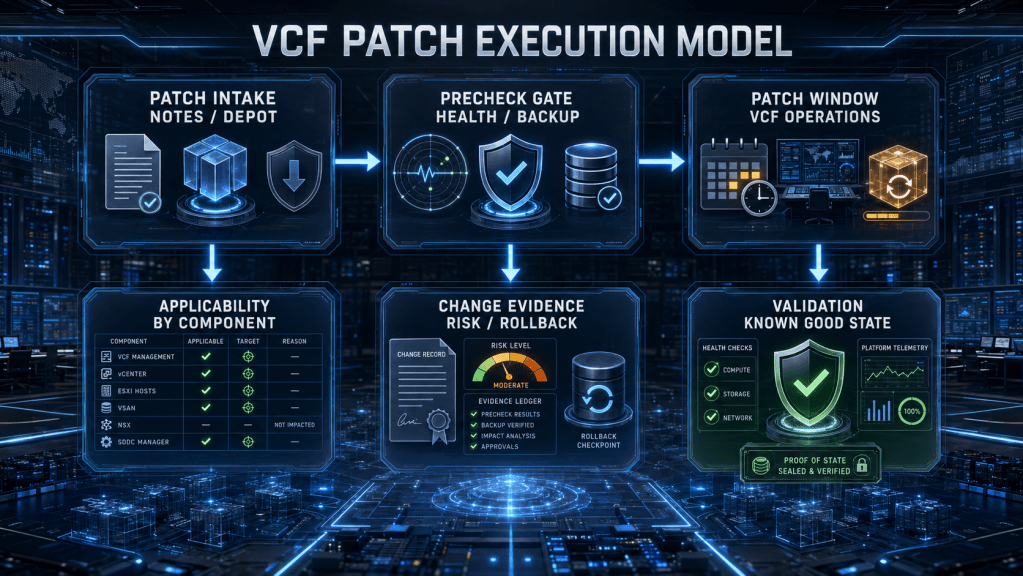
The diagram below shows the workflow at a high level. The most important thing to notice is that patch execution is only one part of the process. Intake, applicability, prechecks, and validation are what make the patch window survivable.

This is the operating pattern teams should standardize. The exact screens, components, and target versions can change by release. The decision logic should not.
Patch Intake
Start with intake, not execution. The patch ticket should capture the patch release, affected components, business driver, risk driver, and urgency. A security-driven Express Patch should not be evaluated the same way as a cosmetic UI fix, but both still need traceability.
Capture the following before touching the environment:
| Intake Item | Why It Matters |
|---|---|
| Patch release identifier | Prevents confusion between component versions |
| Affected components | Avoids assuming the entire stack is in scope |
| Security or product-fix driver | Sets urgency and change path |
| Current environment baseline | Confirms whether the patch is applicable |
| Required base version | Prevents attempting a patch before the needed base release |
| Online or offline depot method | Determines how binaries and metadata are managed |
| Known issues | Protects the window from avoidable failures |
| Rollback or recovery plan | Defines what happens if the patch fails |
Do not rely on memory for this. Put it in the change record.
Confirm the Current Baseline
Before selecting a target version, confirm the current state. The practical baseline should include VCF version, SDDC Manager version, VCF Operations version, VCF Management Services state, vCenter version, ESX versions, NSX version, vSAN status, and workload domain health.
This is where many patch windows become messy. Teams see a patch, assume it applies, and only later discover that one component is not at the required base version or that an offline depot contains a patch binary when the environment first needs the base GA or maintenance release.
The baseline should answer three questions:
- What are we currently running?
- What target version applies to each component?
- Is there any required intermediate version before the Express Patch?
If those questions are not answered, the patch window is not ready.
Synchronize the Depot and Confirm Binaries
For connected environments, synchronize the VCF software depot metadata through the lifecycle interface. For disconnected environments, confirm the offline depot process has the correct metadata and binaries staged before the maintenance window begins.
The depot step is not clerical. It controls what versions the lifecycle tooling can see, plan, and apply. If the wrong binaries are staged, or if metadata is stale, the UI can mislead the operator or fail to show the expected target version.
Offline environments need extra care. Keep base releases and Express Patches clearly separated in your internal repository structure. An Express Patch is not a substitute for a missing base version.
Precheck Gate
Prechecks are a gate, not a courtesy. Run them early enough to fix problems before the change window, then run them again as part of the approved patch workflow if the tool requires it.
At minimum, validate:
| Precheck Area | What to Confirm |
|---|---|
| VCF Operations health | Lifecycle UI and services are available |
| SDDC Manager health | Management domain is healthy |
| VCF Management Services | Required services are running and reachable |
| Depot status | Metadata and binaries are visible |
| vCenter health | Services, certificates, and inventory are clean |
| ESX cluster health | Hosts, maintenance mode behavior, and vLCM images are ready |
| NSX health | Managers, edges, transport nodes, and alarms are reviewed |
| vSAN health | Resync, object health, capacity, and skyline health are acceptable |
| Backups | Recent backups exist and restore process is understood |
| DNS, NTP, certificates | Basic platform dependencies are stable |
A failed precheck should not be hand-waved unless the team understands the failure, documents the risk, and gets explicit approval to continue.
Patch Management Services First When Needed
VCF 9.1 introduces stronger dependency on VCF Operations and VCF Management Services for lifecycle activity. That means the management and lifecycle plane deserves careful attention before patching downstream components.
If an Express Patch includes Fleet Lifecycle, SDDC Lifecycle, depot services, or other VCF Management Services components, evaluate those first. The reason is straightforward: lifecycle services help drive the patching process. Patching them early can reduce risk for the remaining steps, especially when the patch itself improves lifecycle behavior, validation, or error handling.
A practical sequence often looks like this:
This does not mean every patch requires every component. It means management-plane patching should be consciously evaluated before core component patching.
Patch Core Components
After the management and lifecycle services are ready, move to the VCF instance and core component patch workflow. In VCF Operations, build the upgrade or patch plan for the applicable component target versions, review the plan, run required prechecks, and then execute the patch workflow.
For ESX and vCenter, VCF 9.1 introduces lifecycle improvements such as ESX live patching and vCenter quick patching in applicable scenarios. Those capabilities can reduce maintenance impact, but they do not remove the need to validate cluster health, workload behavior, and management-plane availability.
Treat each component based on its blast radius:
| Component | Operational Focus |
|---|---|
| SDDC Manager | Lifecycle orchestration, workflow continuity, API behavior |
| VCF Operations | Fleet visibility, lifecycle UI, health, and telemetry |
| VCF Management Services | Lifecycle services, depot behavior, runtime health |
| vCenter | API availability, inventory, automation workflows, certificate state |
| ESX | Host remediation, maintenance mode, workload placement, cluster compliance |
| NSX | transport node health, edge health, control plane, datapath validation |
| vSAN | object health, resync state, capacity, performance, storage policy compliance |
This is where the runbook should be specific to your environment. A single-site management domain, a stretched vSAN cluster, an NSX Federation design, and a VCF on VxRail environment all have different operational risk profiles.
Validation After the Patch
The patch is not complete when the UI says the workflow finished. The patch is complete when the environment is validated, evidence is captured, and the operations team can explain the resulting state.
Validate these areas before closing the change:
| Validation Area | Evidence to Capture |
|---|---|
| Component versions | Before and after version list |
| VCF Operations health | Lifecycle and fleet views clean |
| SDDC Manager health | No failed workflows or blocking alarms |
| vCenter availability | UI, API, inventory, and critical services responsive |
| ESX cluster compliance | Hosts at expected image or patch state |
| NSX health | managers, edges, transport nodes, and alarms reviewed |
| vSAN health | no unexpected resync, object health clean |
| Workload smoke test | representative VMs or services confirmed |
| Backup status | post-change backup status or next scheduled backup confirmed |
| Monitoring | alerts reviewed and false positives documented |
This evidence does two things. It protects the team if a later issue is blamed on the patch, and it improves the next patch window by creating a repeatable record.
Rollback and Fallback Thinking
Rollback for platform patches is not always a simple “undo” button. The better approach is to define fallback decisions before the window starts.
Use these questions in the change plan:
- What symptom would cause us to stop?
- Which failed precheck is a hard stop?
- Which component failure can be retried?
- Which failure requires vendor support?
- What backup or restore path exists for management components?
- What workload impact is acceptable during the window?
- Who makes the decision to continue, pause, or abandon the change?
Do not wait until an error appears to decide who owns the call.
Common Failure Patterns
The most common Express Patch problems are usually not caused by the patch payload itself. They are caused by readiness gaps.
Stale depot metadata can prevent the expected patch from appearing.
Incorrect offline depot staging can make lifecycle tools see the wrong version or miss a required base release.
Skipped prechecks can turn known environmental issues into patch-window failures.
Weak certificate hygiene can block or complicate management-plane workflows.
Unhealthy vSAN, NSX, or vCenter states can make a targeted patch behave like a platform incident.
Incomplete change evidence can make post-change troubleshooting much harder than it needs to be.
The fix is not to slow everything down. The fix is to standardize the readiness checklist.
Copy-and-Paste Change Evidence Template
Use a simple evidence block in each Express Patch change record:
VCF Express Patch Change Evidence

Environment:
VCF version before:
VCF version after:
Patch release:
Patch driver:
Affected components:
Current component versions:
Target component versions:
Depot method:
Depot sync completed:
Release notes reviewed:
Backups verified:
Prechecks completed:
Precheck exceptions:
Patch start time:
Patch end time:
Components patched:
Components not applicable:
Validation completed:
Open issues:
Rollback or recovery actions used:
Final status:
Owner:
Reviewer:
This is not glamorous, but it is the difference between “we patched it” and “we can prove what changed.”
Conclusion
VCF Express Patches are meant to help teams respond faster, but the operational win only appears when patching is handled as a repeatable lifecycle process. The runbook needs to cover intake, baseline confirmation, depot synchronization, prechecks, management service sequencing, component patch execution, validation, and evidence capture.
The best VCF teams will not treat Express Patches as one-off events. They will build a lightweight patch factory around them: current inventory, trusted depot process, clean prechecks, controlled execution, and proof of health afterward. That is how Express Patches become a security and operations advantage instead of another source of platform noise.
