Close Menu

    Subscribe to Updates

    Get the latest news from tastytech.

    What's Hot

    All Star Fox games that the new Star Fox game is technically a remake of

    May 7, 2026

    Our Land review – superb doc on the right to roam

    May 7, 2026

    Mercedes-Maybach Boss: Buyers Want V12 Engines

    May 7, 2026
    Facebook X (Twitter) Instagram
    Facebook X (Twitter) Instagram
    tastytech.intastytech.in
    Subscribe
    • AI News & Trends
    • Tech News
    • AI Tools
    • Business & Startups
    • Guides & Tutorials
    • Tech Reviews
    • Automobiles
    • Gaming
    • movies
    tastytech.intastytech.in
    Home»Guides & Tutorials»Integrating PowerCLI with External APIs and Tools
    Integrating PowerCLI with External APIs and Tools
    Guides & Tutorials

    Integrating PowerCLI with External APIs and Tools

    gvfx00@gmail.comBy gvfx00@gmail.comSeptember 29, 2025No Comments3 Mins Read
    Share
    Facebook Twitter LinkedIn Pinterest Email


    Table of Contents

    Toggle
      • Learning Objectives
    • My Personal Repository on GitHub
      • Prerequisites
    • 1. Why Integrate PowerCLI with External APIs?
    • 2. PowerShell Example: Sending a Slack Notification from PowerCLI
    • 3. Python Example: Creating a Jira Ticket from a PowerCLI Script
    • 4. Diagram: Integration Workflow
    • 5. Other Integration Ideas
    • 6. Troubleshooting Tips
    • 7. Further Reading
    • 8. Conclusion and Next Steps
      • Next Post
      • Like this:
      • Related posts:
    • The Ultimate 48 Laws of Power Prompt System
    • Even if AI is Your Goal, Why Starting Without AI Improves Outcomes
    • Be Part of the AI Revolution at the Chatbot Conference Tomorrow! | by Cassandra C.

    Learning Objectives

    By the end of this article, you will:

    • Use PowerCLI and Python to send data to and receive data from external REST APIs.
    • Automate notifications and ticket creation with VMware scripting.
    • Build workflows that bridge VMware and IT service management tools.
    • Visualize multi-tool integration with an diagram.

    My Personal Repository on GitHub

    VMware Repository on GitHub


    Prerequisites

    • Completed Articles 1–8.
    • PowerCLI, Python, and access to the external tool/API (e.g., ServiceNow, Slack, Jira).
    • Network permissions for API access (outbound HTTP/S).

    1. Why Integrate PowerCLI with External APIs?

    Many organizations automate IT workflows by connecting VMware scripts to ticketing, chat, monitoring, or CI/CD tools. This allows:

    • Automated incident response (e.g., open a ticket when a VM alert occurs).
    • Real-time notifications to Slack, Teams, or email.
    • Custom dashboards and cross-platform data pipelines.

    2. PowerShell Example: Sending a Slack Notification from PowerCLI

    Suppose you want to send a Slack alert when a VM is powered off.

    Step 1: Get Your Slack Webhook URL

    • Create an incoming webhook in your Slack workspace.

    Step 2: PowerShell Code to Post a Message

    # Power off a VM and send a Slack alert if successful
    $vmName = ""
    $webhookUrl = ""

    Stop-VM -VM $vmName -Confirm:$false

    $message = @ Out-File -FilePath $outputFile -Encoding utf8
    | ConvertTo-Json

    Invoke-RestMethod -Uri $webhookUrl -Method Post -ContentType 'application/json' -Body $message


    3. Python Example: Creating a Jira Ticket from a PowerCLI Script

    Suppose your automation needs to open a Jira ticket if a VM fails to snapshot.

    Step 1: PowerShell Script to Attempt a Snapshot and Output Result

    Save as snapshot_status.ps1:

    $vmName = ""
    $outputFile = "C:\Temp\snap_status.txt"

    try Out-File -FilePath $outputFile -Encoding utf8
    catch Out-File -FilePath $outputFile -Encoding utf8

    Step 2: Python Script to Read Result and Call Jira API

    import requests

    status_file = r"C:\Temp\snap_status.txt"
    with open(status_file, "r") as f:
    status = f.read().strip()

    if status == "FAILED":
    url = "https:///rest/api/2/issue/"
    auth = ('', '')
    headers = {"Content-Type": "application/json"}
    data = {
    "fields": {
    "project": {"key": "IT"},
    "summary": "VM Snapshot Failure - Automated",
    "description": "Snapshot failed during automation run for VM.",
    "issuetype": {"name": "Task"}
    }
    }
    r = requests.post(url, json=data, auth=auth, headers=headers)
    print("Jira Ticket Created:", r.status_code, r.json())


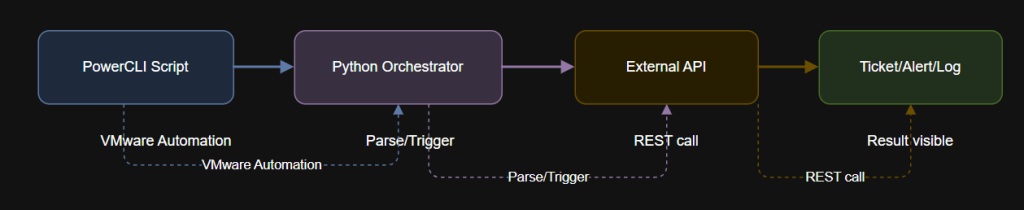
    4. Diagram: Integration Workflow


    5. Other Integration Ideas

    • Post VM inventory reports to Teams or email with attachments.
    • Trigger Ansible/Terraform or other IT automation from VMware events.
    • Sync inventory with asset management databases.
    • Send critical vSphere alerts to on-call engineers automatically.

    6. Troubleshooting Tips

    • For REST API authentication issues, check token/username, endpoint, and permissions.
    • Test your API calls with sample data before wiring to production automation.
    • Use PowerShell’s Invoke-RestMethod or Python’s requests for API interaction.
    • Review API documentation for required fields and quotas.

    7. Further Reading


    8. Conclusion and Next Steps

    You now know how to connect your VMware automation to popular APIs and tools, unlocking workflows that bridge IT silos and speed up incident response.

    Next up: Article 10 is your capstone project—combining everything you’ve learned into a robust, multi-step automation workflow with PowerCLI and Python.

    Next Post

    Unlocking VMware Automation Power: One Python Script to Rule Them All

    Learning Objectives By the end of this article, you will: See how a single Python script can orchestrate inventory, lifecycle, reporting, health checks, and notifications in VMware. Understand the power…

    Like this:

    Like Loading…

    Related posts:

    VCF 9.0 GA Mental Model Part 4: Fleet Topologies and SSO Boundaries (Single Site, Dual Site, Multi-R...

    Convert Azure VMs from Unmanaged to Managed Disks: A Production-Ready Runbook

    Even if AI is Your Goal, Why Starting Without AI Improves Outcomes

    Share. Facebook Twitter Pinterest LinkedIn Tumblr Email
    Previous ArticleCan AI detect hedgehogs from space? Maybe if you find brambles first.
    Next Article 8 Reasons Developers Switch to Google ADK: Insights from Developer Interviews
    gvfx00@gmail.com
    • Website

    Related Posts

    Guides & Tutorials

    VCF 9.0 GA Mental Model Part 6: Topology and Identity Boundaries for Single Site, Dual Site, and Multi-Region

    February 21, 2026
    Guides & Tutorials

    VCF 9.0 GA Mental Model Part 4: Fleet Topologies and SSO Boundaries (Single Site, Dual Site, Multi-Region)

    February 19, 2026
    Guides & Tutorials

    Convert Azure VMs from Unmanaged to Managed Disks: A Production-Ready Runbook

    February 19, 2026
    Add A Comment
    Leave A Reply Cancel Reply

    Top Posts

    Black Swans in Artificial Intelligence — Dan Rose AI

    October 2, 2025140 Views

    We let ChatGPT judge impossible superhero debates — here’s how it ruled

    December 31, 202571 Views

    Every Clue That Tony Stark Was Always Doctor Doom

    October 20, 202568 Views
    Stay In Touch
    • Facebook
    • YouTube
    • TikTok
    • WhatsApp
    • Twitter
    • Instagram

    Subscribe to Updates

    Get the latest tech news from tastytech.

    About Us
    About Us

    TastyTech.in brings you the latest AI, tech news, cybersecurity tips, and gadget insights all in one place. Stay informed, stay secure, and stay ahead with us!

    Most Popular

    Black Swans in Artificial Intelligence — Dan Rose AI

    October 2, 2025140 Views

    We let ChatGPT judge impossible superhero debates — here’s how it ruled

    December 31, 202571 Views

    Every Clue That Tony Stark Was Always Doctor Doom

    October 20, 202568 Views

    Subscribe to Updates

    Get the latest news from tastytech.

    Facebook X (Twitter) Instagram Pinterest
    • Homepage
    • About Us
    • Contact Us
    • Privacy Policy
    © 2026 TastyTech. Designed by TastyTech.

    Type above and press Enter to search. Press Esc to cancel.

    Ad Blocker Enabled!
    Ad Blocker Enabled!
    Our website is made possible by displaying online advertisements to our visitors. Please support us by disabling your Ad Blocker.