



TL;DR
Kubernetes Dynamic Resource Allocation changes NVIDIA GPU scheduling from an opaque integer request into an explicit device-selection workflow. Instead of asking only for nvidia.com/gpu: 1, a workload can claim a class of GPU, filter by architecture or memory, request full GPUs or MIG devices, and let the scheduler bind a specific device through a ResourceClaim.
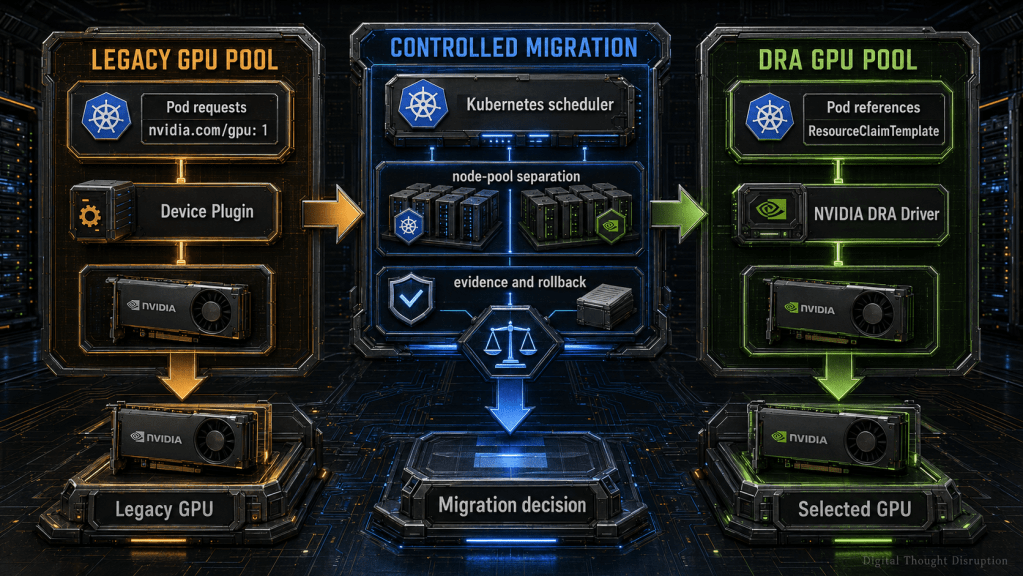
The safest migration is not an in-place swap across every GPU node. Build a DRA-enabled node pool, keep the NVIDIA device plugin on legacy nodes, and ensure the same physical GPU is never advertised by both allocation systems. Kubernetes 1.36 is the preferred baseline because the DRAExtendedResource bridge can preserve existing nvidia.com/gpu workload manifests while the selected nodes are backed by DRA.
Start with full-GPU claims, validate scheduling evidence, migrate workloads in waves, and keep advanced sharing features outside the first production cutover. Dynamic MIG, MPS, and configurable time-slicing remain feature-gated, while DRA support in the NVIDIA NIM Operator is still Technology Preview.
Introduction
The NVIDIA Kubernetes device plugin solved an important early problem: make a GPU visible to the Kubernetes scheduler as an extended resource. A pod asks for one unit of nvidia.com/gpu, the scheduler finds a node with an available unit, and the device plugin injects a GPU into the container.
That model is simple, familiar, and still useful. It is also intentionally narrow.
A single integer does not describe whether the workload needs Ampere, Hopper, or Blackwell architecture. It does not express minimum GPU memory, a specific MIG profile, an interconnect requirement, or a workload-specific device configuration. Platform teams usually compensate with node labels, node affinity, multiple device-plugin configurations, scheduler extensions, or separate clusters. Each workaround can solve one problem, but the complete operating model becomes difficult to standardize.
Kubernetes Dynamic Resource Allocation, or DRA, moves device selection into a first-class Kubernetes API. The NVIDIA DRA Driver publishes GPU inventory as ResourceSlice objects. Platform administrators expose approved DeviceClass objects. Workloads request devices through ResourceClaim or ResourceClaimTemplate objects. The Kubernetes scheduler selects a matching device and records the allocation before the NVIDIA DRA kubelet plugin prepares it for the pod.
This walkthrough focuses on the migration path, not only the object model. The goal is to move from device-plugin scheduling to DRA without creating two allocators for the same GPU, breaking every existing workload manifest at once, or losing a tested rollback path.
Migration Objective
The target outcome is a Kubernetes cluster in which:
- existing GPU workloads can continue running on a legacy node pool during the transition
- selected GPU nodes publish devices through the NVIDIA DRA Driver
- new workloads can request GPU characteristics through
ResourceClaimTemplateobjects - approved legacy manifests can use the Kubernetes extended-resource bridge during staged migration
- platform teams control which device classes tenants can consume
- every migration wave produces scheduling and runtime evidence
- rollback returns affected nodes and workloads to the device-plugin model without competing allocations
This is a control-plane and workload-contract migration. Installing the driver is only one step.
Scope, Assumptions, and Version Baseline
This walkthrough uses a research baseline validated on July 25, 2026.
| Component | Practical baseline for this walkthrough | Why it matters |
|---|---|---|
| Kubernetes | Version 1.36 preferred | Core DRA is stable, and the extended-resource bridge is beta and enabled by default in 1.36 |
| Minimum Kubernetes documented by NVIDIA | Version 1.34.2 or later | Earlier releases do not meet the current NVIDIA GPU Operator DRA prerequisite |
| NVIDIA GPU Operator | Version 26.3.3 | Current NVIDIA installation guidance configures CDI and NVIDIA driver 580 or later for the DRA path |
| NVIDIA DRA Driver for GPUs | Version 0.4.1 | Current documented chart and driver release |
| Initial resource type | Full GPU | Reduces migration variables before adding MIG or sharing configuration |
| Workload rollout | Non-production pilot, then controlled waves | DRA support varies by Kubernetes distribution and workload operator |
Assumptions:
- GPU Operator already manages, or will manage, the NVIDIA driver and container integration.
- You can create or isolate at least one GPU node pool for DRA.
- You can modify workload manifests, Helm charts, or operators where native claims are required.
- You have cluster-admin access for driver installation and DeviceClass management.
- Your Kubernetes distribution exposes the required DRA APIs and feature gates.
- You will confirm platform support with the Kubernetes distribution vendor before production rollout.
This walkthrough does not enable dynamic MIG, MPS, VFIO passthrough, ComputeDomains, or configurable CUDA time-slicing during the first migration wave. Those features introduce additional feature gates, failure modes, and support boundaries.
Prerequisites
Before changing GPU allocation, confirm that you have:
- a Kubernetes 1.36 cluster for the preferred coexistence path, or a validated 1.34.2 or later cluster for native DRA testing
- a healthy NVIDIA GPU Operator installation or an approved plan to install version 26.3.3
- NVIDIA driver 580 or later when following the current GPU Operator-managed DRA path
- Helm 3,
kubectl, andjqavailable from the administrative workstation - at least one GPU node that can be isolated as a DRA pilot pool
- a maintenance window for changing device-plugin labels on the pilot node
- access to the current Kubernetes distribution support matrix and NVIDIA GPU Operator platform support documentation
- an application owner who can validate workload behavior after the GPU is allocated
- a stored copy of the current GPU Operator values and every workload manifest included in the migration wave
Do not proceed until the existing device-plugin workload path is healthy. DRA should not be introduced as a troubleshooting shortcut for an already broken NVIDIA driver, runtime, or GPU Operator deployment.
Why the Traditional Extended-Resource Model Is Limited
The device-plugin model exposes a resource name and a count. That abstraction works when all GPUs are operationally interchangeable and workloads need exclusive access to a whole device.
Modern GPU platforms rarely remain that simple.
| Scheduling requirement | Traditional device plugin | Kubernetes DRA |
|---|---|---|
| Request one generic GPU | Native | Native through a claim or compatibility bridge |
| Select architecture | Usually node labels and affinity | Device attribute selector |
| Select minimum GPU memory | Usually custom labels | Device capacity selector |
| Select full GPU versus MIG | Separate resource names and operator configuration | DeviceClass and claim selection |
| Apply per-workload device configuration | Limited and plugin-specific | Claim configuration model |
| Share one claim across containers | Not a native device-plugin contract | Supported through pod resource claims |
| Publish detailed device inventory | Node capacity plus labels | ResourceSlice objects |
| Abstract hardware tiers for tenants | Naming and scheduling conventions | Administrator-managed DeviceClass objects |
| Preserve an allocation object for inspection | No standalone claim object | ResourceClaim status records the allocation |
The most important difference is not that DRA adds more YAML. It separates the workload request from the physical device inventory.
The platform team can define an approved class such as nvidia-hopper-large-memory.platform.example.com. The application team requests that class without hard-coding a node name or maintaining a list of GPU product labels. The scheduler evaluates current device inventory and binds a matching GPU.
That is a better platform contract, but it also moves more responsibility into DeviceClass design, RBAC, admission control, scheduler behavior, and DRA driver lifecycle management.
DRA Architecture and Terminology
The DRA workflow resembles dynamic storage provisioning. A workload describes what it needs, Kubernetes binds an available resource, and a driver prepares that resource on the selected node.
The following diagram shows the primary control path. The important point is that the pod does not select a GPU directly. It references a claim, and the scheduler resolves that claim against inventory published by the driver.

DeviceClass
A DeviceClass is a cluster-scoped policy and categorization object. It can select devices with Common Expression Language, or CEL, expressions and can provide a stable platform-facing name even when the underlying GPU fleet changes.
Treat DeviceClasses like StorageClasses or approved infrastructure service tiers. Application teams should consume them. Platform administrators should own them.
ResourceClaim
A ResourceClaim is a namespace-scoped request for one or more devices. Its status records the selected allocation after scheduling. A directly created claim is useful when the lifecycle of the device allocation must be managed independently or intentionally shared.
ResourceClaimTemplate
A ResourceClaimTemplate is also namespace-scoped. A controller creates a claim for each pod that uses the template. This is the better default for Deployments, Jobs, and operators that create and replace pods because the claim lifecycle follows the workload.
ResourceSlice
A ResourceSlice is device inventory published by the DRA driver. NVIDIA ResourceSlices can expose attributes such as architecture, product name, compute capability, driver version, PCI location, UUID, and memory capacity. The scheduler uses this data when evaluating claim selectors.
NVIDIA DRA Driver Components
The NVIDIA chart installs a controller and a node-local kubelet plug-in. The controller manages driver-side resources and classes. The kubelet plug-in publishes inventory and handles device preparation and cleanup on DRA-enabled nodes.
Choose the Coexistence Pattern Before Installing DRA
The phrase “run DRA alongside the device plugin” needs a precise operational definition.
It should mean two allocation models in one cluster, separated by nodes.
It should not mean the same physical GPU is advertised by both the NVIDIA device plugin and the NVIDIA DRA Driver.
| Pattern | Legacy nodes | DRA nodes | Workload manifest impact | Recommendation |
|---|---|---|---|---|
| Native staged migration | Device plugin | DRA driver | New workloads use claims | Best first implementation |
| Extended-resource bridge | Device plugin | DRA driver with a bridged DeviceClass | Existing nvidia.com/gpu requests can continue |
Useful on Kubernetes 1.36 after validation |
| Global cutover | Device plugin removed everywhere | DRA driver everywhere | Coordinated migration required | Use only after pilot evidence |
| Same-node dual advertisement | Device plugin | Device plugin plus DRA on the same GPU | Ambiguous and unsafe allocation ownership | Do not use |
Kubernetes 1.36 can map an extended-resource request to a DeviceClass. That allows the same resource name to be provided by the device plugin on legacy nodes and by DRA on other nodes. This compatibility layer is valuable because it decouples node migration from immediate application-manifest migration.
It does not remove the need for node-level exclusivity.
Inventory the Existing GPU Scheduling Model
Do not begin by installing another driver. First capture the current state and identify which workloads depend on the extended-resource contract.
kubectl version
helm version

helm list -A | grep -E 'gpu-operator|device-plugin|dra' || true
kubectl get nodes -o wide
kubectl get nodes \
  -L nvidia.com/gpu.product,nvidia.com/gpu.count,nvidia.com/mig.capable

kubectl get daemonsets -A | grep -E 'nvidia|gpu|dra' || true
kubectl get pods -A -o wide | grep -E 'nvidia|gpu-operator|dra' || true
List nodes that currently advertise nvidia.com/gpu:
kubectl get nodes \
  -o custom-columns="NODE:.metadata.name,GPU:.status.allocatable.nvidia\.com/gpu,PRODUCT:.metadata.labels.nvidia\.com/gpu\.product"
Use jq to locate existing pods with NVIDIA extended-resource limits:
kubectl get pods -A -o json | jq -r '
  .items[]
  | select(any(.spec.containers[]?;
      .resources.limits["nvidia.com/gpu"] != null))
  | [
      .metadata.namespace,
      .metadata.name,
      .spec.nodeName,
      ([.spec.containers[]?.resources.limits["nvidia.com/gpu"] // empty] | join(","))
    ]
  | @tsv'
Record at least:
- namespace and workload owner
- controller type, such as Deployment, Job, StatefulSet, or custom resource
- requested GPU count
- node selectors, affinity, and tolerations
- GPU product and memory dependency
- MIG or sharing configuration
- restart tolerance and maintenance window
- whether the workload manifest can be changed
- rollback owner and validation test
This inventory becomes the migration-wave register.
Build Separate Legacy and DRA Node Pools
Use explicit node labels to make allocation ownership visible.
The examples use custom platform labels plus the NVIDIA-required DRA label. Replace node names and label domains with your standards.
kubectl label node gpu-legacy-01 \
  gpu-scheduling.platform.example.com/mode=legacy \
  --overwrite

kubectl label node gpu-dra-01 \
  gpu-scheduling.platform.example.com/mode=dra \
  nvidia.com/dra-kubelet-plugin=true \
  --overwrite
A taint can prevent ordinary GPU workloads from landing on the DRA pilot pool before their manifests are ready:
kubectl taint node gpu-dra-01 \
  gpu-scheduling.platform.example.com/mode=dra:NoSchedule \
  --overwrite
Disable the Device Plugin Only on DRA Nodes
During coexistence, keep the GPU Operator device plugin enabled globally for the legacy pool. Do not set the chart-wide devicePlugin.enabled=false value until the final cutover.
The GPU Operator device-plugin DaemonSet selects nodes labeled with nvidia.com/gpu.deploy.device-plugin=true. Disable that operand on each DRA node:
kubectl label node gpu-dra-01 \
  nvidia.com/gpu.deploy.device-plugin=false \
  --overwrite
Confirm that reconciliation preserves the label and that the device-plugin pod no longer runs on the DRA node:
kubectl get node gpu-dra-01 \
  -o jsonpath="{.metadata.labels.nvidia\.com/gpu\.deploy\.device-plugin}{"\n"}"

kubectl get pods -n gpu-operator -o wide \
  -l app=nvidia-device-plugin-daemonset
Current GPU Operator behavior must be tested carefully here. Some releases can leave the operator validator unhealthy on a node where the device plugin is intentionally disabled because the validator still expects the extended resource. If that occurs only on the DRA pool, disable the validator operand for those nodes and replace it with the DRA validation gates later in this walkthrough.
kubectl label node gpu-dra-01 \
  nvidia.com/gpu.deploy.operator-validator=false \
  --overwrite
Do not disable the driver, container toolkit, GPU Feature Discovery, DCGM exporter, or other required operands merely to remove the device plugin. DRA still depends on a healthy NVIDIA driver and container-device injection path.
Prepare GPU Operator for the DRA Kubelet Plug-In
NVIDIA documents a driver-manager setting that identifies DRA nodes so the DRA kubelet plug-in can be evicted correctly during NVIDIA driver container upgrades.
Merge this value into the existing GPU Operator values file. Do not overwrite an existing environment list without reviewing it.
driver:
  manager:
    env:
      - name: NODE_LABEL_FOR_GPU_POD_EVICTION
        value: nvidia.com/dra-kubelet-plugin
Apply the updated values while preserving the rest of the current GPU Operator configuration:
export GPU_OPERATOR_VERSION="v26.3.3"

helm upgrade gpu-operator nvidia/gpu-operator \
  --namespace gpu-operator \
  --version "${GPU_OPERATOR_VERSION}" \
  --reuse-values \
  -f gpu-operator-dra-values.yaml \
  --wait
Validate the existing NVIDIA foundation before installing the DRA driver:
kubectl get pods -n gpu-operator
kubectl get node gpu-dra-01 \
  -L nvidia.com/dra-kubelet-plugin,nvidia.com/gpu.deploy.device-plugin
The DRA node should retain a healthy driver, container toolkit, and discovery stack while no NVIDIA device-plugin pod runs on that node.
Install the NVIDIA DRA Driver
The NVIDIA Helm repository is intentionally represented by a variable so the article body remains free of publication links. Obtain the current repository endpoint from the NVIDIA installation guide in External References.
export NVIDIA_HELM_REPOSITORY=""
export NVIDIA_DRA_DRIVER_VERSION="0.4.1"

helm repo add nvidia "${NVIDIA_HELM_REPOSITORY}"
helm repo update
Create dra-values.yaml and scope the kubelet plug-in to the DRA node pool:
image:
  pullPolicy: IfNotPresent

kubeletPlugin:
  nodeSelector:
    nvidia.com/dra-kubelet-plugin: "true"
Install the driver with GPU allocation enabled. The driver root shown here is the default path for a GPU Operator-managed NVIDIA driver.
helm upgrade --install dra-driver-nvidia-gpu \
  nvidia/dra-driver-nvidia-gpu \
  --version "${NVIDIA_DRA_DRIVER_VERSION}" \
  --namespace nvidia-dra-driver-gpu \
  --create-namespace \
  --set nvidiaDriverRoot=/run/nvidia/driver \
  --set gpuResourcesEnabledOverride=true \
  -f dra-values.yaml \
  --wait
Managed Kubernetes services and preinstalled-driver environments can require a different nvidiaDriverRoot, controller affinity, priority class, or tolerations. Use the platform-specific NVIDIA values instead of copying the default path blindly.
Validate Driver Installation
kubectl get pods -n nvidia-dra-driver-gpu -o wide
kubectl get deviceclass
kubectl get resourceslice
Expected results include:
- a running DRA controller pod
- a running DRA kubelet plug-in pod on each labeled DRA node
gpu.nvidia.comandmig.nvidia.comDeviceClasses when GPU allocation is enabled- at least one ResourceSlice for each DRA node with an allocatable NVIDIA device
Inspect the published inventory:
kubectl get resourceslice -o yaml
Look for the expected node, driver, product name, architecture, memory capacity, UUID, and device type. Do not proceed if ResourceSlices are missing or advertise unexpected hardware.
Create a Platform DeviceClass
The driver-provided gpu.nvidia.com DeviceClass is appropriate for requesting any full NVIDIA GPU. A platform-specific DeviceClass is useful when tenants should request a service tier instead of writing their own hardware selectors.
This example selects Hopper GPUs with more than 40 GiB of memory:
apiVersion: resource.k8s.io/v1
kind: DeviceClass
metadata:
  name: nvidia-hopper-large-memory.platform.example.com
spec:
  selectors:
    - cel:
        expression: |
          device.driver == 'gpu.nvidia.com' &&
          device.attributes['gpu.nvidia.com'].architecture == 'Hopper' &&
          device.capacity['gpu.nvidia.com'].memory.isGreaterThan(quantity("40Gi"))
Apply and inspect the class:
kubectl apply -f deviceclass-hopper-large.yaml
kubectl get deviceclass nvidia-hopper-large-memory.platform.example.com -o yaml
Use DeviceClasses to publish intent-based tiers such as:
- general full GPU
- large-memory inference GPU
- approved MIG profile
- development time-sliced GPU
- isolated passthrough GPU
- multi-node fabric-capable GPU group
Do not create a separate class for every product SKU unless the application genuinely depends on that SKU. A service tier should remain stable enough to survive routine fleet changes.
Create a ResourceClaimTemplate and DRA-Aware Pod
Create a namespace for the pilot workload:
kubectl create namespace gpu-dra-pilot \
  --dry-run=client -o yaml | kubectl apply -f -
Create hopper-large-claim-template.yaml:
apiVersion: resource.k8s.io/v1
kind: ResourceClaimTemplate
metadata:
  name: hopper-large-gpu
  namespace: gpu-dra-pilot
spec:
  spec:
    devices:
      requests:
        - name: gpu
          exactly:
            deviceClassName: nvidia-hopper-large-memory.platform.example.com
Create dra-gpu-pod.yaml:
apiVersion: v1
kind: Pod
metadata:
  name: dra-gpu-validation
  namespace: gpu-dra-pilot
spec:
  restartPolicy: Never
  containers:
    - name: cuda-validation
      image: ubuntu:22.04
      command: ["bash", "-c"]
      args: ["nvidia-smi -L; nvidia-smi --query-gpu=name,memory.total,uuid --format=csv; sleep 3600"]
      resources:
        claims:
          - name: gpu
  resourceClaims:
    - name: gpu
      resourceClaimTemplateName: hopper-large-gpu
  tolerations:
    - key: gpu-scheduling.platform.example.com/mode
      operator: Equal
      value: dra
      effect: NoSchedule
Apply both objects:
kubectl apply -f hopper-large-claim-template.yaml
kubectl apply -f dra-gpu-pod.yaml
The resources.claims entry makes the device available to the container. The pod-level resourceClaims entry connects that logical name to the template. The template controller creates the actual ResourceClaim for the pod.
Select GPU Attributes and Device Configurations
Start with selectors that answer a real workload requirement. Useful NVIDIA full-GPU attributes and capacities include:
architectureproductNamecudaComputeCapabilitydriverVersionuuidresource.kubernetes.io/pciBusIDresource.kubernetes.io/pcieRootmemory
A claim can select a product family:
devices:
  requests:
    - name: gpu
      exactly:
        deviceClassName: gpu.nvidia.com
        selectors:
          - cel:
              expression: |
                device.attributes['gpu.nvidia.com'].productName.lowerAscii().matches('^.*a100.*$')
Or request a minimum memory capacity:
devices:
  requests:
    - name: gpu
      exactly:
        deviceClassName: gpu.nvidia.com
        selectors:
          - cel:
              expression: |
                device.capacity['gpu.nvidia.com'].memory.isGreaterThan(quantity("40Gi"))
Support Boundary by Configuration Type
| Configuration | Current practical posture | Migration guidance |
|---|---|---|
| Full GPU | Documented baseline | Use for the first production pilot |
| Static MIG | Enabled by default when partitions already exist | Add only after full-GPU scheduling is stable |
| Dynamic MIG | Alpha, disabled by default | Keep out of the first production cutover |
| Configurable time-slicing | Alpha, disabled by default | Use only for controlled development or validated low-isolation workloads |
| MPS | Alpha, disabled by default | Treat as an advanced sharing design |
| VFIO passthrough | Alpha feature path | Separate from ordinary container scheduling |
| ComputeDomains | Specialized multi-node NVLink path | Validate hardware, topology, and support independently |
Time-slicing does not provide memory isolation or guaranteed throughput. Dynamic MIG has feature-gate interactions and can conflict with other advanced modes. Do not turn on several experimental capabilities while also changing the allocation framework.
Preserve Legacy Manifests with the Extended-Resource Bridge
Kubernetes 1.36 can translate an extended-resource request into a DRA claim when a DeviceClass declares the same extended resource name.
This example creates a compatibility class for full NVIDIA GPUs:
apiVersion: resource.k8s.io/v1
kind: DeviceClass
metadata:
  name: nvidia-gpu-legacy-bridge.platform.example.com
spec:
  selectors:
    - cel:
        expression: |
          device.driver == 'gpu.nvidia.com' &&
          device.attributes['gpu.nvidia.com'].type == 'gpu'
  extendedResourceName: nvidia.com/gpu
After applying the class, an unchanged workload request can be satisfied by:
- the NVIDIA device plugin on a legacy node
- the NVIDIA DRA Driver on a DRA node
resources:
  limits:
    nvidia.com/gpu: 1
This is a migration bridge, not the final DRA workload contract. It preserves compatibility but does not let the workload express architecture, memory, MIG profile, or device configuration. Use it to decouple platform migration from application release timing, then move important workloads to native claims.
Before enabling the bridge in production, verify:
- Kubernetes 1.36 components have the feature enabled
- the same GPU is not exposed through both allocators on one node
- legacy and DRA node pools have consistent taints and workload constraints
- application scheduling behavior is tested under GPU scarcity
- admission and tenant policies still apply to the generated claim path
Integrate DRA with NVIDIA NIM Services
The NVIDIA NIM Operator can allocate devices for NIMService, NIMPipelines, and NIMBuild resources. The recommended NIM pattern is to let the operator create a ResourceClaimTemplate from spec.draResources.claimCreationSpec.
The following excerpt requests one Ampere GPU with at least 40 GiB of memory:
spec:
  draResources:
    - claimCreationSpec:
        devices:
          - name: gpu
            deviceClassName: gpu.nvidia.com
            driverName: gpu.nvidia.com
            count: 1
            attributeSelectors:
              - key: architecture
                op: Equal
                value:
                  stringValue: Ampere
            capacitySelectors:
              - key: memory
                op: GreaterThanOrEqual
                value: 40Gi
Keep the NIMCache, NIMService, ResourceClaim, and ResourceClaimTemplate in the same namespace. Validate the generated template and claim, not only the NIMService status.
kubectl get nimservice -n nim-service
kubectl get resourceclaimtemplate -n nim-service
kubectl get resourceclaim -n nim-service
kubectl describe resourceclaim -n nim-service
NIM DRA support is currently Technology Preview and is not suitable for production according to NVIDIA documentation. Use it in a non-production migration wave, preserve the existing resources.limits.nvidia.com/gpu deployment path, and define a separate rollback for the NIM custom resource.
Enforce Namespace and Tenant Controls
DRA introduces new cluster-scoped and namespace-scoped APIs. The permission model should reflect that separation.
| Resource | Scope | Recommended owner |
|---|---|---|
| DeviceClass | Cluster | Platform engineering or cluster administration |
| ResourceSlice | Cluster | DRA driver service accounts only |
| ResourceClaim | Namespace | Approved workload operators |
| ResourceClaimTemplate | Namespace | Approved workload operators or platform automation |
| Pod claim reference | Namespace workload | Application deployment identity |
A tenant Role can allow claims without granting DeviceClass or ResourceSlice administration:
apiVersion: rbac.authorization.k8s.io/v1
kind: Role
metadata:
  name: gpu-claim-operator
  namespace: gpu-dra-pilot
rules:
  - apiGroups: ["resource.k8s.io"]
    resources: ["resourceclaims", "resourceclaimtemplates"]
    verbs: ["get", "list", "watch", "create", "update", "patch", "delete"]
Additional controls should include:
- admission policy that permits only approved DeviceClass names per namespace
- namespace-level ownership and cost labels on claim templates
- ResourceQuota object-count limits for claims and templates where appropriate
- prohibition of DRA admin access for ordinary tenants
- GitOps review for platform DeviceClasses and opaque device configuration
- event and audit-log retention for claim creation, allocation, and deletion
- alerting on claims that remain pending or reserved unexpectedly
- separate namespaces for development sharing modes and production exclusive GPU classes
Do not let every tenant write arbitrary CEL expressions against raw hardware inventory. That recreates node-level coupling through a different API.
Migrate Workloads in Stages
A successful migration proves one layer at a time.
| Stage | Action | Exit evidence | Rollback point |
|---|---|---|---|
| Baseline | Inventory workloads and capture device-plugin scheduling | Workload register, node capacity, runtime GPU output | No change |
| Pilot pool | Label one DRA node and remove the device plugin from that node | No dual advertisement, DRA plug-in healthy | Restore node labels |
| Driver validation | Install DRA driver and inspect ResourceSlices | Correct GPU product, memory, UUID, and node | Uninstall DRA driver from pilot pool |
| Native claim pilot | Run a simple pod with ResourceClaimTemplate | Bound claim, correct node, correct GPU inside container | Delete pod and claim, restore device plugin |
| Compatibility bridge | Test unchanged nvidia.com/gpu manifest on both pools |
Expected placement and implicit DRA allocation | Remove bridge DeviceClass |
| Application wave | Migrate one non-critical application | Functional, performance, restart, and failure tests | Reapply legacy manifest |
| NIM non-production | Test NIM claim creation and status | Generated template, allocated claim, healthy NIM | Restore extended-resource NIM spec |
| Scale | Migrate additional workloads by risk class | Stable scheduling latency and no allocation leaks | Pause at previous wave |
| Final cutover | Remove remaining device-plugin dependency | No legacy workloads or device-plugin pods | Re-enable plugin before uninstalling DRA |
Use one or two representative workloads in the first wave:
- a simple CUDA validation pod
- a restartable inference or batch workload
- a workload with a known memory requirement
- a workload whose owner can validate application output
Do not choose the largest multi-node training job as the first DRA test.
Collect Validation and Scheduling Evidence
A pod reaching Running is necessary but not sufficient. Capture evidence across the complete allocation path.
Confirm Node-Level Allocator Separation
kubectl get node gpu-dra-01 \
  -L nvidia.com/dra-kubelet-plugin,nvidia.com/gpu.deploy.device-plugin

kubectl get pods -n gpu-operator -o wide \
  -l app=nvidia-device-plugin-daemonset

kubectl get pods -n nvidia-dra-driver-gpu -o wide
The DRA node should run the DRA kubelet plug-in and should not run the NVIDIA device-plugin pod.
Confirm Inventory and Class Selection
kubectl get deviceclass
kubectl get resourceslice
kubectl get resourceslice -o yaml
Confirm that the selected DeviceClass can match at least one published device.
Confirm Claim Allocation
kubectl get resourceclaimtemplate -n gpu-dra-pilot
kubectl get resourceclaim -n gpu-dra-pilot
kubectl describe resourceclaim -n gpu-dra-pilot
kubectl get resourceclaim -n gpu-dra-pilot -o yaml
Look for allocation details, the selected driver and device, and the expected reserved or allocated state.
Confirm Scheduler Placement
kubectl get pod dra-gpu-validation \
  -n gpu-dra-pilot -o wide

kubectl describe pod dra-gpu-validation \
  -n gpu-dra-pilot
The pod should be placed on the DRA pool, and events should not show unresolved claim or device-filter failures.
Confirm Runtime Device Identity
kubectl exec -n gpu-dra-pilot dra-gpu-validation -- nvidia-smi -L

kubectl exec -n gpu-dra-pilot dra-gpu-validation -- \
  nvidia-smi --query-gpu=name,memory.total,uuid --format=csv
Compare the GPU identity and memory with the ResourceSlice and claim evidence.
Confirm Restart and Cleanup Behavior
Delete and recreate the pod, then confirm that claims and allocations are cleaned up as expected:
kubectl delete pod dra-gpu-validation -n gpu-dra-pilot
kubectl get resourceclaim -n gpu-dra-pilot -w
For a Deployment or Job, validate repeated creation and deletion, not only one long-running pod.
Troubleshoot Common Migration Failures
DeviceClasses Exist but No ResourceSlices Appear
Likely causes include:
- DRA kubelet plug-in is not running on the GPU node
- required node label is missing
- wrong
nvidiaDriverRoot - GPU driver or CDI path is unhealthy
- unsupported GPU or platform configuration
- driver service account cannot publish inventory
Check the DRA kubelet plug-in logs and the GPU Operator driver and toolkit state.
ResourceClaim Remains Pending
Inspect the claim, pod events, DeviceClass selectors, and ResourceSlice inventory. A selector can be syntactically valid but match no device. Product naming and memory values should be copied from the cluster’s ResourceSlice, not assumed from a hardware purchase record.
Pod Is Pending Even Though a Matching GPU Exists
Check node taints, tolerations, node affinity, topology constraints, namespace policy, and whether another claim has reserved the device. DRA scheduling also does not currently provide preemption for DRA devices, so a higher-priority pod should not be expected to reclaim a device automatically.
Device Plugin Reappears on a DRA Node
Confirm the node label remains false after GPU Operator reconciliation. Inspect the DaemonSet node selector and GPU Operator logs. Treat this as a failed exclusivity gate and stop scheduling new DRA workloads on the node until the allocation owner is unambiguous.
Operator Validator Fails on DRA Nodes
The validator can expect nvidia.com/gpu even when the device plugin is intentionally disabled. Confirm that the failure is isolated to the device-plugin validation path, disable that validator operand on DRA nodes when necessary, and use the explicit ResourceSlice, ResourceClaim, and runtime checks in this walkthrough.
DRA Plug-In Does Not Restart Cleanly During Driver Upgrade
Confirm the GPU Operator driver-manager environment includes the DRA node label. Test the complete driver-upgrade sequence in the pilot pool before allowing routine lifecycle automation to touch production DRA nodes.
A100 MIG Inventory Does Not Refresh
NVIDIA documents a known interaction in which the MIG Manager does not automatically evict the DRA kubelet plug-in during an A100 MIG configuration change. Restart the DRA kubelet plug-in after the MIG change and revalidate ResourceSlices before scheduling new workloads.
NIMService Does Not Create or Bind a Claim
Confirm that:
- the NIM Operator version includes DRA support
- the cluster uses the
resource.k8s.io/v1API - the NIM resource and claim objects are in the same namespace
- the requested DeviceClass exists
- the selectors match published inventory
- the feature is being tested as Technology Preview, not assumed to be production supported
Roll Back to the Device-Plugin Model
Rollback must restore allocation ownership in a controlled order. Do not start the device plugin on a node while DRA claims are still reserved or prepared.
Freeze the Migration Wave
Stop new DRA deployments and suspend automation that creates claim-backed workloads.
kubectl cordon gpu-dra-01
kubectl get resourceclaim -A
Remove DRA Workloads Before the Driver
Delete or scale down workloads using DRA claims. Confirm that claims are released and device cleanup completes while the DRA kubelet plug-in is still running.
kubectl delete pod dra-gpu-validation -n gpu-dra-pilot
kubectl get resourceclaim -A
The DRA driver should be drained late because it performs device unprepare and cleanup operations.
Disable DRA on the Node
After no active claims remain, remove the DRA selector label:
kubectl label node gpu-dra-01 \
  nvidia.com/dra-kubelet-plugin-
Confirm that the DRA kubelet plug-in leaves the node.
Re-enable the NVIDIA Device Plugin
kubectl label node gpu-dra-01 \
  nvidia.com/gpu.deploy.device-plugin=true \
  --overwrite

kubectl label node gpu-dra-01 \
  nvidia.com/gpu.deploy.operator-validator=true \
  --overwrite
Wait for GPU Operator reconciliation and confirm that nvidia.com/gpu returns to node allocatable capacity:
kubectl get pods -n gpu-operator -o wide \
  -l app=nvidia-device-plugin-daemonset

kubectl get node gpu-dra-01 \
  -o custom-columns="NODE:.metadata.name,GPU:.status.allocatable.nvidia\.com/gpu"
Restore the Legacy Workload Contract
Reapply the previous manifest with the extended-resource limit and validate the application, not only GPU visibility.
resources:
  limits:
    nvidia.com/gpu: 1
Remove the pilot taint only after the legacy validation workload succeeds:
kubectl taint node gpu-dra-01 \
  gpu-scheduling.platform.example.com/mode=dra:NoSchedule-

kubectl uncordon gpu-dra-01
Uninstall DRA Only After the Last DRA Node Is Clear
Do not uninstall the cluster-wide DRA driver while another node still has active claims. When the complete migration is abandoned or the final DRA node has been returned to the device-plugin model, remove the Helm release and any custom bridge or platform DeviceClasses that are no longer needed.
Current Maturity and Support Boundaries
Kubernetes DRA is no longer only an experimental API. Core DRA reached stable status in Kubernetes 1.35. That does not make every related GPU capability equally mature.
The migration decision should separate four layers:
- Kubernetes core DRA API maturity
- Kubernetes optional feature maturity
- NVIDIA DRA Driver feature maturity
- workload-operator and Kubernetes-distribution support
The current practical boundaries are:
- Kubernetes 1.36 is the stronger migration baseline because the extended-resource bridge and partitionable-device support are enabled by default.
- The NVIDIA GPU Operator documents DRA Driver 0.4.1 with GPU Operator 26.3.3 and NVIDIA driver 580 or later.
- Full-GPU allocation is the appropriate first production target.
- Static MIG is available, but changes to MIG configuration require careful driver refresh validation.
- Dynamic MIG, MPS, configurable time-slicing, passthrough, and several health or metadata features remain alpha and disabled by default.
- DRA device preemption is not currently supported.
- NIM Operator DRA support is Technology Preview and not suitable for production under the current NVIDIA documentation.
- A Kubernetes distribution can expose the upstream API without offering the same support commitment for the NVIDIA driver, GPU Operator integration, or managed control-plane feature gates.
- Driver upgrades, node drains, and GPU Operator reconciliation must be tested as part of lifecycle validation.
NVIDIA’s March 2026 donation of the DRA Driver to the Kubernetes and CNCF community is strategically important. The driver is now developing under upstream community governance and is positioned as a reference implementation for the vendor-neutral DRA API.
That is evidence of direction, not a substitute for a production support matrix.
Conclusion
Migrating NVIDIA GPU scheduling to Kubernetes DRA is not a Helm installation exercise. It is a change in how the platform describes devices, how the scheduler binds them, how tenants request them, and how operators prove allocation and cleanup.
The strongest migration pattern is deliberately boring. Keep the NVIDIA device plugin on legacy nodes. Build a separate DRA node pool. Remove the device plugin from those nodes. Install and validate the NVIDIA DRA Driver. Start with one full-GPU claim. Capture the selected device, node, runtime UUID, restart behavior, and cleanup evidence. Only then move a real workload.
Kubernetes 1.36 makes the transition more practical because the extended-resource bridge can preserve existing nvidia.com/gpu manifests while node pools move to DRA. That bridge should reduce migration coupling, not become the final design. Native DeviceClasses and ResourceClaims are where DRA delivers its real value: attribute-aware scheduling, stable service tiers, explicit allocation objects, and a cleaner contract between application teams and the GPU platform.
Keep advanced sharing and dynamic reconfiguration outside the first cutover. Keep NIM DRA integration in non-production while it remains Technology Preview. Most importantly, preserve node-level allocator exclusivity and a tested rollback sequence. A migration is complete only when the platform can allocate, validate, upgrade, drain, and recover the GPU path consistently.
