

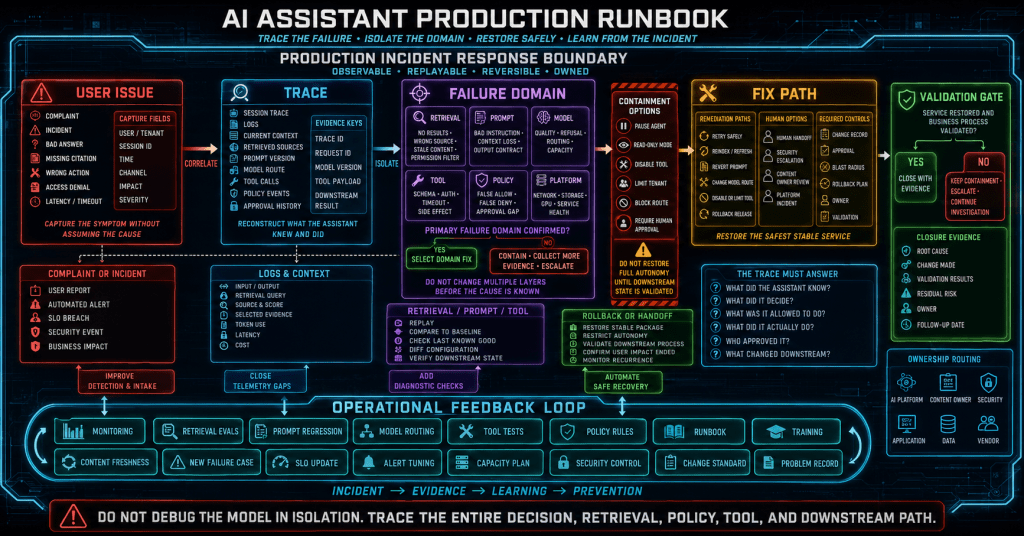


TL;DR
AI assistant failures are usually system failures, not just model failures. A production assistant can fail because of weak retrieval, stale content, poor routing, missing telemetry, slow tools, unclear handoff logic, prompt drift, or access-control gaps. Treat the assistant like an operational system with traces, failure domains, validation tests, rollback paths, and accountable owners.
Scenario
An AI assistant looked good during the pilot. The demo questions worked, leadership liked the interface, and the first group of users gave positive feedback. Then production traffic exposed a different reality.
Users are getting stuck in loops. Some answers sound confident but are not grounded in approved sources. The assistant is slow during peak periods. Handoffs are inconsistent. Support teams do not know whether the problem is the model, retrieval, prompt, routing logic, tool call, access control, or source content.
This runbook gives operators a structured way to triage those failures without turning every issue into a prompt rewrite.
Why It Matters Operationally
AI assistant failures are rarely isolated to the model. A bad answer may come from stale content. A loop may come from missing fallback logic. Latency may come from retrieval, tool calls, model size, or poor orchestration. A hallucination may come from weak grounding or a prompt contract that rewards helpfulness over evidence.
Treating every symptom as a prompt problem creates churn. Treating the assistant as an application with routing, dependencies, telemetry, and rollback paths creates an operating model.
That shift matters because AI assistants sit between users and enterprise systems. When they fail, they can waste support time, reduce trust, misroute work, expose data, or create operational confusion.
Symptoms and Risks
| Symptom | Likely Risk |
|---|---|
| Repeated clarification loops | Poor intent routing or no escalation threshold |
| Confident unsupported answers | Weak grounding, bad prompt contract, or retrieval failure |
| Slow responses | Model latency, retrieval overhead, or tool-chain complexity |
| Wrong handoff team | Inaccurate routing rules or stale ownership data |
| Refuses valid requests | Overly broad safety rules or missing role context |
| Leaks sensitive context | Access-control or prompt-injection weakness |
| Users abandon assistant | Poor trust, poor UX, or no visible escalation path |
The symptoms matter because they point to different failure domains. If the team cannot classify the failure, it will usually guess at the fix.
Failure Decision Tree at a Glance
The diagram below should be used before changing prompts or swapping models. The goal is to determine whether the failure came from routing, retrieval, generation, tooling, handoff, or expectation mismatch.
The key point is simple: do not tune the model until you know whether the evidence path worked.
Latency Breakdown Design
Total response time is not enough. You need to know where time is being spent. The diagram below separates response latency by stage so teams can isolate the slow path.

A model swap may not fix latency if the delay is caused by slow tools, inefficient retrieval, overloaded indexes, or heavy post-processing. Latency has to be measured by stage, not guessed from the final response time.
Prerequisites and Safety Checks
Before troubleshooting, confirm that the assistant has enough telemetry to inspect:
- user message
- routed intent
- selected tool or workflow
- retrieved sources
- prompt version
- model version or deployment configuration
- response latency by stage
- handoff decision
- user feedback
- policy or guardrail events
If that telemetry does not exist, the first remediation is observability. Without traces, the team is guessing.
Also verify whether the incident involved sensitive data, privileged action, legal or compliance advice, customer impact, or production change guidance. Escalate those cases through the appropriate operational process before experimenting with fixes.
Reproduce and Classify the Failure
Reproduce the issue using the original user phrasing when possible. Then classify the failure into one primary category:
- routing failure
- retrieval failure
- generation failure
- tool failure
- latency failure
- handoff failure
- access-control failure
- user-experience failure
Avoid combining everything into a generic bad-answer complaint. Specific classification determines the fix.
A useful incident record should include the user request, detected intent, tool path, retrieved evidence, final answer, failure symptom, and proposed remediation owner. That level of detail turns assistant failures into trackable engineering work.
Validate Retrieval Separately
If the assistant uses RAG, inspect the retrieved chunks before looking at the final answer.
Ask:
- Did the query retrieve authoritative sources?
- Were stale documents ranked above current ones?
- Did access control filter the right documents?
- Were chunks too small to carry meaning?
- Were chunks too large and noisy?
- Did the retrieved evidence actually answer the question?
If retrieval failed, do not fix the prompt first. Fix source quality, metadata, chunking, filtering, query rewriting, or ranking strategy.
A model cannot reliably compensate for the wrong evidence. It may only make the wrong evidence sound more convincing.
Validate the Prompt Contract
If retrieval worked but the final answer was wrong, inspect the prompt contract.
The assistant should have explicit instructions for:
- using retrieved sources over prior knowledge
- saying when evidence is missing
- citing source material
- avoiding unsupported policy claims
- escalating high-risk requests
- asking clarifying questions when context is insufficient
- avoiding tool execution when approval is required
A prompt that only says to be helpful is not an enterprise control.
Prompt changes should also be versioned and tested. If a prompt update fixes one failure but causes another, the team needs regression tests rather than another round of manual tuning.
Inspect Routing and Handoff Rules
If users are stuck in loops, the issue is usually routing or fallback logic.
Set thresholds for:
- number of clarification attempts
- confidence score below which the assistant escalates
- repeated user frustration signals
- high-risk intents
- unsupported domains
- tool execution failures
- missing evidence
- policy conflicts
A good assistant knows when to stop being conversational and route the user to a deterministic workflow or human team.
A handoff should preserve context. The receiving team should see what the user asked, which intent was detected, which sources were retrieved, which path was attempted, and why the assistant escalated.
Tool failures can look like model failures from the user’s perspective. If the assistant creates tickets, checks status, calls APIs, retrieves files, or triggers workflows, those tools must be monitored like production dependencies.
Validate:
- authentication and authorization
- timeout and retry behavior
- input validation
- tool result formatting
- failure messages
- audit logs
- rate limits
- rollback or compensation paths
The model may have selected the right tool, but the tool may have failed silently, returned ambiguous output, or exposed a permission boundary that the prompt did not understand.
After remediation, test with:
- the original failed query
- similar phrasing variants
- role-based access variants
- missing-evidence queries
- adversarial or prompt-injection style inputs
- slow-path tool calls
- handoff trigger scenarios
- conflicting-source scenarios
Update the evaluation set with the incident so the failure does not regress later.
Production assistants need regression testing because their behavior is shaped by prompts, retrieval indexes, model configuration, tool contracts, and policy rules. Any one of those can change.
Rollback and Fallback Guidance
Every assistant should have a fallback plan. Options include:
- route affected intent to human support
- disable a high-risk tool
- roll back prompt version
- roll back model deployment
- remove a bad content source from the index
- switch to deterministic flow for a specific task
- temporarily require citations only and suppress synthesis
- disable autonomous action while preserving read-only retrieval
The fallback should reduce risk, not simply hide the assistant. If an assistant cannot answer safely, it should fail visibly, preserve context, and route the user to the right support path.
Operating Model Implications
AI assistant operations need owners. Someone must own the retrieval index. Someone must own prompts. Someone must own tool contracts. Someone must own policy behavior. Someone must own the user experience and support handoff.
Without ownership, the assistant becomes a shared system with no accountable operating model.
A practical ownership split looks like this:
| Capability | Likely Owner |
|---|---|
| Source content | Domain or service owner |
| Retrieval index | AI platform or search platform team |
| Prompt contract | AI platform plus domain owner |
| Tool integration | Platform engineering or application owner |
| Policy gates | Security, compliance, and platform governance |
| User handoff | Support operations |
| Observability | SRE, platform operations, or AI operations |
The exact ownership model can vary, but the accountability cannot be vague.
Conclusion
AI assistants fail in production when teams treat them like prompts instead of systems. A reliable assistant needs routing logic, source governance, retrieval quality, prompt contracts, telemetry, handoff paths, ownership, and rollback options.
The runbook mindset changes the conversation. Instead of asking how to make the model better, the team asks which part of the assistant path failed and how to prevent that failure from recurring.
That is how AI operations becomes operational reality instead of demo maintenance.
External References
