
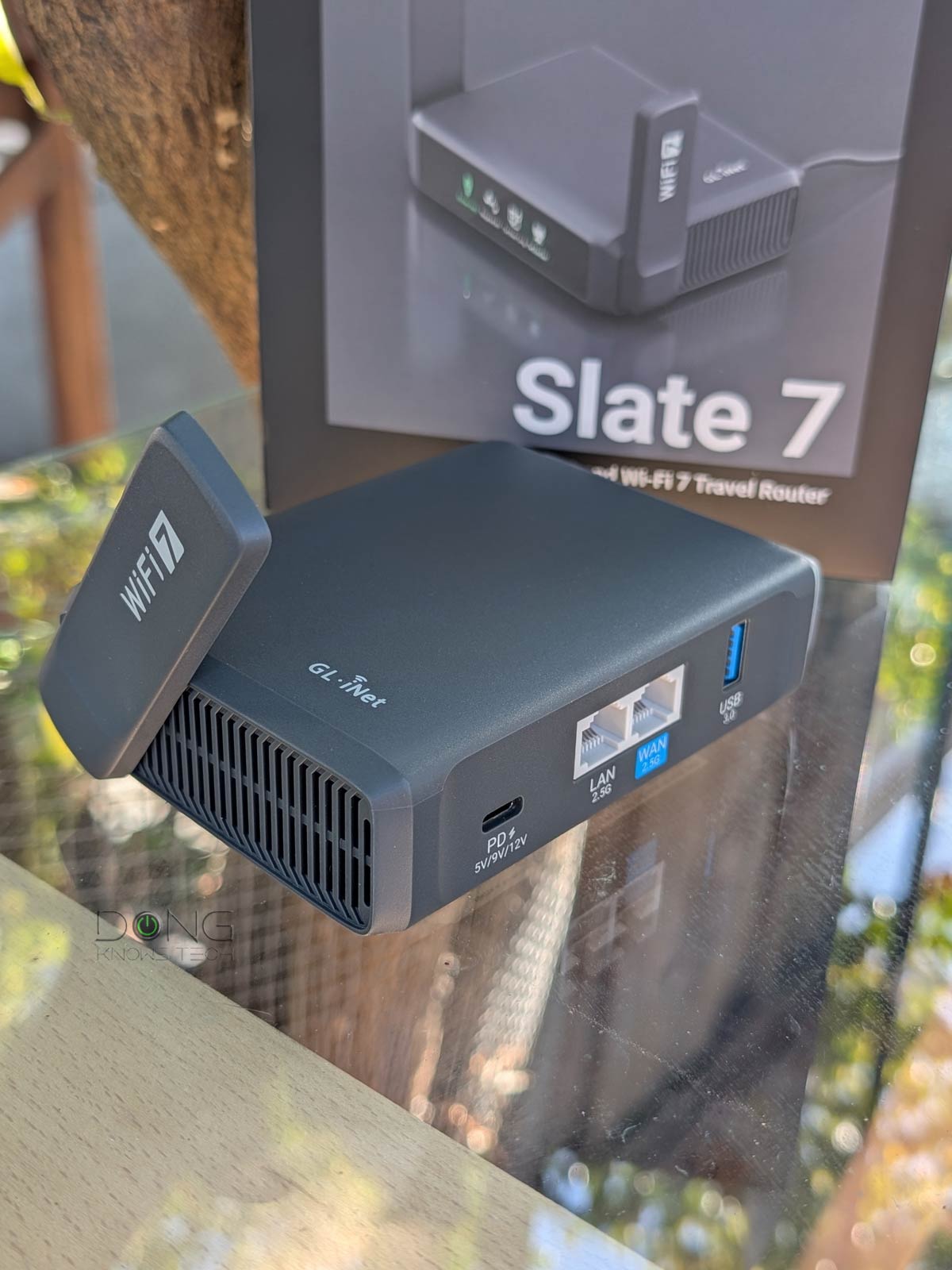

If you’re looking for a compact travel router with two 2.5Gbps ports — one more than the ASUS RT-BE58 Go or the TP-Link TL-WR3602BE —the GL.iNet GL-BE3600 Slate 7 would be it. The name might not ring a bell—this is the first time you’ve seen the GL.iNet brand covered here—but this is the first travel router I’ve run into that can deliver multi-gigabit real-world performance in some instances.
Here’s the bottom line: The GL.iNet GL-BE3600 Slate 7 is a mighty little dual-band Wi-Fi 7 router that has everything to justify its slightly higher street price. If you’re comfortable with another Chinese brand that’s somewhat ambiguous on various aspects, get one today for your next travel season. Among other things, unlike TP-Link, GL.iNet is not facing a potential US government ban.

GL.iNet GL-BE3600 Slate 7: Dual 2.5Gbps port for the win!
Out of the box, the Slate 7 is somewhat of a slightly larger version of the ASUS RT-BE58 Go.
It, too, has two external antennas on the side and all the ports on the back, including a standard USB-C port that supports USB Power Delivery (PD). It comes with a standard USB-C power adapter with worldwide electrical adapters. On the inside, it also features dual-band Wi-Fi 7 with up to 3,600 Mbps of combined wireless bandwidth.
On the left side, like the ASUS RT-BE58 Go, the Slate 7 also has a hardware toggle switch that can be programmed to perform various tasks, such as switching between operation modes or turning on a VPN connection. This switch does nothing by default.


Looking more closely, though, you’ll note some major differences. The first, and most significant, is that Slate 7’s network ports (WAN and LAN) are both 2.5GbE, allowing it to have a real multi-Gig wired connection. Secondly, it comes with a 3-line touch screen on the front. You can use this screen to quickly access certain router functions, though, considering its size, it’s more of a gimmick than a practical feature. By default, the screen turns itself off after a few minutes, and you can also program it via the router’s web-based user interface.
The table below shows the hardware specs of the two travel routers with the TP-Link TL-WR3602BE as a reference.
Hardware specifications: GL.iNet GL-BE3600 Slate 7 vs. ASUS RT-BE58 Go vs. TP-Link TL-WR3602BE
 |
|
|
|
|---|---|---|---|
| Full Name | GL.iNet GL-BE3600 Slate 7 Dual-Band Wi-Fi 7 Router | ASUS RT-BE58 Go BE3600 Dual-Band Wi-Fi 7 Travel Router | TP-Link TL-WR3602BE BE3600 Wi-Fi 7 Travel Router |
| Model | GL.iNet Slate 7 | RT-BE58 Go | TL-WR3602BE |
| Dimensions | 130 x 91 x 34 mm | 98mm x 94mm x 31mm | 104 × 90 × 28 mm |
| Weight | 295g | 232g | 170 g |
| Processing Power | Quad-core 1.1GHz, 512 Flash, 1GB RAM | Quad-core 2.0GHz, 256MB Flash, 1GB RAM | undiscolosed |
| Wi-Fi Technology | Dual-band BE3600 | ||
| 1st Band (2.4GHz) |
2×2 BE: Up to 688Mbps (20/40MHz) |
||
| 2nd Band (5GHz) |
2×2 BE: Up to 2882Mbps (20/40/80/160MHz) |
||
| Wireless Security | WPA, WPA2, WPA3 | ||
| Built-in Cellular Modem | None | ||
| Mobile App | Asus Router | TP-Link Tether | |
| Web User Interface | Yes (open-source OpenWRT) |
Yes (open-source AsusWRT) |
Yes |
| Networking Features | All OpenWRT Features | All ASUS Routers’ Core Features, for example: Advanced VPN (Server or client with InstantGuard) AiProtection Parental Control QoS AiMesh |
VPN (Server and Client) Device-based QoS, Dynamic DNS |
| Operating Roles | Router Mode, USB Tethering Mode, 3G/4G/5G USB Modem Mode, Hotspot Mode (WISP Mode), Access Point Mode |
Router Mode, USB Tethering Mode, 3G/4G/5G USB Modem Mode, Hotspot Mode (WISP Mode), AiMesh (router or satellite), Access Point Mode, Range Extender Mode, Client Mode |
Router Mode, USB Tethering Mode, 3G/4G/5G USB Modem Mode, Hotspot Mode (WISP Mode), Access Point Mode, Range Extender Mode, Client Mode |
| Firmware Version (at review) |
4.8.1 | 3.0.0.6.102_38978 | not yet tested |
| USB Port | 1x USB-C (power) 1x USB 3.0 (cellular tethering and storage) |
||
| Gigabit Port | None | 1x LAN | |
| Multi-Gig Port | 1x 2.5Gbps WAN 1x 2.5Gbps LAN |
1x 2.5Gbps WAN | |
| Dual-WAN | Multi-WAN (WAN+USB+WISP) |
Yes (WAN+USB) |
|
| Link Aggregation | No | ||
| Real-World Power Consumption (anecdotally measured in 24 hours) |
≈ 210 Wh | ≈ 185 Wh | not yet tested |
| US Launch Price (check street price!) |
$169.99 | 159.99 | $139.99 |


A standard router powered by OpenWRT
As shown in the table, the Slate 7, like most, if not all, GL.iNet routers, runs the OpenWRT firmware. The company says that it “offers OpenWRT routers.” However, this notion is not entirely true, at least with the Slate 7.
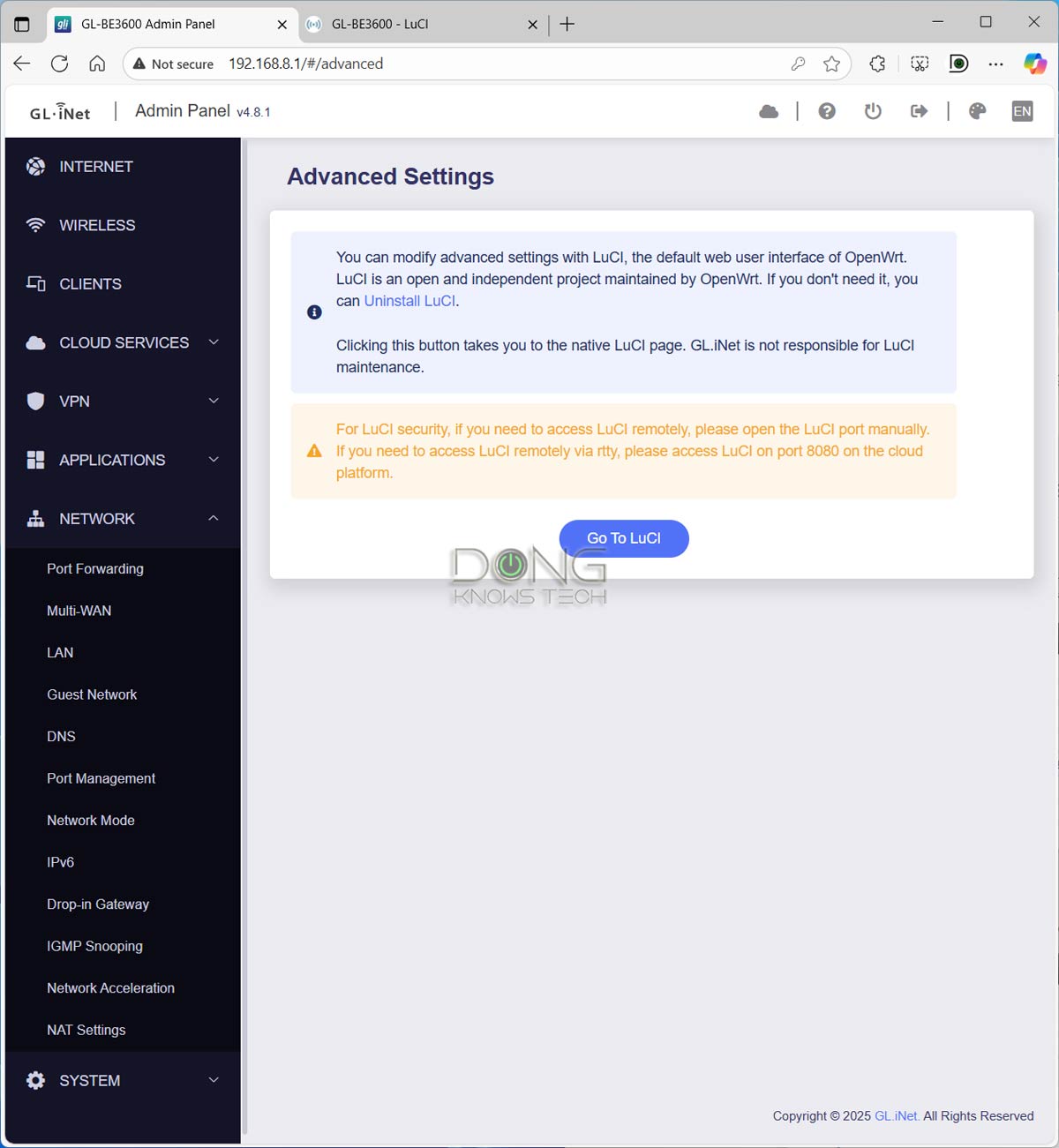
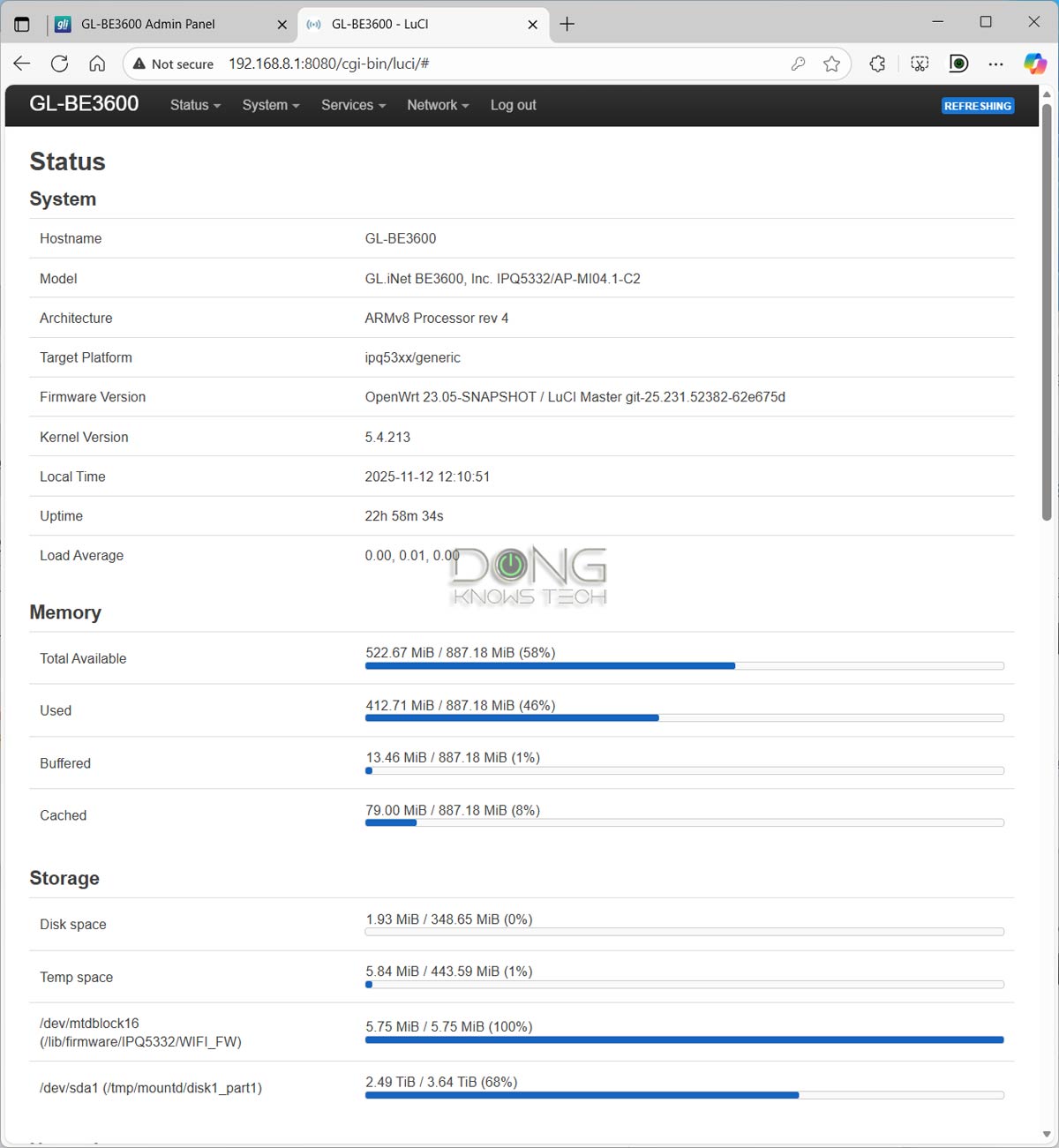
The first thing to note is that you can’t install standard firmware available at the OpenWRT project’s site onto it—I tried. Instead, it seems its firmware is a customized version based on an older OpenWRT release, available on GL.iNet’s website, with an interface similar to that of ASUSWRT. (Savvy users can access the advanced interface of OpenWRT, called LuCI, on the Slate 7). Still, the Slate 7 is not precisely an OpenWRT router, but rather one that’s based on OpenWRT.
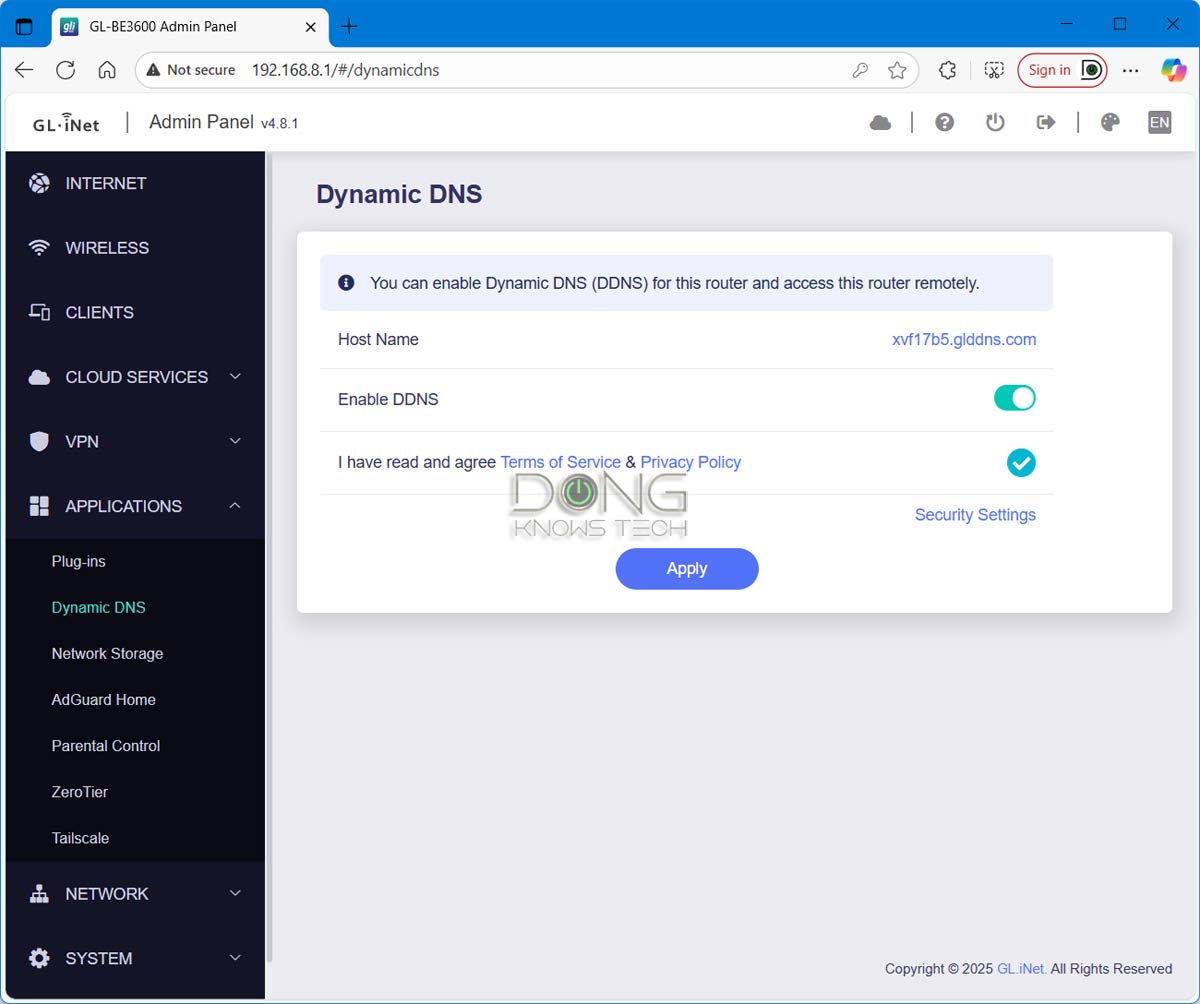
The second thing is that the Slate 7’s stock firmware gives the impression that it is GL.iNet’s own firmware. The branding aside, many standard features are tied solely to the vendor’s services. For example, Dynamic DNS uses only GL.iNet’s host server, via the glddns.com domain, which undermines the feature’s privacy notion—the standard OpenWRT firmware supports all third-party DDNS services. Another example is a proprietary VPN option called AstroWARP that links multiple supported routers together via a GL.iNet account.
Linking your router to a vendor’s account translates into inherent privacy risks. Here’s GL.iNet’s privacy policy. Given that GL.iNet is a Hong Kong-based company, there’s a risk that it may share data or grant hardware access to the Chinese government. On this front, I have sent the company questions and will update this review when I hear back from them.
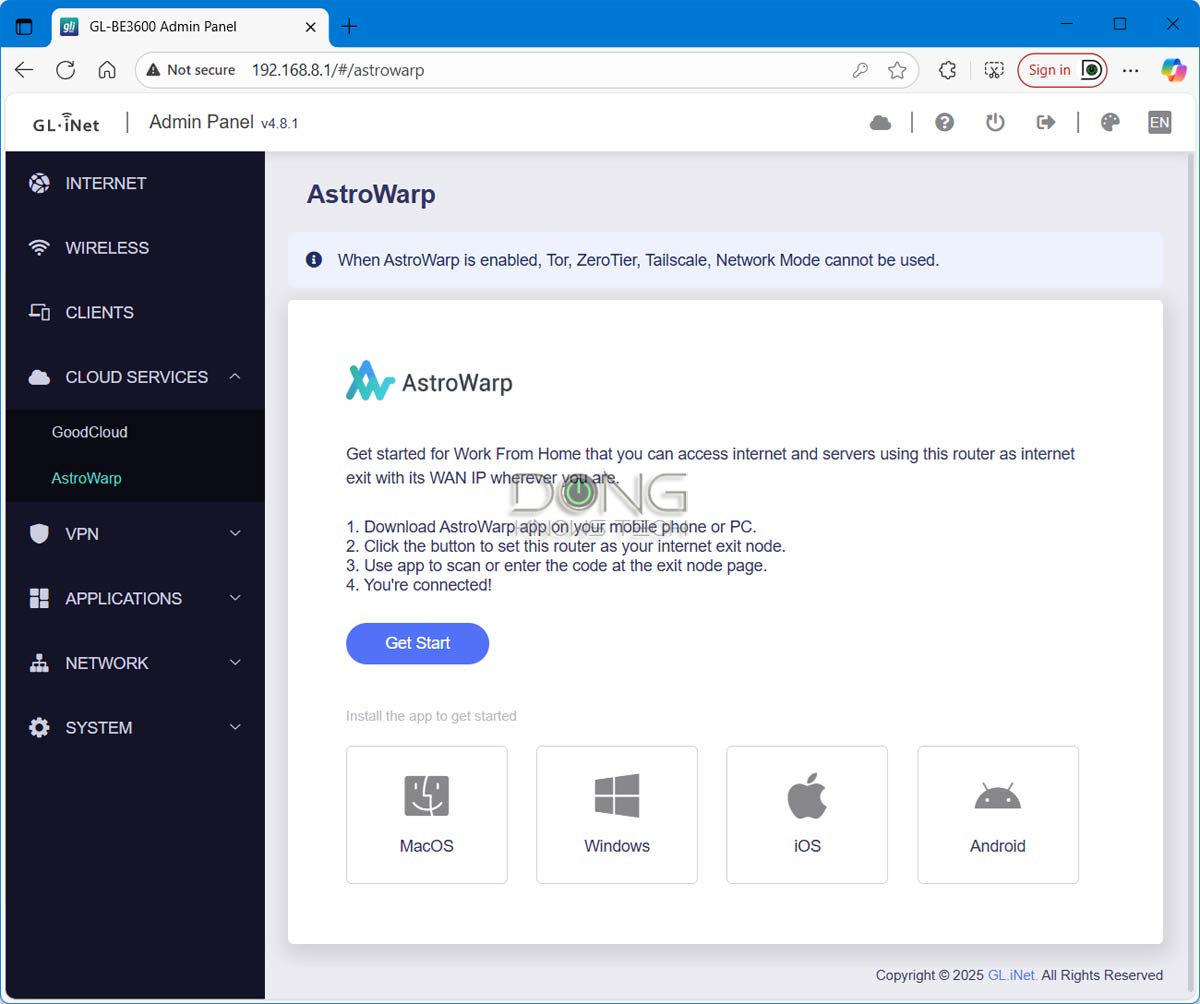
In any case, generally, part of the reason you’d want to use an open-source operating system, like the case of OpenWRT, is to avoid privacy and security risks. The way GL.iNet put this firmware on the Slate 7 (and possibly other routers) makes the whole idea ambiguous.
Standard feature set plus flexible WAN configuration
Other than that, OpenWRT offers many settings and customization options. Additionally, there are also “plugins” that add more features for advanced users. That said, like all routers running this firmware, the Slate 7 offers the standard settings and features, including, though not limited to:
- Advanced QoS and Parental Control
- Multiple virtual SSIDs, including MLO support
- Lots of advanced VPN options.
- Network-attached storage (NAS) via a USB external drive
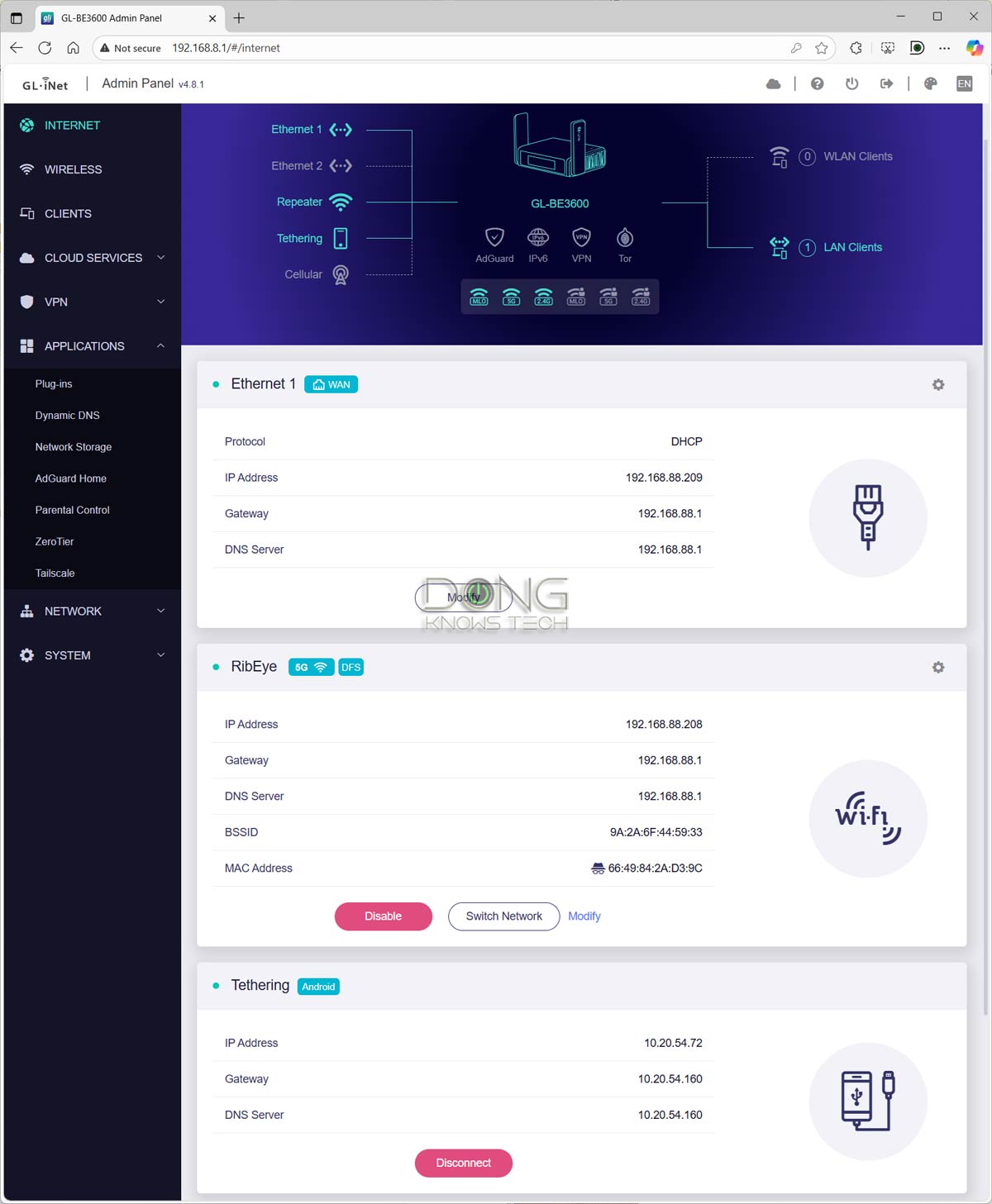
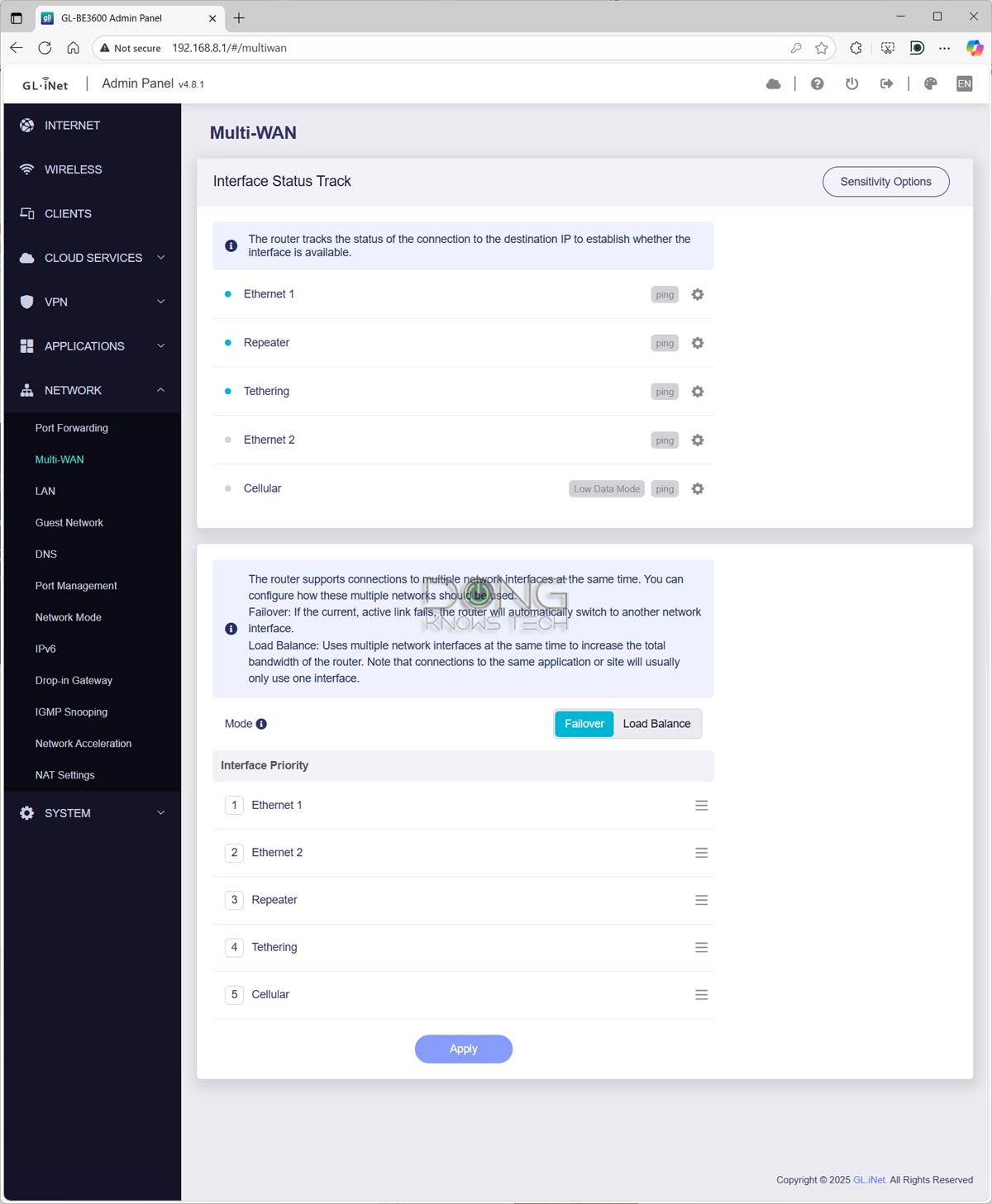
Additionally, as a travel router, the Slate 7 also offers the following:
- USB-C charging that supports the universal Power Delivery standard. You can use any USB-C charger that delivers 18W or more to power it, making it convenient to use on the go. It includes a power adapter that can also charge most other USB-C devices, and comes with an electrical adapter for worldwide use.
- Flexible WAN inputs: The router can accept and deliver the Internet access via three main ways and do that simultaneously —it features “multi-WAN”, specifically:
- Via the default WAN port. In this standard setup, you connect its WAN port to an Internet source, such as a cable modem, a fiber-optic ONT, or a network port in a hotel room.
- Via the USB port: You can tether a smartphone or host a USB cellular modem. By the way, the USB port can also charge the device plugged into it.
- Via an existing Wi-Fi network (a.k.a. WISP mode, though GL.iNet calls this mode “repeater”): The router can connect to an existing Wi-Fi network, such as that of a hotel, and then deliver it to its local network via a separate Wi-Fi network and its network ports.
Tip
WISP stands for Wireless Internet Service Provider. It’s an operating mode in which a supported router receives an Internet connection via Wi-Fi and then distributes it to multiple devices via its own Wi-Fi network. It works similarly to a Wi-Fi extender (or repeater) with two added elements:
- The WISP router’s Wi-Fi network is shielded from the existing Internet-providing Wi-Fi network to keep its connected clients safe and private.
- The WISP router can handle an incoming Internet-enabled Wi-Fi connection that requires a particular authentication method, such as a captive portal or via a paid login account.
When you use a public Wi-Fi network or one with ambiguous security, WISP is recommended.


All of these WAN options worked as intended in my testing. In all, on the WAN side, the GL.iNet GL-BE3600 Slate 7 has everything to be an excellent, flexible travel router. And it did well in real-world performance, too.
GL.iNet GL-BE3600 Slate 7: Excellent overall performance for the specs
I tested the GL.iNet GL-BE3600 Slate 7 for over a week and was generally happy with it. The router passed my 3-day stress test without a single disconnection and can cover about 1500 ft2 (139 m2) of Wi-Fi, about the same as the ASUS RT-BE58 Go, which is typical for a router of its physical size. Wi-Fi coverage is always tricky, and your mileage will vary.
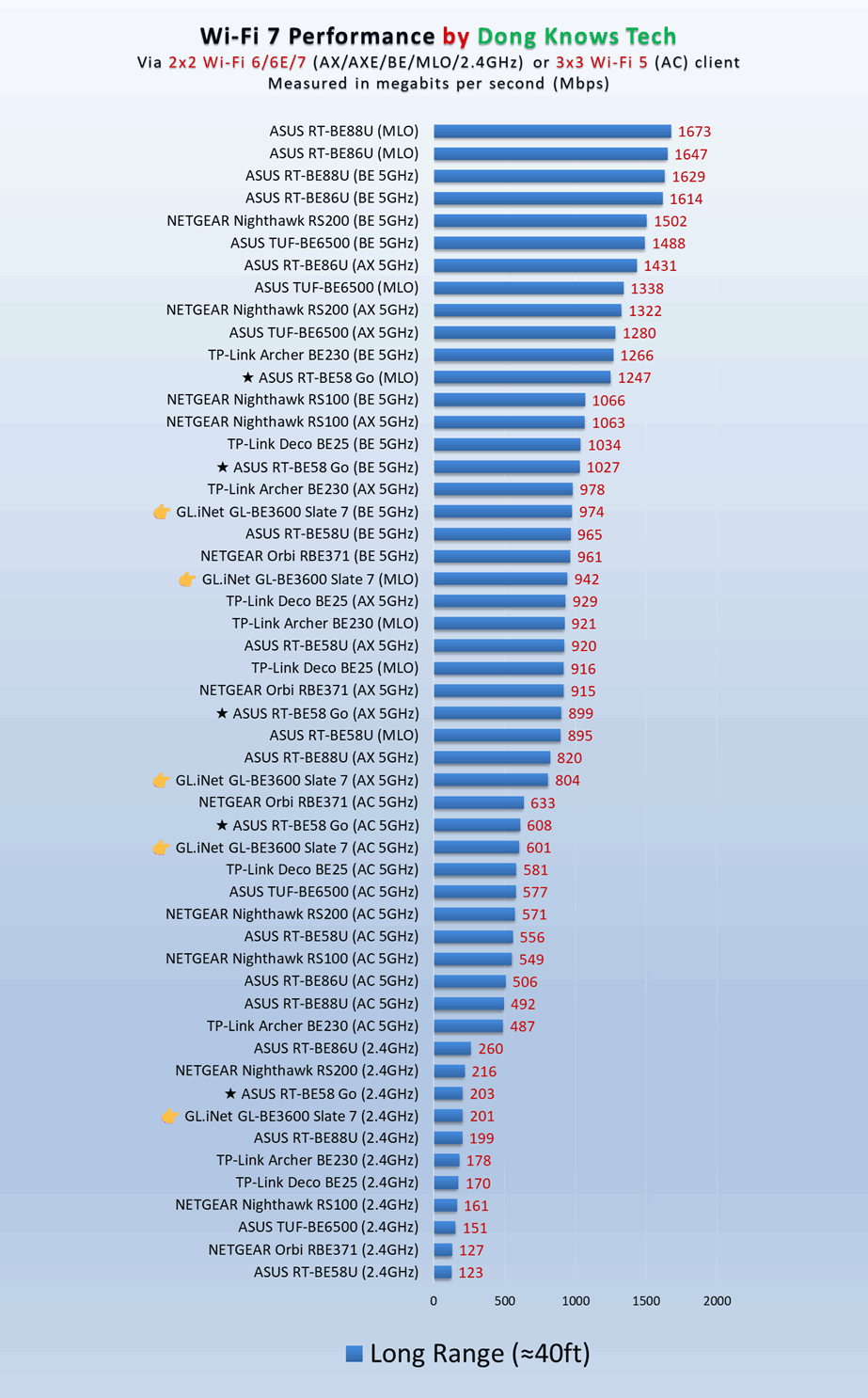
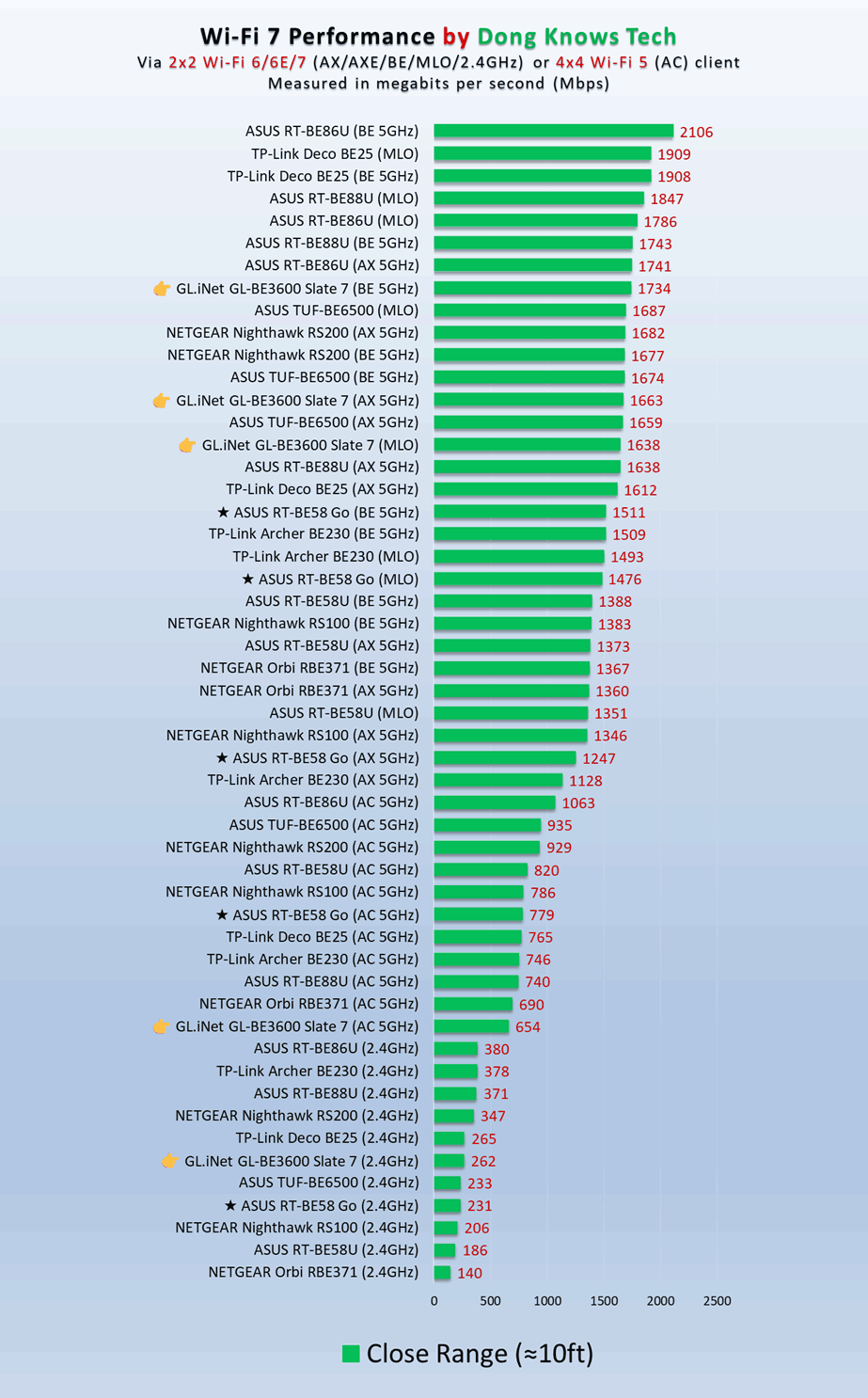
In terms of real-world data rate, the Slate 7’s 2.5Gbps LAN port proved to be an edge over the ASUS rival, at least at the short range. Indeed, in my testing, the GL.iNet offered over 2Gbps on a wired connection and high Gig+ on Wi-Fi at close range.
Tip
Gig+, or Gig Plus, denotes a speed grade between 1Gbps and 2Gbps. So, it’s 1.5Gbps, give or take a couple of hundred megabits per second, and it’s not speedy enough to qualify as Multi-Gig Ethernet or multi-Gigabit. Intel coined the term to describe its Wi-Fi 6E client chips, the AX210 and AX211, in terms of their real-world speeds.
Gig+ primarily applies to sustained Wi-Fi 6 or Wi-Fi 7 speeds via a 2×2 at 160MHz connection, or to broadband internet speeds.
However, further out, its Wi-Fi performance degraded quickly and was similar to that of the RT-BE58 Go, if not slightly lower. Additionally, the Slate 7 delivered around 2Gbps of download and upload speed when connected to my 10Gbps Fiber-optic Internet, which is similar to that of the ASUS.

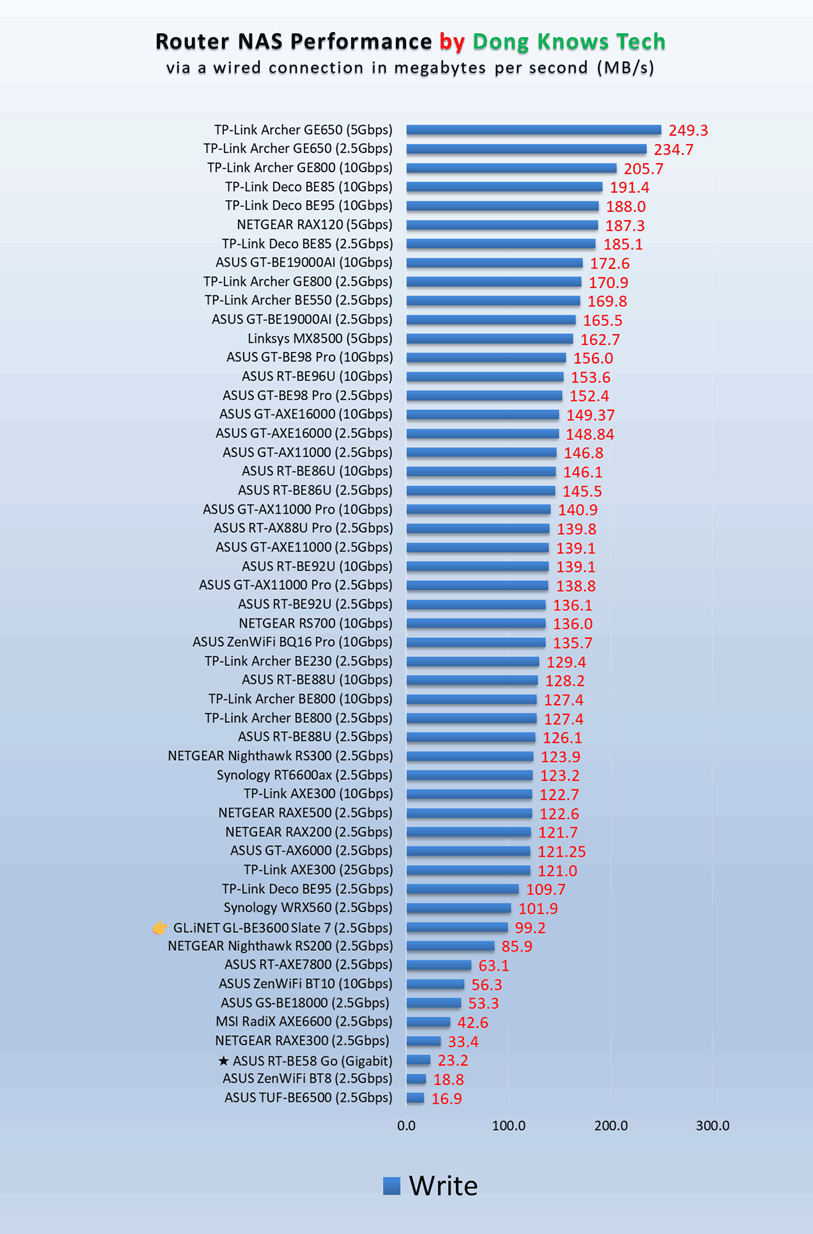
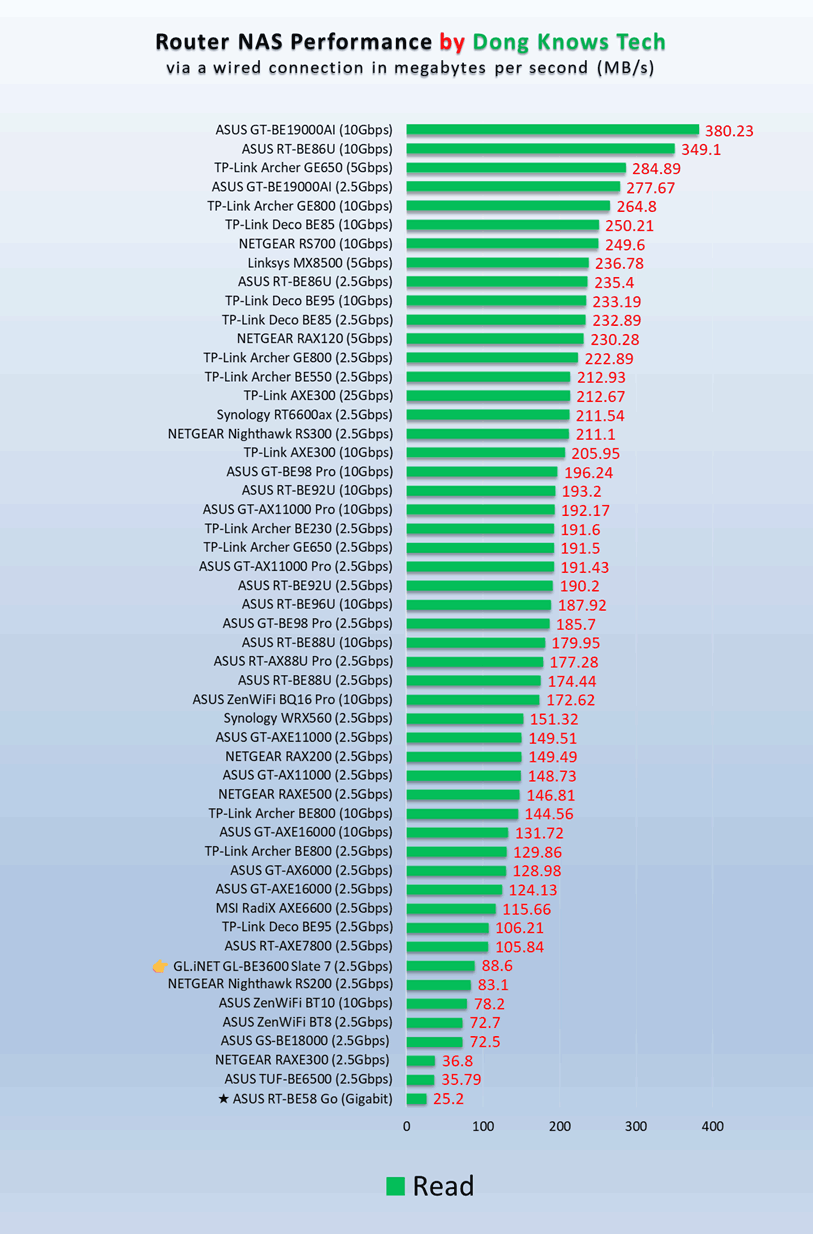
What the GL.iNet GL-BE3600 Slate 7 was decidedly better than the ASUS RT-BE58 Go was in the NAS performance when hosting a portable SSD via its USB 30 port. While its performance wasn’t impressive compared to other Multi-Gig routers with the same features, it more than doubled that of the ASUS counterpart.
Like other travel routers, the GL.iNet GL-BE3600 Slate 7 has no internal fan and therefore remained completely silent during operation. It did become a bit warm after a while, but never to the point of concern.

A bit buggy
The GL.iNet GL-BE3600 Slate 7 performs well overall, but it wasn’t perfect.
For one, the router can take a long time to boot up or restart, almost twice as long as the ASUS RT-BE58 Go. This delay is not a huge deal, but it can be a hassle when you need to restart it.
Secondly, some of the functions proved buggy. For example, when I used it in WISP mode, it sometimes and randomly failed to connect to an existing Wi-Fi network, and I had to try a few times before succeeding.

Finally, none of the available plugins—there are many—worked. I tried installing a dozen of them, and then nothing happened, or the router might crash. But this is an advanced feature, and considering how small the router is, there’s simply no need for any of them.
Pros
Wi-Fi 7 with dual 2.5Gbps ports to offer reliable and fast performance
Multi-WAN support with all OpenWRT features and settings
Compact design, standard USB-C charging
Cons
No built-in cellular modem, SIM slot, or battery option
A tad expensive and buggy with potential privacy risks
The takeaway
With dual 2.5Gbps ports, the GL.iNet GL-BE3600 Slate 7 delivers excellent performance, worthy of its retail cost. However, if you care more about long-range Wi-Fi performance than having a 2.5Gbps wired connection, the ASUS RT-BE58 Go offers slightly more at a slightly lower cost. In any case, either will make an excellent travel router. Looking to care for an advanced home network on the go? Consider one today!
