Skip to content
Close Menu

    Subscribe to Updates

    Get the latest news from tastytech.

    What's Hot

    HD Hyundai Lands 1,000 MW Engine Order to Power U.S. AI Data Centers – Unite.AI

    August 10, 2026

    PRISM2 model uses clinical dialogue to interpret pathology slides

    August 10, 2026

    Framework’s Data Breach Revealed Customer Data: Here’s What to Know

    August 10, 2026
    Facebook X (Twitter) Instagram
    Facebook X (Twitter) Instagram
    tastytech.intastytech.in
    Subscribe
    • AI News & Trends
    • Tech News
    • AI Tools
    • Business & Startups
    • Guides & Tutorials
    • Tech Reviews
    • Automobiles
    • Gaming
    • movies
    tastytech.intastytech.in
    Home»Tech Reviews»Pinned chats in ChatGPT are here – and so is a mildly annoying restriction
    Pinned chats in ChatGPT are here – and so is a mildly annoying restriction
    Tech Reviews

    Pinned chats in ChatGPT are here – and so is a mildly annoying restriction

    gvfx00@gmail.comBy gvfx00@gmail.comDecember 19, 2025No Comments3 Mins Read
    Share
    Facebook Twitter LinkedIn Pinterest Email


    • Pinned chats have arrived in ChatGPT
    • You can only pin up to three conversations at a time
    • You can also rename conversations to help find them

    OpenAI has been on a roll as the holiday season approaches, releasing more and more updates to ChatGPT. We’ve had ChatGPT-5.2, better AI image generation, branched chats, new apps like Apple Music, and now… drum roll please… pinned chats.

    OK, pinned chats might not be the most exciting feature OpenAI has released in the last few days, but it’s a welcome addition because it helps you organize your conversations.

    It’s exactly what it sounds like: a way to pin chats to the top of the conversations list in the left-hand menu bar, so you don’t lose them.


    You may like

    Table of Contents

    Toggle
    • How to pin conversations in ChatGPT
    • One more tip
      • Related posts:
    • The iPhone Air 2 Will Reportedly Land Next Spring With A Second Camera
    • The Webb Telescope Has Captured Its First 'Bulge Fossil Fragment'
    • The iPhone Fold could be the ultimate mobile gaming device, if Apple sticks to this rumored design

    How to pin conversations in ChatGPT

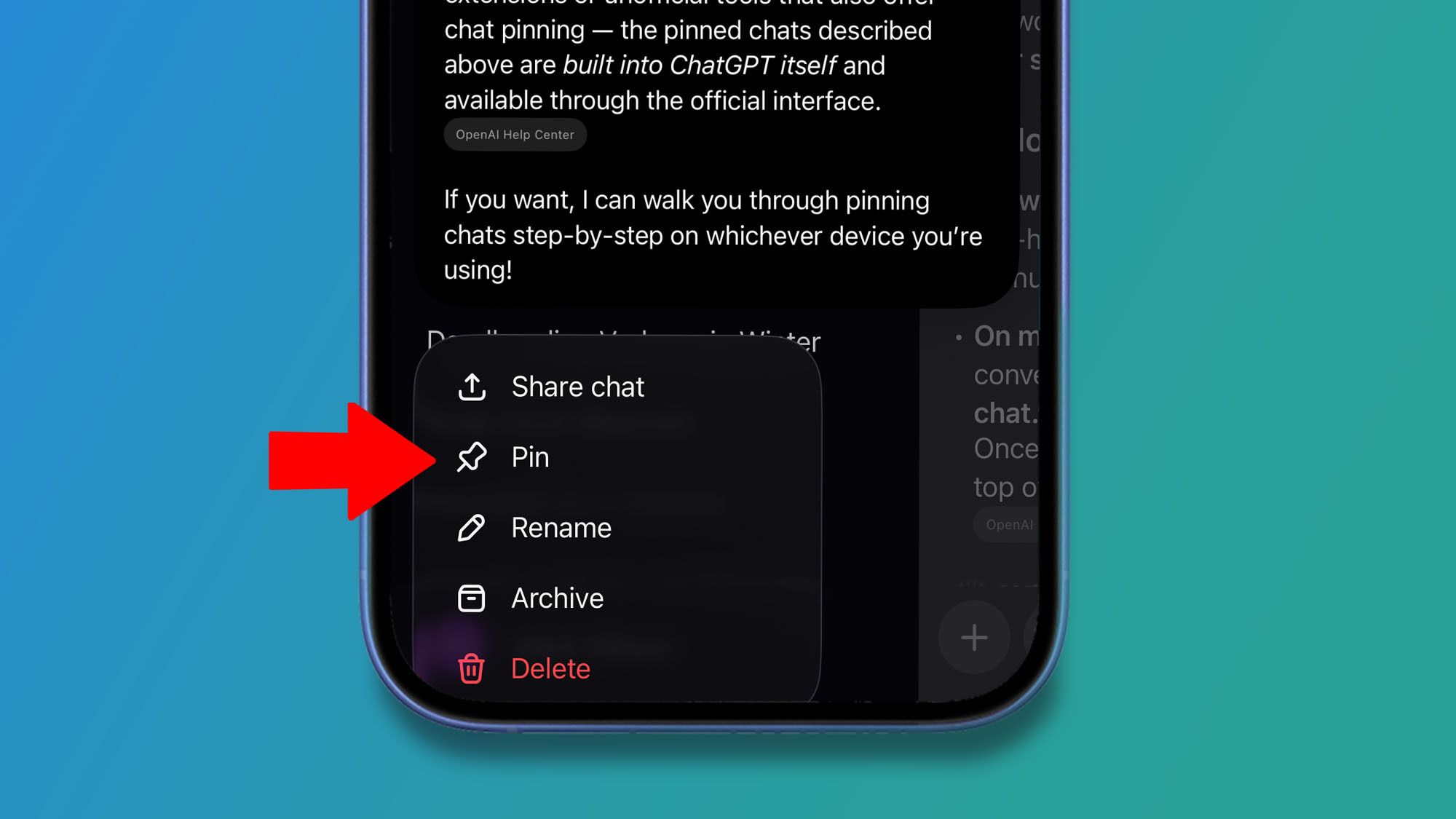
    The feature is available on web and mobile on iOS and Android. On the web, you click the three dots that appear when your cursor hovers over a chat name and choose Pin. On mobile, you press and hold on a chat name and select Pin from the menu that appears.

    If you use ChatGPT a lot, you’ll know how easy it is to lose a conversation thread in the growing list of chats, especially since they’re named automatically in ways that don’t always make sense. Pinned chats solve that problem by letting you keep especially important conversations at the top of the list so you can always find them. There is, however, one big restriction: you can only pin three chats.

    Why? We don’t know. It feels like an unnecessary limitation, but for now you’re restricted to pinning just three chats, no matter which ChatGPT tier you’re using: Free, Plus, or Pro. The good news is that the pinning feature is available across all tiers, including Free.

    ChatGPT pinned chats limit

    (Image credit: OpenAI)

    One more tip

    Here’s a tip: if you’re still losing track of conversations (because you can only pin three at a time), don’t forget that you can always rename chats. That makes them easier to recognize and quicker to find later.

    Sign up for breaking news, reviews, opinion, top tech deals, and more.

    To do this, just open the same menu you’d use to pin a chat, and you’ll see a Rename option there as well.

    Ultimately, pinned chats may not be the flashiest ChatGPT update this month, but it quietly solves a real problem — keeping your most important conversations exactly where you need them.


    Follow TechRadar on Google News and add us as a preferred source to get our expert news, reviews, and opinion in your feeds. Make sure to click the Follow button!

    And of course you can also follow TechRadar on TikTok for news, reviews, unboxings in video form, and get regular updates from us on WhatsApp too.

    Purple circle with the words Best business laptops in white

    The best business laptops for all budgets

    Our top picks, based on real-world testing and comparisons


    Related posts:

    Today's Wordle Hints, Answer and Help for Aug. 3, #1871

    Thousands of servers can be backdoored by exploiting buggy motherboard controllers

    How to host your files online using Nextcloud Hub

    Share. Facebook Twitter Pinterest LinkedIn Tumblr Email
    Previous ArticleIt’s official: Battlefield 6 is 2025’s best-selling game, but Black Ops 7 still managed to be November’s top-seller
    Next Article A 6-Month Guide to Mastering AI Agents
    gvfx00@gmail.com
    • Website

    Related Posts

    Tech Reviews

    Framework’s Data Breach Revealed Customer Data: Here’s What to Know

    August 10, 2026
    Tech Reviews

    Samsung’s floating data center moves toward Texas as massive 50MW project promises faster construction and water-based cooling advantages

    August 9, 2026
    Tech Reviews

    8 Snacks and Guilty-Pleasure Foods Chefs Can’t Live Without 

    August 9, 2026
    Add A Comment
    Leave A Reply Cancel Reply

    Top Posts

    Black Swans in Artificial Intelligence — Dan Rose AI

    October 2, 2025218 Views

    Every Clue That Tony Stark Was Always Doctor Doom

    October 20, 2025142 Views

    We let ChatGPT judge impossible superhero debates — here’s how it ruled

    December 31, 2025109 Views
    Stay In Touch
    • Facebook
    • YouTube
    • TikTok
    • WhatsApp
    • Twitter
    • Instagram

    Subscribe to Updates

    Get the latest tech news from tastytech.

    About Us
    About Us

    TastyTech.in brings you the latest AI, tech news, cybersecurity tips, and gadget insights all in one place. Stay informed, stay secure, and stay ahead with us!

    Most Popular

    Black Swans in Artificial Intelligence — Dan Rose AI

    October 2, 2025218 Views

    Every Clue That Tony Stark Was Always Doctor Doom

    October 20, 2025142 Views

    We let ChatGPT judge impossible superhero debates — here’s how it ruled

    December 31, 2025109 Views

    Subscribe to Updates

    Get the latest news from tastytech.

    Facebook X (Twitter) Instagram Pinterest
    • Homepage
    • About Us
    • Contact Us
    • Privacy Policy
    © 2026 TastyTech. Designed by TastyTech.

    Type above and press Enter to search. Press Esc to cancel.

    Ad Blocker Enabled!
    Ad Blocker Enabled!
    Our website is made possible by displaying online advertisements to our visitors. Please support us by disabling your Ad Blocker.