

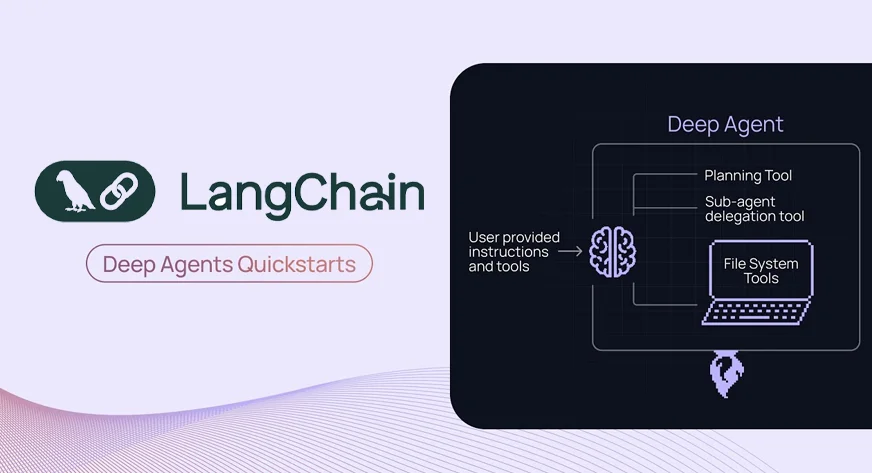

Imagine an AI that doesn’t just answer your questions, but thinks ahead, breaks tasks down, creates its own TODOs, and even spawns sub-agents to get the work done. That’s the promise of Deep Agents. AI Agents already take the capabilities of LLMs a notch higher, and today we’ll look at Deep Agents to see how they can push that notch even further. Deep Agents is built on top of LangGraph, a library designed specifically to create agents capable of handling complex tasks. Let’s take a deeper look at Deep Agents, understand their core capabilities, and then use the library to build our own AI agents.
Deep Agents
LangGraph gives you a graph-based runtime for stateful workflows, but you still need to build your own planning, context management, or task-decomposition logic from scratch. DeepAgents (built on top of LangGraph) bundles planning tools, virtual file-system based memory and subagent orchestration out of the box.
You can use DeepAgents via the standalone deepagents library. It includes planning capabilities, can spawn sub-agents, and uses a filesystem for context management. It can also be paired with LangSmith for deployment and monitoring. The agents built here use the “claude-sonnet-4-5-20250929” model by default, but this can be customized. Before we start creating the agents, let’s understand the core components.
Core Components
- Detailed System Prompts – The Deep agent uses a system prompt with detailed instructions and examples.
- Planning Tools – Deep agents have a built-in tool for Planning, the TODO list management tool is used by the agents for the same. This helps them stay focused even while performing a complex task.
- Sub-Agents – Subagent spawns for the delegated tasks and they execute in context isolation.
- File System – Virtual filesystem for context management and memory management, AI Agents here use files as a tool to offload context to memory when the context window is full.
Building a Deep Agent
Now let’s build a research agent using the ‘deepagents’ library which will use tavily for websearch and it’ll have all the components of a deep agent.
Note: We’ll be doing the tutorial in Google Colab.
Pre-requisites
You’ll need an OpenAI key for this agent that we’ll be creating, you can choose to use a different model provider like Gemini/Claude as well. Get your OpenAI key from the platform: https://platform.openai.com/api-keys
Also get a Tavily API key for websearch from here: https://app.tavily.com/home

Open a new notebook in Google Colab and add the secret keys:

Save the keys as OPENAI_API_KEY, TAVILY_API_KEY for the demo and don’t forget to turn on the notebook access.
Also Read: Gemini API File Search: The Easy Way to Build RAG
Requirements
!pip install deepagents tavily-python langchain-openai We’ll install these libraries needed to run the code.
Imports and API Setup
import os
from deepagents import create_deep_agent
from tavily import TavilyClient
from langchain.chat_models import init_chat_model
from google.colab import userdata


# Set API keys
TAVILY_API_KEY=userdata.get("TAVILY_API_KEY")
os.environ["OPENAI_API_KEY"]=userdata.get("OPENAI_API_KEY")
We are storing the Tavily API in a variable and the OpenAI API in the environment.
Defining the Tools, Sub-Agent and the Agent
# Initialize Tavily client
tavily_client = TavilyClient(api_key=TAVILY_API_KEY)

# Define web search tool
def internet_search(query: str, max_results: int = 5) -> str:
   """Run a web search to find current information"""
   results = tavily_client.search(query, max_results=max_results)
   return results

# Define a specialized research sub-agent
research_subagent = {
   "name": "data-analyzer",
   "description": "Specialized agent for analyzing data and creating detailed reports",
   "system_prompt": """You are an expert data analyst and report writer.
   Analyze information thoroughly and create well-structured, detailed reports.""",
   "tools": [internet_search],
   "model": "openai:gpt-4o",
}

# Initialize GPT-4o-mini model
model = init_chat_model("openai:gpt-4o-mini")
# Create the deep agent
# The agent automatically has access to: write_todos, read_todos, ls, read_file,
# write_file, edit_file, glob, grep, and task (for subagents)
agent = create_deep_agent(
   model=model,
   tools=[internet_search],  # Passing the tool
   system_prompt="""You are a thorough research assistant. For this task:
   1. Use write_todos to create a task list breaking down the research
   2. Use internet_search to gather current information
   3. Use write_file to save your findings to /research_findings.md
   4. You can delegate detailed analysis to the data-analyzer subagent using the task tool
   5. Create a final comprehensive report and save it to /final_report.md
   6. Use read_todos to check your progress

   Be systematic and thorough in your research.""",
   subagents=[research_subagent],
)
We have defined a tool for websearch and passed the same to our agent. We’re using OpenAI’s ‘gpt-4o-mini’ for this demo. You can change this to any model.
Also note that we didn’t create any files or define anything for the file system needed for offloading context and the todo list. These are already pre-built in ‘create_deep_agent()’ and it has access to them.
Running Inference
# Research query
research_topic = "What are the latest developments in AI agents and LangGraph in 2025?"

print(f"Starting research on: {research_topic}\n")
print("=" * 70)

# Execute the agent
result = agent.invoke({
   "messages": [{"role": "user", "content": research_topic}]
})

print("\n" + "=" * 70)
print("Research completed.\n") 
Note: The agent execution might take a while.
Viewing the Output
# Agent execution trace
print("AGENT EXECUTION TRACE:")
print("-" * 70)
for i, msg in enumerate(result["messages"]):
   if hasattr(msg, 'type'):
       print(f"\n[{i}] Type: {msg.type}")
       if msg.type == "human":
           print(f"Human: {msg.content}")
       elif msg.type == "ai":
           if hasattr(msg, 'tool_calls') and msg.tool_calls:
               print(f"AI tool calls: {[tc['name'] for tc in msg.tool_calls]}")
           if msg.content:
               print(f"AI: {msg.content[:200]}...")
       elif msg.type == "tool":
print(f"Tool '{msg.name}' result: {str(msg.content)[:200]}...") 
# Final AI response
print("\n" + "=" * 70)
final_message = result["messages"][-1]
print("FINAL RESPONSE:")
print("-" * 70)
print(final_message.content) 
# Files created
print("\n" + "=" * 70)
print("FILES CREATED:")
print("-" * 70)
if "files" in result and result["files"]:
   for filepath in sorted(result["files"].keys()):
       content = result["files"][filepath]
       print(f"\n{'=' * 70}")
       print(f"{filepath}")
       print(f"{'=' * 70}")
       print(content)
else:
   print("No files found.")

print("\n" + "=" * 70)
print("Analysis complete.") 
As we can see the agent did a good job, it maintained a virtual file system, gave a response after multiple iterations and thought it should be a ‘deep-agent’. But there is scope for improvement in our system, let’s look at them in the next system.
Potential Improvements in our Agent
We built a simple deep agent, but you can challenge yourself and build something much better. Here are few things you can do to improve this agent:
- Use Long-term Memory – The deep-agent can preserve user preferences and feedback in files (/memories/). This will help the agent give better answers and build a knowledge base from the conversations.
- Control File-system – By default the files are stored in a virtual state, you can this to different backend or local disk using the ‘FilesystemBackend’ from deepagents.backends
- By refining the system prompts – You can test out multiple prompts to see which works the best for you.
Conclusion
We have successfully built our Deep Agents and can now see how AI Agents can push LLM capabilities a notch higher, using LangGraph to handle the tasks. With built-in planning, sub-agents, and a virtual file system, they manage TODOs, context, and research workflows smoothly. Deep Agents are great but also remember that if a task is simpler and can be achieved by a simple agent or LLM then it’s not recommended to use them.
Frequently Asked Questions
A. Yes. Instead of Tavily, you can integrate SerpAPI, Firecrawl, Bing Search, or any other web search API. Simply replace the search function and tool definition to match the new provider’s response format and authentication method.
A. Absolutely. Deep Agents are model-agnostic, so you can switch to Claude, Gemini, or other OpenAI models by modifying the model parameter. This flexibility ensures you can optimize performance, cost, or latency depending on your use case.
A. No. Deep Agents automatically provide a virtual filesystem for managing memory, files, and long contexts. This eliminates the need for manual setup, although you can configure custom storage backends if required.
A. Yes. You can create multiple sub-agents, each with its own tools, system prompts, and capabilities. This allows the main agent to delegate work more effectively and handle complex workflows through modular, distributed reasoning.

Passionate about technology and innovation, a graduate of Vellore Institute of Technology. Currently working as a Data Science Trainee, focusing on Data Science. Deeply interested in Deep Learning and Generative AI, eager to explore cutting-edge techniques to solve complex problems and create impactful solutions.
Login to continue reading and enjoy expert-curated content.
