



TL;DR
Azure Local 2607 is an architecture-significant release, but it should not receive blanket production approval.
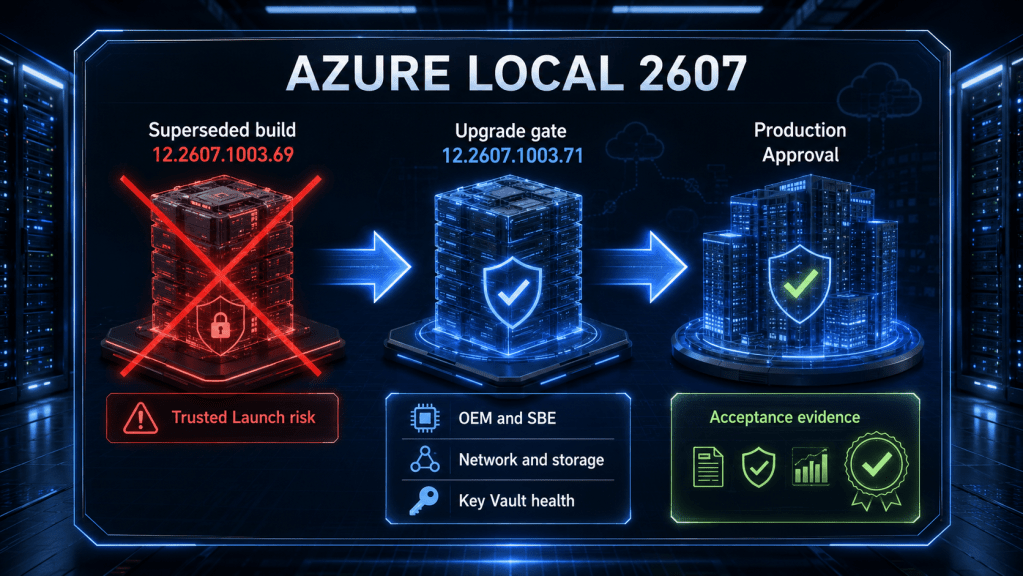
The release baseline changed quickly. Microsoft first published Azure Local 12.2607.1003.69 on July 22, 2026, then published 12.2607.1003.71 on July 29, 2026. The newer build supersedes .69 while retaining OS build 26100.33158. Microsoft also changed the Trusted Launch position: the startup failure affecting Trusted Launch VMs created on earlier releases is now listed as fixed in .71.
That changes the upgrade decision. The appropriate posture is no longer to block every 2607 upgrade involving existing Trusted Launch VMs. Instead:
- Reject the superseded 12.2607.1003.69 package.
- Require 12.2607.1003.71 or a later supported build.
- Inventory existing Trusted Launch VMs and make successful boot validation a formal pilot exit criterion.
- Use conditional, pilot-first approval only after validating the OEM solution, Solution Builder Extension, firmware, drivers, networking mode, logical networks, Azure Key Vault extension dependencies, and storage.
- Treat disaggregated iSCSI and local availability zones as production candidates only after Microsoft and the storage vendor confirm the exact implementation.
- Do not describe guest-hosted DNS or NVA support as a universal Azure-managed Layer 3 networking service.
- Do not import the 2607 limited-connectivity bundle while Microsoft’s download table still exposes the superseded .69 package. Wait for a .71-or-later bundle or written Microsoft guidance.
- Even after the bundle is corrected, do not describe the limited-connectivity package as a complete air-gapped update mechanism.
The remaining upgrade concern with the clearest Microsoft-documented impact is the Azure Key Vault extension, which can remain in a Failed state after the update and currently has no documented workaround.
Introduction
Azure Local 2607 is more than a monthly servicing release. It changes the design conversation around workload networking, external storage, disaggregated deployments, placement domains, migration permissions, and disconnected update planning.
It also demonstrates why release advisories must be treated as living technical documents.
An advisory based only on the July 22 build would identify a hard Trusted Launch upgrade blocker. An advisory revalidated against the July 29 build must reach a different conclusion because Microsoft superseded the original package and marked the Trusted Launch startup issue as fixed.
The architectural opportunities remain significant. Azure Local VMs can now host DNS or network virtual appliance functions using addresses defined on workload logical networks. External iSCSI is documented as generally available for supported hyperconverged and disaggregated configurations. Local availability zones add rack-aware placement metadata for disaggregated clusters. Azure Migrate adds more precise built-in roles and preview Terraform automation.
None of those changes remove the need for production discipline. Azure Local remains a validated system in which the server model, OEM image, Solution Builder Extension, drivers, firmware, network adapters, host bus adapters, storage array, fabric, and update workflow must be treated as one supportable stack.
This advisory translates the 2607 release into architecture decisions, upgrade gates, and acceptance evidence.
The Release Baseline Changed After the Initial 2607 Publication
The first production decision is version control.
| Release element | July 22 baseline | Current validated baseline |
|---|---|---|
| Azure Local solution version | 12.2607.1003.69 | 12.2607.1003.71 |
| Availability date | July 22, 2026 | July 29, 2026 |
| OS build | 26100.33158 | 26100.33158 |
| Status | Superseded | Current 2607 baseline |
| Trusted Launch issue | Existing VMs could fail to start after upgrade | Listed as fixed |
| Key Vault extension issue | Documented | Still documented, no workaround |
This distinction matters operationally. A cached package, stale change record, OEM portal, disconnected repository, or previously approved implementation plan can still refer to .69 even after Microsoft has superseded it.
The upgrade gate should therefore validate the full solution version, not only the OS build. Both packages use OS build 26100.33158, so an OS-only check cannot prove that the cluster is receiving the corrected solution release.
There is also a release-distribution mismatch. As of July 30, 2026, Microsoft’s limited-connectivity bundle table still lists 12.2607.1003.69 for OS build 26100.33158 even though the release-information page identifies .71 as the current build. A static payload is not safe merely because it is the published download for that OS build.
Microsoft release availability and OEM availability are also separate milestones. Existing integrated and premier systems may not receive the feature update until the hardware vendor completes platform validation.
Recommended version-control posture
- Do not approve or install 12.2607.1003.69.
- Refresh update discovery before the maintenance window.
- Confirm that the supported workflow offers 12.2607.1003.71 or later.
- Record the solution version and OS build in the change ticket.
- Confirm that the OEM has approved the release for the exact server model and SKU.
- For limited-connectivity environments, do not import the currently listed .69 bundle. Wait for a .71-or-later payload or written Microsoft instructions that define a supported correction path.
- If a cluster already received .69, use the supported Azure Local update process and Microsoft or OEM guidance to move to the superseding build. Do not assume the Trusted Launch correction is present until the reported solution version confirms it.
Recommended Production Posture
The right answer is conditional approval, not blanket approval and not blanket rejection.
| Scenario | Recommended posture | Reason |
|---|---|---|
| Update target is 12.2607.1003.69 | Block | The package is superseded and does not contain the currently documented Trusted Launch fix |
| Update target is 12.2607.1003.71 or later, OEM and SBE validated, standard hyperconverged storage | Representative pilot, then small production batches | Current release baseline with manageable validation scope |
| Existing pre-2607 Trusted Launch VMs are present | Pilot only until representative boot tests pass | Microsoft lists the defect as fixed, but the original failure mode was severe enough to require explicit acceptance evidence |
| Critical workflows depend on Azure Key Vault extension health | Hold unless the Failed-state risk is understood and accepted | Microsoft documents no workaround |
| Disaggregated iSCSI is planned | Require written Microsoft and storage-vendor confirmation before production | Current documentation conflicts on protocol and support status |
| Local availability zones are planned | Design and lab validation only until final supported commands and operational guidance are confirmed | The configuration documentation contains placeholder PowerShell |
| The only desired change is Azure Migrate RBAC or Terraform support | Do not upgrade solely for this reason | Azure Migrate releases separately from the Azure Local cluster |
| Limited-connectivity workflow exposes only the .69 static bundle | Block the 2607 import | Microsoft’s bundle table has not caught up with the superseding release |
| Limited-connectivity site requires zero internet retrieval during update | Do not call the current package fully offline | Arc resource bridge and AKS container images are excluded from the static payload |
The decision flow below makes the gating logic explicit.
The important point is that “Microsoft released it” and “the complete environment is ready for it” are different statements.
Why Azure Local 2607 Is Architecturally Significant
The release affects several design domains at once.
| Design domain | 2607 change | Practical interpretation |
|---|---|---|
| Workload networking | Azure Local VM can own a logical network DNS or gateway address | Enables guest-hosted DNS and NVA patterns, but does not create a native Azure-managed Layer 3 service |
| External storage | iSCSI documented as generally available for supported HCI and disaggregated configurations | Requires exact array, firmware, driver, adapter, MPIO, and fabric validation |
| Disaggregated placement | Local availability zones map nodes to customer-defined physical domains | Improves placement intent, but does not create independent Azure-style zones or eliminate shared SAN failures |
| Migration operations | New Azure Migrate roles and preview Terraform workflow | Improves least privilege and repeatability, but is separate from the 2607 cluster update |
| Disconnected operations | Static update packages can be imported | Reduces internet dependency, but does not include all container images |
| Security | Confidential VM preview and a stated 14-character local-account baseline change | Adds capability and policy impact, but the confidential VM feature remains preview and Microsoft’s password documentation is inconsistent |
| VM management | Multiple fixes for deletion, placement, networking, scale, and Arc resource bridge behavior | Potentially valuable for large environments, but still requires regression testing |
The release should therefore be reviewed as an architecture and operations change, not processed as a routine operating system patch.
Networking Architecture: Guest DNS and NVA Support Without Overclaiming
The headline networking change is useful: an Azure Local VM can own the DNS-server address or default-gateway address configured on a workload logical network.
That enables designs such as:
- Active Directory Domain Services and DNS hosted on Azure Local VMs.
- A guest network virtual appliance acting as the default gateway for a workload logical network.
- Tenant or application segments that depend on appliance-based inspection, routing, or policy.
- Brownfield designs where network functions must remain inside virtual appliances rather than move into a native SDN gateway service.
The capability is generally available in 2607, but its scope must be described precisely.
It does not add a native Azure-managed route-table service, highly available gateway service, software load balancer, VPN gateway, or automated NVA clustering framework. The NVA vendor and the customer still own routing, high availability, convergence, health detection, asymmetric-path prevention, licensing, monitoring, upgrades, and recovery.
Azure Local has three relevant networking branches

| Networking model | Workload management | Supported functions | 2607 guest DNS or NVA status |
|---|---|---|---|
| Standard Azure Local workload logical networks, without SDN enabled by Azure Arc | Azure Local VMs through Azure control-plane tools | VLAN-backed logical networks, VM NICs, IP pools, gateway and DNS definitions | Supported |
| SDN enabled by Azure Arc | Azure Local VMs | Logical networks, VM NICs, NSGs | Unsupported when the guest uses the logical-network DNS or gateway address |
| SDN managed through on-premises tools | Hyper-V or SCVMM-managed VMs | Logical networks, virtual networks, NSGs, software load balancing, and VPN gateway services | Separate management model and feature set |
The restriction is tied to the optional SDN enabled by Azure Arc mode. It is not a statement that Azure Arc registration or Azure Local VM management is unsupported. Azure Local VM management itself still relies on the Arc resource bridge.
Microsoft also prohibits mixing the Arc-managed and on-premises SDN management methods. The architecture decision record should therefore state which branch governs the cluster before anyone designs the guest DNS or NVA pattern.
Logical-network immutability raises the design stakes
Several workload logical-network properties cannot be changed after creation, including:
- Default gateway.
- IP pools.
- Address space.
- VLAN.
- Virtual switch.
That makes the gateway address and NVA high-availability design an early architecture decision, not a Day 2 tuning choice.
DNS changes require similar caution. Microsoft documents updating DNS settings on an existing workload logical network as preview. Updated values apply automatically to newly created VMs, while existing guests require separate DNS reconfiguration.
Before creating the logical network, the high-level design should define:
- Which appliance owns the gateway address.
- Whether the appliance uses active-passive, active-active, or another vendor-supported HA model.
- How upstream and downstream route convergence occurs.
- How health is detected.
- How asymmetric forwarding is prevented.
- How maintenance and failover are tested.
- How a failed appliance is isolated and recovered.
- How existing VMs receive DNS changes.
The 2607 capability is an enabler, not a complete networking architecture.
External iSCSI and Disaggregated Storage
External iSCSI support is one of the most important 2607 changes, but “generally available” does not mean “any iSCSI SAN is supported.”
The external-storage design still depends on a validated combination of array model, controller firmware, host adapter or NIC, driver, firmware, multipath software, switch configuration, cabling, and Azure Local release.
Hyperconverged and disaggregated designs remain different
In a hyperconverged deployment, external SAN is a Day 2 addition alongside Storage Spaces Direct. In a disaggregated deployment, the SAN supplies the cluster storage and Storage Spaces Direct is not part of the data path.
For iSCSI, Microsoft’s current implementation guidance requires:
- Dedicated physical iSCSI adapters.
- Identical adapter configuration across nodes.
- No vNIC-based iSCSI path.
- MPIO enabled and verified.
- Static storage-network addressing.
- No default gateway on isolated iSCSI interfaces.
- Consistent MTU and VLAN configuration.
- Manual iSCSI networking outside Network ATC.
- TCP port 3260 reachability.
- Redundant paths.
- Consistent LUN visibility and identifiers across all nodes.
- RAW LUNs before deployment or initialization.
- Supported CSV formatting and allocation-unit requirements.
These are not optional optimization details. They define the support and failure model.
The current documentation is internally inconsistent
Microsoft’s newer 2607 release documentation and external-storage guide state that Fibre Channel and iSCSI are supported, with iSCSI generally available.
A separate supported-SAN requirements page still states that external SAN supports only Fibre Channel and describes SAN-backed volumes using preview language.
The newer release and implementation documentation is the stronger current signal, but the contradiction lowers confidence in broad production-readiness claims. It also creates a practical support problem: an implementation team can follow one current Microsoft page and still encounter a conflicting support statement on another.
Before approving production use, obtain written confirmation covering:
- Azure Local solution release 12.2607.1003.71 or later.
- Exact storage array and controller firmware.
- Fibre Channel or iSCSI protocol.
- NIC or HBA model, driver, and firmware.
- MPIO software, policy, and expected path count.
- Switch and fabric configuration.
- LUN presentation and identifier behavior.
- CSV filesystem requirements.
- Joint Microsoft, OEM, and storage-vendor ownership during incident escalation.
Treat unsupported-vendor and unsupported-LUN rejection during deployment as a useful validation control, not proof that every possible Day 2 storage combination has been tested or retroactively certified.
Local Availability Zones Are Placement Domains, Not Azure Cloud Zones
Local availability zones let a disaggregated Azure Local deployment map nodes to customer-defined physical topology.
A zone can represent:
- A rack.
- A room.
- A power distribution boundary.
- A top-of-rack switch pair.
- A maintenance group.
- Another local failure or operational domain.
This is valuable because placement intent becomes visible and enforceable. It can reduce the chance that application replicas or maintenance-sensitive workloads concentrate in one physical area.
It does not create the isolation properties of an Azure regional availability zone.
Local availability zones do not:
- Create separate clusters.
- Create separate control planes.
- Automatically isolate a shared SAN failure domain.
- Verify that a server is physically installed in the rack declared by the administrator.
- Make an application highly available without application and VM design.
- Replace backup, disaster recovery, or site-level resilience.
Placement mode also changes failure behavior.
| Placement mode | Behavior | Operational consequence |
|---|---|---|
| Strict | VM remains in its assigned zone | VM can remain down when no node in that zone is available |
| Non-strict | VM can run outside the preferred zone | Availability is favored, with later failback attempts |
Microsoft’s current documentation also states that existing VM placement configuration cannot be updated through the documented placement workflow.
The largest implementation-readiness concern is more direct: the disaggregated-zone configuration page labels its PowerShell commands as placeholders that must be replaced with final supported cmdlets.
That is a stop sign for automation. Do not copy those commands into production runbooks, pipelines, or configuration repositories. Wait for final supported syntax or obtain explicit confirmation through a Microsoft support case.
Azure Migrate Improvements Are a Separate Workstream
Azure Migrate added two built-in roles for Azure Local migrations:
- Azure Local Migrate Owner supports project creation, appliance registration, replication, migration, and constrained migration-role assignment.
- Azure Local Migrate Execute Expert performs and monitors replication and migration within an existing configured project.
The Execute Expert role is the better least-privilege default for migration operators who do not need to create projects or register appliances.
Terraform support is also available in preview. Microsoft’s documented workflow currently requires Terraform 1.9 or later, AzAPI provider 2.4 or later, and Microsoft’s Azure Local migration pattern module.
These changes should be tracked as migration-workstream improvements, not used as justification for a production-cluster upgrade.
Azure Migrate follows its own release cadence. Microsoft documents the workflow for Azure Local 2503 and later, and Hyper-V source migration remains preview. An organization can adopt the new roles, evaluate the module, and improve migration governance without treating 2607 as a prerequisite.
Other 2607 Changes That Matter Operationally
Azure Key Vault extension can remain failed
The Azure Key Vault extension can remain in a Failed state after the 2607 update. Microsoft currently documents no workaround.
The documentation does not establish the exact functional impact for every deployment, so the risk must be mapped locally. Before the maintenance window, capture:
- Extension names and versions.
- Current provisioning and health state.
- Managed identities.
- Role assignments and access policies.
- Certificates and secrets consumed by the platform or workloads.
- Local identity dependencies.
- BitLocker recovery dependencies.
- SBE credential or secret dependencies.
- Automation that assumes a healthy extension state.
If failure of the extension would leave the organization unable to operate, recover, rotate credentials, or satisfy policy, the update should not proceed without an agreed escalation and recovery plan.
Trusted Launch is now a validation requirement, not a blanket blocker
The original .69 advisory required a hard stop because existing Trusted Launch VMs could fail to start after upgrade. Microsoft now lists that issue as fixed in .71.
That removes the blanket prohibition, but it should not remove the test.
Inventory every existing Trusted Launch VM, including guest operating system, generation, security type, vTPM state, Secure Boot state, application tier, and startup dependencies. The representative pilot must prove that these VMs can stop, start, restart, migrate, and recover after host maintenance.
A release-note fix is necessary evidence. A successful workload acceptance test is production evidence.
Confidential VMs remain preview
AMD SEV-SNP confidential VMs entered public preview. Do not treat this as a production-ready security control without supported hardware, guest operating systems, attestation design, backup support, recovery procedures, monitoring, and vendor support confirmation.
The local-account password baseline documentation conflicts
Microsoft’s 2607 features page states that the security baseline enforces a 14-character minimum for local-account passwords.
The current security-defaults page describes a different operating model. It says the default value can remain seven characters, the customer must set the value to 14, and the setting is not protected by drift control.
Do not assume the effective policy from the release headline. Validate the actual local policy and compliance state on every node.
Review:
- Local administrator credentials.
- Break-glass accounts.
- Service or automation accounts using local identities.
- Password vault policies.
- Rotation workflows.
- Deployment scripts and unattended configuration.
- Current minimum-password-length policy.
- Drift-control behavior.
- Operational documentation that assumes shorter credentials.
VM management reliability improvements may justify a pilot
The current 2607 release resolves multiple management problems involving:
- VM deletion.
- Placement-setting preservation.
- Network reconciliation.
- Capacity checks.
- Logical-network overlap validation.
- DNS information display.
- Arc resource bridge deployment timeouts.
- Management and monitoring behavior at larger scale.
These fixes can be meaningful for environments already experiencing those symptoms. They strengthen the case for a representative pilot, but they do not eliminate the need for regression testing.
Limited Connectivity Has Both a Version Problem and an Offline Boundary
The limited-connectivity workflow allows an update package to be downloaded, imported, and discovered without every component being retrieved during normal online discovery.
For 2607, the immediate problem is package identity. As of July 30, 2026, Microsoft’s static bundle table still lists 12.2607.1003.69 for OS build 26100.33158. That package is superseded by .71 on the release-information page.
Do not import the .69 bundle into a production update repository. Wait for Microsoft to publish a .71-or-later bundle or obtain written instructions that identify a supported path and prove that the corrected solution components will be installed.
The second boundary remains even after the static package is corrected. The payload includes the operating system security update, extensions, and core agents, but it does not include container images required by the Arc resource bridge and Azure Kubernetes Service. Those images are downloaded during the update.
The accurate description is limited connectivity, not complete offline updating.
A disconnected-operations plan should identify:
- Whether the published CombinedSolutionBundle is .71 or later.
- Where the CombinedSolutionBundle is obtained.
- How hashes and provenance are verified.
- How the bundle enters the controlled environment.
- Which endpoints remain required.
- How Arc resource bridge images are retrieved.
- How AKS images are retrieved when applicable.
- Whether proxies, firewalls, and allowlists permit those downloads.
- What happens when a required image is unavailable during the maintenance window.
- How the process is proven in a representative test environment.
Calling the process air-gapped without resolving those dependencies creates a false maintenance assumption.
Production Upgrade Gate for 12.2607.1003.71
A controlled 2607 rollout should use the following gate.
Confirm the exact target build
- Verify that the offered solution release is 12.2607.1003.71 or later.
- Confirm OS build 26100.33158.
- Reject a cached or imported .69 bundle.
- Record package identity and hashes.
- Confirm the release is offered through the supported Azure Local update workflow.
- Do not use manual Windows Update, third-party host patching, or standalone node updates.
Inventory Trusted Launch workloads
- Identify every existing Trusted Launch VM.
- Record guest OS, security type, Secure Boot, vTPM, and business service.
- Select representative VMs for the pilot.
- Define pass criteria for stop, start, restart, migration, backup, and recovery.
- Confirm that the pilot reports the .71 solution version before accepting results.
Baseline Azure Key Vault extension dependencies
- Export extension names, versions, state, identities, and permissions.
- Map secrets, certificates, recovery material, and automation dependencies.
- Define the operational effect of a Failed extension.
- Establish Microsoft escalation ownership.
- Decide whether a Failed state is an automatic rollback, stop, or accepted-risk condition.
Validate the complete OEM and SBE stack
- Confirm the exact server model and SKU.
- Confirm that the OEM supports 2607.
- Verify that the update is offered through the supported workflow.
- Validate the Solution Builder Extension.
- Validate BIOS, BMC, NIC, HBA, storage controller, driver, and firmware versions.
- Confirm that cluster-aware updating and OEM package sequencing remain supported.
- Do not treat generic Windows Server 2025 driver compatibility as sufficient approval for the integrated Azure Local solution.
Regress the selected networking branch
Record whether the cluster uses:
- Standard workload logical networks.
- SDN enabled by Azure Arc.
- SDN managed through on-premises tools.
Then export or document:
- Logical networks.
- Address spaces.
- VLANs.
- IP pools.
- Gateways.
- DNS servers.
- Virtual switches.
- VM NICs.
- NSGs.
- Static IP assignments.
- Multi-NIC workloads.
- Guest DNS or NVA ownership.
Test VM creation, deletion, NIC modification, DNS resolution, gateway reachability, east-west traffic, north-south traffic, multi-NIC behavior, route convergence, and NVA failover.
Validate external storage precisely
For every external array:
- Confirm the exact supported model and protocol.
- Verify controller firmware.
- Verify NIC or HBA model, driver, and firmware.
- Confirm MPIO policy and path count.
- Confirm consistent LUN IDs across nodes.
- Test path failover and restoration.
- Verify TCP 3260 for iSCSI.
- Verify MTU, VLAN, static routes, and isolated addressing.
- Confirm dedicated physical iSCSI adapters remain outside Network ATC.
- Validate CSV health and performance.
- Capture Microsoft and storage-vendor support ownership.
For disaggregated iSCSI or local availability zones, require written support confirmation before production approval.
Prove the limited-connectivity path
- Confirm that Microsoft has published or explicitly approved a .71-or-later CombinedSolutionBundle.
- Do not import the currently listed .69 payload.
- Download and hash-verify the correct CombinedSolutionBundle.
- Confirm that the bundle contains the intended superseding version.
- Identify remaining Arc resource bridge and AKS image downloads.
- Validate proxy, firewall, DNS, certificate, and endpoint access.
- Run the process in a representative nonproduction environment.
- Do not label the design offline unless all remaining dependencies are satisfied through a supported disconnected-operations architecture.
Pilot and batch the rollout
- Use a representative nonproduction or low-risk cluster.
- Match production hardware, SBE, networking mode, storage pattern, and workload security types.
- Run pre-update health and capacity checks.
- Update through Azure Update Manager or the supported Azure Local workflow.
- Complete the acceptance test before approving the next cluster.
- Roll out in small batches.
- Stop on unexplained health, extension, storage, network, VM lifecycle, or Arc resource bridge failures.
Post-Upgrade Acceptance Evidence
A successful update is not simply a green update job. It is a set of proven platform and workload behaviors.
| Domain | Required evidence | Stop condition |
|---|---|---|
| Version | Solution release reports .71 or later and expected OS build | Cluster remains on .69 or reports inconsistent version state |
| Cluster health | Nodes, storage, network, update services, and health faults are normal | New critical or unexplained warnings |
| Trusted Launch | Representative existing VMs start, restart, migrate, and recover | Any pre-existing Trusted Launch VM fails lifecycle testing |
| Key Vault extension | State and dependent workflows remain acceptable | Failed state causes operational, security, or recovery impact |
| VM lifecycle | Create, delete, resize, move, and placement operations succeed | Reconciliation, deletion, placement, or capacity errors |
| Logical networks | Portal and command-line views agree; IP pools and DNS are correct | Missing, overlapping, or stale network data |
| Data path | East-west, north-south, DNS, gateway, and multi-NIC traffic pass | Packet loss, asymmetry, route failure, or NVA instability |
| External storage | All expected paths are healthy; failover and restoration pass | Missing path, LUN mismatch, CSV error, or performance regression |
| Arc resource bridge | Management operations and deployment functions succeed | Timeout, unhealthy appliance, or failed reconciliation |
| Monitoring | Alerts, logs, metrics, and escalation workflows operate | Loss of visibility or incomplete evidence |
Preserve the evidence with the change record. The purpose is not bureaucracy. It is to prove which combination of release, hardware, firmware, network, storage, and workloads was actually tested.
Final Recommendation
Azure Local 2607 should be approved conditionally, with the current approval target set to 12.2607.1003.71 or later.
The superseded .69 package should be blocked. The earlier blanket Trusted Launch prohibition should also be retired because Microsoft now lists the startup issue as fixed. Existing Trusted Launch workloads still deserve explicit boot and lifecycle testing because the original defect had a high operational impact and the correction arrived through a rapid release revision.
For conventional hyperconverged clusters with validated OEM support, aligned SBE content, stable logical networks, understood Key Vault dependencies, and no unresolved storage concerns, a representative pilot followed by small production batches is reasonable.
For disaggregated iSCSI and local availability zones, the support posture is less mature than the headline features suggest. Conflicting SAN documentation and placeholder availability-zone commands are sufficient reason to require written Microsoft and vendor confirmation before production use.
Azure Migrate RBAC and preview Terraform support should proceed as a separate workstream. The 2607 limited-connectivity import should remain blocked while the public bundle table exposes .69, and any later package must still be described accurately because Arc resource bridge and AKS images remain outside the static payload.
Conclusion
Azure Local 2607 expands the platform in useful directions. Guest-hosted DNS and NVA designs become possible on standard workload logical networks. Supported external iSCSI broadens storage architecture choices. Local availability zones add placement awareness for disaggregated clusters. Azure Migrate gains more precise roles and an automation path. VM management receives a substantial reliability pass.
The release also reinforces a harder lesson: production readiness cannot be inferred from a feature label or a release date. The target build, OEM validation, SBE, drivers, firmware, networking branch, immutable logical-network properties, Key Vault dependencies, storage support matrix, update connectivity, and workload acceptance evidence all influence the decision.
The correct posture is precise rather than permissive. Reject .69. Do not import the currently listed .69 limited-connectivity bundle. Pilot .71 or later. Prove Trusted Launch behavior. Treat the Key Vault extension issue as a real dependency risk. Require written confirmation for disputed or placeholder-backed designs. Roll forward only when the evidence from the representative environment supports the production change.
