


Amazon Elastic VMware Service is easy to describe incorrectly.
The shallow description is “VMware on AWS.”
That is directionally true, but it misses the operational point. Amazon EVS is not just a place to run virtual machines. It is a way to place a VMware Cloud Foundation environment inside an AWS operating boundary, with Amazon VPC networking, AWS account governance, AWS cost controls, AWS connectivity patterns, and the familiar VMware stack sitting inside that model.
That distinction matters.
If the goal is only to move VMs out of a data center, EVS may look like a hosting target. If the goal is to create a governed landing zone for VMware workloads that need AWS adjacency, EVS becomes something more strategic.
It becomes a bridge between two operating worlds:
- VMware administrators who understand vCenter, NSX, vSAN, and SDDC Manager
- AWS platform teams who understand accounts, VPCs, IAM, Transit Gateway, Direct Connect, tagging, routing, logging, and billing
That bridge can be useful.
It can also become fragile if nobody designs the operating model.
This article focuses on Amazon EVS as a cloud landing zone. The question is not whether EVS is good or bad. The better question is whether your organization is ready to operate VMware Cloud Foundation inside an AWS landing-zone model.
Scope and Assumptions
For this article:
- Amazon EVS means Amazon Elastic VMware Service.
- VCF means VMware Cloud Foundation.
- Private VCF means a customer-operated VMware Cloud Foundation environment running in a data center, colo, hosted private cloud, or other dedicated private infrastructure model.
- This is not a VMware Cloud on AWS comparison.
- This is not a generic lift-and-shift article.
- Pricing, supported versions, regional availability, and licensing should be verified again before publishing or making a production decision.
The focus here is landing-zone design.
That means the evaluation criteria are not only hypervisor features. They include governance, network integration, workload placement, skills continuity, operating ownership, cost visibility, and the path from migration to modernization.
Why the Landing-Zone Framing Matters
A landing zone is not just a network.
In cloud architecture, a landing zone usually includes the account model, identity boundaries, network topology, security controls, logging, monitoring, tagging, cost allocation, backup standards, operational ownership, and deployment patterns that make workloads governable.
EVS needs that same discipline.
The familiar VMware tools can make EVS feel comfortable at first. Administrators still see vCenter. NSX is still part of the design. vSAN is still part of the platform. SDDC Manager is still part of lifecycle management.
But the surrounding control plane changes.
The VMware environment now depends on AWS account placement, Amazon VPC design, Route Server behavior, Direct Connect or VPN connectivity, Transit Gateway routing, DNS, NACLs, IAM, Secrets Manager, billing boundaries, and AWS service-adjacent governance.
That is why EVS should be designed as a landing zone, not as an isolated migration target.
Comparison Criteria
A practical EVS landing-zone decision should evaluate these areas:
| Decision Area | What to Evaluate |
|---|---|
| AWS adjacency | Does the workload need proximity to AWS services, data, security tooling, or cloud operations? |
| VPC integration | Can the team design the VPC, subnets, route tables, Route Server, DNS, and hybrid connectivity cleanly? |
| VMware continuity | Does the organization benefit from retaining vCenter, NSX, vSAN, SDDC Manager, and existing VMware skills? |
| Security ownership | Which controls live in AWS, which live in NSX, and who owns each enforcement point? |
| Lifecycle responsibility | Who owns VCF patching, upgrades, host maintenance, and integrated solution updates? |
| Cost visibility | Can the business model EC2, EVS control plane, Route Server, storage, licensing, backup, and data transfer? |
| Workload placement | Which workloads belong in EVS, which belong in private VCF, and which should move to native AWS services? |
| Modernization path | Is EVS a destination, a bridge, a disaster recovery target, or a temporary migration runway? |
These criteria keep the conversation grounded.
Without them, EVS discussions can collapse into vendor preference, cloud enthusiasm, or infrastructure fear. None of those are good architecture methods.
Landing-Zone Model at a Glance
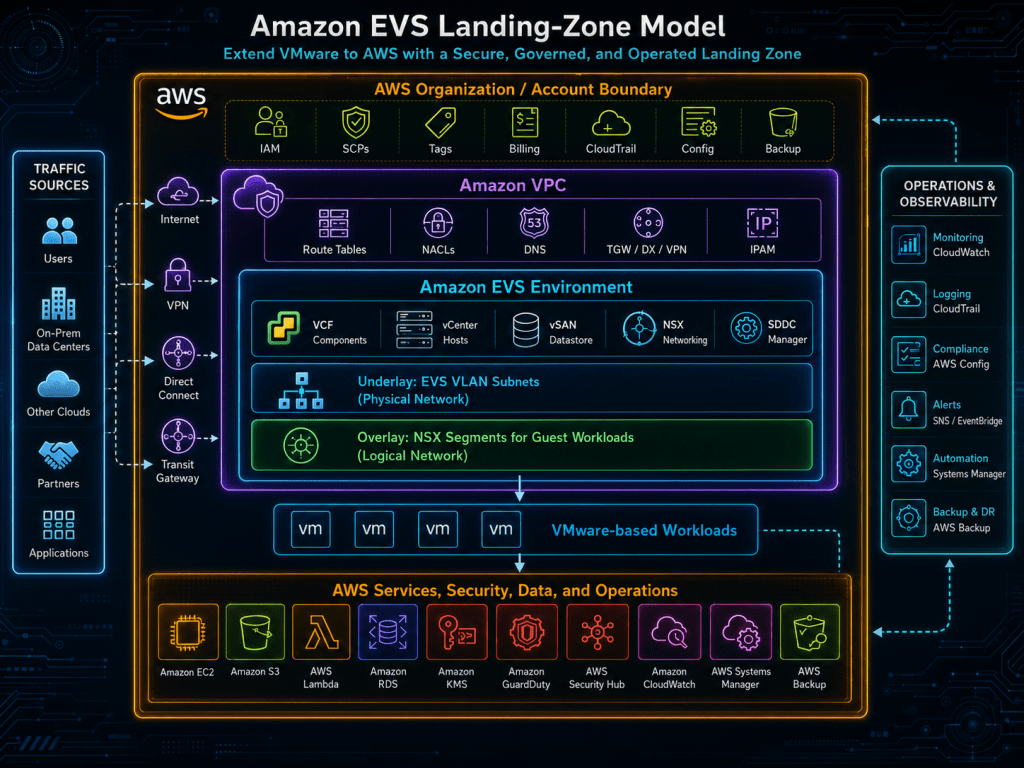
The diagram below shows the main point. EVS does not sit beside AWS governance. It sits inside it.

What matters in this diagram is the boundary stack.
The workload is still a VMware workload, but it now lives under AWS account, VPC, routing, identity, logging, tagging, billing, and connectivity decisions. If those decisions are not made intentionally, EVS becomes a cloud-shaped silo.
What EVS Changes Operationally
EVS gives VMware teams continuity, but it does not preserve the old data center operating model unchanged.
The VMware layer remains familiar:
- vCenter remains part of daily administration.
- NSX remains central to workload networking and segmentation.
- vSAN remains part of storage operations.
- SDDC Manager remains important for VCF lifecycle.
- VMware migration tooling may still matter, especially when preserving workload structure or reducing application change.
The surrounding platform changes:
- The environment is created inside an AWS account.
- The VPC design becomes a platform dependency.
- EVS VLAN subnet planning matters before deployment.
- Guest workload networking uses NSX overlays.
- AWS route tables and route propagation need clear ownership.
- DNS, NTP, hybrid connectivity, and route advertisement need design discipline.
- Cost allocation moves into AWS billing and tagging structures.
- Security review must include both AWS and NSX enforcement points.
This is the landing-zone shift.
The VMware team does not disappear. The AWS team does not take over everything. The two teams inherit a shared operating boundary.
That shared boundary needs a runbook.
VPC Integration Is the Main Architectural Difference
The most important EVS design work happens around the VPC.
A private VCF environment usually begins with private infrastructure questions:
- Which data center or colo?
- Which racks?
- Which spine-leaf network?
- Which VLANs?
- Which firewall zones?
- Which storage design?
- Which management cluster?
- Which workload domain model?
- Which physical failure boundaries?
EVS begins with AWS landing-zone questions:
- Which AWS account owns the EVS environment?
- Which VPC and CIDR strategy should be used?
- How will EVS VLAN subnet CIDRs be sized?
- How will DNS and NTP be provided?
- How will Route Server participate in dynamic routing?
- Will connectivity use Direct Connect, VPN, Transit Gateway, or a combination?
- How will route propagation be approved and monitored?
- Which traffic paths require inspection?
- Which AWS-native logs and controls are mandatory?
- How will NSX security policy align with AWS network controls?
That is why treating EVS as a simple VMware deployment is risky.
It is VMware Cloud Foundation embedded inside an AWS network and governance design.
Security Ownership Needs to Be Explicit
EVS security cannot be owned by one team in isolation.
AWS platform teams may expect familiar AWS controls. VMware teams may expect familiar NSX controls. Security teams may expect central inspection, logging, and policy evidence. Network teams may expect route control and clear escalation paths.
All of them are partially right.
The correct question is not “Which tool owns security?”
The correct question is “Which control owns which security decision?”
A useful ownership table looks like this:
| Control Area | Likely Owner | Landing-Zone Question |
|---|---|---|
| AWS account boundary | Cloud platform team | Which account owns EVS and who can administer it? |
| IAM and break-glass access | Cloud/security team | Who can create, modify, or delete EVS and supporting AWS resources? |
| VPC route tables | Cloud network team | Who approves route propagation and route changes? |
| NACLs for EVS VLAN subnets | Cloud network/security team | Which underlay traffic is permitted or denied? |
| NSX segments | VMware/network team | How are workload networks segmented? |
| NSX Distributed Firewall | VMware/security team | Who owns east-west policy and exception handling? |
| Inspection path | Network/security team | Where does north-south inspection happen? |
| Logging and evidence | Security operations team | Which logs are required for audit and incident response? |
| Backup and recovery policy | Platform/application owners | Which workloads are protected, how often, and where? |
| Cost allocation tags | Cloud governance team | How are EVS costs assigned to applications or business units? |
This table does not need to be perfect on day one.
But the conversation must happen before production workloads arrive.
Skills Continuity Is Real, But It Has a Boundary
One of the strongest arguments for EVS is skills continuity.
Many organizations have deep VMware experience. They understand cluster operations, vCenter workflows, VM placement, templates, storage policy, NSX segmentation, migration tooling, and operational troubleshooting. EVS lets those teams retain much of that muscle memory.
That matters during migrations.
It can reduce retraining pressure. It can help teams move workloads without forcing every application into a refactor project. It can preserve operational practices while the organization builds cloud-native maturity elsewhere.
But skills continuity is not the same as operational sameness.
The VMware team still needs to understand enough AWS to operate safely:
- Account boundaries
- IAM roles and permissions
- VPC concepts
- Route tables
- NACLs
- Transit Gateway
- Direct Connect
- DNS patterns
- AWS logging
- Cost tags
- AWS support boundaries
- Infrastructure-as-code expectations
The AWS team also needs to understand enough VMware to avoid bad assumptions:
- NSX overlay networking
- vCenter access models
- SDDC Manager lifecycle
- vSAN behavior
- VMware backup patterns
- HCX migration concepts
- NSX Distributed Firewall policy
- Management and workload separation
EVS works best when neither team pretends the other layer is invisible.
Where EVS Fits Best as a Landing Zone
EVS is most compelling when the workload still needs VMware, but the business needs AWS adjacency.
Good candidates include:
| Workload Scenario | Why EVS May Fit |
|---|---|
| Data center exit with limited application change | Moves VMware workloads into AWS without forcing immediate refactoring |
| Applications with AWS data dependencies | Places VMware workloads closer to AWS databases, analytics, storage, or integration services |
| Migration runway before modernization | Gives teams a governed interim platform while application teams plan the next step |
| VMware-based disaster recovery into AWS | Can align VMware continuity with AWS regional capacity and recovery planning |
| M&A or divestiture migrations | Provides a familiar landing zone when timelines are shorter than application modernization cycles |
| Workloads with strong VMware operational dependencies | Preserves tooling and skills while changing placement |
EVS should not be the default answer for every VM.
It should be used when the workload has a reason to be in AWS and a reason to remain on VMware for now.
Where EVS Is Usually the Wrong Landing Zone
EVS is less compelling when the workload already has a better target.
Examples include:
| Workload Scenario | Better Direction |
|---|---|
| Application is ready for cloud-native refactoring | Native AWS services may be cleaner |
| Workload requires specialized hardware | Private VCF or another dedicated platform may fit better |
| Strict locality or sovereignty dominates | Private VCF or sovereign/private cloud may be required |
| Organization needs newer VCF capabilities unavailable in EVS | Private VCF may provide more direct version control |
| Extremely predictable high-density steady-state estate | Private infrastructure economics may be more favorable |
| No AWS adjacency requirement exists | EVS may add cloud complexity without enough benefit |
| No shared AWS/VMware operating model exists | Fix the operating model before moving production workloads |
The worst EVS use case is “we moved it because we could.”
That is not a strategy.
Cost Should Be Modeled as a Landing-Zone Constraint
EVS cost analysis needs more than a VMware license conversation.
The business case should include:
- EC2 bare-metal instance usage
- EVS control plane usage
- VPC Route Server endpoints
- Storage choices and optional external storage
- Backup and recovery tooling
- Data transfer
- Windows licensing if applicable
- Monitoring and logging
- Migration tooling
- Partner or managed services
- Operational support
- Capacity reservations or term commitments
- Showback or chargeback model
The key question is not “Is EVS cheaper than private VCF?”
The better question is “Does EVS cost align with the workload’s purpose?”
A migration runway workload may justify a different cost profile than a ten-year steady-state workload. A workload that needs AWS data adjacency may justify EVS because placement reduces operational friction elsewhere. A workload with no AWS dependency may not justify the additional cloud operating surface.
Cost needs context.
Landing-Zone Readiness Checklist
Before using EVS for production workloads, validate the landing zone.
| Area | Questions to Answer |
|---|---|
| Account placement | Is EVS in a dedicated platform account, shared services account, or application account? |
| Network design | Are VPC CIDRs, EVS VLAN subnet CIDRs, NSX overlays, DNS, NTP, TGW, DX, VPN, and route tables designed? |
| Routing ownership | Who approves route propagation, route changes, and emergency network changes? |
| Security controls | Which controls live in AWS, which live in NSX, and how are exceptions handled? |
| Identity | Who has AWS admin access, vCenter access, NSX access, SDDC Manager access, and break-glass access? |
| Lifecycle | Who owns VCF patching, upgrades, host maintenance, integrated solutions, and maintenance windows? |
| Backup and recovery | Which tools protect workloads, management components, and configuration state? |
| Observability | Where do logs, alerts, metrics, flow records, and audit evidence land? |
| Cost governance | Are tags, budgets, alerts, chargeback, and workload ownership mapped? |
| Migration approach | Is HCX or another migration method required, and how will cutover and rollback work? |
| Workload placement | Which workloads are approved for EVS, which stay private, and which should modernize? |
| Exit criteria | Is EVS the final destination, a bridge, a DR platform, or a temporary landing zone? |
A landing zone is not ready because the environment deployed successfully.
It is ready when the organization can operate it predictably.
Common Landing-Zone Mistakes
Mistake 1: Treating EVS Like a Normal VPC Workload
EVS runs inside an AWS VPC, but it is not the same as a fleet of EC2 instances. The VMware underlay and NSX overlay need to be understood as part of the design.
If the cloud team assumes normal EC2 security and routing patterns apply everywhere, the design will have gaps.
Mistake 2: Letting VMware Own Everything
The VMware team should not own the AWS account, route tables, Direct Connect design, Transit Gateway routing, IAM policy, and cost controls alone.
EVS is a shared platform.
The ownership model needs to reflect that.
Mistake 3: Letting AWS Own Everything
The AWS team should not assume EVS eliminates VMware operational responsibility.
vCenter, NSX, vSAN, SDDC Manager, lifecycle coordination, and workload-level VMware operations still matter.
Mistake 4: Migrating Before Placement Is Decided
A workload should not move to EVS simply because it is currently a VM.
The placement decision should answer:
- Why AWS?
- Why VMware?
- Why now?
- How long?
- What happens next?
If those questions are not answered, EVS becomes a parking lot.
Mistake 5: Confusing Landing Zone with Modernization
EVS can support modernization, but it is not modernization by itself.
Moving a VM into EVS does not automatically improve deployment automation, observability, application architecture, release velocity, security policy, or cost accountability.
It changes placement.
Modernization still requires work.

The landing-zone question is not “Can EVS run this VM?”
The better question is “Should this workload become part of our AWS operating model while remaining on VMware?”
Conclusion
Amazon EVS is best understood as an operating model shift.
It brings VMware Cloud Foundation into an AWS landing-zone context. That gives organizations a practical way to preserve VMware skills, move workloads into AWS, and create proximity to AWS services without forcing immediate application refactoring.
But the value only shows up when EVS is designed as part of the AWS platform.
That means account placement, VPC design, routing, DNS, identity, security controls, NSX policy, lifecycle ownership, cost governance, backup, monitoring, and workload placement all need to be clear.
Used well, EVS can be a governed landing zone for VMware workloads that need AWS adjacency.
Used casually, it becomes another silo with a cloud bill attached.
The architecture decision is not simply EVS versus private VCF.
The better decision is whether the workload belongs in an AWS-governed VMware landing zone at this stage of its lifecycle.
