



TL;DR
Local AI in 2026 is no longer limited to a command-line chatbot. A practical local stack can include model runtimes, desktop assistants, private document search, coding agents, visual orchestration, image workflows, transcription, and offline translation.
The best starting point depends on the layer you need. Ollama, llama.cpp, KoboldCpp, LocalAI, and TextGen focus on model execution. LM Studio, Jan, GPT4All, and Msty Studio provide more approachable desktop experiences. Open WebUI and AnythingLLM add browser access, retrieval, and knowledge workflows. Open Interpreter, Cline, Aider, and Flowise extend local models into action and automation. ComfyUI, InvokeAI, whisper.cpp, and Argos Translate cover creative and language workloads.
The software can be free while the deployment is still expensive. Model licenses, RAM, GPU memory, storage, electricity, patching, network exposure, and operational ownership all matter. Local execution improves control, but it does not automatically guarantee privacy or security.
Introduction
The appeal of local AI is straightforward. You can keep more data under your control, experiment without paying for every token, choose your own models, and make use of hardware you already own. For engineers, creators, home-lab users, and security-conscious organizations, local inference also provides visibility into model versions, quantization, runtime settings, integrations, storage, and failure boundaries.
The problem is that the local AI market is frequently presented as one flat list of interchangeable applications. It is not. Some products are model runtimes. Others are desktop interfaces, API servers, retrieval platforms, coding agents, launchers, visual workflow builders, or specialist media tools.
Comparing them without separating those roles leads to duplicate installations and poor architecture decisions. A desktop assistant may depend on a separate runtime. A coding agent may need a capable tool-using model and a local API. A retrieval platform also needs embeddings, parsing, chunking, a vector store, and access controls.
This guide organizes 20 useful free local AI tools by architectural role. Every product has a practical path for Windows, macOS, and Linux, although that path may be a native application, portable binary, Python package, source build, WSL environment, or container.
What Free and Local Actually Mean
Before selecting a tool, separate four concepts that are often compressed into the word “free.”
Application cost: Some tools are open source. Some are free proprietary desktop applications. Others provide a permanent free tier alongside paid plans. Those models create different procurement, redistribution, support, and governance considerations.
Model licensing: A free application can load a model with restrictions on commercial use, redistribution, fine-tuning, or derivative works. The runtime license does not override the model license.
Infrastructure cost: Local inference consumes system memory, GPU memory, storage, electricity, cooling, administrator time, and replacement hardware. Removing an API bill does not remove the cost of the platform.
Data boundary: A locally installed interface may still connect to cloud providers, download models, call search services, install extensions, check for updates, or expose an API on the network. Privacy depends on the complete request path.
For this article, a free local AI tool is a product with a usable no-cost path that can perform its primary AI workload on hardware you control. Optional cloud inference, enterprise controls, premium features, and commercial support may still cost money.
How the Local AI Stack Fits Together
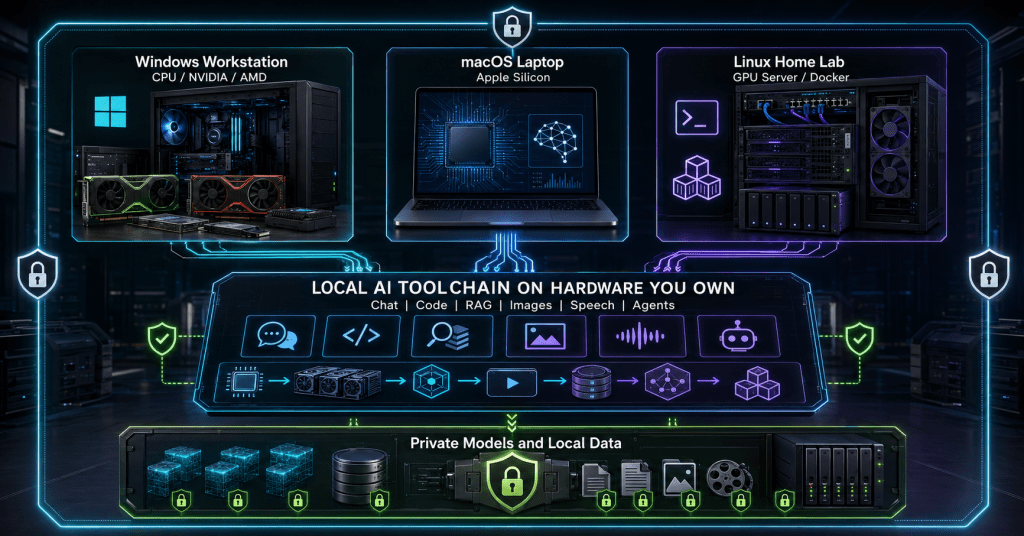
The model is only one component in a working local AI environment. The diagram below shows the layers that are often hidden behind a simple chat window.
The operational lesson is to choose the capability first, then select the interface and runtime that support it. Installing several overlapping desktop applications rarely improves model quality. It usually creates duplicate model caches, competing background services, inconsistent API endpoints, and more software to patch.
| Tool | Best fit | Free path | Cross-platform approach | Main caveat |
|---|---|---|---|---|
| Ollama | Simple local model runtime and API | Free local tier | Native packages | Easy to start, but service exposure still needs control |
| LM Studio | Desktop model testing and local API | Free for home and work | Native desktop app | Intel Macs are not supported |
| Jan | Open desktop AI assistant | Open source | Native desktop downloads | Fast-moving features require version discipline |
| GPT4All | Private desktop chat and local documents | Open source | Native installers | Model compatibility and quality vary |
| llama.cpp | Maximum inference control | Open source | Binaries, packages, and source | Lower-level operational experience |
| KoboldCpp | Portable GGUF chat and storytelling | Open source | Portable binaries and builds | Enthusiast focus, limited enterprise controls |
| LocalAI | Self-hosted compatible AI APIs | Open source | Containers and direct installs | Requires platform engineering |
| TextGen | Advanced local model experimentation | Open source | Portable desktop builds | Large option surface increases complexity |
| Open WebUI | Browser-based local chat | Free self-hosting | Docker or Python | Current license includes branding requirements |
| AnythingLLM | Local RAG, documents, and agents | Open source | Desktop app and containers | Retrieval quality depends on ingestion design |
| Msty Studio | Polished multi-model workspace | Free plan | Native desktop app | Some features require paid plans |
| Pinokio | One-click local AI application launcher | Open source | Native desktop app | Scripts can run commands and download software |
| Open Interpreter | Local coding and computer-control agent | Open source | Native cross-platform terminal app | Command execution needs strict permissions |
| Cline | Agentic coding with local models | Open source | IDE and terminal workflows | Capable coding models need substantial memory |
| Aider | Git-aware terminal pair programming | Open source | Python-based installation | Weak models may produce unusable edits |
| Flowise | Visual AI and agent orchestration | Open source | Node.js or Docker | Self-hosting adds identity and secrets concerns |
| ComfyUI | Node-based generative media workflows | Open source | Desktop and manual installs | GPU support differs by vendor and OS |
| InvokeAI | Managed local image workspace | Open source community edition | Native launcher | macOS requires Apple Silicon |
| whisper.cpp | Offline speech-to-text | Open source | Native builds and binaries | Accuracy depends on model and audio quality |
| Argos Translate | Offline machine translation | Open source | Python library, CLI, and GUI | Language coverage and quality vary |
Local Model Runtimes and Desktop Assistants
Ollama: The Practical Default Runtime
Ollama is one of the easiest ways to create a reusable local model service. It supports Windows, macOS, and Linux, manages model downloads, and provides an API that can be consumed by other tools.
Its strongest advantage is composability. Open WebUI, AnythingLLM, Cline, Aider, Flowise, and many custom applications can use Ollama as the model layer. This allows a user or home-lab operator to maintain one model service instead of downloading the same model into several applications.
The convenience can create false confidence. Treat the API binding, model inventory, storage path, update process, logs, and network firewall as managed configuration. Ollama now also offers optional cloud capabilities, so verify that a supposedly local workflow is using a local model rather than a cloud model.
Best fit: Engineers and home-lab users who want a simple runtime that can support several interfaces and applications.
LM Studio: The Desktop Model Workbench
LM Studio combines model discovery, local chat, hardware-aware loading, runtime settings, and a programmable local API in one desktop application. It supports modern Windows and Linux systems plus Apple Silicon Macs.
It is especially useful for model evaluation. You can compare quantizations, inspect memory requirements, change context and offload settings, and expose a local API without building an inference server from source.
LM Studio is free for home and work use, but the application and the downloaded model have separate license terms. Intel Macs are currently unsupported, and actual workload capacity depends on memory, context length, and model format.
Best fit: Users who want a polished interface for evaluating models before deciding how to operationalize them.
Jan: An Open Desktop Alternative
Jan is an open-source desktop assistant with native downloads for Windows, macOS, and Linux. It can run local models and can also connect to remote providers when those are deliberately enabled.
Jan fits users who want a transparent desktop product rather than a separate runtime and browser interface. It is approachable enough for individual users but still exposes enough model and integration behavior to interest engineers.
Because Jan is developing quickly, pin versions when using it in repeatable business workflows. Changes to model backends, agents, integrations, or defaults can alter behavior between releases.
Best fit: Privacy-conscious users who want an open desktop assistant with a familiar chat experience.
GPT4All: Private Chat on Everyday Hardware
GPT4All is designed to run local language models on common Windows, macOS, and Linux desktops. It supports private chat, local documents, and an optional compatible API mode without requiring a discrete GPU for basic use.
Its LocalDocs capability makes it useful for lightweight personal document search. The important caveat is that retrieval quality depends on parsing, chunking, embeddings, metadata, and the selected model. A simple user interface does not remove those dependencies.
GPT4All is a reasonable starting point for CPU-only systems and smaller models. It should not be treated as proof that every large model or long-context workload will perform well on an ordinary laptop.
Best fit: Users who need an approachable private desktop assistant on modest hardware.
llama.cpp: Maximum Control Over GGUF Inference
llama.cpp is a foundational local inference project that targets a wide range of CPUs and accelerator backends. Official releases include builds for macOS, Linux, and Windows across several architectures and GPU technologies.
Choose llama.cpp when you need detailed control over model loading, GGUF quantization, context, batching, GPU offload, server behavior, or embedding the runtime in another application. Many higher-level tools build on the same ecosystem, so understanding llama.cpp also helps explain what those interfaces are doing.
The tradeoff is responsibility. You choose the binary, backend, flags, model file, and performance settings. That flexibility is valuable for engineering work, but it is more than most casual users need.
Best fit: Developers, performance testers, and integrators who need low-level control and broad hardware support.
KoboldCpp: Portable Inference for Chat and Storytelling
KoboldCpp packages GGUF inference into a self-contained application with a web interface and features oriented toward interactive chat, storytelling, role-play, and long-form generation. Ready-to-use binaries are available for Windows, macOS, and Linux.
Its portability is the main attraction. A user can load a GGUF model, tune generation behavior, and expose a local interface without installing a large dependency stack.
For business use, assess it as an enthusiast-oriented runtime. Authentication, network controls, auditability, support ownership, backup, and upgrade testing remain the operator’s responsibility.
Best fit: Enthusiasts and creators who want a portable local interface with detailed generation controls.
LocalAI: A Self-Hosted API Compatibility Layer
LocalAI is designed for teams that want self-hosted model capabilities behind familiar API patterns. Depending on the configured backends, it can serve text, embeddings, speech, images, and other workloads.
Containers provide the most consistent cross-platform path, including Windows through Docker or WSL. macOS and Linux also have direct installation options. LocalAI becomes useful when several applications need one internal endpoint or when a team wants to redirect an existing integration toward infrastructure it controls.
This is platform software rather than a simple chat application. Plan persistent storage, model lifecycle, authentication, TLS, concurrency, observability, backup, GPU pass-through, and upgrade testing. API compatibility does not guarantee identical model behavior.
Best fit: Developers and platform teams building a shared local or on-premises AI service.
TextGen: The Advanced Experimentation Workbench
TextGen, formerly known primarily as text-generation-webui, now provides portable desktop builds for Windows, macOS, and Linux. It supports GGUF models and several acceleration paths, including CUDA, Vulkan, ROCm, and CPU-only operation.
Use it when you need to experiment across loaders, quantization formats, parameters, extensions, chat modes, and model configurations. It exposes more of the inference machinery than a streamlined desktop assistant.
That flexibility is also the main risk. A large option surface creates more ways to choose an incompatible backend, exhaust memory, install an unsafe extension, or create a configuration that cannot be reproduced. Record model hashes, runtime versions, and launch settings when results matter.
Best fit: Advanced users who want a configurable model laboratory rather than a simplified chat product.
Knowledge, RAG, and Local AI Workspaces
Open WebUI: A Browser Interface for Shared Local Models
Open WebUI provides a polished browser experience that can connect to Ollama and other model services. It is commonly deployed through Docker and can turn a home-lab runtime into a more familiar chat environment for one or more users.
The product is useful when you want centralized access without installing a full desktop application on every client. It also supports offline configuration, although administrators must still pre-stage required models and dependencies.
Review the current license before commercial redistribution, white-labeling, or branding changes. The current codebase includes a requirement to preserve Open WebUI branding unless the deployment qualifies for an exception or uses an appropriate commercial arrangement.
Best fit: Individuals and small teams that want browser-based access to a managed local runtime.
AnythingLLM: Private Documents, RAG, and Agents
AnythingLLM Desktop runs on Windows, macOS, and Linux and combines local models, retrieval-augmented generation, document workspaces, and agent features with relatively little configuration. A Docker edition is available for shared deployments.
It is one of the most accessible ways to test private document chat before designing a full enterprise RAG platform. The interface makes the ingestion, embedding, storage, retrieval, and generation workflow visible enough for practical experimentation.
Retrieval systems can fail quietly. Poorly parsed files, oversized chunks, missing metadata, weak embeddings, or unrestricted document collections can produce confident but incomplete answers. Validate retrieval separately from generation, and protect the vector store because extracted text and embeddings can remain sensitive.
Best fit: Users who want a practical private knowledge assistant without assembling every RAG component manually.
Msty Studio: A Polished Multi-Model Workspace
Msty Studio is a local-first desktop workspace available for Windows, macOS, and Linux. Its free plan includes core capabilities such as local and online model chat, knowledge stacks, agent mode, prompts, personas, media tools, and MCP tooling, while advanced team and enterprise features require paid plans.
It is a strong fit for users who value a cohesive daily workspace over infrastructure-level control. Local and remote models can exist side by side, so administrators should document which providers are enabled and where each workload executes.
The free-plan distinction matters. Msty is not the same licensing model as an entirely open-source stack, and organizations should evaluate paid-feature dependencies before standardizing it for a team.
Best fit: Creators, consultants, and engineers who want a polished local AI workspace with a usable free tier.
Pinokio: A One-Click Launcher for Local AI Projects
Pinokio is not a model runtime. It is a desktop launcher that automates the installation and startup of local AI applications across Windows, macOS, and Linux.
That can remove a large amount of dependency work when evaluating image, audio, video, and language projects. It also means Pinokio deserves the same scrutiny as a script runner and package manager. Its own policy states that scripts can execute commands, download files, and run them.
Use trusted scripts, inspect the source repository, and avoid running unknown packages under an account that holds production credentials. Record what was installed, where models are stored, which ports are opened, and how the environment can be removed.
Best fit: Home-lab users and creators who want to evaluate complex local AI projects quickly.
Coding Agents and Visual Orchestration
Open Interpreter: A Local Agent That Can Act
Open Interpreter is a terminal-based coding agent that can inspect files, edit projects, and execute commands. Current releases support native sandboxing on macOS, Linux, and Windows, plus permissions, skills, hooks, MCP integrations, and local session storage.
Its value is action rather than conversation alone. It can use the computer as part of the workflow, which also places it in a higher risk category than a chat-only application.
Run it with explicit approvals, least-privileged accounts, isolated working directories, source control, and recoverable environments. A local model can still delete files, reveal secrets, install packages, or follow a malicious instruction when the agent has broad permissions.
Best fit: Engineers who need a local terminal agent and are prepared to manage execution risk.
Cline: Agentic Coding with Local Model Support
Cline is an open-source coding agent that can connect to local runtimes such as Ollama and LM Studio. It supports IDE and terminal-oriented workflows for planning, multi-file editing, command execution, and iterative validation.
Local use avoids a hosted inference dependency, but it does not make the workload small. Cline’s guidance places typical small or quantized setups around 16 to 32 GB of RAM, mid-size coding models around 32 to 64 GB, and larger models or context windows above that range.
Use compact prompts, narrow tasks, repository checkpoints, and automated tests. A local coding agent is most useful when the model can reliably follow tool instructions and produce valid edits, not merely generate plausible code.
Best fit: Developers who want an agentic IDE workflow and have enough memory for capable coding models.
Aider: Git-Aware Pair Programming in the Terminal
Aider works directly with Git repositories and can connect to Ollama, LM Studio, or other compatible local endpoints. It installs through Python-based tooling on Windows, macOS, and Linux.
Its strength is disciplined change management. Edits are tied to repository context, diffs, and commits, which makes review and rollback more natural than in a generic chat interface.
Model quality still matters. A weak local model may generate code that looks reasonable but fail to return edits in a format the tool can apply. Begin with a disposable repository, compare models on real tasks, and require tests before accepting generated changes.
Best fit: Engineers who prefer terminal workflows, Git checkpoints, and explicit code review.
Flowise: Visual Orchestration for Models and Agents
Flowise is an open-source visual platform for building AI agents and LLM workflows. It can run through Node.js or Docker and can connect to local model services.
The visual canvas is useful for explaining how prompts, retrievers, tools, memory, evaluations, and models connect. It can accelerate prototyping before a stable design is moved into a code-managed service.
A visual graph does not remove production concerns. Protect credentials, add authentication, control network access, back up state, pin component versions, and trace model and tool activity. Agent flows can fail through loops, hidden state, unrestricted tools, or unbounded context even when each individual node works.
Best fit: Architects and developers prototyping local RAG, automation, and agent workflows.
ComfyUI: Node-Based Generative Media Workflows
ComfyUI is a modular node-based environment for image and generative media workflows. It exposes models, samplers, conditioning, control, upscaling, and output stages as a graph, making workflows reproducible and shareable.
Windows, macOS, and Linux are supported, but acceleration depends on the hardware and backend. NVIDIA CUDA remains a common path. Apple Silicon uses Metal. AMD support differs between Linux ROCm and newer experimental Windows or Linux paths for supported GPU generations.
Save workflow files, pin models and custom nodes, and separate experimental packages from stable environments. A custom-node update can break a previously working workflow even when the base application still launches.
Best fit: Creators and technical users who need repeatable, highly configurable generative media pipelines.
InvokeAI: A Managed Creative Workspace
Invoke Community Edition provides a more integrated creative experience with a visual canvas, workflow tooling, model management, and local execution. Its launcher supports Windows, Apple Silicon macOS, and Linux.
Choose InvokeAI when creators need a coherent application rather than the full low-level graph flexibility of ComfyUI. It is well suited to image iteration, inpainting, composition, and managed model workflows.
Hardware compatibility must be verified before standardization. Current requirements support Apple Silicon on macOS, while AMD GPU support and other acceleration paths vary by operating system.
Best fit: Creative teams and individuals who want a structured local image-generation workspace.
whisper.cpp: Offline Speech-to-Text
whisper.cpp is a lightweight C and C++ implementation for running Whisper-family speech recognition locally. It supports Windows, macOS, Linux, and several additional platforms, with Metal acceleration available on Apple Silicon.
This is a useful workload for systems that do not have a high-end discrete GPU. Smaller models can run on modest hardware, while larger models trade additional memory and compute for improved accuracy.
Test with real audio. Accents, background noise, speaker overlap, microphone quality, technical vocabulary, and language selection affect results. Sensitive recordings, temporary audio, transcripts, and logs should be managed as data assets.
Best fit: Users who need private transcription, subtitles, meeting notes, or voice interfaces.
Argos Translate: Offline Machine Translation
Argos Translate is an open-source offline translation system written in Python. It can be used as a library, command-line tool, or graphical application and supports downloadable language packages.
It is useful when text cannot be sent to an external translation service or when disconnected environments need repeatable translation. It can also be integrated into local applications without a cloud translation API.
Language coverage and quality vary. Some translations may pivot through an intermediate language when a direct package is unavailable, which can reduce quality. Legal, medical, safety-critical, and customer-facing translations still need qualified human review.
Best fit: Privacy-sensitive users and developers who need offline machine translation.
How to Choose Based on Hardware
Local AI capacity is governed by the full workload rather than the parameter count printed in a model name. Quantization, context length, KV cache, batch size, concurrent users, embeddings, image resolution, and background applications all consume memory.
The ranges below are planning guidance, not universal guarantees.
| Hardware profile | Good starting workloads | Likely constraints |
|---|---|---|
| CPU-only system with 8 to 16 GB RAM | Small quantized chat models, Argos Translate, smaller whisper.cpp models | Slow generation, limited context, minimal concurrency |
| Laptop or desktop with 16 to 32 GB RAM | General local chat, small coding models, RAG experiments, transcription | Larger agents and contexts may exhaust memory |
| GPU with 8 to 12 GB VRAM | Small-to-mid quantized models, common image workflows, faster transcription | Large models and high-resolution workflows remain constrained |
| GPU with 16 to 24 GB VRAM or high-memory Apple Silicon | Larger local models, longer context, more capable coding and creative workflows | Cost, power, thermal limits, and backend support still matter |
| System with 32 to 64+ GB shared or unified memory | Mid-size coding models, larger contexts, multi-service labs | Memory bandwidth and runtime efficiency can still limit throughput |
NVIDIA generally has the broadest compatibility because many local AI projects target CUDA first. Apple Silicon provides an efficient unified-memory model for supported applications. AMD can perform well, but Vulkan, ROCm, and Windows support vary by application and GPU generation.
Select one representative workload, measure peak memory and throughput, then scale. Do not purchase a GPU solely from a model parameter count or another user’s screenshot.
Privacy and Security Guardrails
Local AI reduces some exposure paths while transferring responsibility to the owner. Once you operate the runtime, you also own its patching, identity, logs, network policy, retention, backup, abuse controls, and recovery.
Use these controls before placing sensitive information into a local stack:
- Map outbound connectivity. Identify model downloads, update checks, cloud providers, web search, extensions, plug-in repositories, and telemetry.
- Review application and model licenses separately. Confirm commercial use, redistribution, derivative-work, and attribution requirements.
- Protect retained data. Prompt history, embeddings, uploaded documents, transcripts, model caches, and generated media may contain confidential information.
- Bind services deliberately. A workstation service should not listen on every network interface without authentication and firewall policy.
- Isolate agents and launchers. Use least privilege, disposable environments, source control, and explicit approvals for command-executing tools.
- Pin and inventory versions. Record the application, model file, quantization, hash, extensions, custom nodes, and configuration.
- Define retention and deletion. Confirm how chats, vector indexes, temporary files, logs, and backups are removed.
- Treat shared local AI as a service. Add identity, audit logging, resource limits, monitoring, patch ownership, and recovery testing when multiple users depend on it.
“The data stays in the building” is not a complete security statement. A stronger claim is that the organization has verified the request path, limited outbound traffic, protected retained data, controlled tool permissions, and assigned an operational owner.
Practical Starter Stacks
Easiest Private Desktop Chat
Start with LM Studio, Jan, or GPT4All. Each combines model selection and a user interface, reducing the number of components that must be understood on day one.
Best Home-Lab Chat Service
Use Ollama as the runtime and Open WebUI as the browser interface. Keep the services on a private network, add authentication, and document model storage and backup behavior.
Best Private Document Assistant
Use Ollama or LM Studio with AnythingLLM. Test document parsing and retrieval with known-answer questions before trusting generated summaries.
Best Local Coding Setup
Use Aider for a Git-centered terminal workflow or Cline for a more agentic IDE workflow. Connect either to Ollama or LM Studio, start with a disposable repository, and require tests and checkpoints.
Best Local Creative Workstation
Use ComfyUI when you need reusable graphs and detailed control. Use InvokeAI when creators need a more integrated application. Add whisper.cpp for private transcription of source audio or video.
Best Local API and Workflow Lab
Use LocalAI as the shared API layer and Flowise for visual orchestration. Secure the combination like an internal application platform rather than a desktop experiment.
Common Failure Modes and Troubleshooting
The Model Loads but Performance Is Extremely Slow
Confirm whether the runtime actually offloaded work to the GPU. Driver, backend, binary, and model-format mismatches can silently force CPU execution. Reduce context, use a smaller quantization, close competing applications, and measure memory use.
The Model Fails During Load
The model file may fit on disk but exceed available memory after runtime overhead and context allocation. Try a smaller model or quantization, reduce context, lower GPU offload, or select a better-supported backend.
A Container Cannot See the GPU
Containerized AI adds dependencies between the host driver, container runtime, device pass-through, image, and application backend. Validate GPU visibility with a minimal test container before troubleshooting the AI application.
RAG Answers Ignore the Correct Document
Test ingestion and retrieval separately. Confirm that the file was parsed, the relevant text exists in the index, metadata filters are correct, and the expected chunks appear in retrieval results. Changing the chat model will not repair a missing chunk.
A Coding Agent Produces Unusable Changes
Reduce task scope, provide explicit acceptance criteria, use a more capable coding model, enable repository checkpoints, and require automated tests. Local agent quality often falls sharply when context becomes too large or the model cannot follow the tool’s edit format.
The Application Is Local but Data Still Leaves the Device
Inspect enabled cloud providers, web search, plug-ins, remote embeddings, update services, model downloads, and telemetry. Local inference and local data handling are separate controls.
An Upgrade Breaks a Working Environment
Restore the recorded application version, model file, extensions, custom nodes, and configuration as one unit. Upgrading only one layer can invalidate a previously working workflow.
Conclusion
The local AI market in 2026 is mature enough to support real work, but the tools solve different layers. Ollama, llama.cpp, KoboldCpp, LocalAI, and TextGen focus on execution. LM Studio, Jan, GPT4All, and Msty Studio optimize the individual workspace. Open WebUI and AnythingLLM add shared access and private knowledge workflows. Open Interpreter, Cline, Aider, and Flowise extend models into action and orchestration. ComfyUI, InvokeAI, whisper.cpp, and Argos Translate cover specialist creative and language workloads.
The best starting point is not the application with the longest feature list. It is the smallest stack that meets the use case, fits the available memory, and creates a security boundary you can explain. One runtime paired with one purposeful interface is usually more sustainable than several overlapping desktop products.
For individuals and home labs, local AI provides control, repeatability, and direct access to the mechanics of inference. For businesses, the same control creates obligations. Model licensing, network exposure, retained data, agent permissions, patching, observability, and ownership must be designed rather than assumed.
Own the GPU only when you are prepared to own the platform around it.
