


AI demand rarely arrives as a clean infrastructure request.
It usually starts as a conversation. A data science team has a model they want to test. A business unit wants an internal assistant. A security team wants retrieval-augmented generation close to sensitive data. A platform team is asked whether the existing private cloud can “just add GPUs.”
That is where many infrastructure teams get pulled into the wrong first decision.
The first decision is not which GPU server to buy, whether the workload should run on Kubernetes or a VM, or whether the cluster should be VxRail, Dell vSAN Ready Nodes, or a dedicated GPU island.
The first decision is the operating model.
VCF 9.1 gives infrastructure teams more options for private AI, GPU acceleration, Kubernetes, vSAN efficiency, observability, and cost management. Broadcom has positioned VCF 9.1 as a private cloud platform for modern workloads, including production AI, with support for AI-oriented infrastructure, Kubernetes, multi-tenant isolation, high-speed networking, and accelerator ecosystem integrations.
That does not remove the design work. It actually makes the design work more important.
If the platform team does not define placement, lifecycle, tenancy, storage, network, and cost models before the first GPU cluster lands, the first successful AI workload can become the pattern everyone else inherits.
That is dangerous.
A GPU cluster is expensive, scarce, operationally sensitive, and politically visible. Once it becomes shared infrastructure, every missing decision turns into a ticket, an exception, or an outage conversation.
This article lays out the decision model infrastructure teams should build before deploying the first GPU-ready VCF cluster.
TL;DR
VCF 9.1 can support a stronger private AI architecture, but the GPU cluster should be the output of the design process, not the starting point.
Before deploying the first GPU cluster, infrastructure teams need to decide:
- Where AI workloads belong: existing workload domain, dedicated AI workload domain, or separate expansion path
- How GPUs are consumed: full-device passthrough, vGPU, MIG-style partitioning, CPU inference, or Kubernetes node pools
- Who owns lifecycle risk: platform, virtualization, VxRail, data science, application, or shared platform engineering
- How tenants are isolated: VCF Automation project, Kubernetes namespace, NSX boundary, workload domain, or physical cluster
- Which storage classes are appropriate for models, datasets, checkpoints, vector databases, logs, and ephemeral scratch
- Whether network design supports GPU-to-GPU, storage, management, and tenant separation
- How GPU cost is measured, allocated, reclaimed, and justified
The practical mental model is this:
Do not build “a GPU cluster.” Build an AI service contract, then place the cluster behind it.
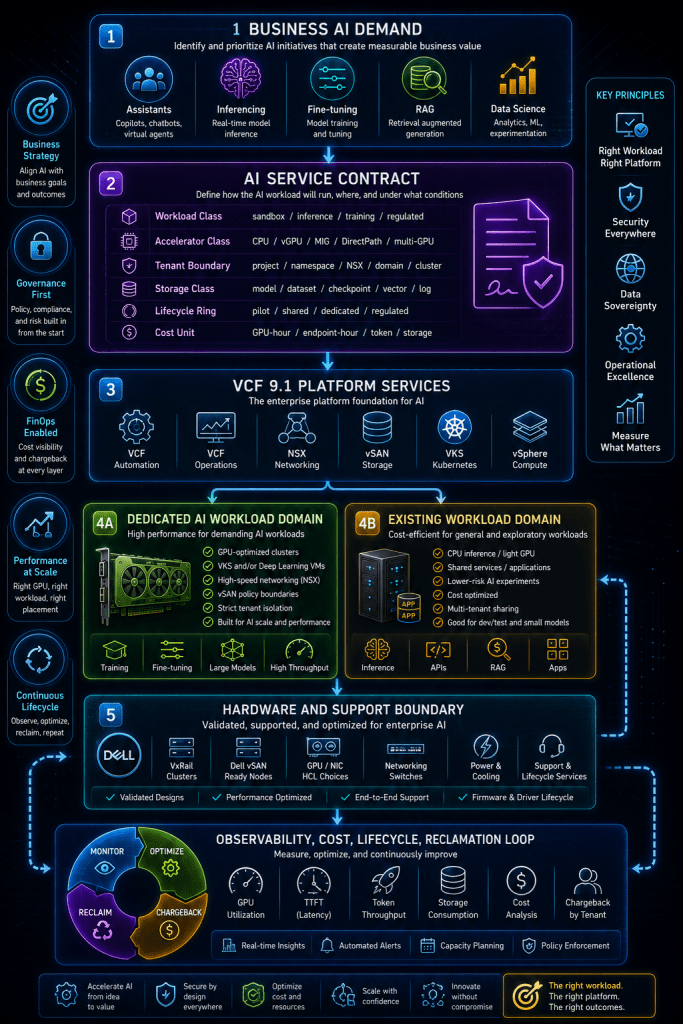
Architecture at a Glance: The GPU Cluster Is Not the Service
The diagram below shows the model this article uses. The important part is the order.
The AI request should flow through a service contract first. That contract defines placement, tenancy, accelerator access, storage policy, network path, lifecycle ring, observability, and chargeback. The VCF workload domain and GPU cluster are implementation choices behind that contract.

What to notice: the GPU cluster sits below the service contract. That is intentional. If the platform team cannot describe the service contract, the cluster will absorb every decision by accident.
Scenario: The First AI Request Lands
Assume a realistic enterprise scenario.
The infrastructure team already runs VCF on VxRail with vSAN. The environment supports traditional VM workloads, some Kubernetes use cases, and standard lifecycle operations. A new AI initiative appears with three near-term requests:
- A data science team wants GPU-backed notebooks and model testing.
- An application team wants an internal inference endpoint for a business assistant.
- A governance team wants sensitive data to stay on-premises or inside the private cloud boundary.
The initial instinct may be to create a GPU cluster and hand access to the requesting team.
That works for a lab.
It does not work as an enterprise pattern.
By the third or fourth tenant, the team will need answers to questions that should have been resolved before the first host was ordered:
- Can two tenants share the same GPUs?
- Who gets priority when GPU capacity is constrained?
- Are GPU drivers and firmware patched with the rest of the VCF fleet?
- Are training workloads allowed to consume the same storage fabric as inference workloads?
- Can a tenant request full-GPU passthrough for performance reasons?
- How is idle GPU capacity reclaimed?
- Which costs are visible to the business unit?
- Who owns model endpoint performance when the bottleneck is storage, network, or token throughput rather than raw GPU utilization?
VCF 9.1 adds capabilities that help with these questions, but it does not answer the operating model for you. Broadcom’s VCF 9.1 material highlights AI observability, multi-tenant AI infrastructure, Kubernetes support, high-speed networking, and accelerator ecosystem options. Those are platform ingredients. The infrastructure team still has to define the service boundaries.
Scope and Terminology Guardrails
This article is not a bill of materials, a sizing guide, or a deployment runbook. It is a decision framework.
| Term | How this article uses it |
|---|---|
| VCF instance | The broader VMware Cloud Foundation environment, including management, workload domains, lifecycle, operations, automation, networking, and storage services. |
| Workload domain | A major placement and lifecycle boundary. For AI, this may become the most important decision after the hardware platform. |
| GPU cluster | A vSphere cluster with hosts that include supported GPU and network hardware for AI workloads. |
| AI service class | A platform-facing contract that describes how an AI workload consumes compute, GPU, storage, network, lifecycle, and cost controls. |
| Tenant boundary | The isolation model for teams, applications, projects, namespaces, networks, storage policies, and lifecycle blast radius. |
| Accelerator access model | How a workload gets GPU capacity: CPU-only, shared GPU, vGPU, MIG-style partitioning, DirectPath, or multi-GPU / multi-host acceleration. |
| Lifecycle ring | A grouping that controls how quickly hardware, firmware, drivers, ESXi, Kubernetes, and AI platform components move through updates. |
A key guardrail: Kubernetes is not automatically the right interface for every AI workload. VKS may be the right model for platform-managed Kubernetes and containerized inference or AI services. Deep learning VMs may be better for teams that need a VM-centric workflow, specific drivers, or tighter control over runtime packaging. Lightweight inference may not need GPUs at all.
VCF Private AI Services documentation and announcements for VCF 9.1 discuss GPU-backed deep learning VMs, DirectPath-style access, and CPU-based inference options such as Llama.cpp in the context of observability and private AI services. The practical point is simple: decide the workload pattern before choosing the accelerator pattern.
Assumptions
This decision model assumes:
- The organization is already using, or planning to use, VCF 9.1.
- The infrastructure team is considering AI workloads on-premises or in a private cloud boundary.
- VxRail and vSAN are part of the existing or target platform.
- Some AI workloads may run on VKS, while others may run on VMs.
- The team wants a repeatable operating model, not a one-off lab.
- GPU supply is constrained enough that cost allocation and reclamation matter.
- Security, data locality, and tenant separation are part of the design conversation.
Exact GPU, NIC, firmware, driver, server, vSAN, and VCF compatibility must be validated against the current Broadcom and Dell support matrices before procurement or deployment. VCF 9.1 expands options, but supportability still depends on the exact hardware and software combination.
Decision Criteria Before the First GPU Cluster
Before discussing placement, storage, and lifecycle, the infrastructure team needs a shared set of decision criteria.
A GPU-ready VCF design should be evaluated against these questions:
| Decision criterion | Why it matters |
|---|---|
| Performance isolation | AI workloads can be noisy. A training job, inference burst, or data pipeline can consume GPU, CPU, memory, storage, and network resources in ways traditional VM teams may not expect. |
| Lifecycle blast radius | GPU drivers, firmware, NICs, ESXi versions, Kubernetes versions, and AI runtime dependencies may move at different cadences. |
| Tenant isolation | AI workloads often mix sensitive data, proprietary models, shared platforms, and experimental code. Tenant separation must be explicit. |
| Data gravity | Models may be small, but datasets, embeddings, checkpoints, vector indexes, and logs can be large and persistent. |
| Supportability | Hardware flexibility is useful only if support boundaries remain clean. |
| Cost visibility | GPU capacity is too expensive to treat as generic cluster capacity. |
| Operational ownership | AI infrastructure touches virtualization, storage, network, Kubernetes, security, automation, FinOps, and data science teams. |
| Developer interface | The right abstraction may be a VM, Kubernetes namespace, API endpoint, catalog item, notebook, or managed model service. |
The mistake is to optimize one column too early.
For example, a full GPU passthrough model may look ideal for performance but poor for sharing. A shared vGPU model may improve utilization but complicate support, scheduling, and tenant expectations. A dedicated AI workload domain may simplify lifecycle isolation but increase cost. A shared domain may reduce initial spend but create lifecycle and performance conflicts later.
Main Model: Define AI Service Classes First
A practical VCF AI architecture starts with service classes.
Service classes give the platform team a way to translate messy AI demand into infrastructure patterns. They also prevent every request from becoming a custom design.
A starting model might look like this:
| AI service class | Typical use case | Default placement | Accelerator model | Lifecycle posture |
|---|---|---|---|---|
| AI Sandbox | Experiments, notebooks, proof-of-concept models | Shared non-production domain or small GPU pool | CPU, shared GPU, vGPU, or small GPU quota | Fast-moving, reclaimable |
| Shared Inference | Internal assistants, small model endpoints, RAG services | Shared AI workload domain | vGPU, MIG-style partitioning, or CPU inference if acceptable | Stable but flexible |
| Dedicated Inference | Production endpoint with predictable latency requirements | Dedicated GPU cluster or dedicated resource pool | Full GPU, vGPU, or pinned accelerator class | Controlled change window |
| Fine-Tuning / Training | Model tuning, batch training, larger distributed jobs | Dedicated AI workload domain | Multi-GPU or multi-host GPU design | Isolated lifecycle ring |
| Regulated AI | Sensitive data, strict audit, legal or compliance scope | Dedicated tenant boundary, possibly dedicated domain | Determined by risk and performance | Slowest, most controlled |
This does two things.
First, it gives tenants a language for requesting AI capacity without naming hardware. Second, it gives infrastructure teams a way to map requests into repeatable placement, lifecycle, storage, network, and cost policies.
Placement Model
Placement is the first major architectural decision because it affects every other decision.
There are three common patterns.
Add GPU Capacity to an Existing Workload Domain
This is attractive when demand is early, budget is limited, and the team wants to validate AI use cases quickly.
It works best when:
- Workloads are experimental or low-risk.
- GPU capacity is limited.
- Lifecycle changes can align with the existing domain.
- Tenants do not need strong physical or lifecycle isolation.
- Storage and network patterns are not materially different from existing workloads.
The risk is that early convenience becomes permanent architecture. Once production AI workloads land in a shared domain, GPU driver updates, host maintenance, resource contention, and tenant expectations become harder to separate.
Create a Dedicated AI Workload Domain
A dedicated AI workload domain gives the team a cleaner lifecycle and placement boundary.
It works best when:
- GPU hardware has a different lifecycle cadence.
- AI workloads have distinct storage and network requirements.
- Multiple tenants will consume a shared AI platform.
- The business expects production inference or training.
- Chargeback and governance need a visible boundary.
This is often the better long-term pattern for serious AI adoption. It may cost more up front, but it reduces ambiguity.
Use a Mixed VCF-on-VxRail Expansion Pattern Where Supported
For organizations already running VCF on VxRail, VCF 9.1 introduces a useful design consideration: Broadcom and Dell describe support for mixed hardware within a VCF-on-VxRail deployment using VxRail clusters and Dell vSAN Ready Node clusters, with guardrails. Dell’s VCF 9.1 material states that workload domains can use VxRail clusters or Dell vSAN Ready Node clusters, but hardware within a workload domain remains homogeneous; the management domain remains VxRail when VxRail is present; third-party vSAN Ready Nodes are not supported in VCF on VxRail.
That matters for AI.
If the existing VxRail environment is stable, but GPU-optimized expansion is easier through Dell vSAN Ready Nodes, the team may be able to build a dedicated AI workload domain without turning the entire environment into a one-size-fits-all hardware design. The tradeoff is operational: VxRail lifecycle remains integrated for VxRail clusters, while Dell vSAN Ready Nodes use standard VCF lifecycle management.
The decision is not simply “VxRail or Ready Node.” It is:
Which support and lifecycle boundary do we want AI hardware to live inside?
GPU Consumption Model
The second major decision is how workloads consume GPU capacity.
This is where infrastructure teams need to be careful. Not every AI workload deserves a full GPU. Not every AI workload belongs on shared GPU capacity. Not every workload needs Kubernetes.
VCF 9.1 Private AI Services material highlights DirectPath enablement for NVIDIA AI infrastructure, where a GPU can be assigned exclusively to a single VM. vSphere material for VCF 9.1 also describes Enhanced DirectPath I/O improvements, including support for certain operations without tearing down the AI workload, and notes that NVIDIA vGPU can use time slicing and MIG.
A practical decision table looks like this:
| GPU access model | Best fit | Watch for |
|---|---|---|
| CPU-only inference | Lightweight models, dev/test, small internal tools, low-throughput services | Avoid assuming every AI workload needs GPU. Validate latency and throughput first. |
| vGPU / shared GPU | Shared inference, notebooks, smaller tenants, utilization-focused platforms | Requires clear quota, scheduling, profile, and support rules. |
| MIG-style partitioning | Better isolation on supported GPUs where tenants need partitioned accelerator capacity | Must validate GPU model, driver, profile, and management support. |
| DirectPath / full GPU | High-performance inference, specialized workloads, dedicated model endpoints, driver-sensitive workloads | Strong performance isolation but lower sharing efficiency. |
| Multi-GPU / multi-host acceleration | Training, fine-tuning, distributed workloads, large batch jobs | Requires network, storage, scheduling, and lifecycle planning from day one. |
The default platform stance should be:
- Use CPU inference where it meets the service-level objective.
- Use shared or partitioned GPU where utilization matters.
- Use full GPU assignment where performance, isolation, or runtime constraints justify it.
- Use dedicated placement for multi-GPU or multi-host workloads.
The wrong pattern is letting every tenant ask for “a GPU VM” without defining what class of GPU service they are actually buying.
Lifecycle Model
GPU infrastructure changes the lifecycle conversation.
Traditional VCF lifecycle planning already requires coordination across ESXi, vCenter, NSX, vSAN, firmware, drivers, and workload dependencies. AI adds more moving parts: GPU drivers, accelerator libraries, container images, model runtimes, Kubernetes versions, NIC drivers, RoCE settings, observability agents, and sometimes vendor-specific AI software.
VCF 9.1 includes lifecycle improvements such as ESX live patch behavior, firmware and driver validation against compatibility lists for vSAN clusters, and DRS improvements that help avoid contention during evacuation. Those are important platform improvements, but they do not remove the need for lifecycle rings.
A GPU-ready VCF environment should define at least four lifecycle rings:
| Lifecycle ring | Purpose |
|---|---|
| Lab / validation ring | Validate GPU drivers, firmware, ESXi updates, vSAN behavior, VKS versions, and AI runtime dependencies before production exposure. |
| Shared AI ring | Supports common inference and sandbox workloads with predictable update windows. |
| Dedicated production ring | Supports production AI services with tighter change control and tenant communication. |
| Regulated ring | Supports workloads with audit, compliance, or data sensitivity constraints. Slower cadence, more validation, stricter rollback planning. |
For VxRail environments, the lifecycle model must also account for the hardware boundary. In the VCF-on-VxRail mixed hardware model, VxRail clusters and Dell vSAN Ready Node clusters have different lifecycle paths, even when they are part of the same broader VCF deployment.
The practical rule:
Do not place AI workloads into a lifecycle boundary you cannot patch, evacuate, validate, and explain.
Tenancy Model
AI tenancy is not just authentication.
Tenancy includes:
- Who can request AI capacity
- Which projects can see which models
- Which tenants can share GPU hardware
- Which datasets can be mounted or accessed
- Which networks a workload can reach
- Which logs and metrics are visible
- Which costs are charged back
- Which tenant gets priority during contention
- Who approves full-GPU or multi-GPU requests
VCF 9.1’s AI positioning includes multi-tenant infrastructure for AI workloads, with isolation and policy controls as part of the platform story. But the implementation decision is still yours.
A useful model is to define tenancy at five possible layers:
| Tenancy layer | When it is enough | When it is not enough |
|---|---|---|
| Catalog / project | Good for request routing, approvals, ownership, and quotas | Not enough for runtime isolation by itself |
| Kubernetes namespace | Good for app-level separation inside a shared cluster | Not enough for strong lifecycle or physical isolation |
| NSX network boundary | Good for traffic control and microsegmentation | Does not solve GPU scheduling or storage ownership |
| Cluster boundary | Good for stronger performance and lifecycle separation | May be inefficient if every tenant gets a cluster |
| Workload domain boundary | Strongest operational and lifecycle boundary | More expensive and heavier to operate |
Most teams will need more than one layer.
For example:
- AI sandbox: project + namespace + quota
- Shared inference: project + namespace + NSX segmentation + GPU quota
- Dedicated inference: project + dedicated resource pool or cluster + explicit GPU assignment
- Regulated AI: dedicated project + network + storage policy + cluster or workload domain
The tenancy model should be visible in the service catalog. Tenants should not need to understand the entire VCF topology to request the right class of AI service.
Storage and Data Model
AI storage design is easy to underestimate.
The model file may not be the largest part of the environment. The real storage demand can come from:
- Training datasets
- Fine-tuning datasets
- Embedding stores
- Vector databases
- Model checkpoints
- Feature stores
- Intermediate outputs
- Inference logs
- Audit records
- Container images
- Notebook workspaces
- Temporary scratch space
VCF 9.1 includes notable vSAN updates, including global deduplication becoming generally available for supported vSAN HCI and storage clusters, a new compression approach, and expanded persistent volume scale for Kubernetes-oriented workloads. Broadcom’s vSAN material also describes dedupe and compression as cost-reduction capabilities, with specific support limitations such as exclusions for stretched clusters and two-node topologies.
That matters, but storage efficiency is not the whole design.
A GPU-ready VCF storage model should define storage classes by workload behavior:
| Storage class | Example data | Design priority |
|---|---|---|
| Model artifact storage | Model weights, runtime packages, approved versions | Versioning, integrity, access control |
| Dataset storage | Training data, fine-tuning data, evaluation sets | Capacity, throughput, governance |
| Checkpoint storage | Training checkpoints, intermediate outputs | Write performance, recoverability |
| Vector database storage | Embeddings, indexes, metadata | Latency, consistency, backup strategy |
| Inference log storage | Prompts, responses, telemetry, audit events | Retention, privacy, cost control |
| Scratch storage | Temporary pipeline outputs | Performance and automated cleanup |
Do not use one generic vSAN policy for all AI workloads.
Some workloads need performance. Some need capacity efficiency. Some need retention. Some need encryption and audit. Some need fast deletion because temporary AI data can become a governance problem if left unmanaged.
The storage policy should be part of the AI service class.
Network Model
AI network design has two separate conversations that often get collapsed into one.
The first is tenant connectivity: how users, applications, APIs, model endpoints, databases, and storage systems communicate.
The second is accelerator and data-path connectivity: how GPUs, hosts, storage, and high-speed NICs interact for performance-sensitive workloads.
VCF 9.1 networking material describes EVPN-VXLAN interoperability, flexible connectivity, Enhanced DirectPath I/O for NVIDIA ConnectX and BlueField devices, and GPUDirect RDMA for AI, ML, and distributed computing use cases. VKS 3.6 with VCF 9.1 also adds declarative multi-NIC support for Kubernetes nodes on supported backends, with primary and secondary NIC roles and important constraints such as control plane reachability and interface-change limitations.
A practical AI network model should separate at least these paths:
| Network path | Purpose | Design question |
|---|---|---|
| Management | ESXi, VCF components, lifecycle, monitoring | Does AI hardware introduce new management or support networks? |
| Tenant access | App-to-model, user-to-service, API traffic | Is this isolated by tenant, application, or environment? |
| Storage/data | Dataset access, checkpoint writes, vector DB traffic | Does storage traffic compete with inference traffic? |
| GPU / accelerator fabric | GPU-to-GPU, RDMA, distributed workload paths | Does the design require RoCE, GPUDirect RDMA, or specialized NIC behavior? |
| Observability/export | Metrics, logs, traces, billing, model telemetry | Where do AI metrics leave the cluster, and who can see them? |
The key decision is whether the first GPU cluster is for simple inference or a future distributed AI platform.
Those are different networks.
If the first cluster is designed only for basic VM-based inference, it may not support the traffic patterns needed for multi-host training later. If it is overdesigned for distributed training from day one, it may be too expensive and complex for the first wave of use cases.
Cost and Showback Model
GPU cost must be visible early.
If it is not, the platform team becomes the hidden subsidy for every AI experiment.
VCF 9.1 Operations material highlights enhanced cost and operations capabilities, including VKS cost details for showback and chargeback, real-time pricing, billing data aligned to FOCUS, and infrastructure observability improvements. Broadcom also describes FOCUS-normalized cost data as a way to compare private cloud cost with other environments and track AI/GPU workloads in a consistent format.
For AI, chargeback should not be limited to cluster ownership.
A useful cost model should include:
| Cost signal | Why it matters |
|---|---|
| GPU-hour | Baseline unit for scarce accelerator consumption |
| Allocated GPU versus used GPU | Shows waste when tenants reserve but do not consume capacity |
| Endpoint-hour | Useful for always-on inference services |
| Token throughput and latency metrics | Helps connect infrastructure cost to model-serving value |
| Storage consumed by AI class | Prevents embeddings, checkpoints, and logs from becoming invisible cost |
| Network egress or high-speed fabric use | Matters for distributed workloads and data-heavy pipelines |
| Idle capacity by tenant | Supports reclamation policy |
| Service class cost | Helps business units choose sandbox, shared, dedicated, or regulated patterns |
VCF Private AI Services material for VCF 9.1 describes AI observability dashboards with model-level and infrastructure-level metrics, including token throughput, time to first token, latency, GPU utilization, temperature, power, and memory usage. Those metrics are useful beyond troubleshooting. They are also the foundation for deciding whether a tenant needs more GPU, a different model profile, better storage, or a different service class.
A simple rule helps:
No tenant should receive scarce GPU capacity without an owner, quota, lease, utilization target, and cost signal.
GPU-Ready VCF Decision Matrix
Use this matrix before approving the first GPU cluster. It is intentionally operational, not just architectural.
| Decision area | Question to answer before deployment | Default recommendation | Red flag |
|---|---|---|---|
| Placement | Does AI belong in an existing workload domain, a dedicated AI domain, or a separate hardware expansion path? | Use a dedicated AI workload domain when production AI, multi-tenant GPU use, or separate lifecycle is expected. | “We will add GPUs to the existing cluster and figure out governance later.” |
| Hardware boundary | Is the GPU cluster VxRail, Dell vSAN Ready Node, or another supported platform path? | Keep support boundaries clean; validate VCF-on-VxRail mixed hardware rules before ordering. | Mixed hardware inside a workload domain without support validation. |
| GPU access | Will workloads use CPU inference, shared GPU, vGPU, MIG, DirectPath, or multi-GPU? | Define accelerator classes in the service catalog. | Every tenant requests a full GPU by default. |
| Workload interface | Will tenants consume VMs, VKS clusters, namespaces, notebooks, APIs, or catalog items? | Match interface to team maturity and workload pattern. | Forcing Kubernetes for every workload or allowing unmanaged VM sprawl. |
| Tenant boundary | Is isolation handled by project, namespace, network, cluster, or workload domain? | Use layered tenancy: project + network + quota + runtime boundary. | Tenants share GPUs and networks with no documented policy. |
| Lifecycle ring | How are drivers, firmware, ESXi, VKS, GPU operators, and AI runtimes validated? | Build lab, shared, production, and regulated lifecycle rings. | Production AI runs on unvalidated driver and firmware changes. |
| Storage class | Where do models, datasets, checkpoints, vector data, logs, and scratch data live? | Create AI-specific storage policies and retention rules. | All AI data lands on one generic datastore policy. |
| Network path | Are management, tenant, storage, GPU fabric, and observability flows separated? | Design network paths by traffic type before cluster deployment. | Training, inference, storage, and management traffic compete on unclear paths. |
| Observability | Which model, GPU, storage, network, and tenant metrics are required? | Track GPU utilization, latency, TTFT, token throughput, storage, and tenant cost. | Platform team only monitors host CPU and memory. |
| Cost model | How are GPU, storage, endpoint, and idle costs allocated? | Start with showback, move to chargeback where governance requires it. | GPU capacity is free to tenants and invisible to finance. |
| Reclamation | What happens when a tenant stops using allocated GPU capacity? | Require leases, expiration, and utilization review. | Idle GPUs remain reserved because nobody owns reclamation. |
| Ownership | Who owns runtime, model platform, infrastructure, cost, and security policy? | Publish a RACI before onboarding tenants. | Every issue becomes an infrastructure ticket. |
Practical Service Contract Example
The platform team does not need to expose every VCF detail to tenants. It needs to expose enough structure to make requests governable.
This example is not a VCF API object. It is a practical worksheet the infrastructure team can translate into catalog items, project policies, namespace templates, storage policies, or approval workflows.
ai_service_class: shared-inference-standard

business_owner: claims-automation-team
technical_owner: ml-platform-team
environment: production

placement:
  workload_domain: ai-prod-wld
  cluster_policy: shared-gpu-cluster
  lifecycle_ring: production-ai

accelerator:
  access_model: shared-gpu
  max_gpu_quota: 2
  allow_full_gpu_directpath: false
  gpu_lease_days: 30
  reclamation_review: monthly

runtime:
  interface: vks
  namespace_model: tenant-namespace
  approved_runtimes:
    - model-serving-runtime-standard
    - rag-api-runtime-standard

storage:
  model_artifacts_policy: vsan-ai-model-standard
  vector_database_policy: vsan-ai-latency-standard
  logs_policy: vsan-ai-retention-30d
  scratch_policy: vsan-ai-ephemeral

network:
  tenant_segment: nsx-ai-claims-prod
  secondary_data_network: enabled
  external_access: approved-egress-only

observability:
  required_metrics:
    - gpu_utilization
    - token_throughput
    - time_to_first_token
    - endpoint_latency
    - storage_consumed
    - idle_gpu_allocation

cost:
  showback_unit:
    - gpu_hour
    - endpoint_hour
    - storage_gb_month
  chargeback_enabled: true
The important part is not the syntax. The important part is the decision coverage.
A service class like this forces the conversation before the cluster becomes a dumping ground for every AI experiment.
Operational Implications
A GPU-ready VCF design changes the daily operating model.
Capacity Planning Becomes Reservation-Aware
Traditional virtualization capacity planning often focuses on CPU, memory, datastore capacity, and cluster headroom. GPU capacity is different.
A tenant may reserve a GPU and use it poorly. Another may need short bursts. A production inference endpoint may need consistent latency rather than high average utilization. A training job may need multi-GPU scheduling for a limited window.
The platform team needs to track both allocation and actual use.
Lifecycle Planning Becomes More Cross-Functional
The infrastructure team may own VCF lifecycle. The data science team may own containers and models. The security team may own base images and vulnerability policy. The application team may own the endpoint. The platform engineering team may own the catalog.
If those ownership lines are not explicit, patching becomes negotiation.
Storage Operations Become Part of AI Governance
Model artifacts, prompts, responses, vector data, and logs may contain sensitive information. Retention and deletion matter.
AI storage is not only a performance problem. It is also a governance problem.
Network Teams Need to Join Earlier
Distributed AI, high-speed storage access, RDMA, and secondary Kubernetes interfaces are not afterthoughts. If the first GPU cluster may become the foundation for future training or high-throughput inference, network design needs to be part of the initial decision process.
FinOps Moves into the Private Cloud
Many organizations are used to cloud GPU cost being visible because the hyperscaler bill makes it visible. Private cloud GPU cost can disappear into capital expense unless the platform exposes showback or chargeback.
VCF Operations and FOCUS-aligned cost data can help, but the operating model still needs owners, service classes, and accountability.

Before the First GPU Cluster: Infrastructure Team Checklist
Use this checklist as the readiness gate.
| Area | Readiness question |
|---|---|
| Demand intake | Do we know the first three AI workload patterns, not just the first hardware request? |
| Service classes | Have we defined sandbox, shared inference, dedicated inference, training, and regulated AI patterns? |
| Placement | Have we chosen existing domain, dedicated AI domain, or supported hardware expansion path? |
| Hardware support | Have GPU, NIC, firmware, driver, ESXi, vSAN, and OEM support matrices been validated? |
| Lifecycle | Do we have a validation ring before production AI workloads land? |
| Tenancy | Do we know whether isolation is by project, namespace, network, cluster, or workload domain? |
| Storage | Are model, dataset, checkpoint, vector, log, and scratch policies separate? |
| Network | Are management, tenant, storage, accelerator, and observability paths understood? |
| Observability | Can we see GPU utilization, endpoint latency, TTFT, token throughput, storage growth, and idle allocation? |
| Cost | Can we showback or chargeback GPU-hour, endpoint-hour, and storage consumption? |
| Reclamation | Do leases and utilization reviews exist for GPU allocations? |
| Ownership | Is there a published RACI across infrastructure, platform, data science, app, security, and FinOps teams? |
If the answer to most of these is “not yet,” the team is not ready for a production GPU cluster. It may be ready for a lab, but the lab should be labeled as a lab.
Conclusion: Build the AI Operating Model Before the GPU Island
VCF 9.1 gives infrastructure teams a stronger platform foundation for private AI workloads. The release brings more AI-oriented options across GPU access, Kubernetes, networking, observability, storage efficiency, and cost visibility.
But the platform does not make the operating model decision for you.
The infrastructure team still has to decide where AI workloads live, how GPUs are consumed, how tenants are isolated, how lifecycle risk is contained, how storage policies map to AI data types, how network paths support accelerator-heavy workloads, and how costs are exposed.
The first GPU cluster will set expectations.
If it is deployed as a one-off capacity answer, every future tenant will inherit ambiguity. If it is deployed behind a clear AI service contract, it becomes the first building block of a private AI platform.
That is the decision that matters.
Do not start with the GPU cluster.
Start with the service model the cluster is supposed to serve.
External Sources
Use these sources for publish-time validation of the VCF 9.1, VxRail, vSAN, VKS, NSX, Private AI, lifecycle, observability, and cost-management claims referenced in the article.
- Broadcom: Broadcom Announces VMware Cloud Foundation 9.1
https://news.broadcom.com/releases/broadcom-announces-vmware-cloud-foundation-9-1
Used for: VCF 9.1 positioning, private AI claims, Kubernetes and multi-tenant AI infrastructure messaging, cost and operational improvement claims. - VMware Cloud Foundation Blog: Streamline, Simplify, and Protect All Your AI Workloads with VCF 9.1
https://blogs.vmware.com/cloud-foundation/2026/05/05/streamline-simplify-and-protect-all-your-ai-workloads-with-vcf-9-1/
Used for: VCF Private AI Services, AI observability dashboards, deep learning VM patterns, GPU-backed workloads, DirectPath-style access, CPU inference references, and AI infrastructure metrics. - VMware Cloud Foundation Blog: What’s New with vSphere 9.1
https://blogs.vmware.com/cloud-foundation/2026/05/12/whats-new-with-vsphere-9-1/
Used for: vSphere 9.1 lifecycle updates, Enhanced DirectPath I/O, GPU-related platform behavior, DRS improvements, and firmware/driver validation references. - VMware Cloud Foundation Blog: VMware Cloud Foundation 9.1 Path for Dell VxRail Customers
https://blogs.vmware.com/cloud-foundation/2026/06/16/vmware-cloud-foundation-9-1-path-for-dell-vxrail-customers/
Used for: VCF-on-VxRail mixed hardware guidance, VxRail and Dell vSAN Ready Node workload domain boundaries, homogeneous hardware requirements inside workload domains, management domain constraints, and lifecycle/support model differences. - VMware Cloud Foundation Blog: vSAN Compression and Global Deduplication in VCF 9.1
https://blogs.vmware.com/cloud-foundation/2026/05/07/vsan-compression-and-global-deduplication-in-vcf-9-1/
Used for: vSAN global deduplication, compression, supported topology limitations, storage efficiency claims, and persistent volume scale references. - VMware Cloud Foundation Blog: Simplify Workload Connectivity and Enhance Network Scale and Performance with VCF 9.1
https://blogs.vmware.com/cloud-foundation/2026/05/05/simplify-workload-connectivity-and-enhance-network-scale-and-performance-with-vcf-9-1/
Used for: NSX and VCF 9.1 networking updates, EVPN-VXLAN interoperability, Enhanced DirectPath I/O for NVIDIA ConnectX and BlueField devices, and GPUDirect RDMA references. - VMware Cloud Foundation Blog: VCF 9.1 Brings Multi-Network Support to vSphere Kubernetes Service
https://blogs.vmware.com/cloud-foundation/2026/06/02/vcf-9-1-brings-multi-network-support-to-vsphere-kubernetes-service/
Used for: VKS 3.6 multi-network support, Kubernetes node multi-NIC behavior, primary and secondary NIC roles, and operational constraints. - VMware Cloud Foundation Blog: Deploy Modern Apps Faster, Scale Smarter, and Lower Your TCO with VKS on VCF 9.1
https://blogs.vmware.com/cloud-foundation/2026/05/05/deploy-modern-apps-faster-scale-smarter-and-lower-your-tco-with-vks-on-vcf-9-1/
Used for: VKS 3.6 and VCF 9.1 modern application platform claims, Kubernetes placement, node pool improvements, and TCO-related vendor claims. - VMware Cloud Foundation Blog: Scale, Simplify, and Secure Your Private Cloud Operations with VCF 9.1
https://blogs.vmware.com/cloud-foundation/2026/05/05/scale-simplify-and-secure-your-private-cloud-operations-with-vcf-9-1/
Used for: VCF Operations updates, cost visibility, showback and chargeback, real-time pricing, VKS cost details, observability, and private cloud operations claims. - VMware Cloud Foundation Blog: Unified Cloud Value: Accelerating Cloud FinOps with VCF 9.1 and FOCUS
https://blogs.vmware.com/cloud-foundation/2026/06/03/unified-cloud-value-accelerating-cloud-fin-ops-with-vcf-9-1-and-focus/
Used for: FOCUS-aligned cost data, FinOps normalization, private cloud cost comparison, and AI/GPU workload cost-tracking context.
