


You probably already know how a router can host several wired devices in a home network and simultaneously deliver Wi-Fi access to multiple wireless clients. That’s generally how a Wi-Fi router works.
However, there are also “router NAS options” where a Wi-Fi machine can function as a mini server to provide storage for the entire network via a USB drive. In other words, add a good external drive, and your router will also work as a server for file-sharing, media streaming, and even more.
So, if you want to dabble in network-attached storage (NAS), a good USB-enabled Wi-Fi router is the best way to start before a real NAS server. To help you start, this post includes the performance chart of (almost) all USB-enabled routers available on the market and the five best representatives for this type of network-based file-sharing application.
Routers vs. NAS servers
In this post, we’re talking about routers being used as network-attached storage servers, not actual dedicated NAS servers.
All routers will work with all real NAS servers in their respective roles. There’s no such thing as “the best router for NAS”, but those with multi-Gigabit ports generally can deliver higher bandwidth than those without when working with dedicated NAS servers of the same port grades.
Dong’s note: I first published this frequently-revised post on October 29, 2020, and last updated it on November 17, 2025, with the latest options.

Popular Wi-Fi router NAS options in numbers
Almost all Wi-Fi routers with a USB port can work as a mini NAS server, at least for simple file sharing. However, it’s the actual performance that counts.
Below is the chart of NAS performance of Wi-Fi routers I’ve tested, listed alphabetically, and last updated on November 17, 2025.
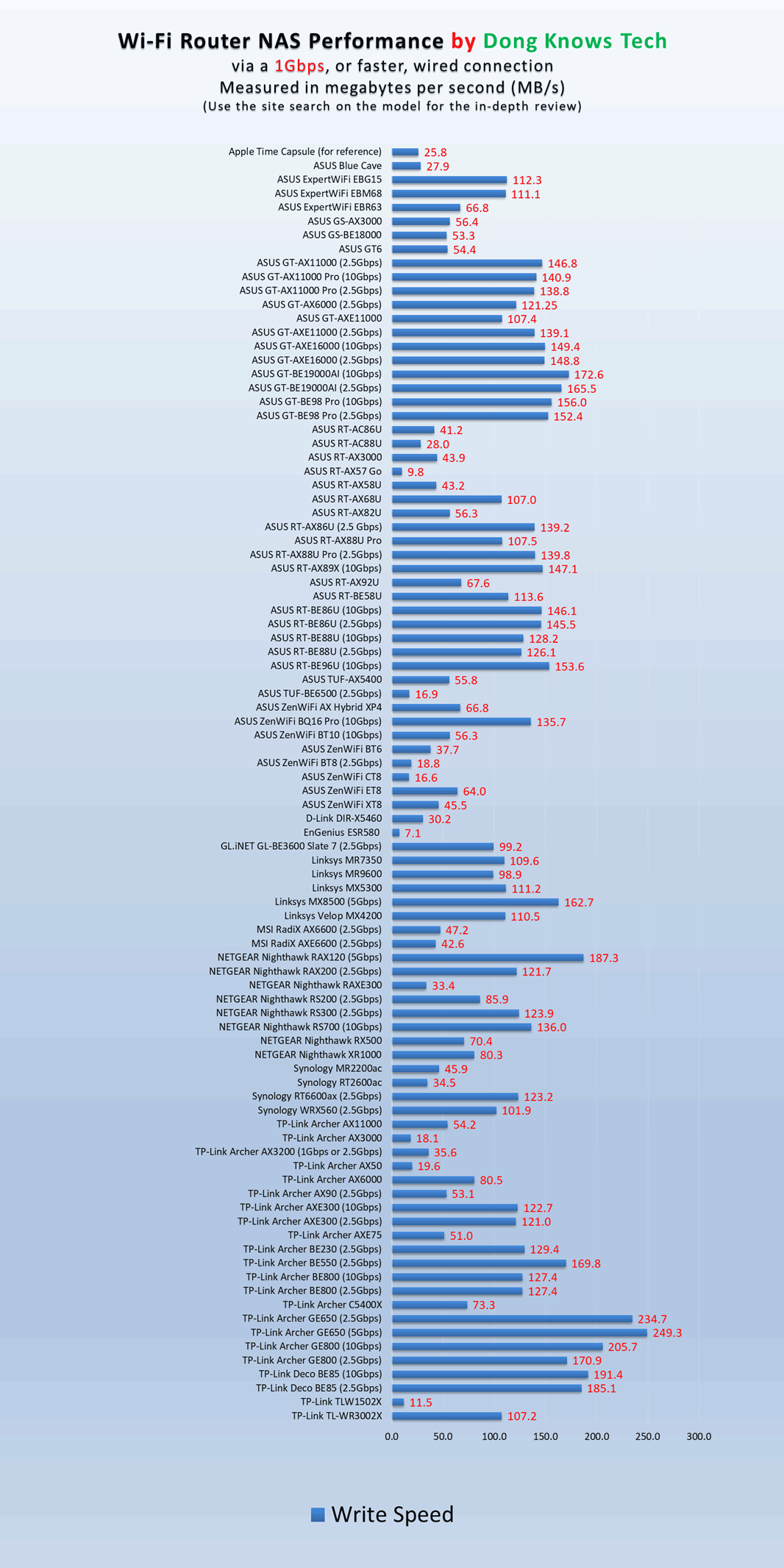
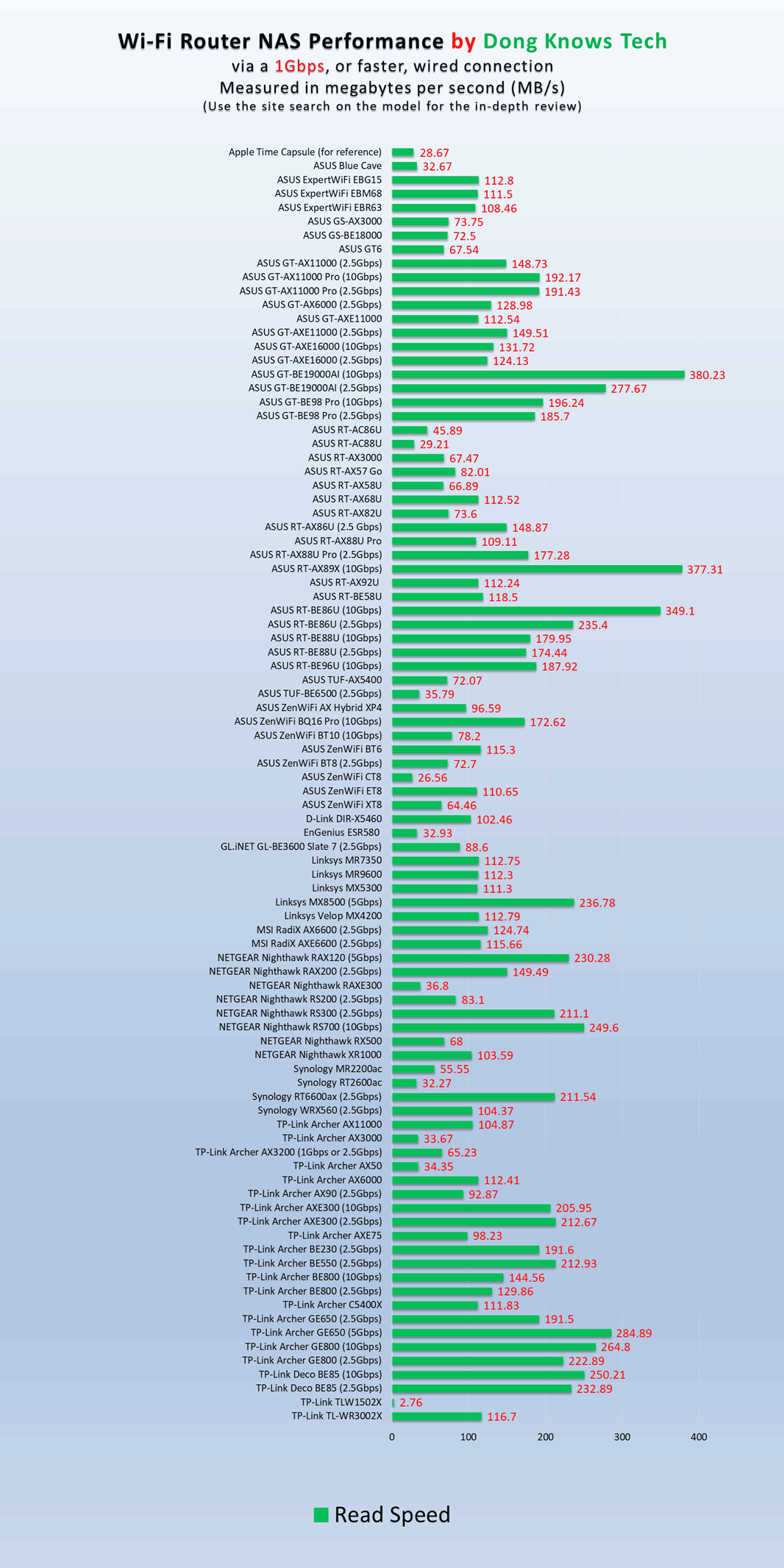
I generally test all routers’ NAS functions via wired connections using all available port grades—Gigabit and Multi-Gig. To reduce the number of entries, the charts above show only the performance numbers tested via a Multi-Gig connection for routers that support it.
As for storage devices, I’ve always used USB 3.2 Gen 2 (10Gbps) or faster portable SSDs, which are much faster than the router’s USB ports—most routers use USB 3.2 Gen 1 (a.k.a USB 3.0) with a 5Gbps max ceiling speed.
Note that the scores on the chart are in megabytes per second (MB/s), not megabits (Mbps). (The latter is generally used for network connection speed.) Open the drawer below if you’re new to digital data and connection speeds.
Digital storage and data transmission in brief
The phrase “Dong Knows Tech” (no quotes), when digitized, consists of the following binary string, which varies depending on what application you use to code:
01000100 01101111 01101110 01100111 00100000 01001011 01101110 01101111 01110111 01110011 00100000 01010100 01100101 01100011 01101000Each digit in the string equals a bit, which is short for “binary digit“, which is the lowest unit of data storage. The spaces between eight-digit groups are there only to make the whole string less mind-boggling. They also help separate the more common data unit, a byte. One byte (B) equals eight bits (b).
As you might have noticed, each character on the screen, including the space between two words, generally requires one byte of data. On top of that, formatting, font size, and colors also require additional bytes to store.
So, we need a lot of bytes—often in thousands or kilobytes (KB), millions or megabytes (MB), billions or gigabytes (GB), trillions or terabytes (TB)—to store data. As a result, byte is used to convey:
- Storage space, such as a 32GB thumb drive, a 128GB microSD card, or a 4TB SSD.
- Data copy speed per second (often MB/s or GB/s). For example, a USB 3.2 Gen 2 portable SSD drive can have copy speeds of up to 1000MB/s.
For data transmission, we use bits per second, often in millions (1,000,000) or megabits per second (Mbps) or in billions or gigabits per second (Gbps). Based on that, the following are common terms:
- Fast Ethernet: A connection standard that can deliver up to 100Mbps.
- Gigabit: That’s short for the Gigabit Ethernet (GbE) standard and generally means transmission speeds in gigabits per second.
- Gig+: A connection that’s faster than 1Gbps but slower than 2Gbps. It often applies to 2×2 Wi-Fi 6/6E or broadband Internet speeds.
- Multi-Gigabit: A link that’s 2Gbps or faster. This often applies to Multi-Gig or Wi-Fi 7 hardware.
- Multi-Gig: A new BASE-T wired connection standard that delivers 2.5GbE, 5GbE, or 10GbE over CAT5e (or a higher grade) network cables, depending on the devices involved, and is also backward compatible with Fast Ethernet and Gigabit.
Best Wi-Fi router NAS solutions: The top five options and their similar alternatives
This list is sorted according to my preference, with the most recommended on top—the numbers are their ranking.
1. GT-BE19000AI: Representing ASUS’s full-band NAS-ready routers
The GT-BE19000AI is ASUS’s top-tier tri-band Wi-Fi 7 router. Besides the over-the-top hardware specs and support for Edge AI and Docker apps, this beast of a Wi-Fi machine also comes with two USB ports and plenty of Multi-Gig ports to deliver the fastest NAS performance to date when hosting a portable SSD.
Similar alternaives among ASUS’s full-band routers:
Pros
Top-tier Wi-Fi 7 with excellent real-world performance
Refined ASUSWRT 6.0 firmware with lots of free, in-depth, and valuable features and settings (advanced VPN, AiProtection online protection, Parental Control, adblocking, virtual SSDs, AI-enabled gaming-related features, and AiMesh)
Two 10Gbps and four 2.5Gbps Multi-Gig ports with WAN/LAN flexibility; supports Dual-WAN and LAN Link Aggregations
No vendor required login account, silent performer, runs relatively cool
Cons
Bulky design, buggy Docker support (at launch), not wall-mount-ready
AFC unavailable (at launch)
2. RT-BE86U: Representing ASUS’s dual-band NAS-ready routers
The RT-BE86U is one of ASUS’s long list of dual-band Wi-Fi 7 routers. Currently, it’s the fastest among its peers in NAS read speed performance when hosting a portable SSD.
Like all ASUS routers, the RT-BE86U has all available eUSB-related features and applications, including local and cloud-based data sharing, a PC-less download feature, Time Machine backup, and much more.
Similarly excellent dual-band alternatives from ASUS:
Pros
Top-tier dual-band Wi-Fi with MLO support and excellent real-world performance
Tons of valuable features, including AiMesh 2.0, Gaming, Guest Network Pro, and VLAN
One 10Gbps and four 2.5Gbps flexible network ports with Dual-WAN and Link Aggregation support
Universal setting backup and restoration; open source firmware; fanless design
Relatively compact design, comparatively affordable
3. Archer GE650: Representing TP-Link’s NAS-ready routers

The Archer GE650 is a smaller and supposedly lesser version of the Archer GE800, which was previously on this list. However, it’s a better router, all things considered. Like the bigger cousin, it’s also a true gaming router from TP-Link. Most importantly, it forgoes all Gigabit ports and only includes multi-Gigabit wired connections, including two 5GbE and three 2.5GbE ports. That and a USB 3.2 Gen 1 (5Gbps) port translate into a robust network storage solution.
Other similar alternatives from TP-Link on the network storage front:
Pros
Excellent performance for the specs.
Two 5GBASE-T, three 2.5GBASE-T ports in a compact, fanless, cool-looking design
Robust web user interface with a generous set of free network features, including MLO and gaming-related functions
Competitively priced, EasyMesh-ready
Cons
No 10Gbps ports, mid-tier Wi-Fi 7 specs, no AFC
Online protection and advanced parental controls require subscriptions
4. Nighthawk RS700S: Representing NETGEAR USB-enabled routers
The RS700S is NETGEAR’s first standalone router with two 10Gbps ports—it’s also the networking vendor’s first Wi-Fi 7 router. That, plus the USB 3.0 ports, makes it an excellent mini NAS server for hosting a portable SSD.
Like most NETGEAR Nighthawk routers, the RS700S’ network storage features include hosting a file server and a DLNA media streaming server.
You can share that locally or via FPT over the Internet. The router also supports local backup for Windows and Mac’s Time Machine.
An alternative worth considering:
Pros
Top-tier tri-band specs with Wi-Fi 7 support
Two 10Gbps Multi-Gig ports
Robust web interface, helpful (optional) mobile app
Practical fanless design; runs cool and quiet
Cons
Only two Multi-Gig ports; no standard Remote Management via Dynamic DNS
Online protection and Parental Controls require the Nighthawk mobile app and premium subscriptions
5. RT6600ax: Representing Synology as a major NAS maker

The Synology RT6600ax isn’t the fastest in NAS performance—though its performance is up there—but it has a comprehensive network storage feature similar to that of a Synology server.
This network feature persists in most Synology routers. If you only care about that, also consider the following alternatives:
Pros
Fast and reliable Wi-Fi with support for 5.9GHz UNII-4 spectrum, mesh-ready
Robust, comprehensive, yet user-friendly SRM 1.3 firmware with excellent web interface and DS Router app
Lots of useful built-in settings and networking features, helpful add-on packages with accompanying mobile apps
Can work as a full-featured NAS server
Practical design, wall-mount-ready
Cons
No Link Aggregation, awkward Multi-Gig WAN, rigid default WAN port
Only client-based QoS, 5.9GHz clients are scarce
The final thoughts
All of the routers above will work well as a mini NAS solution. Apart from them, any of the others mentioned in the charts at the beginning of the post will work, albeit with slower performance.
In any case, remember that you’re using a router whose primary function is to deliver network performance. The storage portion is not its primary function. If you’re serious about network storage, consider a real NAS server.
