

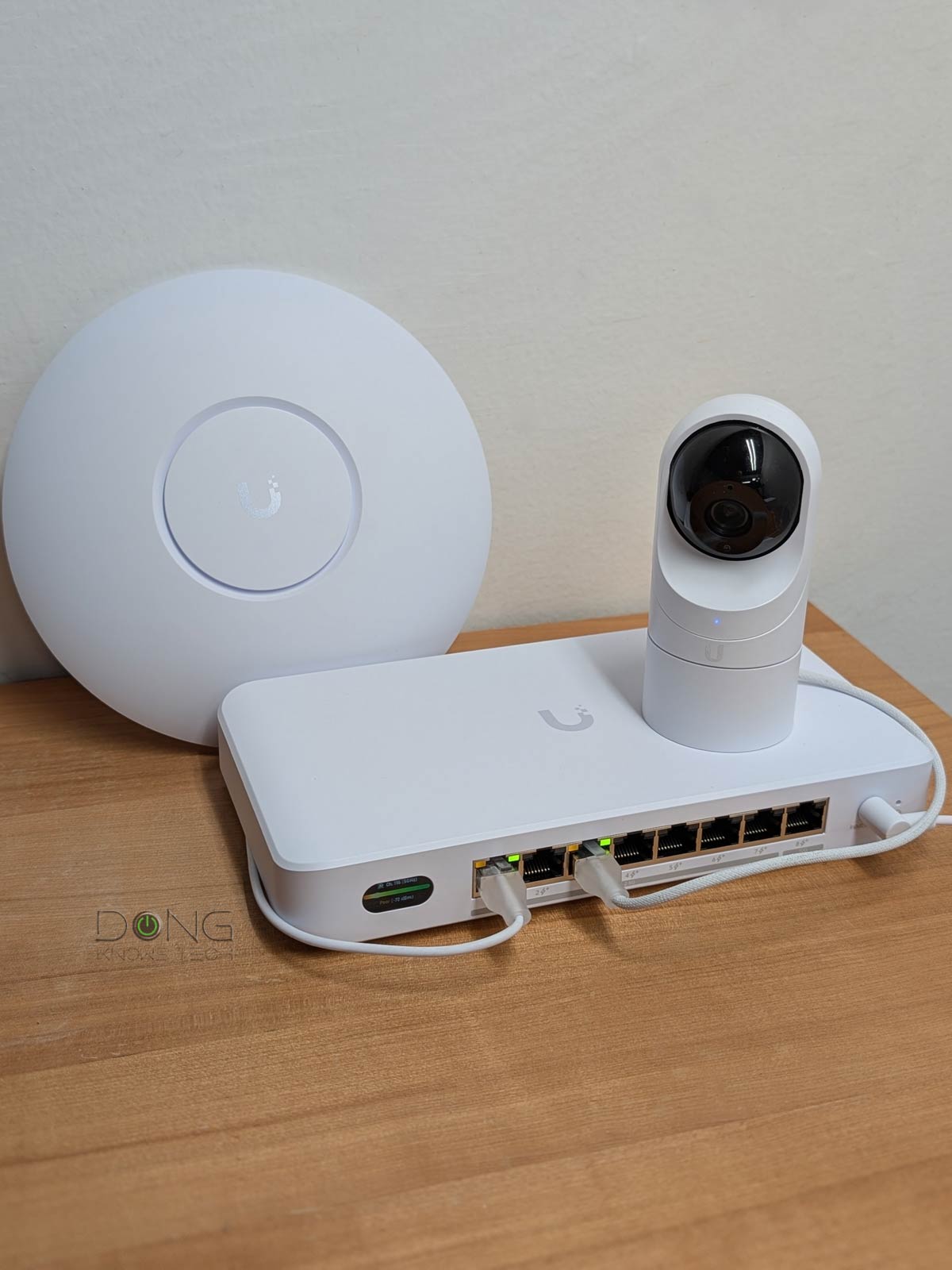

The UniFi Device Bridge Switch (a.k.a. UDB Switch, model UDB-Switch) announced by Ubiquiti today is a unique PoE network switch—it’s more than a typical one. Besides being a standard PoE unmanaged switch, it can also use Wi-Fi as the uplink in a UniFi environment. And that flexibility can be a game-changer.
Here’s the bottom line: The UDB Switch is a versatile device that combines a Multi-Gig PoE+ switch and a fast Wi-Fi 7 media bridge in a compact hardware box. The result is a solution that has more than enough to justify the suggested retail price of $299.
Suppose you already have a Wi-Fi network powered by UniFi cloud gateway and want to hook multiple (UniFi) PoE cameras, or any PoE device for that matter, at the far end of a property, without using network cables. In that case, the UDB Switch makes life much easier. Get one today!

Ubiquiti UniFi Device Bridge Switch: A versatile PoE+ switch with Wi-Fi uplink
Out of the box, Ubiquiti’s UDB Switch looks like a typical 8-port PoE Multi-Gig switch with one 10Gbps and seven 2.5Gbps ports—and can work as one as mentioned below. It’s about the size of the Flex 2.5G PoE, which itself is a special switch thanks to the PoE Power Forwarding function.
The UDB Switch has no power forwarding, but something else equally noteworthy: a built-in Wi-Fi 7 receiver, allowing it to connect to an existing UniFi network wirelessly.
This wireless uplink option, which supports Wi-Fi 7, means you won’t need to use any of its 8 PoE+ ports for the wired uplink. As a result, you can connect multiple PoE devices to an existing network without running network cable in areas where the job is difficult.
Other than that, all of its ports—including one Multi-Gig 10Gbps port and seven 2.5Gbps Multi-Gig ports—support PoE+. They don’t feature Etherlighting, which allows for programmable port lighting for easy identification, unlike some other UniFi switches. The table below compares the UDB Switch’s full hardware specs with Ubiquiti’s other PoE switch, the Flex 2.5G PoE.


Ubiquiti Device Bridge Switch: Hardware specifications
 |
 |
|
|---|---|---|
| Full Name | Device Bridge Switch | Ubiquiti 8-Port Flex 2.5G PoE Switch |
| Model | UDB-Switch | USW-Flex-2.5G-8-PoE |
| Dimensions (W x D x H) |
8.38 x 4.45 x 1.28 in (212.9 x 113 x 32.5 mm) |
8.4 x 3.9 x 1.3 in (212.9 x 99.4 x 33.5 mm) |
| Weight | 1.21 lb (548 g) |
20 oz (567 g) |
| Design | Desktop with mounting accessories | |
| Etherlighting | No | |
| Gigabit Port | None | |
| Multi-Gig Port | 7x 2.5Gbps Multi-Gig and 1x 10Gbps Multi-Gig |
8x 2.5Gbps Multi-Gig and 1x SFP+/10Gbps Multi-Gig |
| PoE-out Port | 8x IEEE 802.3at (PoE+) | 8x IEEE 802.3at (PoE++) |
| PoE-in Port | None | 1x 10Gbps Multi-Gig PoE+++ |
| PoE Power Forwarding | No | Yes |
| Max Available PoE Power Budget (for clients) |
35W via 60W power adapter (included), 185W via 210W power adapter |
Via PoE+++ input: 76W Via PoE++ input: 46W Via PoE+ input: 16W Via 210W AC adapter input: 196W |
| Max. PoE Wattage per port as a PSE (allowed by the power budget) |
PoE: 15.4W PoE+: 30W |
PoE: 15.4W PoE+: 30W PoE++: 60W |
| Switching Capacity | 60Gbps | |
| Wi-Fi Bridge Function | Yes | No |
| Wi-Fi Specs | 5GHz: 2×2 Wi-Fi 7 with up to 4.3Gbps (20/40/80/160/240MHz) 6GHz: 2×2 Wi-Fi 7 with up to 5.8Gbps (20/40/80/160/320MHz) |
None |
| Wi-Fi Broadcasting Power and Antenna Gain | 5GHz: 26 dBm / 8 dBi 6GHz: 23 dBm / 8 dBi |
N/A |
| Touchscreen | .9 inch | None |
| Management | Via UniFi-OS Controller | |
| Power Supply | 60W (54V 1.1A) power adapter included, 210W power adapter (purchasable) |
External AC/DC adapter (not included), PoE++ switch or injector (not included) |
| Power Consumption (per 24 hours—no PoE devices) |
≈ 280 Wh | N/A (tested via PoE-in port) |
| US Price (at launch) |
$299 | $199 |
Plug-and-play as a standard PoE switch
The UDB Switch, by default, is a typical unmanaged PoE switch. In this case, you can use any port for the uplink role, though conventionally it’s best to use the highest-grade port, the sole 10Gbps.. In this case, it’s dead easy to use:
- Connect one of its ports to the existing router (or switch), and it’ll work as the uplink.
- Plug it into power, and the remaining ports will now be ready to host up to 7 wired (PoE) clients.
In this standard usage, the UDB Switch proved to be completely plug-and-play. All you have to do is what is described above, and, in my experience, the switch took about a minute to get ready. Also, it’ll work with all existing networks, including those powered by a third-party router. When connected to a UniFi network, it can be “adopted” by the UniFi Cloud Gateway (the router) to be part of the system, just like any other UniFi device.
It’s worth noting that when used in this setup, the UDB Switch’s Wi-Fi portion can’t act as an access point—it’s not used at all. Specifically, its built-in Wi-Fi is only for client mode, or, as Ubiquiti calls it, “dedicated bridge” mode. This is not a huge deal, since you should get a UniFi access point if you want one anyway.
However, the UDB Switch’s novelty is its Wi-Fi uplink. In this case, it’s applicable only to those with a UniFi network.
UniFi WiFi Auto-Link required
Using the UDB Switch with Wi-Fi uplink is simple enough. Per my experience, and confirmed by Ubiquiti, there are a couple of things to keep in mind:
- The Wi-Fi uplink requires the UniFi WiFi Auto-Link feature, introduced with UniFi Network 7, and therefore is applicable only when you have a network powered by a UniFi Cloud Gateway.
- The switch doesn’t support MLO yet (it will via future firmware updates, per Ubiquiti), and it doesn’t support the 2.4GHz band. That said, for now, it’ll connect to an existing network via a 5GHz or a 6GHz connection.

Other than that, the process for setting up the UDB Switch via Wi-Fi uplink was the same as adding any UniFi device to a network, though it took me a bit longer than the wired uplink mode mentioned above. Here are the specific steps:
- Place the switch within the coverage of the current UniFi Network’s Wi-Fi.
- Plug it into power and wait for it to boot up, which takes about a minute.
- Either run the UniFi app or, from a network computer, open the web user interface of the UniFi Cloud Gateway that hosts the network. The UDB Switch will be automatically detected and can be adopted via a tap (or a mouse click).
The adtopping process took over 10 minutes in my trial, including the time it took for the switch to restart. After that, it’ll become ready to host more wired devices. With Wi-Fi uplink, the UDB Switch can host up to 8 wired devices.
A note on PoE power budget
As mentioned, the UDB Switch has eight PoE+ ports, each capable of delivering up to 30W of power. However, it includes a 60W adapter. As a result, after powering itself, it has only 35W of budget for all of its PoE ports.
While that’s enough for multiple lower-power PoE devices—I tested it with a U7 Lite access point and a G3 Flex camera without any issue—if you want to use multiple high-power PoE+ devices, you’ll need to buy a 210W power adapter, which brings its power budget to 185W.
No matter which power adapter you use, the UDB Switch can’t host a PoE++ device, such as the UNAS 2—I tried, and the NAS server failed to boot up fully. In other words, at best, you can only use the switch to power a PoE device with a 30W maximum power requirement. The good news is that the majority of PoE devices on the market require much lower power than that.


Ubiquiti UniFi Device Bridge UDB Switch: Fast and reliable performance
I tested the UDB Switch for a couple of days and was happy with its performance.
In a wired setup, it delivers the same performance as the 2.5Gbps port grade, sustaining around 2.4Gbps. The switch has only one 10Gbps port—a second port is needed for it to deliver a 10Gbps connection.

As for Wi-Fi backhauling, I tested the UDB Switch in a network hosted by a UCG Fiber and a few UniFi access points, including an E7 and a U7 XGS. The sustained backhaul bandwidth varied between 400Mbps and around 2.3Gbps, depending on the distance (and obstacles), which is generally fast enough in most cases, especially if you only want to host PoE cameras.
The numbers in the chart above were from my standardized test. For the wireless backhaul (WB) test, the switch was placed 40 feet (13 meters) from the U7 XGS, in line of sight, and connected via the 5GHz band.
The UDB Switch seems to have no internal fan—it didn’t open it up to make sure—and it was utterly silent during my testing. It also ran relatively cool, only slightly warm to the touch.

Pros
Eight Multi-Gig PoE+ ports in a compact design
Plug-and-play as an unmanaged switch with the option to use Wi-Fi 7 as the uplink and advanced port options when coupled with a UniFi cloud gateway
Cons
Wi-Fi uplink requires UniFi Network, can’t work as an access point, no local web user interface
High-wattage power adapter not included
Single 10Gbps port, no Etherlighting
Conclusion
The Ubiquiti UniFi Device Bridge UDB Switch is a unique solution for those who want to use Wi-Fi to bridge the connection to multiple PoE devices. Come to think of it, it’s a perfect fit for those looking to extend Ubiquiti’s Protect camera security surveillance system on a large property where running long network cables isn’t feasible in certain areas. If that’s what you need, and you’re using a UniFi Network console, get this switch today!
Looking for a UniFi cloud gateway to use as your network’s router? Below is the top-five list.
