



TL;DR
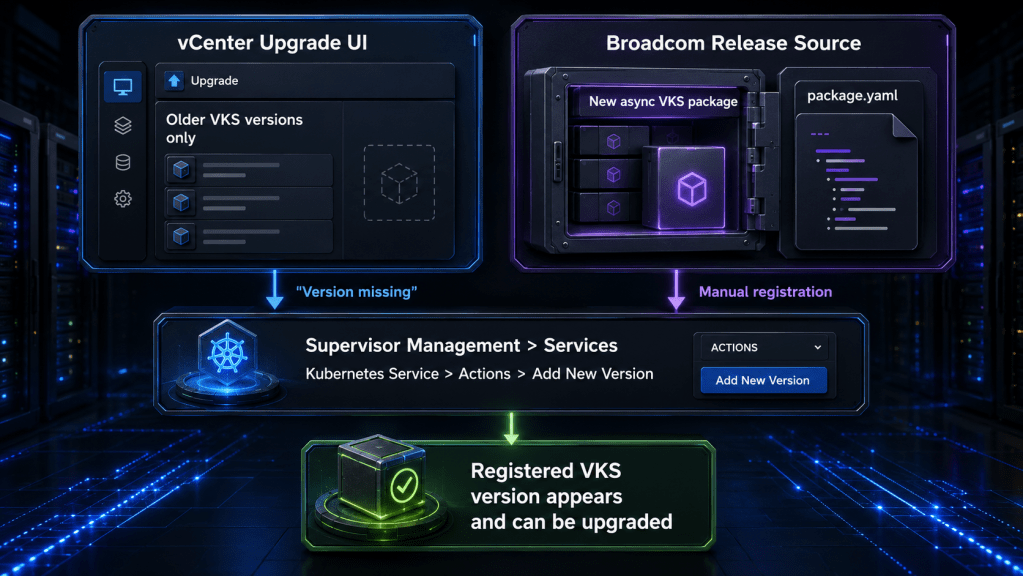
A newer VMware vSphere Kubernetes Service version may be fully released and still not appear in the vCenter upgrade dropdown. Broadcom KB 439327 explains that this is expected for asynchronous VKS releases. The dropdown automatically shows the VKS versions embedded in the installed vCenter build, while later asynchronous releases must be registered manually by uploading the release package.yaml file.
The practical runbook is straightforward: confirm that the missing item is the VKS Supervisor Service version, not a missing workload-cluster Kubernetes release; validate vCenter, Supervisor, and target-version compatibility; download the correct VKS package from the Broadcom Support Portal; register it under Supervisor Management > Services; then perform the VKS upgrade as a separate controlled change.
Introduction
The most confusing part of the VKS lifecycle is that the vCenter interface looks authoritative even when it is only showing a partial release inventory.
An administrator opens the Kubernetes Service tile, selects Actions > Upgrade, and sees only the versions that were already available with the installed vCenter build. A newer VKS release may exist, its release notes may be published, and support may recommend it, yet it remains absent from the dropdown.
That absence does not automatically mean the release is unsupported, the repository is broken, or vCenter has failed to synchronize. In many cases, it means the release was delivered asynchronously and has not yet been registered with that vCenter.
KB 439327 documents the behavior directly. Embedded, synchronous VKS packages appear automatically. Newer asynchronous packages require a manual registration step before the upgrade workflow can see them.
The operational lesson is larger than one missing dropdown entry: VKS now has a lifecycle that must be tracked separately from the broader vCenter and Supervisor release cadence, while still respecting compatibility across the entire stack.
Why the VKS Upgrade Dropdown Is Incomplete by Design
The VKS upgrade interface is not a live catalog of every VKS release available from Broadcom. It is a catalog of the service versions currently registered with that vCenter.
Some versions arrive as embedded packages with a particular vCenter build. Those versions are already known to the local Supervisor services framework and can appear automatically in the interface.
Other VKS versions are released asynchronously. They can be published after the vCenter build in your environment and do not become visible until an administrator downloads and uploads the corresponding package.yaml.
This creates two valid release paths:
| Release path | How the VKS version reaches vCenter | What the operator sees |
|---|---|---|
| Embedded or synchronous | Included with a specific vCenter build | Version appears automatically after the required platform sequence is complete |
| Asynchronous | Published separately from the installed vCenter build | Version remains absent until its package.yaml is manually registered |
Registration and upgrade are separate operations. Uploading package.yaml adds the VKS version to the service catalog. It does not, by itself, upgrade the active VKS service.
Do Not Confuse VKS, Supervisor, and Workload Kubernetes Versions
Before troubleshooting, identify which version is actually missing. Several related version layers appear in the same operational workflow, and treating them as one lifecycle leads to the wrong fix.
| Version layer | What it controls | Typical location | Common misunderstanding |
|---|---|---|---|
| vCenter Server build | Management plane and embedded service packages | vCenter About and lifecycle views | A newer vCenter build is assumed to be required for every VKS update |
| Supervisor Kubernetes version | Kubernetes control plane used by the Supervisor | Supervisor status and upgrade workflow | It is mistaken for the VKS service version |
| VKS Supervisor Service version | Cluster lifecycle service, APIs, controllers, and supported capabilities | Supervisor Management > Services > Kubernetes Service | A missing version is blamed on the workload-cluster content library |
| Kubernetes Release or VKr | Kubernetes version and image used by VKS workload clusters | Supervisor KubernetesRelease objects and cluster specifications | A missing VKr is mistaken for a missing VKS service package |
| Content library images | VM images required to create or update workload-cluster nodes | VKS content library and synchronization status | Registering VKS is expected to repair an unsynchronized image library |
The distinction matters because each failure has a different remediation.
A missing VKS service version is addressed by registering the VKS package.yaml. A missing VKr may require content-library synchronization. An unsupported workload-cluster upgrade path may require an intermediate Kubernetes release. An incompatible embedded package may require the Supervisor to be upgraded before the VKS service.
The Decision Path for a Missing Version
The first troubleshooting step is not to upload a file. It is to identify which inventory is incomplete.
What the diagram makes clear is that package.yaml registration solves one specific problem: the VKS service version is not registered with vCenter. It does not repair every missing Kubernetes version or bypass upgrade-path enforcement.
Scenario and Symptoms
This runbook applies when the environment shows one or more of the following symptoms:
- A newer VKS version is documented or available in the Broadcom Support Portal, but the vCenter VKS upgrade dropdown lists only older versions.
- The Kubernetes Service tile does not offer the target release under Actions > Upgrade.
- The installed vCenter build is older than the asynchronous VKS release date.
- Another environment has the newer VKS service registered, while this vCenter does not.
- The operator assumes that upgrading vCenter or refreshing the browser should make the release appear, but it remains absent.
This runbook does not assume that every published VKS version is valid for every vCenter and Supervisor combination. Registration makes a package available to the service framework. Compatibility still determines whether the version can be deployed.
Prerequisites and Safety Checks
Treat a VKS service update as a platform change, not as a harmless catalog refresh. The service controls workload-cluster lifecycle operations, and a failed or incompatible update can affect cluster provisioning and upgrades.
Before registering or upgrading the VKS service, record the following:
- Current vCenter Server version and build.
- Current Supervisor Kubernetes version and health.
- Current VKS Supervisor Service version.
- Target VKS version.
- Current workload-cluster Kubernetes releases.
- Cluster API and ClusterClass versions in use.
- Network implementation, including NSX or the applicable VDS-based design.
- VKS content-library health and most recent successful synchronization.
- Backup status for stateful workload clusters.
- Maintenance window, escalation owner, and support entitlement.
Also review the target VKS release notes, the relevant compatibility matrices, and any known issues that apply to the current Supervisor and workload-cluster versions.
For larger estates or high-risk production upgrades, consider opening a proactive upgrade case with Broadcom Support before the change window. Broadcom’s published process asks for the current and target Supervisor, VKS, VKr, operating-system, ClusterClass, networking, backup, and health details because those dependencies determine whether the upgrade is routine or risky.
Confirm the Current VKS and Supervisor State
Start in the vSphere Client.
Navigate to:
Supervisor Management > Services
Locate the Kubernetes Service tile and record the installed version and health state. Depending on the vSphere generation and interface terminology, older environments or documentation may refer to Workload Management > Services.
From an authenticated Supervisor context, the following commands provide a useful pre-change snapshot:
kubectl get pkgi -n vmware-system-supervisor-services
kubectl get cluster -A
kubectl get kcp,md,machine -A
kubectl get pods -A | grep -v Running
kubectl get kr
What these commands provide:
pkgishows installed Supervisor service packages and their reconciliation state.cluster,kcp,md, andmachineexpose workload-cluster control-plane and worker health.- The pod check highlights Supervisor system workloads that are not currently running.
krlists available KubernetesRelease objects used by newer VKS versions. Older environments may still use TKR terminology.
Successful output does not mean the upgrade is automatically safe. It establishes a baseline that can be compared with the post-upgrade state.
Find the Newer Asynchronous VKS Release
Do not use the vCenter dropdown as the source of truth for release discovery.
Use the current VKS release documentation and the Broadcom Support Portal to identify the intended target. Confirm that the package belongs to VMware vSphere Kubernetes Service or vSphere Supervisor Services and matches the target release you have approved.
Download the corresponding VKS package.yaml file. Preserve the original filename and record a local file hash as part of the change record so the exact artifact can be identified later.
Before upload, confirm:
- The target version is newer than the installed VKS version.
- The release is intended for the current platform family.
- The required vCenter and Supervisor levels are satisfied.
- The package is not a workload-cluster image or a standard-package repository manifest.
- The artifact came from the authorized Broadcom download location.
- The release notes do not require a platform sequence or intermediate upgrade that has not been completed.
Do not rename or edit the YAML unless Broadcom documentation explicitly instructs you to do so. The package is a release artifact, not a configuration template.
Register the New VKS Version in vCenter
Once the package has been validated, register it with the local vCenter.
In the vSphere Client:
- Navigate to Supervisor Management > Services.
- Locate the Kubernetes Service tile.
- Select Actions > Add New Version.
- Upload the downloaded VKS
package.yaml. - Allow vCenter to process and register the service package.
- Refresh the Services view.
- Confirm that the target VKS version is now listed as an available service version.
At this point, the package is registered. The active VKS service has not necessarily changed.
Record the registration task result and any warnings. If the target version does not appear, do not repeatedly upload the same package without understanding the failure. Check the task details, permissions, package identity, and platform compatibility first.
Upgrade the VKS Supervisor Service
After registration, return to the Kubernetes Service tile.
- Select Actions > Upgrade.
- Choose the newly registered VKS version.
- Review the compatibility and impact information presented by the interface.
- Start the upgrade during the approved maintenance window.
- Monitor the vCenter task and the Kubernetes Service tile until reconciliation completes.
- Do not begin workload-cluster upgrades until the VKS service is healthy.
The VKS service update is separate from upgrading the workload clusters it manages. Completing the service update may make additional cluster capabilities or Kubernetes releases usable, but each workload cluster still needs its own supported upgrade path and validation.
Validate the Registration and Upgrade
Validation should prove more than the fact that the task reached 100 percent.
Validate the Service Tile
Confirm that:
- The Kubernetes Service tile reports the target VKS version.
- The service health is normal.
- No pending or failed upgrade action remains.
- The expected version is available consistently after logging out and back in.
Validate Supervisor Service Reconciliation
Run:
kubectl get pkgi -n vmware-system-supervisor-services
kubectl get pods -A | grep -v Running
Expected result:
- The VKS-related package installation reports a reconciled or successful state.
- No new Supervisor system pods remain failed, pending, or crash-looping.
Investigate any non-running pod rather than assuming it is unrelated. Capture describe output and logs before restarting or deleting resources.
Validate Workload-Cluster Management
Run:
kubectl get cluster -A
kubectl get kcp,md,machine -A
kubectl get kr
Confirm that:
- Existing workload clusters remain healthy.
- Control-plane and worker machine objects are stable.
- The KubernetesRelease inventory is present.
- The expected target release path is available before attempting a cluster update.
A healthy VKS service does not guarantee that every workload cluster can jump directly to the newest Kubernetes version.
Perform a Low-Risk Functional Check
Where change policy allows, perform one low-impact lifecycle action in a non-production namespace or test cluster. Examples include reading cluster status, reconciling a test cluster specification without changing its version, or creating and deleting a small test persistent volume claim.
The purpose is to validate the complete management path, including identity, API access, cluster controllers, storage integration, and event processing.
Troubleshooting Common Failure Modes
The Package Upload Completes but the Version Does Not Appear
Check:
- Whether the YAML is the VKS service package for the intended release.
- Whether the version is already registered.
- Whether the account has sufficient Supervisor service privileges.
- Whether the vCenter task reported a parsing, validation, compatibility, or service-registration error.
- Whether the browser is showing stale session data.
- Whether the package is intended for another platform generation.
Do not modify the manifest to force registration. Preserve the task details and artifact, then escalate with the exact current and target versions.
The Embedded VKS Version Is Visible but Reports Incompatible
This can happen when the vCenter upgrade has introduced an embedded VKS package but the Supervisor has not yet completed the platform sequence required to use it.
Broadcom documents the sequence for this condition as:
If the Supervisor is still at the earlier level, complete the supported Supervisor upgrade before attempting the embedded VKS update. In environments where the embedded package was not pulled automatically, Broadcom documents manually applying the VKS YAML as an asynchronous registration path.
VKS Is Current but Newer Workload Kubernetes Releases Are Missing
This is a different problem.
If kubectl get kr shows only older releases, verify that the VKS content library is reachable and synchronized. DNS, routing, firewall, proxy, storage, or repository reachability problems can prevent vCenter from retrieving the newer workload-cluster images.
Registering another VKS service package will not repair a failed content-library synchronization path.
A Workload-Cluster Upgrade Is Rejected as Unsupported
VKS enforces supported, non-regressive upgrade paths. A highly patched Kubernetes release may not be allowed to move directly to an early patch of the next minor release if doing so would remove fixes.
Inspect the current KubernetesRelease object and its destination semantic-version constraint. Select a target that satisfies the allowed range, or use an approved intermediate release.
Do not attempt to bypass the Cluster API admission webhook. The enforcement exists to prevent unsupported or regressive cluster transitions.
The Environment Is Disconnected or Uses a Private Registry
Air-gapped environments require additional planning for service images, workload-cluster images, and matching client plugins. Registering package.yaml is only the control-plane catalog step.
The required images and plugin bundles must also be available through the approved private-registry and internal-repository design. Validate that the VKS package, registry content, certificates, authentication, and network paths all align before starting the upgrade.
Rollback and Recovery Boundaries
Do not treat VKS rollback as the reverse of registration.
Registering an older package does not prove that an in-place service downgrade is supported. A service update can change controllers, APIs, schemas, and compatibility expectations. Unless the release documentation explicitly provides a downgrade procedure, treat rollback as a support-led recovery activity.
Before the upgrade:
- Preserve the current and target version inventory.
- Capture service and cluster health output.
- Confirm workload backups and recovery procedures.
- Record the exact package artifact and hash.
- Define the stop conditions for the maintenance window.
- Know how to collect Supervisor and workload-cluster support bundles.
- Identify the Broadcom case escalation path.
If the VKS upgrade fails:
- Stop further workload-cluster lifecycle changes.
- Preserve vCenter task details, service status, events, package-install status, pod state, and logs.
- Do not delete Supervisor service resources or edit package objects without documented guidance.
- Determine whether the service is still reconciling, failed before activation, or partially upgraded.
- Engage Broadcom Support with the current and target versions, timestamps, package artifact, network model, and collected evidence.
The operational goal is to avoid turning a recoverable service reconciliation problem into an unsupported manual repair.
Build VKS into the Platform Release Process
KB 439327 should change how platform teams track VKS releases.
Do not wait for the upgrade dropdown to tell you that a newer version exists. Add VKS to the platform release register as an independently monitored component.
A useful operating model includes:
| Control | Practical implementation |
|---|---|
| Release discovery | Review VKS release notes and Support Portal downloads on a defined cadence |
| Compatibility review | Map vCenter, Supervisor, VKS, ClusterClass, VKr, networking, and content-library dependencies |
| Artifact control | Store the approved package.yaml, hash, release notes, and change record |
| Pilot | Register and upgrade in a representative non-production Supervisor first |
| Validation | Compare pre-change and post-change service, pod, cluster, machine, storage, and release inventory |
| Production rollout | Use a controlled maintenance window with explicit stop conditions |
| Evidence retention | Preserve tasks, support bundles, command output, and upgrade results |
| Lifecycle ownership | Assign one team to track VKS separately from vCenter and Supervisor, while coordinating compatibility decisions |
The important distinction is independence without isolation. VKS can be released and upgraded asynchronously, but it still depends on the surrounding vSphere platform, Supervisor state, content distribution, cluster APIs, and workload version paths.
Conclusion
When a newer VKS version is missing from the vCenter upgrade interface, the interface may be working exactly as designed.
Versions embedded in the installed vCenter build are registered automatically. Newer asynchronous VKS releases require the administrator to download the release package.yaml and add it through the Kubernetes Service tile before the upgrade workflow can offer it.
The safe response is not to upload the first YAML file that appears to match. Confirm the missing layer, validate compatibility, capture the current platform state, register the correct VKS package, upgrade the service during a controlled window, and prove that the Supervisor and workload-cluster management paths remain healthy.
The broader operational change is to manage VKS as its own release stream. Track it independently, validate it with the full platform dependency chain, and never confuse VKS service registration with workload Kubernetes image distribution or cluster upgrade eligibility.
