


Everyone says Claude can’t make pictures. That’s partly true.
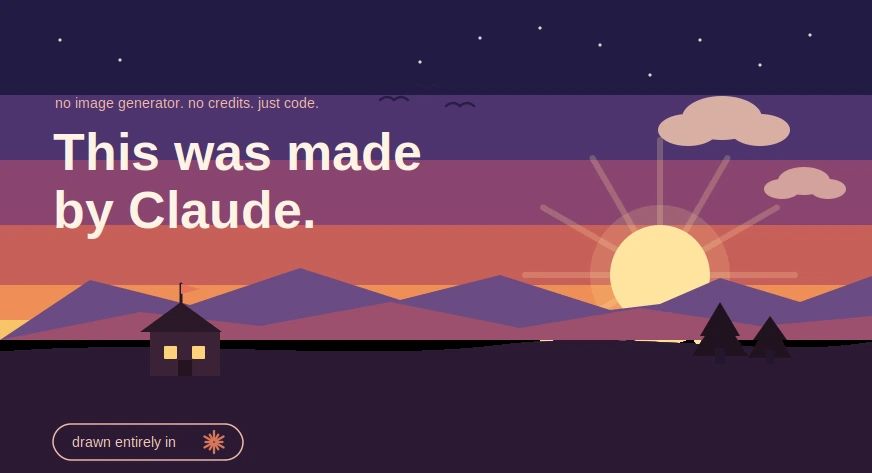
Here is the kind of art it makes on its own, with no plugins and no connectors:

Drawn by Claude in SVG, no image model anywhere near it. Not pixels but code: shapes and coordinates that stay sharp at any size and redraw themselves when you ask.
What follows is the full tour, with the exact prompts that made each piece, so you can see the range of Claude’s visual capabilities and try it yourself.
You have probably heard that Claude can’t make images. It is the one knock on it that never quite goes away. Open a chat, ask for a picture, and you will not get a photo back the way you would from Midjourney or the image tools baked into ChatGPT and Gemini.
That part is true, but is also half the story. There is a whole that Claude makes entirely on its own, with no connectors, no credits, and no signing up for some third-party tool. It draws. Not with pixels, but with code. And it carries one advantage that no image generator can match, which we will get to near the end.
Below is what that looks like, with the exact prompts that produced each piece. Everything you are about to see was drawn by Claude.
How it works, in one minute
When Claude makes a visual, it writes SVG. Instead of painting a grid of colored dots, SVG describes a picture as shapes and coordinates: a circle here, a line there, this color, that angle. It is a recipe for a drawing rather than a photograph of one.

Two useful things fall out of that. First, the art stays razor sharp at any size, because the shapes are recomputed instead of stretched. Second, and this is the part that matters most, you can change the picture by changing the words, which is the trick we will come back to.
The trade is honest: this is flat, graphic, vector-style work. Think logos, icons, diagrams, and editorial illustration, not photorealistic skin or painterly texture. Within that lane, though, the range is wider than most people expect.
The range (hands-on)
Here are five pieces, each made from a single plain-English request. The prompt sits under each one so you can try it yourself.
1. Single-weight line art

>
Draw a potted plant as minimalist single-weight line art. Black strokes only, no fill, rounded ends.
Pure outline, even line weight. The kind of thing that sits nicely at the top of a blog post or as a quiet section break.
2. Isometric, three-face shading

›
Make an isometric little house. Three shaded faces, warm windows, a small flag on top.
Isometric work is all angles and consistent shading, which is exactly the sort of math code is good at. Useful for product explainers and how-it-works graphics.
3. An icon set in one consistent style

›
Give me a flat weather icon set: sun, cloud, rain, snow, lightning. Keep one consistent style.
The win here is consistency. Ask for a set and you get shapes that share the same weight and spacing, which is the hard part to keep steady by hand.
4. A small data panel

›
Turn this into a clean bar chart: Mon 7, Tue 11, Wed 9, Thu 15, Fri 20. Highlight the best day.
Hand Claude numbers and it will lay out a chart with labels, a baseline, and a highlighted bar. Good for reports and slides where you want one tidy figure rather than a spreadsheet.
5. A flat character illustration

›
Draw a cute sitting fox in flat illustration style, warm palette, simple shapes.
Characters land too, as long as you keep them flat and graphic. This is where “vector” starts to feel like proper illustration rather than clip art.
The trick no image generator has
Here is the part worth the price of admission. With a normal image generator, a small change means rolling the dice again and hoping the next render keeps everything you liked. With Claude’s drawings, you just say what to change, and it edits the picture you already have.
Watch a plain mug pick up a few requests, one sentence at a time.
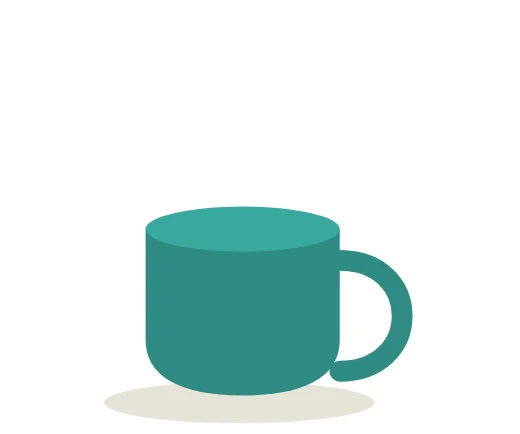

· make it coral instead
· add steam rising off the top
· give it polka dots and a little saucer
Three sentences, three edits, and the mug never lost its shape between steps. Try doing that cleanly with a text-to-image model.
This is the real reason to care. Claude does not just hand you a picture, it hands you a picture you can keep steering. The conversation is with the editor.
How to get good results
The difference between a flat “meh” and something you would publish usually comes down to how you ask. A few habits that help:
- Name the style: Say the words out loud: “flat vector,” “single-line art,” “isometric,” “editorial spot illustration.” Claude leans into a named look far better than a vague one.
- Set the mood: Give it a palette and a feeling. “Warm dusk colors, calm” beats “make it nice” every time.
- Ask for SVG: Request it as an SVG so you get the sharp, editable version rather than a one-off.
- Edit small: Change one thing per message. Small instructions keep the rest of the drawing intact.
- Ask for a set: Need icons or a series? Ask for them together so the style stays consistent across all of them.
Where it shines, where it doesn’t
| Reach for it | Skip it for |
|---|---|
|
|
Being clear about the ceiling is the whole point. Promise someone a painterly portrait and they will be let down. Show them a clean icon set, a chart, or the fox above, and they tend to be surprised it came out of a chat window at all.
The takeaway
Claude will not paint you a photo. But it will draw you something good, for free, the moment you ask, and then let you redirect it with a sentence. For a huge slice of everyday visual work, the headers, the icons, the diagrams, the little illustrations that make a page feel made rather than dumped, that is more than enough.
The fastest way to believe it is to open a chat and ask for one thing. Try “draw me a flat vector mountain scene at sunset as an SVG,” then tell it to warm up the sky. Watching the picture change on command is the moment it clicks.
Note: Every illustration in this article was drawn by Claude as SVG and rendered to image as-is. No image generator or connector was used to make them.
Frequently Asked Questions
A. Yes. Claude draws in SVG code—shapes and coordinates instead of pixels: producing logos, icons, diagrams, and flat illustrations with no plugins, connectors, or credits required.
A. Flat, graphic, vector-style work: single-line art, isometric drawings, icon sets, charts, and flat character illustrations. Not photorealism, painterly texture, or busy organic scenes.
A. SVG describes pictures as shapes, so art stays razor sharp at any size. Best of all, you edit it by changing words, not regenerating.
A. You can keep steering the same picture. Instead of rerolling and hoping, just say what to change and Claude edits the existing drawing directly.
A. Name the style, set a palette and mood, request SVG, edit one thing per message, and ask for sets together to keep style consistent.

I specialize in reviewing and refining AI-driven research, technical documentation, and content related to emerging AI technologies. My experience spans AI model training, data analysis, and information retrieval, allowing me to craft content that is both technically accurate and accessible.
Login to continue reading and enjoy expert-curated content.
