
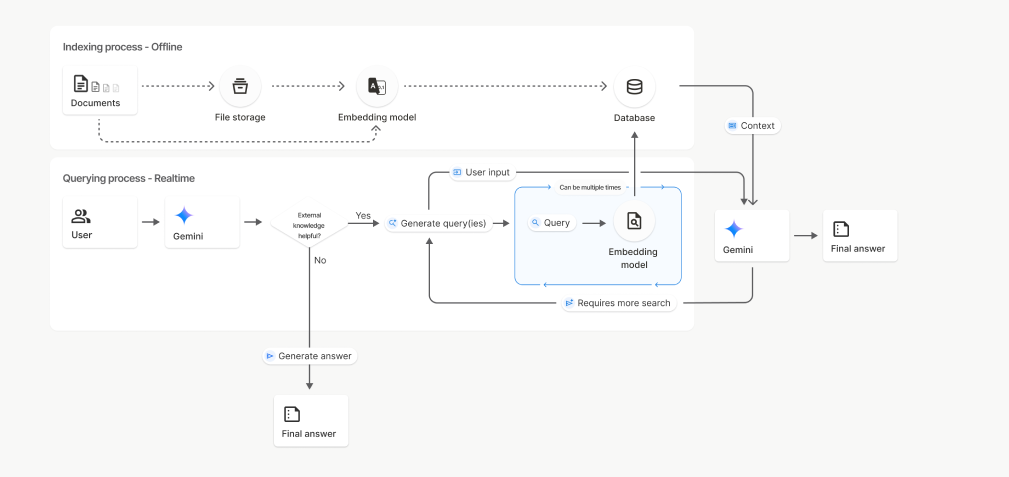

Building a RAG system just got much easier. Google has introduced File Search, a managed RAG feature for the Gemini API that handles the heavy lifting of connecting LLMs to your data. Forget managing chunking, embeddings, or vector databases: File Search does it all. This allows you to skip the infrastructure headaches and focus on what matters: creating a great application. In this guide, we’ll explore how File Search works and walk through its implementation with practical Python examples.
What File Search Does?
File Search enables Gemini to comprehend and reference information from proprietary data sources like reports, documents, and code files.
When a file is uploaded, the system separates the content into smaller pieces, known as chunks. It then creates an embedding, a numeric representation of meaning for each chunk and saves them in a File Search Store.
When a user asks a question, Gemini searches through these stored embeddings to find and pull the most relevant sections for context. This process allows Gemini to deliver accurate responses based on your specific information, which is a core component of RAG.
Also Read: Building an LLM Model using Google Gemini API
How File Search Works?
File Search is powered by semantic vector search. Instead of matching on words directly, it will find information based on meaning and context. This means that File Search can find you relevant information even if the wording of the query is different.
Time needed: 4 minutes
Here’s how it works step-by-step:
- Upload a file
The file will be broken up into smaller sections referred to as “chunks.”
- Embedding generation
Each chunk would be transformed into a numerical vector that represents the meaning of that chunk.
- Storage
The embeddings will be stored in a File Search Store, an embedded store designed specifically for retrieval.
- Query
When a user poses a question, File Search will transform that question into an embedding.
- Retrieval
The retrieval step will compare the question embedding with the stored embeddings and find which chunks are most similar (if any).
- Grounding
Relevant chunks are added to the prompt to the Gemini model so that the answer is grounded in the factual data from the documents.
This entire process is handled under the Gemini API. The developer does not have to manage any additional infrastructure or databases.
Setup Requirements
To utilize the File Search Tool, developers will need a few fundamental components. They will need to have Python 3.9 or newer, the google-genai client library, and a valid Gemini API key that has access to either gemini-2.5-pro or gemini-2.5-flash.
Install the client library by running:
pip install google-genai -U Then, set your environment variable for the API key:
export GOOGLE_API_KEY="your_api_key_here"Creating a File Search Store
A File Search Store is where Gemini saves and indexes embeddings created from your uploaded files. The embeddings encapsulate the meaning of your text, and they continue to be stored to the store when you delete the original file.
from google import genai from google.genai import types

client = genai.Client()

store = client.file_search_stores.create( config={'display_name': 'my_rag_store'} ) print("File Search Store created:", store.name)
Each project can have a total of 10 stores, with the base tier having store limits of 1 GB, and higher tier limits of 1 TB.
The store is a persistent object your indexed retain data in.
Upload a File
After the store is loaded, you can upload a file. When a file is uploaded, the File Search Tool will automatically chunk the file, generate embeddings and index for a fast retrieval process.
# Upload and import a file into the file search store, supply a unique file name which will be visible in citations

operation = client.file_search_stores.upload_to_file_search_store(

file="/content/Paper2Agent.pdf",

file_search_store_name=file_search_store.name,

config={

'display_name' : 'my_rag_store',

}

)

# Wait until import is complete

while not operation.done:

time.sleep(5)

operation = client.operations.get(operation)

print("File successfully uploaded and indexed.")
File Search supports PDF, DOCX, TXT, JSON, and programming files extending to .py and .js.
After the upload step, your file is chunked, embedded, and ready for retrieval.
Ask Questions About the File
Once indexed, Gemini can respond to inquiries based on your document. It finds the relevant sections from the File Search Store and uses those sections as context for the answer.
# Ask a question about the file

response = client.models.generate_content(

model="gemini-2.5-flash",

contents="""Summarize what's there in the research paper""",

config=types.GenerateContentConfig(

tools=[

types.Tool(file_search=types.FileSearch(

file_search_store_names=[file_search_store.name]

))

]

)

)

print("Model Response:\n")

print(response.text)
Here, File Search is being utilized as a tool inside generate_content(). The model first searches your stored embeddings, pulls the most relevant sections, and then generates an answer based on that context.
Customize Chunking
By default, File Search decides how to split files into chunks, but you can control this behavior for better search precision.
operation = client.file_search_stores.upload_to_file_search_store(
    file_search_store_name=file_search_store.name,
    file="path/to/your/file.txt",
    config={
        'chunking_config': {
            'white_space_config': {
                'max_tokens_per_chunk': 200,
                'max_overlap_tokens': 20
            }
        }
    }
)
This configuration sets each chunk to 200 tokens with 20 overlapping tokens for smoother context continuity. Shorter chunks give finer search results, while larger ones retain more overall meaning useful for research papers and code files.
Manage Your File Search Stores
You can easily list, view, and delete file search stores using the API.
print("\n Available File Search Stores:")

for s in client.file_search_stores.list():

print(" -", s.name)
# Get detailed info

details = client.file_search_stores.get(name=file_search_store.name)

print("\n Store Details:\n", details
# Delete the store (optional cleanup)

client.file_search_stores.delete(name=file_search_store.name, config={'force': True})

print("File Search Store deleted.")
These management options help keep your environment organized. Indexed data remains stored until manually deleted, while files uploaded through the temporary Files API are automatically removed after 48 hours.
Also Read: 12 Things You Can Do with the Free Gemini API
Pricing and Limits
The File Search Tool is intended to be simple and affordable for every developer. Each uploaded file can be as big as 100 MB, and you can make up to 10 file search stores per project. The free tier allows for 1 GB of total storage in file search stores, while the higher tiers allow for 10 GB, 100 GB, and 1 TB for Tier 1, Tier 2, and Tier 3, respectfully.
Indexing embeddings costs $0.15 per one million tokens processed, but both storage embeddings and embedding queries that index data at run-time are free. Retrieved document tokens are billed as regular context tokens if used in generation. Storage uses approximately 3 times your file size, since the embeddings are taking up extra space.
The File Search Tool was built for low-latency response times, and it will get back queries quick and reliably even if you have a large set of documents. This will ensure a smooth responsive experience for your retrievals and generative tasks.
Supported Models
File Search is available on both the Gemini 2.5 Pro and Gemini 2.5 Flash models. Both support grounding, metadata filtering, and citations. This means it can point to the precise sections of the documents utilized to formulate answers, adding accuracy and verification to responses.
Also Read: How to Access and Use the Gemini API?
Conclusion
The Gemini File Search Tool is designed to make RAG easier for everyone. It takes care of the complicated aspects, such as chunking, embedding, and searching directly within the Gemini API. Developers don’t have to create retrieval pipelines by themselves or work with an external database. After you have uploaded a file, everything is accomplished automatically.
With free storage, built-in citations, and quick response times, File Search helps you create grounded, dependable, and data-aware AI systems. It alleviates developers from anxious and meticulous building to save time while retaining firm control, accuracy, and integrity.
You can begin setting up File Search now at Google AI Studio, or from the Gemini API. It is a really easy, quick, and safe way to build robustly intelligent applications that utilize actual data responsibly.

Hi, I am Janvi, a passionate data science enthusiast currently working at Analytics Vidhya. My journey into the world of data began with a deep curiosity about how we can extract meaningful insights from complex datasets.
Login to continue reading and enjoy expert-curated content.
