


From Platform Capability to Operational Reality
VCF 9.1 gives VMware teams a stronger private AI story.
But having the platform capability is not the same thing as having an operating model.
That distinction matters.
A production AI platform needs more than GPU hosts and a few model endpoints. It needs clear consumption boundaries, network isolation, Kubernetes ownership, model runtime controls, data service patterns, observability, cost management, and automation.
VCF 9.1 adds several capabilities that support that direction, including Private AI Services, Supervisor-based deployment patterns, VPC networking options, AI metrics, real-time operations visibility, programmable APIs, and data services integration.
The practical question for platform teams is not, “Does VCF support AI?”
The better question is, “How do we design VCF so AI can be consumed safely, repeatedly, and supportably?”
That is the operating model conversation.
The Operating Model Starts With Boundaries
AI expands the blast radius of poor design.
A traditional application may need network access to a database, a few APIs, and a logging platform.
A RAG or agentic AI application may need access to:
- a model runtime
- a vector database
- internal document repositories
- an embedding service
- a prompt or inference gateway
- identity services
- logging and telemetry
- external or internal tools
- workflow systems
- business APIs
That creates a larger security and governance surface.
The platform should define boundaries before teams start deploying AI services.

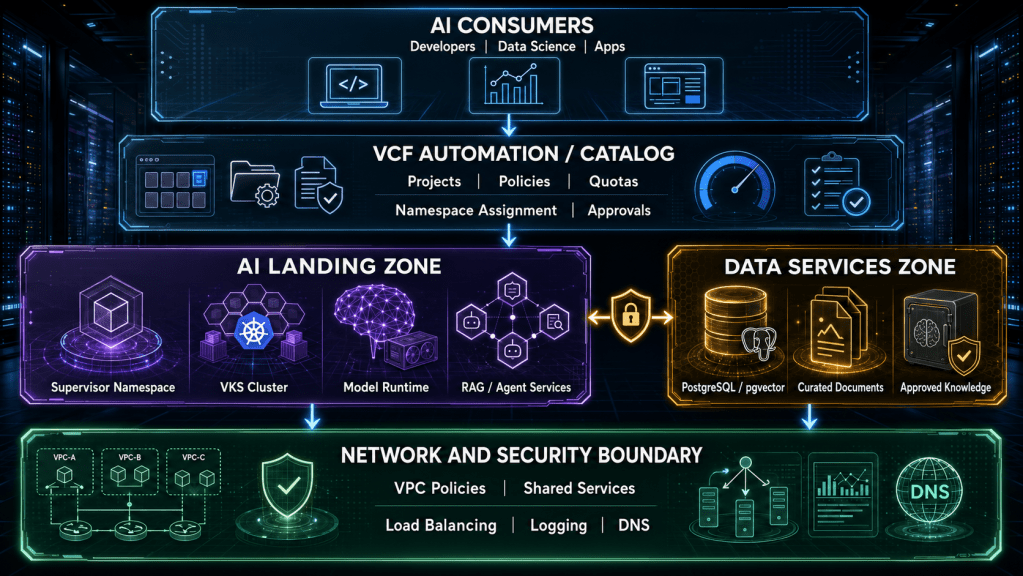
The important point is that AI should enter the platform through a governed landing zone.
A landing zone gives the organization a repeatable pattern for namespace placement, VPC segmentation, data access, model runtime deployment, monitoring, and support ownership.
Without that pattern, every AI project becomes a custom build.
Custom builds do not scale well.
Supervisor Design Becomes a Platform Decision
VCF Private AI Services relies on the vSphere Supervisor as a core foundation.
Broadcom describes the Supervisor as the Kubernetes control plane and resource management layer required to install and run Private AI Services. It also notes that organizations must choose a Supervisor networking stack when enabling AI workloads.
That makes Supervisor design a platform decision, not just a deployment step.
The design needs to answer:
| Design Question | Operational Impact |
|---|---|
| Which clusters will host AI workloads? | Determines GPU placement, capacity, and isolation. |
| Which Supervisor size is appropriate? | Affects control plane capacity and future scaling options. |
| Which networking stack will be used? | Determines self-service, segmentation, and future flexibility. |
| Which teams own Kubernetes operations? | Clarifies support boundaries between VMware and platform engineering teams. |
| Which namespaces map to which projects? | Controls tenancy, quotas, and access boundaries. |
The Supervisor becomes the bridge between traditional VMware infrastructure and Kubernetes-native AI consumption.
That bridge needs to be designed deliberately.
VPC Networking Should Be Treated as a Governance Layer
AI networking is not just connectivity.
It is governance.
Broadcom’s Private AI Services networking guidance describes two Supervisor networking options: VCF Networking with VPC and VDS-backed Supervisor networking with an external load balancer. The VPC model is positioned as the richer topology for self-service networking and security, while the VDS model may be simpler for certain environments or proof-of-concept deployments.
The choice matters because AI platforms usually move from experimentation to multi-tenant consumption faster than expected.
A proof of concept may only need a small model endpoint.
A production platform may need multiple project VPCs, shared services, restricted data zones, network policy, NAT, load balancing, and clear routing boundaries.
VCF 9.1 also introduces stronger VPC control patterns. Broadcom describes native cross-VPC communication control through Connectivity Policy, allowing teams to define how VPCs communicate without relying only on firewall rules.
That maps well to private AI.

The goal is not to manually firewall every flow.
The goal is to create repeatable network patterns where communication is intentional.
AI projects should not automatically see every data source, every tool, or every adjacent project.
VPC Network Span Helps Align Workloads to Physical Boundaries
AI workloads are not evenly distributed across the environment.
Some need GPU clusters. Some need regulated zones. Some need high-speed east-west paths. Some should stay away from shared general-purpose clusters.
That makes placement control important.
Broadcom describes VPC Network Span in VCF 9.1 as a way to define which vCenter clusters can see and host the subnets associated with a specific VPC. This allows virtual network boundaries to map more precisely to physical cluster boundaries.
For AI, this has practical value.
You may want:
- model-serving networks only on GPU clusters
- restricted RAG networks only in regulated zones
- external-facing AI applications only in edge or DMZ-aligned clusters
- shared services reachable across multiple projects
- development AI workloads separated from production AI workloads
This helps prevent the platform from stretching every network everywhere.
That matters for security, operational clarity, and physical network simplicity.
Model Runtime Is Only Part of the Stack
A model endpoint is not a complete AI platform.
The surrounding dependencies matter just as much.
A production AI service may require:
- approved model artifacts
- runtime configuration
- GPU allocation
- prompt or inference gateway
- RAG indexing
- vector database
- document ingestion
- identity integration
- network policy
- logs and metrics
- backup and recovery
- lifecycle management
Broadcom’s Private AI Services material lists capabilities such as Model Gallery, Model Runtime, Agent Builder, Data Indexing for RAG, API Gateway, and MCP Tools Registry.
That is important because enterprise AI needs more than model hosting.
The AI platform also has to control how models connect to data and tools.
This is especially important for agentic workloads. An agent that can call tools or query internal systems needs stronger governance than a simple chatbot prototype.
The platform should define which tools are approved, which teams can use them, how calls are logged, and how access is revoked.
Data Services Need to Be Designed Into the Platform
RAG and enterprise AI workflows usually depend on a data services layer.
That layer often includes PostgreSQL, pgvector, object storage, document repositories, ingestion workflows, and backup policies.
Broadcom’s Data Services Manager 9.1 material calls out PostgreSQL with pgvector support for AI workloads such as RAG, semantic search, and embeddings inside a VCF environment.
This matters because many AI projects fail between prototype and production.
The model may work. The demo may be impressive. The business may be interested.
Then the team discovers that production requires:
- supported database lifecycle management
- backup and restore
- encryption
- patching
- performance visibility
- access control
- retention policy
- data refresh workflows
- recovery procedures
- ownership clarity
A VCF AI operating model should include data services from the start.
Do not bolt them on after the first production incident.
Observability Must Include Model and Infrastructure Signals
Traditional infrastructure monitoring is not enough for AI.
A VM can be healthy. A host can be healthy. A cluster can be healthy.
The AI service can still be failing users.
The issue might be token latency, exhausted GPU memory, poor retrieval performance, overloaded model endpoints, slow embedding generation, or a broken data connector.
VCF 9.1 starts to address this with AI-specific observability. Broadcom describes model metrics such as cache utilization, tokens generated per request, token throughput, time to first token, and end-to-end request latency.
VCF Operations 9.1 also adds deeper operational visibility, including real-time observability with configurable collection down to short intervals for ESX hosts, centralized log management, diagnostics, Prometheus integration, and APIs that can support RAG pipelines and MCP frameworks.
A practical AI dashboard should connect multiple layers.
| Layer | Example Signals |
|---|---|
| User experience | Latency, errors, time to first token |
| Model runtime | Token throughput, request volume, cache utilization |
| GPU layer | GPU utilization, GPU memory pressure, placement |
| Kubernetes layer | Pod health, namespace quota, service status |
| Infrastructure layer | ESXi metrics, vSAN latency, network flows, host health |
| Cost layer | GPU allocation, project consumption, showback or chargeback |
Without this full-stack view, teams troubleshoot AI in silos.
The data science team sees model latency. The VMware team sees host metrics. The network team sees flows. The security team sees tool access.
Nobody sees the whole service.
That is the gap the operating model has to close.
Automation Becomes the Consumption Model
AI demand does not scale well through tickets.
If every model endpoint, namespace, VPC, GPU reservation, database dependency, and data connector requires a custom manual request, the platform will become a bottleneck.
Or worse, teams will route around it.
VCF 9.1’s API-first direction matters here. Broadcom describes VCF 9.1 as a unified, API-first private cloud platform with more consistent OpenAPI-based consumption across tools such as Python, Java, PowerCLI, and Terraform.
That is important because AI platform consumption should be repeatable.
A team should not have to invent a new deployment path for every use case.
A better model is to expose approved AI landing zones through automation.
This might include:
- a development AI sandbox
- a production model endpoint pattern
- a RAG application pattern
- a GPU-backed VKS cluster pattern
- a restricted data access pattern
- a shared services integration pattern
- a monitored and cost-tracked production AI pattern
The point is not to remove governance.
The point is to encode governance into the provisioning path.
Example AI Project Policy
The following YAML is not a VMware product schema. It is a practical design artifact that shows the type of intake and policy model platform teams should define before turning AI into self-service.
apiVersion: platform.dtd.example/v1
kind: PrivateAIProjectPolicy
metadata:
  name: claims-rag-prod
spec:
  owner: data-science
  environment: production

  vcf:
    supervisor: prod-supervisor-01
    namespace: ai-claims-prod

  network:
    vpc: vpc-ai-claims-prod
    connectivityPolicy: community-shared-services
    allowedToolGroups:
      - servicenow-readonly
      - postgres-vector-readonly

  resourceQuota:
    gpuClass: nvidia-production
    maxGpus: 2
    cpuLimit: 128
    memoryLimitGiB: 1024

  modelRuntime:
    allowedModels:
      - approved-enterprise-llm
    maxTokensPerRequest: 8192

  data:
    approvedKnowledgeSources:
      - claims-documents-redacted
      - policy-documents-approved
    piiMode: deny-training-allow-retrieval

  observability:
    requireModelMetrics: true
    requireGpuMetrics: true
    alertOnLatencyMs: 2500
The purpose of this kind of policy is to make the AI service repeatable.
The platform team can map the policy to projects, namespaces, quotas, VPC policies, approved data sources, model runtime patterns, and monitoring requirements.
Security can review tool access.
Data governance can review knowledge sources.
Operations can define alerts before production traffic starts.
That is how private AI becomes a platform instead of another shadow IT stack.
Practical Implementation Path
The best implementation path is staged.
Start with a narrow but realistic use case. Avoid a generic AI platform build with no anchor workload. A RAG use case against a curated internal knowledge source is often a practical starting point because it forces the right conversations around data access, model runtime, retrieval, logging, and user experience.
Then define the first AI landing zone. Include the Supervisor, namespace, VPC, model runtime, data service, observability, and support model. Keep the first pattern controlled. The goal is not to support every team immediately.
Next, define the platform services around that landing zone. Decide which models are approved, which GPU classes are available, which databases are supported, which VPC policies are standard, and which observability dashboards are mandatory.
After that, automate the repeatable parts. Use VCF Automation, APIs, Terraform, PowerCLI, or other standard tooling to reduce manual provisioning and prevent configuration drift.
Finally, create the operational handoff. Define who owns incidents, upgrades, data source changes, model runtime issues, GPU capacity, networking policy, and cost reporting.
This is the part many teams skip.
It is also the part that determines whether the platform survives production use.
Caveats and Gotchas
There are several caveats worth calling out.
Private does not automatically mean governed. If every repository, database, and tool is connected without review, the platform can still create serious exposure.
Supervisor design matters early. Sizing, networking, and ownership decisions become harder to change after teams start depending on the platform.
VPC versus VDS is not just a technical preference. It affects the future self-service and multi-tenant model.
GPU access needs policy. Exclusive assignment may be appropriate for some workloads, but it can reduce flexibility if every project receives dedicated hardware by default.
Data services need production ownership. A vector database is not just a development dependency once production AI depends on it.
Observability has to include model-level metrics. Infrastructure health alone does not prove the AI service is healthy.
Release notes and compatibility matrices still matter. GPU support, driver versions, licensing, add-ons, and feature availability should be verified against current Broadcom documentation before production design approval.
Conclusion
VCF 9.1 gives VMware teams a stronger foundation for private AI, but the real work is operating model design.
The platform needs to define how AI is consumed, where it runs, what data it can access, which tools it can call, how it is monitored, and how costs are governed.
That requires more than a GPU cluster.
It requires a repeatable platform pattern.
The teams that succeed with VCF 9.1 and AI will not build every AI workload as a custom exception. They will create landing zones, policies, network patterns, data service standards, observability baselines, and automation paths.
That is how private AI becomes operationally useful.
And that is where VCF 9.1 can become a practical foundation instead of just another platform release.
References
VCF Private AI Services and Supervisor networking
https://blogs.vmware.com/cloud-foundation/2026/06/11/deploying-vmware-cloud-foundation-private-ai-services-navigating-supervisor-networking-stack/
VCF 9.1 Private AI Services overview
https://blogs.vmware.com/cloud-foundation/2026/05/05/streamline-simplify-and-protect-all-your-ai-workloads-with-vcf-9-1/
VCF Operations observability and AI-ready integrations
https://blogs.vmware.com/cloud-foundation/2026/05/05/scale-simplify-and-secure-your-private-cloud-operations-with-vcf-9-1/
VCF Networking cross-VPC connectivity control
https://blogs.vmware.com/cloud-foundation/2026/05/15/vcf-networking-9-1-simpler-vpc-connectivity-control/
VPC Network Span in VCF 9.1
https://blogs.vmware.com/cloud-foundation/2026/06/09/vcf-9-1-networking-precision-workload-placement-with-vpc-network-span/
Data Services Manager 9.1 and pgvector
https://blogs.vmware.com/cloud-foundation/2026/05/05/vmware-data-services-manager-9-1-automating-the-modern-databases-that-drive-ai-and-private-cloud/
VCF 9.1 programmable infrastructure
https://blogs.vmware.com/cloud-foundation/2026/05/25/unlocking-the-full-potential-of-programmable-infrastructure-with-vmware-cloud-foundation-9-1-new-features-and-capabilities/
