
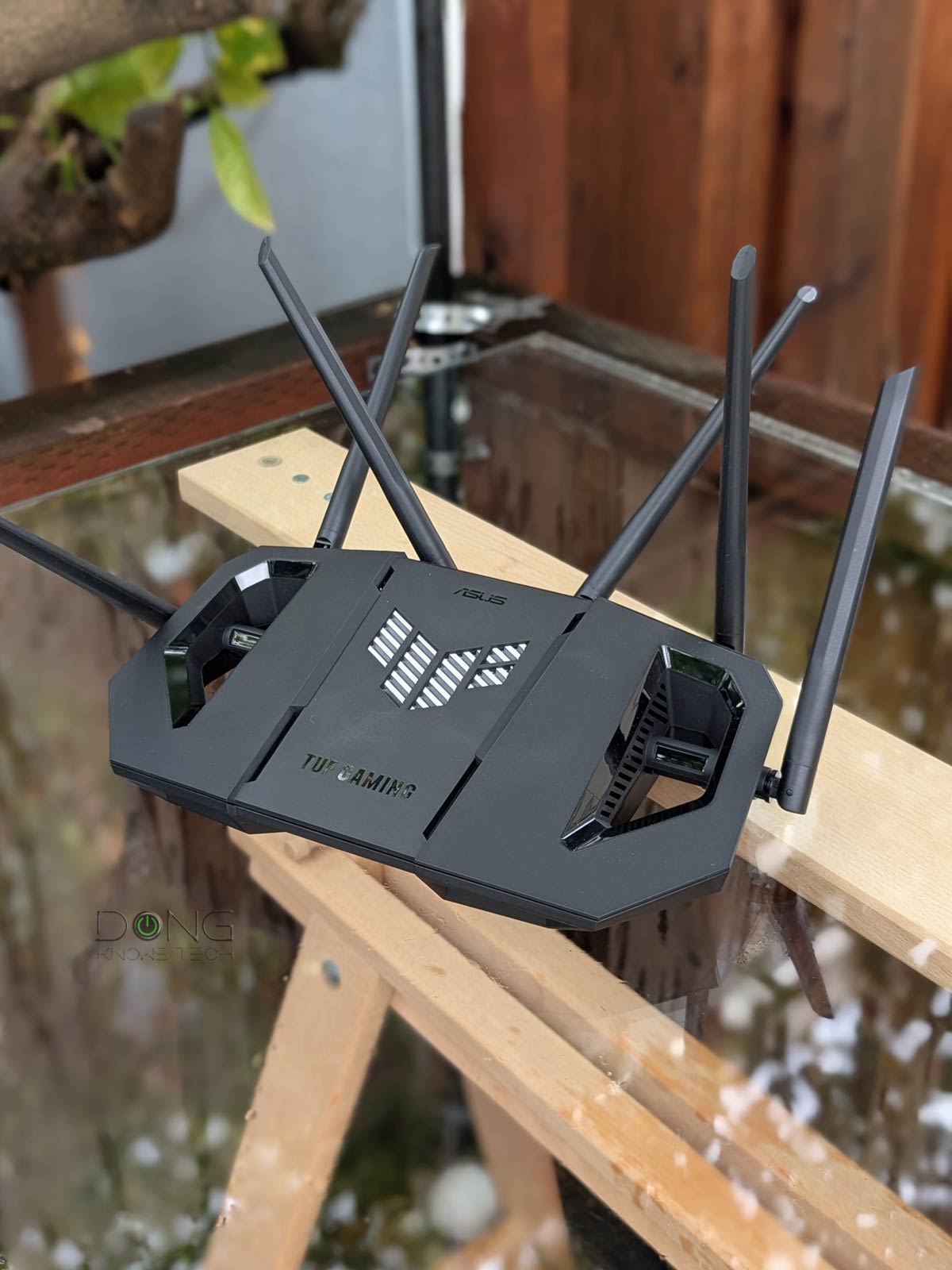

The TUF Gaming BE6500 Wi-Fi 7 router (model TUF-BE6500) is the fourth dual-band Wi-Fi 7 router from ASUS, and the first officially designated as a gaming router. In a way, it’s the Wi-Fi 7 version of the Wi-Fi 6 TUF-AX5400 I reviewed a few years ago.
Short for “The Ultimate Force,” ASUS’s TUF brand is its non-ostentatious alternative to its ROG (or Republic of Gamers) product line. Among other things, the hardware doesn’t have the fancy RGB lighting, which is a trade-off for a lower cost, while the functionality remains the same. In that sense, it’s my type of gaming router.
Here’s the bottom line: If you’re in the market for a frill-free and reliable dual-band Wi-Fi 7 router, for regular usage or gaming, the TUF-BE6500 is a good buy and a much better deal compared to the similarly specced Nighthawk RS200 from Netgear.
Like ASUS routers, you can get multiple TUF-BE6500 units to form an AiMesh Wi-Fi system, preferably via wired backhaul.

ASUS TUF-BE6500: A frill-free yet feature-rich (gaming) Multi-Gig router
Out of the box, the ASUS TUF-BE6500 looks like a typical Wi-Fi router. It’s a flat box, tapering toward the front, with six antennas sticking out from its back and sides. These antennas are not removable, but you can swivel them half a sphere around.
On the back, the router comes with four 2.5Gbps ports (one WAN and three LANs) and a USB 3.0 port, together with the usual power port, on/off switch, WPS, and reset buttons.
On top of the plastic chassis, the router has two big holes on either side of the TUF logo in the middle. This log, by the way, is not an LED like the case of ASUS’s ROG gaming router. In fact, the router’s status lights are located on its underside toward the front, making them pretty hard to see unless you place the router on a reflective surface.
The TUF-BE6500 is designed to be placed on a flat surface, but it also comes with mounting on the underside. All you need is a couple of nails on a wall, and you can hang the router securely.


Note its tiny LED on the frontmost underside.
In terms of Wi-Fi, the ASUS TUF-BE6500 shares the same specs as the Netgear Nighthawk RS200. Both are dual-band Wi-Fi 7 routers with a total wireless capacity of up to 6500Mbps. Though less powerful, the ASUS has more features than its rival. The gaming features aside, it also has multiple virtual SSIDs (called the “Smart Home Master” feature of ASUSWRT 5.0 firmware).
The table below shows the hardware specs of the two routers, with the RT-BE86U, which is ASUS’s first dual-band Wi-Fi 7 router, as the reference.
ASUS TUF-BE6500 vs. NETGEAR Nighthawk RS200 vs. ASUS RT-BE86U: Hardware specficiations
| ASUS TUF-BE6500 Dual-Band Gaming Wi-Fi 7 Router | NETGEAR Nighthawk RS200 Wi-Fi 7 BE6500 Router | ASUS RT-BE86U BE6800 Dual-Band Wi-Fi 7 Router | |
|---|---|---|---|
 |
 |
 |
|
| Model | TUF-BE6500 | RS200 | RT-BE86U |
| Wi-Fi Bandwidth (stream per band) |
Dual-band BE6500 | Dual-band BE6800 | |
| 2.4GHz Band (channel width) |
2×2 BE: Up to 688 Mbps (20/40MHz) |
3×3 BE: Up to 1032Mbps (20/40MHz) |
|
| 5GHz Band (channel width) |
4×4 BE: up to 5762Mbps (20/40/80/160MHz) |
||
| 6GHz Band | None | ||
| Stream per Band | 2×4 | 3×4 | |
| Network Standards | IEEE 802.11a, IEEE 802.11b, IEEE 802.11g, IEEE 802.11n, IEEE 802.11ac, IEEE 802.11ax, IEEE 802.11be, IPv4, IPv6 |
||
| Network Features | Web user interface ASUS Router mobile app Comprehensive free features and settings |
Web user interface Nighthawk mobile app Limited free features and settings |
Web user interface ASUS Router mobile app Comprehensive free features and settings |
| Web-based Remote Management | Yes (via Dynamic DNS) | No | Yes (via Dynamic DNS) |
| Vendor Login Account Required | No | Yes (Only for the Nighthawk Mobile app) |
No |
| Premium Add-on (trial period) |
None | NETGEAR Armor ($100/year) Parental Control (70/year) (30-day) |
None |
| Mesh-Ready | Yes | No | Yes |
| Operating Mode | Router Access Point Repeater Media Bridge AiMesh Router/Node |
Router Access Point |
Router Access Point Repeater Media Bridge AiMesh Router/Node |
| Multi-Gig Port | 1x 2.5Gbps WAN 3x 2.5Gbps LAN |
1x 2.5Gbps WAN 1x 2.5Gbps LAN |
1x 10Gbps WAN/LAN 1x 2.5Gbps LAN/WAN 3x 2.5Gbps LAN |
| Gigabit Port | None | 3x LAN | None |
| Automated Frequency Coordination (AFC) |
N/A | ||
| Multi-Link Operation (MLO) |
Yes | No | Yes |
| Link Aggregation | No | Yes (WAN and LAN) |
|
| Dual-WAN | Yes | No | Yes |
| USB Port | 1 x USB 3.0 | 1 x USB 3.0 1x USB 2.0 |
|
| Dimensions | 11.97 x 6.85 x 8.43 in (30.4 x 17.4 x 21.4 cm) |
9.8 x 5.9 x 4 in (24.9 x 15 x 10.2 cm) |
12.44 x 9.25 x 3.54 (31.6 x 23.5 x 9 cm) |
| Weight | 1.7 lb (772 g) |
2.09 lb (.950 g) |
1.88 lb (854 g) |
| Processing Power | 1.5GHz Quad-core CPU, 256 MB Flash, 1GB DDR4 RAM |
2.0GHz quad-core CPU, 512MB Flash, 2GB DDR4 RAM |
2.6GHz quad-core CPU, 256 MB Flash, 1GB DDR4 RAM |
| Power Intake | 110-240V | ||
| Firmware (at review) |
3.0.0.6.102_57125 | V1.0.1.60 | 3.0.0.6.102_37022 |
| Power Consumption (per 24 hours) |
≈ 200 Wh | ≈ 160 Wh | ≈ 280 Wh |
| US Release Date | Q1 2025 | September 24, 2024 | October 2024 |
| US Launch Price (Check availability!) |
$199.99 | $229 | $329.99 |


Note its two large holes and how it’s wall-mount-ready.
TUF-BE6500: A standard ASUS gaming router with a standard set of features for general users
Though not ostentatious like others in ASUS’s gaming family, the TUF-BE6500 comes with a generous set of gaming features, including support for a gamer’s private network. Additionally, its first LAN port is designated as the gaming port—plug a console into this port and it’s automatically prioritized for gaming.
The table below shows how it compares to other ASUS gaming routers I’ve tested.
All of these routers have the standard set of ASUS’s gaming features, including Mobile Game Mode, Open NAT, Gear Accelerator, and VPN Fusion.
Aside from that, running ASUSWRT 5.0, the TUF-BE6500 has the core features of all ASUS routers, with slight variations. Specifically, here’s a summary of what it has and doesn’t have compared to other ASUS routers:
- Flexible WAN/LAN configurations:
- The TUF-BE6500 features dual-WAN. You can turn one of its LAN ports or the USB port into a second WAN port. The USB port can host a cellular modem or a tethered smartphone.
- Unlike many ASUS routers, the TUF-BE6500 doesn’t have Link Aggregation.
- No universal backup restoration: The TUF-BE6500 is part of a small group of ASUS routers that can’t restore the backup file of another ASUS router model. As a result, if you upgrade to it from an older model, there’s no way to transfer the existing settings over—you always have to set it up from scratch.
- Robust web user interface with optional ASUS Router mobile app. You can set up the router the way you do any standard router via its default IP address, which is 192.168.50.1.
- AiMesh support. The TUF-BE6500 works best with wired backhauling. If you need a wireless setup, it’s best to use multiple units. That’s only when MLO will work for the bachelor.
- Built-in Parental Controls and online protection (AiProtection) plus other traffic-related features.
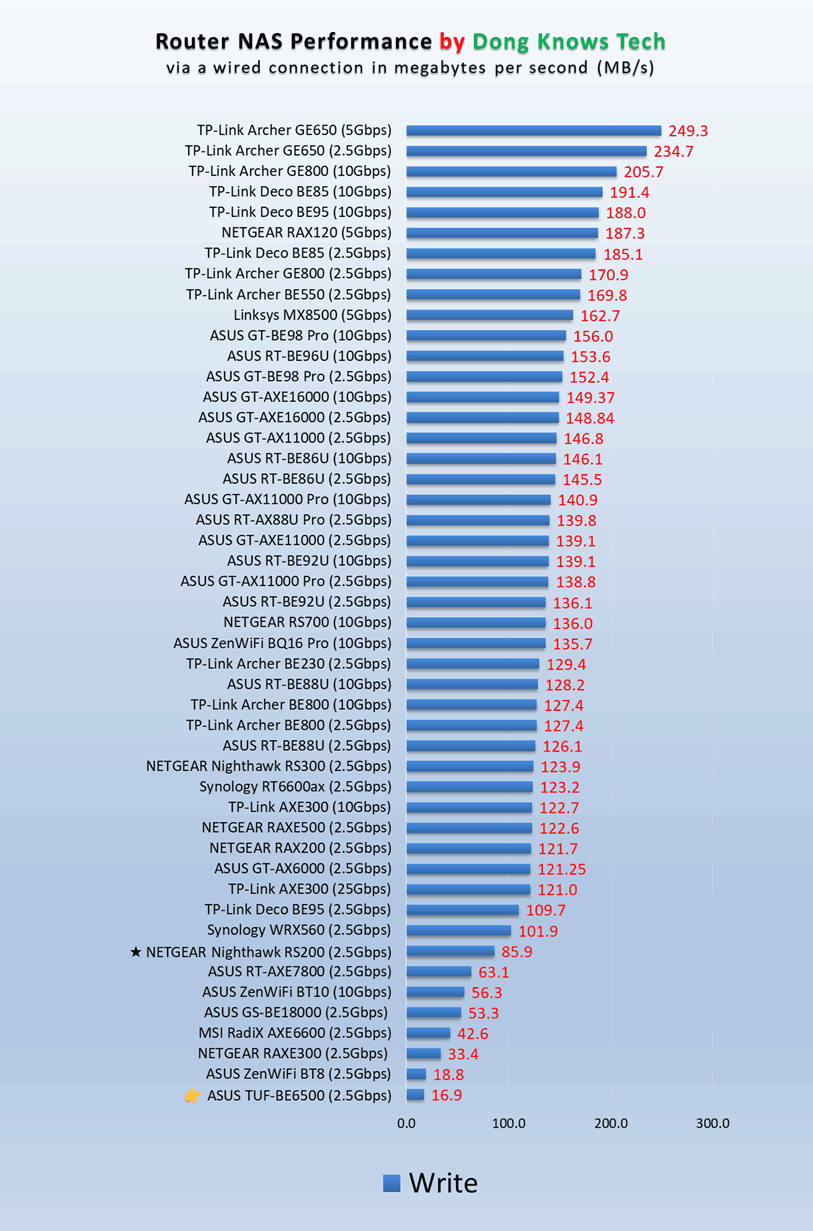
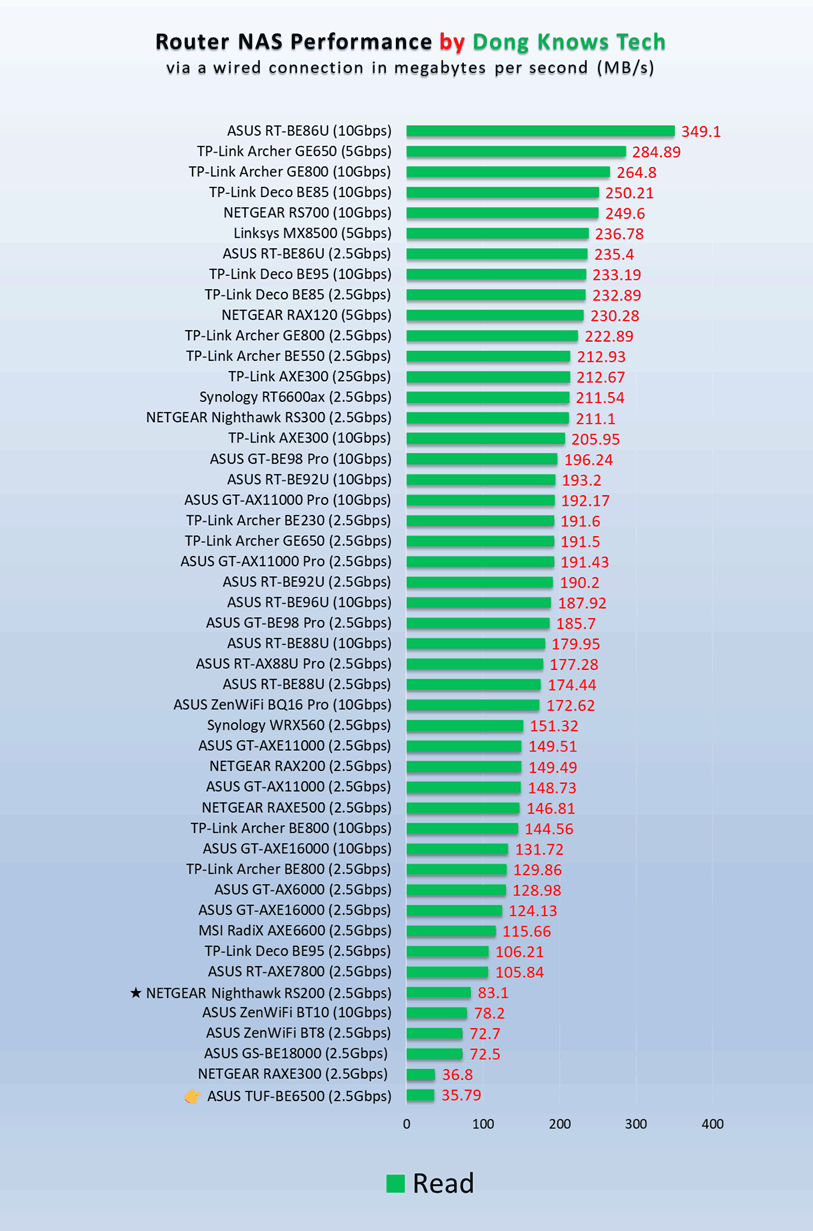
- USB-based features (cellular tethering, network storage, media streaming server, etc.). Unfortunately, its NAS performance when hosting a portable drive proved to be very slow—more in the performance section below.
- The new router supports advanced VPN, including WireGuard and Instant Guard.
- Tons of helpful network/Wi-Fi settings, tools, and other features, including QoS and web-based remote management via Dynamic DNS. The router can handle up to 128 entries of IP reservation and 64 entries of port forwarding.
So, if you had an ASUS router before, the TUF-BE6500 will feel right at home. New users with experience with the web-based user interface will not have a problem, either—most of what it can do is self-explanatory.


ASUS TUF-BE6500: Good Wi-Fi performance, sub-par network-attached storage
I tested the ASUS TUF-BE6500 for over a week and was generally happy with it. Considering the specs, the router wasn’t earth-shattering, but it delivered similar performance to the NETGEAR Nighthawk RS200, which has stronger processing power.


The router also proved reliable, passing my 3-day stress test without any disconnection. In terms of coverage, which is always tricky, it was also similar to the NETGEAR. Generally, if you live in a home of around 1,600 ft2 (135 m2) and place it at the center, you’ll likely get good coverage at every corner. But your mileage will vary.

The TUF-BE6500’s wired performance lived up to expectations for the 2.5Gbps Multi-Gig grade. Generally, the real-world rates were those of the connection after overhead.
What the TUF-BE6500 failed to deliver, however, is its performance when hosting a storage device via its USB 3.0 port. I tested it with multiple portable SSDs, and the performance was consistently terrible, averaging around 15MB/s for writing and 35 MB/s for reading. At these rates, you definitely want a real NAS server for your network storage needs.
Other than that, the TUF-BE6500 was completely silent during operation—it has no internal fan. The router did become a little warm, but it was never to the point that it caused concern.
Pros
Reliable and fast Wi-Fi performance for the specs, four 2.5GbE ports
A generous set of free features for gamers and general consumers
No vendor required login account; practical, mount-ready, fanless design; runs cool and quiet
Cons
Mediocre NAS performance (when hosting a portable SSD)
Conclusion
The ASUS TUF Gaming BE6500 Dual Band Wi-Fi 7 router (TUF-BE6500) is not a must-have. In fact, it’s a bit mundane when you consider many other gaming options. However, if you’re in the market for a reliable dual-band Wi-Fi 7 router that won’t break the bank, it’s definitely worth consideration. After that, the gaming features are definitely a bonus.
