

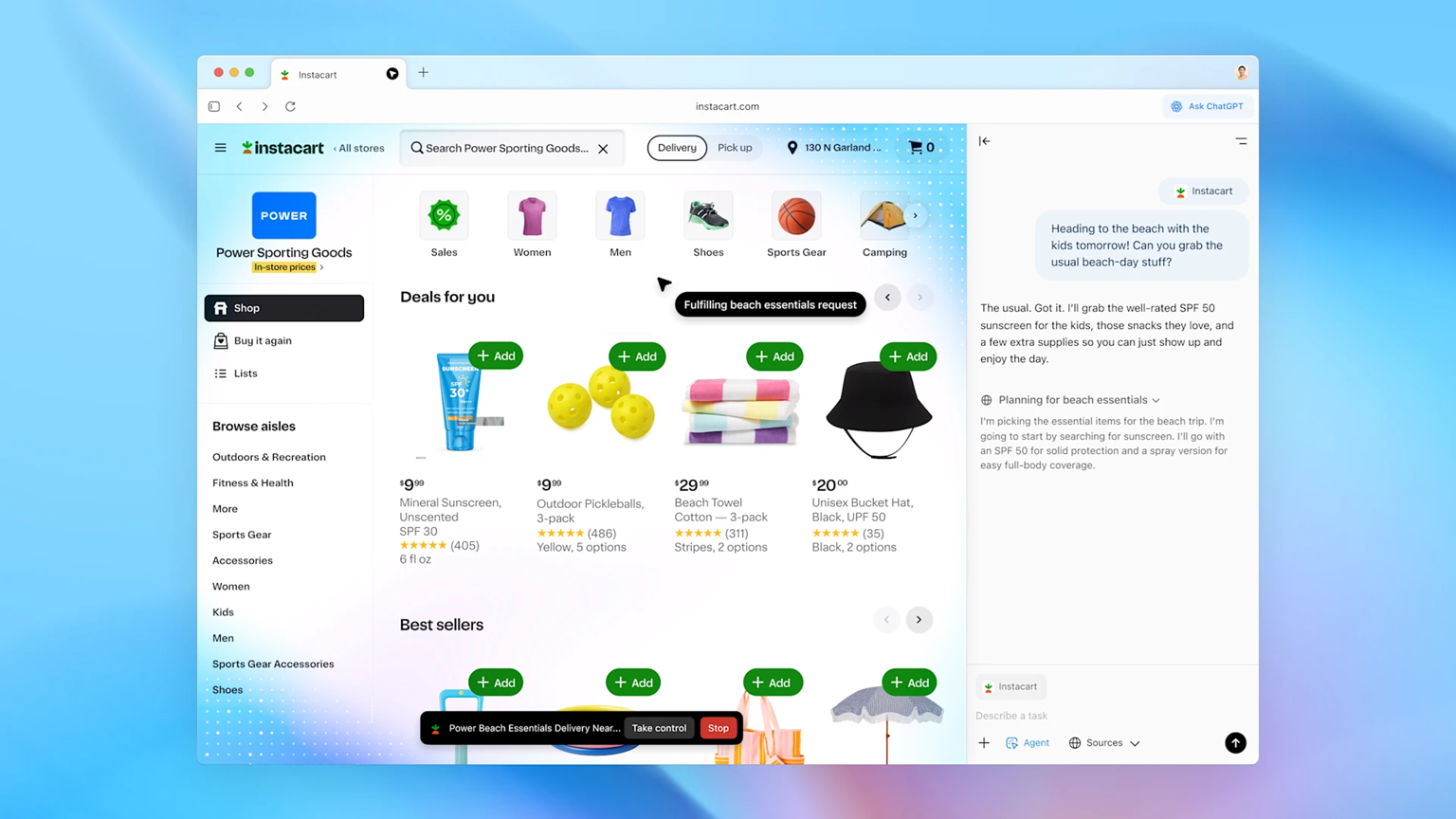

OpenAI has officially launched the ChatGPT Atlas AI-powered web browser today for macOS users around the world. Windows, iOS, and Android versions are on the way, with a ‘coming soon’ timeframe.
ChatGPT Atlas folds ChatGPT capabilities directly into the browser. So, instead of switching tabs to talk to a chatbot, the assistant is baked into the browsing experience. OpenAI has built Atlas around the idea that the web isn’t just a place to look at things, but also a place to complete all sorts of tasks.
ChatGPT Atlas also positions itself as a challenger to Google Chrome by reimagining what a browser can do when it stops being passive. While Chrome remains the default for millions thanks to speed, sync, and its massive extension ecosystem, it still largely acts as a still window to the web. Any actions are up to the user, while AI-assisted browsers like Atlas actively participate.
Here are five things to know about how it works, what makes it different, and what it means for your relationship with the web.
1. Atlas is a ChatGPT browser, not a browser with ChatGPT

Atlas wasn’t designed to look like a regular browser with a chatbot tacked on. Instead, OpenAI has taken the tools, logic, and interface of ChatGPT and created a browser around them. You don’t just visit a website and then open ChatGPT to ask a question. Instead, you ask for a summary or for help booking a hotel “like this one but cheaper,” and Atlas understands that you want action, not just answers.
ChatGPT serves as a live assistant, visible in its own window by default. From there, you can ask it to write emails, make a spreadsheet, or plan a trip without switching tabs.
This alone gives Atlas more power than traditional browsers. OpenAI CEO Sam Altman has a much more expansive vision, however. He and his team see Atlas as the template for interactions between humans and AI, where the digital assistant isn’t waiting for a request, but serving as an active navigator online.
2. Memory and context awareness turn ChatGPT into a web-savvy co-pilot
ChatGPT Atlas includes an opt-in feature called browser memories, which allows ChatGPT to remember details from your browsing history, much like it already remembers details from your conversations.
These memories offer contextualized references that ChatGPT can recall when you ask questions later. ChatGPT won’t need you to repeat yourself and can find the sites you visited, the comparisons you made, and even the bookmarks you might have forgotten.
For example, you can say, “Find the apartments I was looking at last week and tell me which ones are closest to a dog park,” or “Help me finish that outline I started for my travel blog.”
Memories are optional, private to your ChatGPT account, and visible in your settings. You can view, archive, or delete them at any time. You can also browse in incognito mode or toggle off memory on specific sites.
3. Agent mode lets ChatGPT take action
The biggest shift from traditional browsers for Atlas is the agent mode, which is reminiscent of the Operator tool OpenAI currently offers. Agent mode is still in preview and available only to Plus, Pro, and Business users for now, but essentially, it allows ChatGPT to perform multi-step tasks inside your browser, albeit with your supervision.
It’s more than just autocomplete. You can ask it to plan a dinner party and put recipes together for it, or compare multiple websites and analyze their differences in a slide deck. ChatGPT will open tabs, read content, pull information, and even start formatting the results.
But while agent mode gives the browser the ability to click, scroll, and interact with sites, it can’t download files, install anything, or access your file system. And it will ask permission on more sensitive sites like your bank.
There are many other safeguards it’s put in place, but there’s a reason agent mode remains experimental. If it goes wrong, it’s much worse than a confusingly written email.
4. Strong privacy and control features
Given the power Atlas grants ChatGPT, it’s no surprise that OpenAI put a lot of thought into user control. There’s a clear, persistent visibility toggle in the address bar, and incognito browsing is always an option. You can manage memories in settings and prevent any site you visit from triggering memory creation.
For families, the control goes further. If a parent has set up ChatGPT supervision for a child, those restrictions carry over into Atlas. Parents can turn off memory and agent mode entirely for supervised accounts.
5. Atlas among rivals
Those privacy features will likely help Atlas stand out as it faces plenty of rivals from AI-enhanced browsers. They range from The Browser Company’s Dia and Opera Neon to Perplexity’s new Comet browser
But Atlas, as the name suggests, wants to carry more of the load of your web experience. ChatGPT isn’t just reading or summarizing; it’s participating and helping you complete tasks and linking them to your conversations with the chatbot. You can start a task in ChatGPT, continue it in Atlas, and jump back into ChatGPT later without losing track.
It’s a huge change from Chrome, despite its easy-to-use appeal. Chrome might let you open a dozen tabs, but Atlas helps you summarize them, remembers that you visited them, and can even manipulate them or fill out forms within them on your behalf. In that way, Atlas isn’t about beating Chrome when it comes to simplicity or speed, but about reimagining what a web browser is for, and making it more active as a result.
Atlas likely won’t be for everyone. There are likely elements like research or organization where Atlas’ rivals win out, but if you’re a ChatGPT user already, Atlas will probably feel fairly seamless as an addition to your toolkit.
And the idea of an AI assistant acting inside your browser may feel a little too close for comfort. But for anyone who has ever opened 27 tabs to research a single topic, tried to reconstruct a shopping journey from memory, or wasted time redoing something they half-finished days ago, Atlas offers something tantalizing, at least if it can keep it all straight and private.
Follow TechRadar on Google News and add us as a preferred source to get our expert news, reviews, and opinion in your feeds. Make sure to click the Follow button!
And of course you can also follow TechRadar on TikTok for news, reviews, unboxings in video form, and get regular updates from us on WhatsApp too.
You might also like
