Close Menu

    Subscribe to Updates

    Get the latest news from tastytech.

    What's Hot

    How Resident Evil Shifted Perspectives And Framed Fear Over 30 Years

    March 22, 2026

    The Meffs- Business

    March 22, 2026

    BMW Would Make Range-Extenders Fun To Drive, If They Return

    March 22, 2026
    Facebook X (Twitter) Instagram
    Facebook X (Twitter) Instagram
    tastytech.intastytech.in
    Subscribe
    • AI News & Trends
    • Tech News
    • AI Tools
    • Business & Startups
    • Guides & Tutorials
    • Tech Reviews
    • Automobiles
    • Gaming
    • movies
    tastytech.intastytech.in
    Home»Guides & Tutorials»Advanced Automation with PowerCLI, Python, NSX, and Aria Operations
    Advanced Automation with PowerCLI, Python, NSX, and Aria Operations
    Guides & Tutorials

    Advanced Automation with PowerCLI, Python, NSX, and Aria Operations

    gvfx00@gmail.comBy gvfx00@gmail.comSeptember 29, 2025No Comments3 Mins Read
    Share
    Facebook Twitter LinkedIn Pinterest Email


    Table of Contents

    Toggle
      • Learning Objectives
    • My Personal Repository on GitHub
      • Prerequisites
    • 1. PowerCLI and NSX-T Integration
        • Importing the NSX-T Module
        • Example: List All NSX Logical Switches
        • Example: Add a Firewall Rule
    • 2. PowerCLI and Aria Operations Integration
        • Example: Query Recent Alerts from Aria Operations
    • 3. Orchestrating Advanced Automation with Python
    • 4. Diagram: Advanced Automation Integration
    • 5. Best Practices for Advanced Automation
    • 6. Troubleshooting Tips
    • 7. Further Reading
    • 8. Conclusion and Next Steps
      • Next Post
      • Related posts:
    • What are Precision & Recall in Machine Learning?
    • VCF 9.0 GA Mental Model Part 4: Fleet Topologies and SSO Boundaries (Single Site, Dual Site, Multi-R...
    • Understanding the cp Command in Bash | by Javascript Jeep🚙💨

    Learning Objectives

    By the end of this article, you will:

    • Automate advanced vSphere tasks involving NSX and Aria Operations.
    • Use PowerCLI to manage NSX logical switches, firewall rules, and Aria Operations alerts.
    • Integrate Python for orchestration, scheduling, and reporting of complex workflows.
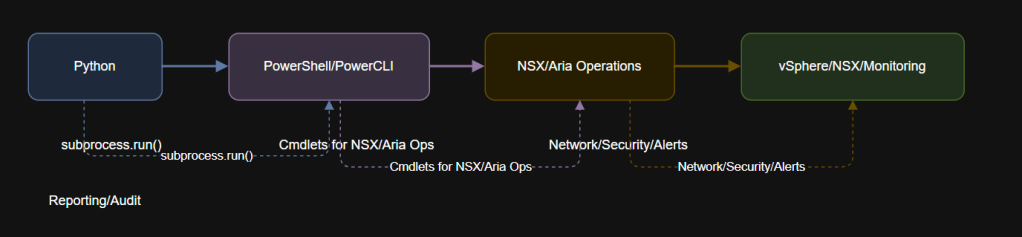
    • Visualize complex automation with an diagram.

    My Personal Repository on GitHub

    VMware Repository on GitHub


    Prerequisites

    • Completed Articles 1–7.
    • PowerCLI modules for NSX and Aria Operations installed (see below).
    • vCenter, NSX-T Manager, and Aria Operations access with automation privileges.

    1. PowerCLI and NSX-T Integration

    PowerCLI supports NSX-T for advanced network automation. You can create logical switches, manage firewall rules, and more.

    Importing the NSX-T Module

    Import-Module VMware.VimAutomation.Nsx

    Example: List All NSX Logical Switches

    # Connect to NSX-T Manager
    Connect-NsxtServer -Server -User -Password

    # List all logical switches
    Get-NsxtLogicalSwitch | Select DisplayName, Id, TransportZoneId

    Disconnect-NsxtServer -Confirm:$false

    Example: Add a Firewall Rule

    # Add a simple firewall rule (example)
    New-NsxtFirewallRule -SectionId -Name "Allow Web" -Action Allow -Source -Destination -Service "HTTP"

    2. PowerCLI and Aria Operations Integration

    PowerCLI can interface with Aria Operations for monitoring, alerts, and health checks.

    Example: Query Recent Alerts from Aria Operations

    # Connect to Aria Operations (formerly vRealize Operations)
    Connect-OMServer -Server -User -Password

    # Get active alerts
    Get-OMAlert | Where-Object {$_.Status -eq "Active"} | Select Name, Resource, Severity, StartTime

    Disconnect-OMServer -Confirm:$false


    3. Orchestrating Advanced Automation with Python

    You can automate these tasks on a schedule or trigger using Python.
    Here’s a sample Python script to run an NSX-T PowerShell script and parse output for reporting.

    import subprocess
    import pandas as pd

    ps_script = r"C:\Automation\get_nsx_switches.ps1"

    completed_process = subprocess.run([
    "powershell.exe",
    "-ExecutionPolicy", "Bypass",
    "-File", ps_script
    ], capture_output=True, text=True)

    if completed_process.stdout:
    # Parse table output to DataFrame if formatted as CSV in PowerShell
    data = pd.read_csv(pd.compat.StringIO(completed_process.stdout))
    print(data.head())
    else:
    print("No output or script failed.")


    4. Diagram: Advanced Automation Integration


    5. Best Practices for Advanced Automation

    • Modular Scripts: Break large tasks into functions or separate scripts for easier maintenance.
    • Secure Credentials: Always use encrypted credentials or secure vaults.
    • Audit Trails: Log every change for compliance and rollback.
    • Test in Lab: Always test automation scripts in a non-production environment first.
    • Error Handling: Add robust try/catch blocks and validate outputs.

    6. Troubleshooting Tips

    • If you get module errors, confirm you have installed NSX-T and Aria Operations modules: Install-Module VMware.VimAutomation.Nsxt -Scope CurrentUser Install-Module VMware.VimAutomation.VROps -Scope CurrentUser
    • Use full paths and explicit credentials in scripts.
    • For API-related failures, validate endpoint URLs and user permissions.

    7. Further Reading


    8. Conclusion and Next Steps

    You have now automated advanced VMware tasks that span NSX, Aria Operations, and vSphere using both PowerCLI and Python.
    This approach lets you build scalable, auditable, and intelligent automation workflows across your hybrid cloud and SDDC stack.

    Next up: In Article 9, you will learn to integrate PowerCLI with external APIs and tools to expand your VMware automation beyond native scripts.

    Next Post

    Integrating PowerCLI with External APIs and Tools

    Learning Objectives By the end of this article, you will: Use PowerCLI and Python to send data to and receive data from external REST APIs. Automate notifications and ticket creation…

    Like this:

    Like Loading…

    Related posts:

    What is AI Ethics? - Kavita Ganesan, PhD

    Exploring the Ethical Implications of AI: A Closer Look at the Challenges Ahead

    Why Apple Intelligence Might Fall Short of Expectations? | by PreScouter

    Share. Facebook Twitter Pinterest LinkedIn Tumblr Email
    Previous ArticleHow to watch The Walsh Sisters on RTE (it’s free)
    Next Article Huawei open-source AI platform details revealed at Huawei Connect 2025
    gvfx00@gmail.com
    • Website

    Related Posts

    Guides & Tutorials

    VCF 9.0 GA Mental Model Part 6: Topology and Identity Boundaries for Single Site, Dual Site, and Multi-Region

    February 21, 2026
    Guides & Tutorials

    VCF 9.0 GA Mental Model Part 4: Fleet Topologies and SSO Boundaries (Single Site, Dual Site, Multi-Region)

    February 19, 2026
    Guides & Tutorials

    Convert Azure VMs from Unmanaged to Managed Disks: A Production-Ready Runbook

    February 19, 2026
    Add A Comment
    Leave A Reply Cancel Reply

    Top Posts

    BMW Will Put eFuel In Cars Made In Germany From 2028

    October 14, 202511 Views

    Best Sonic Lego Deals – Dr. Eggman’s Drillster Gets Big Price Cut

    December 16, 20259 Views

    What is Fine-Tuning? Your Ultimate Guide to Tailoring AI Models in 2025

    October 14, 20259 Views
    Stay In Touch
    • Facebook
    • YouTube
    • TikTok
    • WhatsApp
    • Twitter
    • Instagram

    Subscribe to Updates

    Get the latest tech news from tastytech.

    About Us
    About Us

    TastyTech.in brings you the latest AI, tech news, cybersecurity tips, and gadget insights all in one place. Stay informed, stay secure, and stay ahead with us!

    Most Popular

    BMW Will Put eFuel In Cars Made In Germany From 2028

    October 14, 202511 Views

    Best Sonic Lego Deals – Dr. Eggman’s Drillster Gets Big Price Cut

    December 16, 20259 Views

    What is Fine-Tuning? Your Ultimate Guide to Tailoring AI Models in 2025

    October 14, 20259 Views

    Subscribe to Updates

    Get the latest news from tastytech.

    Facebook X (Twitter) Instagram Pinterest
    • Homepage
    • About Us
    • Contact Us
    • Privacy Policy
    © 2026 TastyTech. Designed by TastyTech.

    Type above and press Enter to search. Press Esc to cancel.

    Ad Blocker Enabled!
    Ad Blocker Enabled!
    Our website is made possible by displaying online advertisements to our visitors. Please support us by disabling your Ad Blocker.