



Introduction
A VMware virtual machine can replicate successfully to Azure Local and still fail the migration in every way that matters to the business. The target disks may exist, the Azure Migrate status may be healthy, and the planned failover job may complete, yet the operating system can blue-screen, data disks can remain offline, static addressing can be lost, the portal can show incomplete information, guest management can remain disabled, and the application can fail its first real transaction.
That is why replication should be treated as a transport milestone, not a service-acceptance milestone. Azure Migrate proves that blocks can move from the VMware source environment to Azure Local. It does not, by itself, prove that the guest operating system can tolerate the virtual-hardware translation, that the network identity can be reconstructed safely, that Azure Arc services can manage the guest, or that the application owner is willing to accept the workload in production.
This field guide follows the migration from source discovery through post-cutover acceptance. It focuses on the failure modes that begin after the VM replicates, because those are the failures most likely to turn a technically successful migration into an operational incident.
The procedures were validated against the current Azure Local migration requirements, prerequisites, architecture, replication, cutover, networking, troubleshooting, guest-support, guest-management, monitoring, backup, and workload-resiliency documentation [1]-[15]. The supplied Microsoft Q&A discussions are used only as community field evidence and are treated separately from official product documentation [16]-[19].
TL;DR
A successful VMware-to-Azure Local migration has four separate success conditions: the VM data replicates, the guest boots, the workload reconnects to its dependencies, and the target enters the enterprise operating model. Azure Migrate handles the first condition and orchestrates part of the second. The migration team still must prepare storage and network drivers, preserve or deliberately change IP identity, validate boot generation and secure boot, enable guest management, confirm Azure portal projection, onboard backup and monitoring, test the application, and preserve a realistic rollback path.
The most important operating rule is simple: do not select Complete migration merely because the VM is running. Complete migration only after the source is off, the target has passed guest, network, application, backup, monitoring, security, and ownership checks, and the rollback decision has expired.
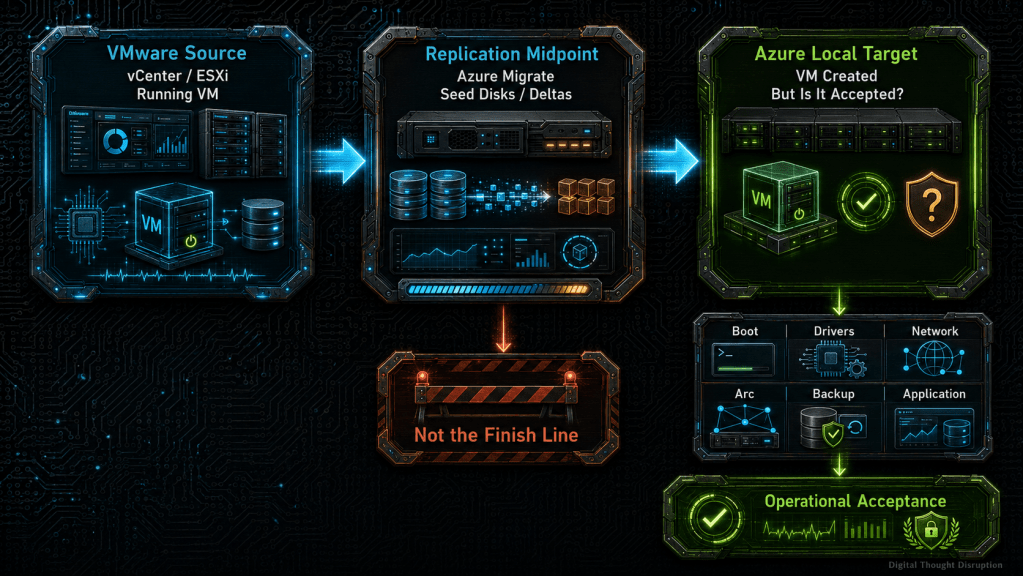
Replication Is the Midpoint, Not the Finish Line
Azure Migrate divides the VMware-to-Azure Local workflow into preparation, discovery, replication, migration, and verification. The workload disk path stays local between the VMware environment and Azure Local, while Azure stores orchestration metadata and replication state. This is a useful architecture because it avoids sending workload disks through Azure, but it also creates a misleading visual cue: once replication reaches a healthy state, the portal looks close to done. [3]
In practice, the migration is only halfway complete. The replicated data still must survive a platform translation from VMware virtual hardware to Hyper-V-based virtual hardware on Azure Local. The target must also become manageable through Azure Local and Azure Arc, connect to the correct logical network, enter backup and monitoring policies, and pass application-owner acceptance.
The migration should therefore use two definitions of completion:
| Completion layer | Evidence required |
|---|---|
| Transport completion | Initial replication completed, hourly deltas healthy, target storage has sufficient capacity, and the VM is ready for planned failover |
| Operational completion | Guest boots, disks are online, network identity is correct, application transactions succeed, guest management is enabled where supported, monitoring and backup are active, ownership is transferred, and rollback criteria have expired |
The second definition is the one that should control decommissioning, change closure, and service acceptance.
The End-to-End Migration Architecture
The architecture has an Azure control layer and an on-premises data path. The Azure Migrate project coordinates discovery, replication state, jobs, and resource creation. A source appliance runs near the VMware environment. A target appliance runs on Azure Local. Azure Arc resource bridge and the Azure Local resource provider create and manage the target VM resources. The VM disk data moves locally between the source and target appliances rather than through Azure Storage. [1], [3], [4]
The following diagram shows where each major failure class enters the process. The key point is that the replication path and the operating path are not the same path.
The architecture implies four ownership boundaries:
- Azure Migrate team: project, appliances, replication, planned failover, jobs, and migration artifacts.
- Azure Local platform team: Azure Arc resource bridge, logical networks, storage paths, cluster capacity, portal resource health, and target VM lifecycle.
- Guest operating-system team: bootability, drivers, disks, services, certificates, host firewall, time, DNS, and guest agent.
- Application owner: functional validation, data integrity, dependency testing, performance, licensing, support approval, and rollback decision.
A migration wave is not ready when only the first team is ready.
VMware Source Assessment Must Go Beyond Inventory
A conventional discovery exercise asks how many VMs exist, how much storage they consume, and which operating systems they run. A migration-ready assessment asks a different question: what assumptions does each guest make about VMware hardware, network identity, storage ordering, and management tooling?
Build a workload-specific migration record
Create one migration record per VM or tightly coupled application group. At minimum, capture:
| Assessment domain | Required evidence | Why it matters after replication |
|---|---|---|
| Business ownership | Service owner, technical owner, validation approver, support group | Prevents a platform team from declaring success without application acceptance |
| Operating system | Exact edition, version, build, kernel, patch state, vendor support status | Determines Hyper-V and Azure Local guest support and guest-management eligibility |
| Firmware and boot | BIOS or UEFI, secure boot state, vTPM usage | Controls Generation 1 or Generation 2 mapping and post-migration boot behavior |
| Storage | SCSI controller, boot disk, disk order, drive letters, mount points, SAN policy, shared disks, encryption | Exposes offline disks, missing drivers, unsupported shared disks, and mount-order problems |
| Networking | Adapter type, MAC, DHCP or static IP, multiple IPs, VLAN, gateway, DNS, routes, firewall dependencies | Exposes identity loss, asymmetric routing, IP conflicts, and portal display limitations |
| VMware dependencies | VMware Tools version, VMXNET3 or E1000E, PVSCSI or LSI controller, custom scripts, snapshot tooling | Identifies drivers and services that may affect discovery, replication, or first boot |
| Azure dependencies | Existing Azure Connected Machine agent, extension state, proxy, certificates | Existing Arc projection must be removed before replication and re-established after migration |
| Application dependencies | Database, queues, file shares, domain services, certificates, service accounts, license bindings | Determines migration grouping, outage sequencing, and rollback scope |
| Data protection | Last successful backup, restore test, application-consistent backup method, retention | Replication is not backup and does not replace recovery evidence |
| Acceptance tests | Boot, login, service, transaction, dependency, performance, monitoring, backup | Defines what the target must prove before completion |
Confirm source platform support before troubleshooting the guest
Current Azure Local migration requirements support VMware vCenter Server and ESXi 6.5, 6.7, 7, and 8.0, with both vCenter and ESXi in a supported combination. ESXi 6.0 is not supported. A source environment outside this matrix should be upgraded, remediated, or moved through a different migration method before the wave begins. [1], [8]
Do not assume that a supported hypervisor version makes every VM supported. The guest operating system must also be supported on Azure Local and Hyper-V. Microsoft publishes separate Windows and Linux or FreeBSD support matrices, and the exact distribution, release, kernel, and generation matter. [11], [12]
Remove the existing Azure Connected Machine agent
If the source VM is already Arc-enabled, uninstall the Azure Connected Machine agent before replication. Microsoft treats leaving the agent installed as unsupported because the source and migrated VM could create competing projections of the same machine. This is not a cosmetic cleanup item. It is an identity and control-plane correctness requirement. [1], [2], [7]
Record the existing Arc configuration before removal, including tags, data collection rules, extensions, update-management assignments, Defender onboarding, policy assignments, and SQL Server enabled by Azure Arc. The target may need to be re-onboarded into those services after guest management is enabled.
Keep VMware Tools until the migration no longer needs it
Current replication guidance requires the source VMs to be powered on and to have VMware Tools installed. The static IP preparation workflow also depends on VMware Tools for VMware guests. Do not remove VMware Tools as a generic pre-migration cleanup step. [4], [6]
The safer sequence is:
- Confirm VMware Tools is healthy before discovery and replication.
- Use it to support source discovery, guest coordination, and static IP preparation.
- Migrate and stabilize the target.
- Preserve rollback until the acceptance gate is passed.
- Remove VMware-specific software from the target only after the guest is stable and the rollback plan no longer depends on reproducing the original source state.
Uninstalling VMware Tools too early can break the supported migration workflow. Leaving it indefinitely can preserve unnecessary services and drivers. The right answer is controlled removal after acceptance, not blanket removal before replication.
Azure Local Destination Readiness Is a Migration Dependency
Azure Local must be ready as a workload platform before the first production VM is replicated. A green cluster status is necessary, but it is not sufficient.
Required destination components
The migration requires:
- A deployed and registered Azure Local instance.
- An Azure Arc resource bridge and custom location.
- At least one Azure Arc logical network for migrated VMs.
- A custom storage path with enough usable capacity for seed disks, final disks, retries, and operational headroom.
- A supported Azure Migrate project in the same Microsoft Entra tenant as the Azure Local instance.
- The required Azure Local migration roles and the Microsoft.DataReplication resource provider.
- A source appliance and target appliance paired one-to-one with the Azure Migrate project. [1], [2]
Current documentation requires a new Azure Migrate project for Azure Local migration rather than reusing an existing general project. Each project has one source appliance and one target appliance, so project topology becomes part of wave and site design. A single project is not a universal migration bus for multiple unrelated sources and targets. [1]
Validate capacity for migration artifacts, not only final VMs
Initial replication creates a temporary seed disk for each source disk on the selected Azure Local storage path. Those disks persist through delta replication and can be reused if migration is retried. They are removed through the service-managed Complete migration action after validation. [4], [5]
Capacity planning must include:
Do not rename, modify, or delete seed disks. If a planned failover fails after target VM creation, Microsoft may require deletion of the partial VM while retaining target disks, seed disks, and network interfaces for retry. Deleting the wrong artifact can force initial replication to restart or require a new migration project. [4], [9]
Validate the target as an operating platform
Before production waves, prove that the target can:
- Create, start, stop, and delete a test Azure Local VM through the Azure portal and Azure CLI.
- Resolve and reach required DNS, Active Directory, NTP, application, storage, and management endpoints from the target logical networks.
- Provide console access through VMConnect when normal network access is unavailable.
- Attach and remove virtual disks and network interfaces.
- Enable guest management on a supported test VM.
- Install a supported extension.
- Send monitoring data and receive policy assignments.
- Complete at least one backup and recovery workflow.
- Sustain node maintenance or failure without violating the workload’s availability requirements.
A target that can host a VM but cannot operate it is not migration-ready.
Appliance Placement and Connectivity Determine Replication Reliability
Azure Migrate uses a source appliance in the VMware environment and a target appliance on Azure Local. Both appliances currently require substantial resources, with Microsoft documenting at least 8 vCPUs, 16 GB RAM, and more than 80 GB of disk. The requirements table lists Windows Server 2022, while the current script-based deployment procedure also describes Windows Server 2025. Use the operating-system version explicitly supported by the current deployment method and record that choice in the migration baseline. [1], [4]
Place appliances near the systems they serve
The source appliance should have low-latency, reliable access to vCenter and ESXi hosts because it performs discovery and accesses snapshot data. The target appliance should run on Azure Local and have reliable management access to the cluster nodes, logical network, storage path, and source appliance.
Placement should minimize the number of firewalls, proxies, NAT boundaries, and unstable WAN links between:
- Source appliance and vCenter.
- Source appliance and ESXi hosts.
- Source appliance and target appliance.
- Target appliance and Azure Local hosts.
- Both appliances and required Azure endpoints.
Microsoft requires mutual network reachability between the VMware source environment and Azure Local, either on the same on-premises network or through a VPN. [1]
Validate the actual port matrix
The current prerequisites include several flows that are commonly missed:
| Flow | Typical port | Purpose |
|---|---|---|
| Administrator to appliance | TCP 3389 | Remote administration when RDP is used |
| Administrator to appliance configuration manager | TCP 44368 | Appliance management interface |
| Source appliance to Azure and vCenter | TCP 443 | Registration, orchestration, and vCenter access |
| Source appliance to ESXi hosts | TCP 902 | Snapshot data transfer and heartbeat |
| Source appliance to target appliance | TCP 445 | Appliance-to-appliance data path |
| Target appliance to Azure Local hosts | TCP 5985 and 5986 | PowerShell remoting and cluster management |
Validate the exact current FQDN and port requirements from the Microsoft prerequisites before each migration program. Do not test only ICMP or a browser session to the Azure portal. A migration can pass high-level connectivity checks and still fail because SMB 445, ESXi 902, or WinRM is blocked. [2], [8]
From the target appliance, explicitly test PowerShell remoting to every Azure Local node. Microsoft lists failed target-cluster share connections and inconsistent cluster connectivity as known symptoms when remoting or firewall configuration is incomplete. [8]
Pin the supported VDDK version
Current replication guidance supports VMware VDDK 8.0.0, 8.0.1, and 8.0.2. VDDK 6.7 is supported but deprecated for new deployments, and Microsoft explicitly warns not to use VDDK 7.0.x because of known migration problems. Treat the VDDK package as a version-controlled migration dependency, not an arbitrary download. [4]
Record its version, checksum, installation path, and validation status in the migration project. Revalidate after any appliance rebuild.
Guest Support and Virtual-Hardware Translation
The source VM does not arrive on Azure Local with the same virtual hardware. Azure Migrate creates an Azure Local VM whose firmware and devices are based on Hyper-V. The guest must have the drivers and configuration required to boot with that target hardware.
BIOS and UEFI determine the target generation
Azure Migrate retains the source boot type:
- VMware BIOS becomes a Hyper-V Generation 1 VM.
- VMware UEFI becomes a Hyper-V Generation 2 VM.
Do not force a different generation as a generic troubleshooting step. A Generation 1 or Generation 2 conversion changes firmware assumptions, boot layout, secure boot behavior, and device availability. The supported service-managed workflow maps generation from the source boot mode. [1]
For eligible UEFI VMs, secure boot state is preserved. If secure boot is changed before migration, Microsoft advises allowing discovery time for the change to be detected. Treat firmware and secure boot as discovered configuration, not a last-minute portal toggle. [2], [7]
Remove unsupported disk states before replication
Current prerequisites require:
- BitLocker disabled for Windows VMs.
- Encrypted disks and volumes decrypted.
- Shared disks detached or remediated.
- All guest disks brought online with persistent drive letters.
- Snapshot-based backup jobs scheduled so they do not collide with Azure Migrate replication snapshots. [2]
These conditions should be hard preflight gates. A migration tool should not be used to discover whether a clustered shared disk, encrypted data volume, or conflicting snapshot product is unsupported during the production window.
Set Windows SAN policy before migration
A migrated Windows guest sees newly created VHD or VHDX disks. Windows can apply a SAN policy that leaves those disks offline. Microsoft recommends setting the source guest SAN policy to OnlineAll before migration. [1], [9]
Run this inside the source guest from an elevated command prompt:
diskpart
SAN
SAN Policy=OnlineAll
exit
Successful preparation means SAN reports OnlineAll, expected data disks are online, and drive-letter assignments are documented. This does not replace application-level validation of drive letters, mount paths, or database file locations after cutover.
Use persistent Linux disk identifiers
Linux guests should use persistent identifiers in /etc/fstab, such as UUIDs, rather than device names that can change when the virtual storage controller changes. Microsoft also documents a known failure in which Linux guests enter emergency mode because the initramfs does not contain required Hyper-V modules. [8], [9]
For distributions that use dracut, the current Microsoft workaround checks and adds the following modules:
lsinitrd | grep -i hv
uname -r
If the modules are missing, back up the current initramfs, add the required drivers, and rebuild it:
add-drivers+=" hv_vmbus hv_netvsc hv_storvsc hv_utils "
dracut -f -v
Successful preparation means the rebuilt initramfs includes the required Hyper-V storage and network modules, the guest boots successfully on its current platform, and the recovery procedure is documented. Distribution-specific support guidance takes precedence over a generic dracut example.
Disk Controllers, VMware Drivers, and Windows Boot Failures
Boot failures after replication are among the most disruptive migration defects because the Azure Migrate job can look successful while the guest repeatedly crashes.
Understand what the field reports prove and what they do not prove
A Microsoft Q&A case involving Windows Server 2022 reported alternating PAGE_FAULT_IN_NONPAGED_AREA and SYSTEM_THREAD_EXCEPTION_NOT_HANDLED errors after migration. The source used an LSI Logic SAS controller and E1000E adapter. The accepted remediation changed the source to PVSCSI and VMXNET3, reinstalled VMware Tools, repeated migration preparation, and then migrated successfully. [17]
That case is useful field evidence, but it is not a universal Microsoft support statement that every LSI or E1000E VM must be converted. Treat it as a risk signal and a tested remediation pattern for affected guests, not as a blanket rule.
Never switch the source boot controller blindly
Changing a source VM’s boot controller can make the original VMware VM unbootable if the guest has not loaded the new driver. The safe pattern is:
- Back up the VM and confirm recovery.
- Add the new controller or device without moving the boot disk when the platform supports that preparation method.
- Boot the source and confirm the operating system loads the driver.
- Verify the driver is present and healthy.
- Move the boot disk or change the adapter only in a controlled maintenance window.
- Reboot and validate the source before restarting replication.
- Re-run static IP and disk preparation if hardware changes altered device enumeration.
If a migrated Windows VM blue-screens, collect the stop code, boot mode, source controller, source adapter, VMware Tools version, and migration job details before changing multiple variables. Dynamic memory or additional CPU rarely fixes a storage-driver crash.
First-boot triage order for Windows
Use this sequence:
- Confirm the VM generation matches the source firmware.
- Confirm the OS disk is attached and selected correctly.
- Use VMConnect to observe the boot path without relying on IP connectivity.
- Record the exact stop code or recovery message.
- Verify whether the failure is storage-driver, boot-configuration, secure-boot, or operating-system corruption related.
- Compare the source controller and NIC types against known successful pilot VMs.
- Roll back or remediate the source, then replicate again rather than improvising unsupported target hardware changes.
Do not complete migration while the guest is in a boot loop, even if the target VM resource exists and the source is off.
Network Identity Is More Than an IP Address
The network cutover must reconcile logical network configuration, guest addressing, DNS, routes, firewalls, DHCP reservations, MAC dependencies, and portal representation. Preserving the same IP does not guarantee preserving the same network identity.
Decide whether the target uses SDN-enabled static preservation
In an SDN-enabled Azure Local environment, current Microsoft guidance states that static IPs can be preserved automatically when the VM NIC is mapped to an appropriate static logical network during replication. The static IP script package is not required in that mode. Linux guests need the necessary DHCP client packages, and multi-NIC guests may receive a default gateway on every static NIC, which must be corrected to prevent asymmetric routing. [6]
In a non-SDN environment, Microsoft provides a static IP migration package. The current dedicated procedure supports Windows Server 2012 R2 and later and specified Linux distributions, including Ubuntu, Red Hat Enterprise Linux, CentOS, and Debian. The dedicated May 2026 procedure is more current and detailed than some FAQ wording, so use it as the operational source and validate the exact current release before a Linux wave. [6], [7]
For Windows, the preparation command is:
.\Prepare-MigratedVM.ps1 -StaticIPMigration
For Linux, the preparation commands are:
chmod u+x prepare_migrated_vm.sh
sudo ./prepare_migrated_vm.sh -o StaticIPMigration
The scripts capture the source NIC configuration and create a startup task or job that applies it after migration. Successful preparation means the generated configuration file exists, the scheduled task or cron job exists, and logs show no collection error. [6]
Map every NIC to the correct logical network
During replication configuration:
- Map DHCP NICs to dynamic logical networks.
- Map static NICs to static logical networks.
- Confirm each static IP falls inside the target logical network’s address space.
- Confirm the address is not already assigned to another Azure Local NIC.
- Validate gateway and DNS configuration.
- Document secondary routes and multi-NIC gateway behavior.
An address conflict can fail the migration with an InUse error. Microsoft also documents static addresses outside the configured logical-network subnet as a migration failure. [6], [8], [9]
Treat portal IP data as useful but not authoritative
Current known limitations include:
- The old VMware network adapter can remain visible in Device Manager.
- Multiple IPs on one NIC may be reduced to one displayed portal IP.
- Mixed DHCP and static multi-NIC guests can show inaccurate or duplicate portal IPs.
- A migrated VM can appear with an incorrect IP or incomplete disk representation even while the guest runs correctly.
- Static IPv6 addresses are not migrated in the current workflow. [6], [8]
Validate the actual guest configuration, switch or SDN state, DNS registration, routing, and application connectivity. Do not declare a network failure solely because one portal field is stale, and do not declare success solely because the portal shows an expected address.
Do not design around preserving a VMware MAC address
Microsoft’s current Azure Migrate FAQ states that preserving the MAC address for a DHCP reservation scenario is not supported. A recent Microsoft Q&A field report also describes Azure Local Arc-managed NIC creation rejecting an arbitrary source MAC outside its managed range. Treat the exact managed range as an implementation detail rather than a durable platform contract. [7], [19]
Before migration, identify every dependency tied to the source MAC:
- DHCP reservations.
- Network access control registrations.
- Firewall objects or packet captures keyed to MAC.
- Monitoring and inventory systems.
- License servers or node-locked software.
- Application allowlists.
- Security tooling that identifies the host by adapter identity.
Replace DHCP reservations with static addressing or a new reservation, rebind licenses, update NAC, and document the new MAC after migration. If a commercial application contractually requires the original MAC, treat that as a migration blocker until the vendor and Microsoft validate a supported design.
Replication Guardrails That Prevent Late Failures
Replication has its own operational controls. A VM that reaches Ready to migrate should have passed more than a progress-bar check.
Validate the Azure Migrate project and storage account
Current requirements include:
- The Azure Migrate project is in the same tenant as Azure Local.
- A source and target appliance are registered to the project.
- The Microsoft.DataReplication resource provider is registered where required.
- The migration storage account uses Standard performance and Azure Blob storage.
- Public network access is enabled for the storage account.
- The storage account region matches the Azure Migrate project region.
- Private endpoint connectivity is not assumed for this migration scenario. [1], [4], [7], [8]
The storage account stores metadata and replication state, not the VM disks. That distinction should be documented in the security review, because public network access may still require an exception even though workload data remains local. [3], [4]
Stay on the replication creation page until artifacts finish
Microsoft warns that leaving the replication setup page before artifact creation completes can result in incomplete replication artifacts and later migration failure. The initial creation can take several minutes. Treat portal navigation during this phase as a controlled operator action, not casual browsing. [4]
Protect seed disks and hidden replication resources
After initial replication, hourly delta replication begins. Do not manually clean up seed disks, seed ISOs, hidden replication fabric resources, target disks, or network interfaces because they look orphaned. Microsoft documents replication stuck at zero percent and failed retries after manual deletion of service-managed resources. [4], [8], [9]
Create storage and resource naming conventions that clearly mark migration-managed artifacts, and restrict deletion rights during active migration waves.
Do not let the portal batch limit define the wave size
The current portal lets an operator select up to 10 VMs at a time for replication. That is a UI limit, not a recommendation to migrate 10 production VMs as one application wave. [4]
Wave size should be based on:
- Shared failure domain.
- Application dependency chain.
- Required outage.
- Validation duration.
- Number of owners available during cutover.
- Rollback complexity.
- Network identity changes.
- Backup and monitoring onboarding capacity.
- Target cluster headroom.
A one-VM stateful application can be a larger operational wave than 10 stateless utility servers.
Test Migration Without a Native Test Migrate Button
As of July 24, 2026, the current Azure Local migration workflow documents prepare, discover, replicate, migrate, and verify, but it does not provide the same built-in Test Migrate action used in some Azure IaaS scenarios. A Microsoft Q&A accepted answer confirms that there is no native Test Migrate button for the Azure Local workflow. [3], [5], [16]
This changes how enterprises should design validation.
Use one of three controlled test patterns
| Test pattern | Best use | Key control |
|---|---|---|
| Non-production clone to a test Azure Local environment | Repeatable technical validation without touching production | Remove duplicate identity, isolate network, and use representative data |
| Dedicated test partition or logical isolation on the target | Validate target hardware, network, storage, and management stack | Block production routes and prevent duplicate IP, DNS, and domain conflicts |
| Canary production wave | Validate the actual service-managed workflow | Treat it as a real migration, with outage approval, rollback, and owner acceptance |
A subset of production VMs migrated to the real target is not a harmless test. It is a real cutover for those VMs. Use low-criticality canaries, not random servers.
Avoid identity collisions during testing
A cloned test VM can collide with production through:
- Duplicate hostname.
- Duplicate machine account.
- Duplicate IP.
- Duplicate application node identity.
- Duplicate certificate or secret.
- Duplicate monitoring record.
- Duplicate SQL instance or cluster membership.
- Scheduled jobs that send real email, process queues, or write to production databases.
An isolated logical network should block production dependencies by default. Open only the flows required for the test, and use test credentials or read-only endpoints where possible.
Define test exit criteria before the pilot
The pilot is complete only when it proves:
- The selected operating-system families boot.
- Windows disks come online and Linux mounts resolve.
- Static and dynamic network patterns work.
- Multi-NIC routing behaves correctly.
- Guest management can be enabled.
- Monitoring and backup can be onboarded.
- The application test script passes.
- The team can collect logs and job IDs.
- The rollback procedure has been exercised.
- The runbook has been updated from actual findings.
A pilot that only shows a login prompt is not a migration pilot.
The Production Cutover Runbook
Production cutover should be a sequence of controlled gates. The goal is to minimize the period in which both source and target are ambiguous while preserving enough evidence to reverse the change.
Freeze and final readiness
Before planned failover:
- Confirm the replication state is healthy and current.
- Confirm the VM shows
Ready to migrate. - Confirm source backup success and restore evidence.
- Freeze infrastructure changes, application deployment, guest patching, and virtual-hardware changes.
- Pause or coordinate VMware snapshot-based backup jobs that can conflict with replication cycles.
- Confirm target logical network, IP availability, DNS plan, and firewall changes.
- Confirm the application owner, network owner, platform owner, and rollback authority are present.
- Record the source VM power state, IP configuration, disk layout, service state, and application health.
- For stateful workloads, stop new work and quiesce services using the application-specific procedure.
Start planned failover with source shutdown
Microsoft recommends shutting down the source VM during migration to prevent data loss. For production workloads, select the option to shut down the source unless a formally approved exception exists. [5], [6]
The cutover sequence should be:
Validate the console before the network
Use VMConnect for first boot. The console can distinguish a boot failure from a network failure and remains useful when the portal shows the wrong IP.
Record:
- Firmware or secure boot errors.
- Windows stop codes.
- Linux emergency-mode messages.
- Disk-repair prompts.
- Domain trust or login behavior.
- Time synchronization.
- Service startup failures.
Do not wait for an RDP or SSH timeout before checking the console.
Do not select Complete migration yet
After planned failover, Microsoft instructs operators to verify that the VM is present, running, configured with the expected disks and network, and that applications behave as expected. Only then should Complete migration be selected. [5]
For an enterprise migration, extend that validation to the full acceptance checklist later in this article. Complete migration removes the protected item, replication state, seed disks, and other service-managed artifacts. It does not delete the migrated VM, but it closes the active service-managed migration relationship. [5]
Failure Modes That Begin After the Target VM Exists
The following table is designed for first-response triage. It separates a created VM resource from a healthy workload.
| Symptom | Likely cause | First action | Do not do |
|---|---|---|---|
| Windows blue-screen or boot loop | Storage or network driver conflict, incorrect boot assumptions, guest corruption | Use VMConnect, record stop code, compare source hardware and pilot baseline, remediate source and retry | Do not change multiple target settings or complete migration |
INACCESSIBLE_BOOT_DEVICE or no boot disk |
Missing storage path, incorrect OS disk selection, controller or boot configuration issue | Confirm target disk attachment, generation, source boot mode, and migration job | Do not manually replace service-managed seed disks |
| Linux emergency mode | Hyper-V modules missing from initramfs or nonpersistent mount identifiers | Boot recovery, inspect initramfs and /etc/fstab, rebuild on source if rollback is possible |
Do not assume the network is the root cause |
| Data disks missing or offline | SAN policy, drive-letter change, mount-order change, portal display issue | Check guest disk state and actual VHDX attachment | Do not rely only on portal disk rendering |
| No network after successful boot | NIC remapping, static IP script failure, wrong logical network, missing Linux DHCP client | Use console, inspect guest NICs, routes, DNS, and logical network mapping | Do not power on source with the same IP while target remains connected |
InUse or address already assigned |
Target logical network already owns the static IP | Identify the conflicting NIC and correct the logical network or migration plan | Do not delete unrelated NIC resources blindly |
| Multiple NICs have default gateways | SDN static IP preservation applied a gateway to each NIC | Remove default gateway from secondary NICs and validate routes | Do not treat intermittent packet loss as an application defect |
| Portal shows wrong or duplicate IP | Known portal representation limitation | Validate inside the guest and against network infrastructure | Do not reconfigure a working guest solely to match the portal field |
| DHCP reservation no longer works | MAC address changed and preservation is unsupported | Create a new reservation or use supported static addressing | Do not design the migration around forcing the VMware MAC |
| Guest management is disabled | Guest agent and Azure Connected Machine agent workflow not completed | Attach provisioning ISO, install guest agent, then enable agent | Do not assume VM visibility means guest management is active |
| VM visible locally but portal actions are stale | Resource projection delay, agent issue, Azure Arc resource bridge problem, or failed provisioning state | Compare portal, Azure CLI, Hyper-V Manager, and guest state; collect job IDs | Do not manually alter hidden control-plane resources |
| Planned failover fails after VM creation | Partial target resource exists | Delete the partial VM as directed, retain disks, seed disks, and NICs, then retry | Do not delete all related resources |
| Data disk shows 1 GB in portal | Known display issue | Validate actual size in guest and on Azure Local; follow current correction procedure if needed | Do not resize blindly without confirming real disk size |
Know where a failed planned failover stopped
Microsoft’s troubleshooting guidance distinguishes failures before target VM creation from failures during or after target VM creation. If the failure occurs before the Preparing protected entities point, no target VM may exist and a direct retry can be appropriate. If it occurs during or after VM creation, manual deletion of the partial VM may be required before retrying, while retaining service-managed disks, seed disks, and NICs. [9]
This is why job details and job IDs must be captured before cleanup. The red failure marker is not enough evidence to decide what to delete.
Guest Management, Azure Arc, and Portal Visibility
A migrated VM can be an Azure Local VM resource without having guest management enabled. Guest management is not enabled by default for migrated VMs. Current Microsoft documentation describes the enablement procedure as a post-migration workflow, and the page is marked preview. [7], [10]
Separate the three management layers
| Layer | What it proves | Typical failure |
|---|---|---|
| Azure Local VM resource | Azure Resource Manager and Azure Arc resource bridge can represent and operate the VM lifecycle | VM missing, stale provisioning state, start or stop disabled |
| Guest management | The guest agent and Azure Connected Machine agent can manage in-guest settings and extensions | Guest management disabled, provisioning ISO not installed, outbound connectivity blocked |
| Service onboarding | Monitoring, policy, updates, security, backup, or SQL management is configured | VM connected but no telemetry, no DCR, no backup, or no extension policy |
Do not collapse these into one statement such as “the VM is in Azure Arc.” Each layer has its own dependencies and evidence.
Enable the provisioning agent on migrated VMs
For migrated VMs, Microsoft documents this sequence:
- Generation 1 VMs must be stopped before attaching the provisioning ISO. Generation 2 VMs can be on or off, although actual state should match the portal.
- Attach the VM configuration agent ISO.
- Start the VM if required and provide outbound connectivity.
- Install the guest agent inside the operating system.
- Enable the agent through Azure CLI.
- Verify guest management in the portal. [10]
Set the variables for the target VM and resource group, then attach the provisioning ISO:
$vmName="" $rgName=" " az stack-hci-vm update ` --name $vmName ` --resource-group $rgName ` --enable-vm-config-agent true
On Windows, run the installer from the mounted provisioning volume:
$d = Get-Volume -FileSystemLabel mocguestagentprov
$p = Join-Path ($d.DriveLetter + ':\') 'install.ps1'
powershell $p
On Linux, mount the provisioning media and run the installer:
sudo -- sh -c 'mkdir /mociso && mount -L mocguestagentprov /mociso && bash /mociso/install.sh && umount /mociso && rm -df /mociso'
After the guest agent is running, enable guest management:
az stack-hci-vm update `
  --name $vmName `
  --resource-group $rgName `
  --enable-agent true
Successful execution means the CLI operation returns Succeeded, the guest agent service is running, the VM has required outbound connectivity, and the portal shows guest management enabled. [10]
Expect the portal toggle to be absent before the agent workflow
A user-supplied Microsoft Q&A report describes the guest-management option being absent after migration. That behavior aligns with the official workflow: the migrated VM requires the provisioning ISO and in-guest installation before full guest management is available. [10], [18]
Do not open a support case solely because the initial portal view lacks the toggle. First validate whether the migrated-VM-specific enablement workflow has been completed.
Use multiple sources of truth during portal-registration troubleshooting
Compare:
- Azure portal VM resource state.
- Azure CLI
az stack-hci-vm showstatus. - Hyper-V Manager or Failover Cluster Manager state.
- Guest operating-system state.
- Azure Connected Machine agent health.
- Extension provisioning status.
- Azure Migrate job and protected-item status.
A portal projection issue should not be diagnosed as a guest failure, and a healthy guest should not hide a broken control-plane projection. Both matter for operational acceptance.
Backup, Monitoring, and Security Onboarding
Migration replication is temporary transport protection. It is not the workload’s steady-state backup, monitoring, or disaster-recovery design.
Monitoring acceptance
For enterprise acceptance, require:
- Guest management enabled where supported.
- Azure Monitor Agent installed through a supported extension workflow.
- The correct data collection rule associated.
- Recent heartbeat or equivalent health signal.
- Required Windows Event Log, syslog, performance, and application data flowing.
- Alerts enabled and routed to the correct support group.
- Time synchronization and log timestamps validated.
- Monitoring ownership and escalation recorded.
For non-Azure machines, Azure Monitor Agent depends on Azure Arc connectivity and a data collection rule. An installed extension without an assigned rule can be healthy but collect none of the expected data. [13]
Backup acceptance
Azure Local supports protection patterns including Microsoft Azure Backup Server and partner solutions. Microsoft documents both host-level and guest-level approaches, with different application-awareness and recovery characteristics. [14]
A migrated VM should not be accepted until the required policy is active. Depending on the workload tier, evidence should include:
- Backup agent or host-level protection configured.
- Correct disks and application components selected.
- First backup completed successfully.
- Retention and vault or repository placement confirmed.
- Encryption and credential ownership confirmed.
- Recovery test scheduled or completed.
- RPO and RTO mapped to the service requirement.
For high-criticality workloads, “backup job scheduled” is not enough. Require a restore or recovery validation artifact.
Security and lifecycle acceptance
After guest management is available, reapply the controls intentionally removed from the source or lost during migration:
- Azure Policy assignments.
- Update-management schedules.
- Defender or endpoint-security onboarding.
- Vulnerability scanning.
- Certificate and secret rotation where identity changed.
- Privileged-access controls.
- Log-retention policy.
- Configuration baselines.
- CMDB and asset ownership.
Do not clone source security state mechanically. VMware-specific agents, drivers, and policies may no longer apply, while Azure Local and Azure Arc introduce new controls and dependencies.
SQL Server and Other Stateful Workloads
Stateful workloads make rollback and acceptance harder because the target can create new data immediately after cutover. The migration plan must define how writes are stopped, how consistency is verified, and what happens to target-side changes if rollback is required.
Treat planned failover as an application event
For SQL Server and similar systems:
- Stop application traffic or place the application in maintenance mode.
- Drain queues and scheduled work.
- Confirm the last successful full, differential, and transaction-log backups as applicable.
- Quiesce the database or service according to vendor guidance.
- Confirm dependent nodes and clients are ready for the endpoint change.
- Shut down the source through the planned failover workflow.
- Start and validate the target.
- Re-enable traffic only after consistency checks pass.
Microsoft recommends regular SQL full, differential, and transaction-log backups as the foundation of disaster recovery. VM migration does not replace that application-native protection. [15]
SQL Server post-cutover validation
Validate at least:
- SQL Server and SQL Server Agent services.
- Database recovery state and
DBCC CHECKDBpolicy where appropriate. - Database file paths and drive letters.
- Service-account logon and permissions.
- SPNs, Kerberos, and delegation.
- Listener, alias, and connection-string behavior.
- SQL Agent jobs and maintenance plans.
- Backup target connectivity and backup-chain continuity.
- Availability Group, log shipping, replication, or clustering state.
- Licensing and core allocation.
- Storage latency and throughput against baseline.
- Time, DNS, certificates, and firewall rules.
- Application transactions, not only a successful database connection.
For other stateful systems, substitute the application’s equivalent consistency and replication checks. Message queues, directory services, file servers, certificate authorities, and identity systems all require service-specific sequencing.
Do not assume reverse synchronization exists
Azure Migrate replicates from the VMware source to Azure Local for the migration. It is not a bidirectional application-replication service. If the target accepts writes and rollback becomes necessary, those writes do not automatically return to the source.
The rollback plan must choose one of three data strategies:
- Discard target writes: appropriate only during a tightly controlled validation period with no accepted production transactions.
- Application-native reconciliation: use database logs, queue replay, file synchronization, export and import, or vendor replication.
- Restore to a known recovery point: accept an RPO impact and recover the source or alternate target from backup.
This decision must be made before cutover, not during an incident.
Migration-Wave Planning
A good wave groups workloads that can be migrated, validated, and rolled back as one operational unit. It does not simply fill the portal’s selection limit.
Recommended wave progression
| Wave | Workload profile | Purpose | Exit criteria |
|---|---|---|---|
| Lab validation | Disposable or cloned VMs | Prove appliances, drivers, networking, guest management, monitoring, and cleanup | Runbook updated and failure recovery tested |
| Technical canary | Low-criticality production utility | Prove real identity, DNS, backup, support, and portal operations | At least one full support cycle completed |
| Standard stateless | Horizontally replaceable application nodes | Build repeatability and automation | Predictable cutover time and low variance |
| Standard stateful | Small databases, file services, line-of-business systems | Prove application quiesce, data validation, and rollback | Application owner signs operational acceptance |
| Critical dependency group | Tier-0 or tightly coupled services | Execute only after patterns are proven | Executive change approval, recovery evidence, and full support coverage |
Avoid mixed-risk waves
Do not combine the following in the same early wave unless they are one application dependency group:
- New operating-system families.
- New static IP patterns.
- First multi-NIC migration.
- First Generation 1 guest-management workflow.
- First SQL Server or domain service.
- First MAC-bound application.
- First encrypted or previously shared-disk workload after remediation.
- First workload with strict latency or storage requirements.
Each wave should introduce as few new variables as possible.
Preserve evidence per VM
The migration record should include:
- Azure Migrate project and appliance names.
- Source VM ID, vCenter, ESXi host, firmware, controller, NIC type, and VMware Tools version.
- Target Azure Local instance, logical network, storage path, VM generation, disk format, vCPU, and RAM.
- Replication start, initial sync completion, last delta, and planned failover job ID.
- Source shutdown evidence.
- Boot, disk, network, guest-management, monitoring, backup, and application test results.
- Rollback decision and expiration time.
- Complete migration job result.
- Decommission approval.
That record becomes the evidence chain for change control, audit, support, and lessons learned.
Preflight Checklist
Use this checklist before enabling replication for a production VM.
Source and guest
- Workload owner, technical owner, validation approver, and rollback authority identified.
- Exact operating system, edition, build, kernel, and support status verified.
- Source vCenter and ESXi versions are supported.
- Source VM is powered on and VMware Tools is installed and healthy.
- Azure Connected Machine agent is removed from the source.
- BIOS or UEFI and secure boot state are recorded.
- Windows SAN policy is
OnlineAll. - Linux uses persistent mount identifiers.
- Linux initramfs includes required Hyper-V modules.
- BitLocker is disabled and encrypted volumes are decrypted.
- Shared disks are removed or the workload is redesigned.
- Disk order, drive letters, mount points, and OS disk are documented.
- Storage-controller and NIC risks are reviewed.
- Static IP migration preparation is complete when required.
- MAC-bound licenses, DHCP reservations, NAC, and monitoring dependencies are remediated.
- Conflicting VMware snapshot or backup jobs are coordinated.
- Source backup is successful and recovery evidence is current.
Azure Local target
- Azure Local release and migration feature support verified against current documentation.
- Azure Arc resource bridge and custom location are healthy.
- Logical networks exist for every source NIC pattern.
- Static IP addresses are within subnet and not already assigned.
- Storage paths have capacity for final disks, seed disks, retries, growth, and resiliency reserve.
- VMConnect and emergency local access are tested.
- Target cluster health, time, DNS, certificates, and node remoting are healthy.
- Backup, monitoring, security, and update-management onboarding paths are ready.
Azure Migrate project and appliances
- New Azure Migrate project created for this source and target pairing.
- Project is in the same tenant as Azure Local.
- Required Azure Local migration roles are assigned.
- Microsoft.DataReplication resource provider is registered where required.
- Source and target appliances meet current CPU, memory, disk, and OS requirements.
- Appliance registration and credentials are validated.
- Source appliance reaches Azure, vCenter, and ESXi.
- Source and target appliances communicate over the required data path.
- Target appliance reaches every Azure Local node through required remoting ports.
- VDDK version is supported and verified.
- Application discovery and agentless dependency analysis are disabled for this workflow where required.
- Storage account uses supported performance and service type.
- Storage account public access and region alignment are validated.
- Seed-disk and hidden-resource deletion controls are in place.
Cutover and rollback
- Maintenance window and outage approved.
- Application quiesce procedure tested.
- DNS, firewall, route, certificate, and load-balancer changes prepared.
- Validation script and expected results approved by the application owner.
- Rollback trigger, decision time, and data-divergence strategy documented.
- Source will remain intact and off until acceptance expires.
- Team understands that Complete migration is delayed until acceptance.
Post-Cutover Operational Acceptance Checklist
A migrated VM should not enter steady-state operations until every applicable item passes.
VM and operating system
- Source VMware VM is off.
- Target VM generation matches the source firmware mapping.
- VM boots without repair loop, blue-screen, or emergency mode.
- OS disk and all data disks are attached, online, and correctly sized.
- Drive letters, mount points, filesystem labels, and volume identifiers are correct.
- CPU, memory, dynamic-memory setting, and disk format match the approved target design.
- Time, timezone, and synchronization are correct.
- Device Manager or Linux logs show no critical device failures.
- VMware-specific software removal is scheduled only after rollback expires.
Network and identity
- Expected NIC count and logical network mapping are correct.
- Static or dynamic addressing is correct inside the guest.
- No duplicate IP exists.
- Default gateways and routes are correct for multi-NIC guests.
- DNS forward and reverse registration are correct where required.
- RDP, SSH, WinRM, application ports, and management flows work.
- DHCP reservations, NAC, firewall objects, and licenses are updated for the new MAC.
- Portal-displayed IP is reconciled with actual guest and network state.
Azure Local and Azure Arc operations
- VM is visible under the correct Azure Local resource and resource group.
- Start, stop, restart, and console operations work through approved tools.
- Portal, Azure CLI, cluster, and guest power state agree.
- Guest agent installation is successful where supported.
- Guest management shows enabled where required.
- Azure Connected Machine agent is healthy.
- Required extensions show successful provisioning.
- Tags, policy, RBAC, and ownership are correct.
Monitoring, backup, and security
- Azure Monitor Agent or approved monitoring agent is installed.
- Correct data collection rule or monitoring policy is assigned.
- Recent heartbeat, logs, metrics, and alerts are visible.
- Backup policy is assigned and first backup succeeds.
- Restore or recovery validation meets workload tier requirements.
- Endpoint security, vulnerability management, update management, and configuration baseline are active.
- Support group receives alerts and has console access.
Application and data
- Required services start automatically.
- Application health checks pass.
- Real transaction or synthetic transaction succeeds.
- Database consistency and recovery checks pass.
- External dependencies, queues, file shares, APIs, identity, certificates, and service accounts work.
- Performance and latency are within the approved baseline or exception.
- Scheduled jobs, backup jobs, and maintenance tasks are enabled intentionally.
- Application owner signs acceptance.
Migration closure
- Rollback window has expired or rollback authority approves closure.
- Complete migration succeeds and service-managed artifacts are removed.
- Target backup and monitoring remain healthy after cleanup.
- Source decommission is separately approved.
- CMDB, diagrams, runbooks, licensing, and support records are updated.
- Migration evidence is retained.
Rollback Requirements
Rollback must be designed as a service-recovery procedure, not as a promise that the portal has an Undo button.
Define rollback triggers
Typical triggers include:
- Guest cannot boot within the approved recovery interval.
- Required data disks or filesystems cannot be made available safely.
- Network identity cannot be established without unacceptable risk.
- Application transaction fails and cannot be remediated inside the window.
- Data-integrity validation fails.
- Required security, backup, or monitoring controls cannot be established for a regulated workload.
- Performance violates a hard service threshold.
- Portal or guest-management failure prevents the approved operating model.
Roll back before data divergence grows
When rollback is declared:
- Stop new application traffic.
- Stop and isolate the Azure Local target.
- Determine whether any target writes must be preserved.
- If target writes can be discarded, verify the source is still intact, then restore network identity and power it on.
- If target writes must be retained, execute the application-specific reconciliation or restore procedure.
- Validate source service before reopening traffic.
- Preserve Azure Migrate job IDs, logs, target state, and failure evidence.
- Decide whether to remediate and retry or redesign the migration method.
Never power on source and target simultaneously on the same production network when they share hostname, IP, application identity, or data authority.
Delay Complete migration until the rollback decision is closed
The source VM should remain intact and powered off during the acceptance window. The target should remain under active migration protection until the workload is accepted. Complete migration should be the closure action after the team no longer expects to use the current replication relationship for retry or recovery. [5]
Source deletion is a separate decommissioning change. Do not combine migration completion, source data deletion, appliance cleanup, and project deletion into one irreversible action.
Conclusion
VMware-to-Azure Local migration is not complete when the blocks arrive. It is complete when the workload has crossed four boundaries: data movement, hardware translation, network and identity reconstruction, and operational acceptance.
Azure Migrate provides the orchestration and local replication path, but the enterprise still owns the guest. That means validating firmware mapping, storage and network drivers, SAN policy, Linux initramfs, static addressing, MAC-dependent systems, guest management, Azure Arc connectivity, portal projection, monitoring, backup, security controls, and application behavior.
The safest migration program treats every wave as a controlled service transition. Replication health authorizes cutover. It does not authorize decommissioning. Planned failover creates the target. It does not prove the application. Complete migration removes service-managed artifacts. It should not be used as a substitute for operational acceptance.
When successful replication is treated as the midpoint, the migration team stops asking, “Did the VM move?” and starts asking the question that matters: “Can this workload now be operated, protected, supported, and recovered on Azure Local?”
