

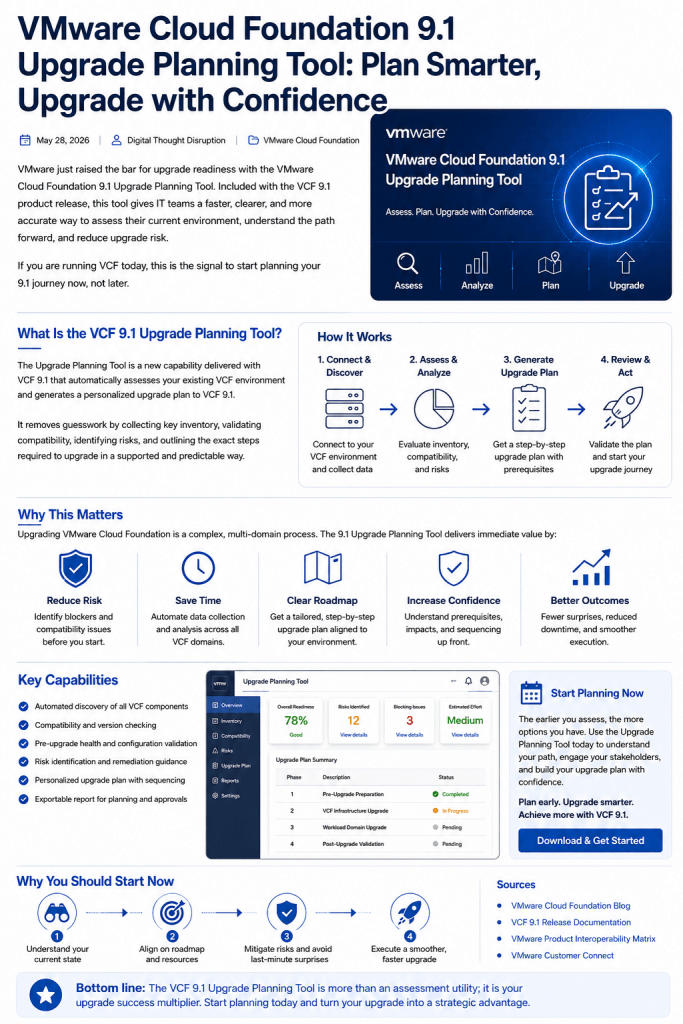


VMware Cloud Foundation 9.1 is not the kind of upgrade you should treat as a last-minute lifecycle task. For many customers, the move to VCF 9.1 is also a shift in operating model, lifecycle sequencing, management services, resource planning, and cross-team readiness.
That is why the new VCF 9.1 Upgrade Planning Tool matters.
VMware’s announcement frames the tool around a practical problem: VCF 9.1 supports a broad set of starting points, from standalone vSphere environments to combinations of vSAN, NSX, Aria Automation, VCF Operations, and full-stack VCF deployments. That flexibility is valuable, but it also means different environments may require different upgrade sequences, resource requirements, and operational workflows.

The real value: turning upgrade uncertainty into a plan
Historically, VCF upgrade planning often meant stitching together documentation, KBs, release notes, interoperability matrix checks, internal design notes, and field experience. That is not a bad discipline, but it is slow, inconsistent, and easy to misread when every environment has a different starting point.
The VCF 9.1 Upgrade Planning Tool changes the starting conversation.
Instead of asking, “What is every possible path to VCF 9.1?” the better question becomes:
What path applies to my current environment?
The planner lets you specify whether you are starting from vSphere or VCF, select the products and versions in scope, choose a target VCF 9.1 destination, and then generate a tailored upgrade plan. VMware states that the output includes phased workflow guidance, resource and networking requirements, key considerations, pitfalls, and links back to product documentation. The tool can also export the workflow or selected phases to PDF for offline review.
Where the planner fits
Use the planner as the front door to the upgrade conversation, not as the only validation source.

The key point is simple: the planner gives teams a structured artifact early enough to influence decisions. That matters more than having a pretty upgrade checklist two days before a change window.
Why customers should care now
VCF 9.1 introduces real planning implications. Broadcom’s upgrade guidance states that a mandatory component upgrade sequence must be followed when upgrading to 9.1, and that workload domains can be upgraded later as a Day-N procedure. It also calls out VCF Management Services as a mandatory part of VCF 9.1 deployment, with minimum and maximum IP address planning considerations, management network requirements, and internal IP range considerations.
That is exactly the kind of detail that should be surfaced during planning, not discovered during execution.
The upgrade guidance also reinforces that the first step is assessment: validate component configuration, review the Planning and Preparation Workbook, check hardware compatibility, remediate prerequisites, and run SDDC Manager prechecks. For environments with Aria Operations, VMware notes that VCF Operations 9.1 requires specific upgrade handling, and existing Aria Operations must be on version 8.18 before upgrading to VCF 9.1.
This is why customers should start now. Not because every environment needs to upgrade tomorrow, but because the readiness work may involve multiple teams, DNS cleanup, IP allocation, password and certificate validation, compatibility checks, and sequencing decisions.
Old way versus better way

The value is not that the planner removes engineering judgment. It does not. The value is that it gives the engineering team a better starting artifact.
Why VCF 9.1 is worth the effort
The upgrade planner is valuable because VCF 9.1 itself is worth evaluating seriously. VCF 9.1 continues Broadcom’s push toward a more unified private cloud platform, including centralized lifecycle and operations capabilities, a common management services layer, and stronger lifecycle coordination across the fleet. VMware describes VCF 9.1 Operations as consolidating patching and upgrading into a unified lifecycle UI, with update plans that outline steps and sequencing.
There are also practical operational improvements. VMware’s VCF 9.1 vSphere update notes that ESX live patch is enabled by default on clusters and can apply capable patches without falling back to normal maintenance mode and reboot behavior. VMware also states that ESX live patch supports TPM-enabled servers in ESX 9.1 and later.
For vCenter, VMware introduced quick patching in VCF 9.1 for rapid security patch deployment, with minimal and sometimes zero downtime depending on the patch payload. VMware is clear that not every patch is quick-patch compatible, which is an important operational caveat.
That combination matters: better planning up front, better lifecycle mechanics after the upgrade, and a platform direction that rewards teams that clean up their operating model.
What customers should do next
Start with a current-state inventory. Capture vCenter, ESX, VCF, NSX, vSAN, VCF Operations, Aria Automation, VxRail, and any adjacent lifecycle dependencies that apply to your environment.
Then run the Upgrade Planning Tool and export the plan. Treat the output as a working document for platform, networking, security, change management, and application teams.
After that, validate the plan against official upgrade documentation, compatibility guidance, KBs, and your own operational standards. The planner helps accelerate the conversation, but the final upgrade plan still needs engineering review, risk assessment, maintenance-window design, and rollback thinking.
Bottom line
The VCF 9.1 Upgrade Planning Tool is a strong value-add because it moves customers from generic upgrade research to environment-specific planning.
For enterprise teams, that means fewer surprises, better cross-team alignment, cleaner change preparation, and a more realistic path into VCF 9.1.
Customers should start considering this now because the hardest part of a VCF 9.1 upgrade may not be clicking the upgrade button. It may be getting the environment, teams, dependencies, and operating model ready before that button ever appears.
