


The UniFi 5G Backup (model U5G-US or U5G-EU, depending on the market), which Ubiquiti announced and made available today, is a stripped-down version of the UniFi 5G Max (U5G-Max): it’s compact, less capable, and significantly more affordable. The new PoE-powered add-on modem is not designed to deliver top 5G speeds, but to provide a reliable, low-cost cellular connection.
Here’s the bottom line: If you have a network hosted by a UniFi Cloud Gateway and need a 5G cellular model as a backup broadband source, the U5G is an easy recommendation for its friendly $99 price tag and reliable real-world performance. Get one today!
Pros
Affordable with excellent 5G cellular support with seamless integration into a UniFi network
Built-in Nano SIM slot with eSIM option
Convenient and compact design with mounting accessories included
Cons
RedCap 5G specs with modest real-world cellular performance
No third-party router support

Ubiquiti U5G: A cool representative of RedCap 5G
Apart from being a much smaller device, the biggest difference between the newly released UniFi 5G Backup and the UniFi 5G Max is the fact that the former is a reduced-capacity (RedCap) 5G modem, whereas the latter is a full-capacity model (5G NR).
As a RedCap device, the U5G has much lower cellular celling speeds, capping at 220 Mbps download and 120 Mbps upload on paper. In return, it costs significantly less, merely a fourth of the U5G-Max’s price. Other than that, the two are essentially the same in terms of usability.
The table below compares the hardware specs of U5G and the U5G-Max (and its Outdoor variant).
Hardware specifications: Ubiquiti U5G Backup vs. U5G Max vs. U5G Max Outdoor
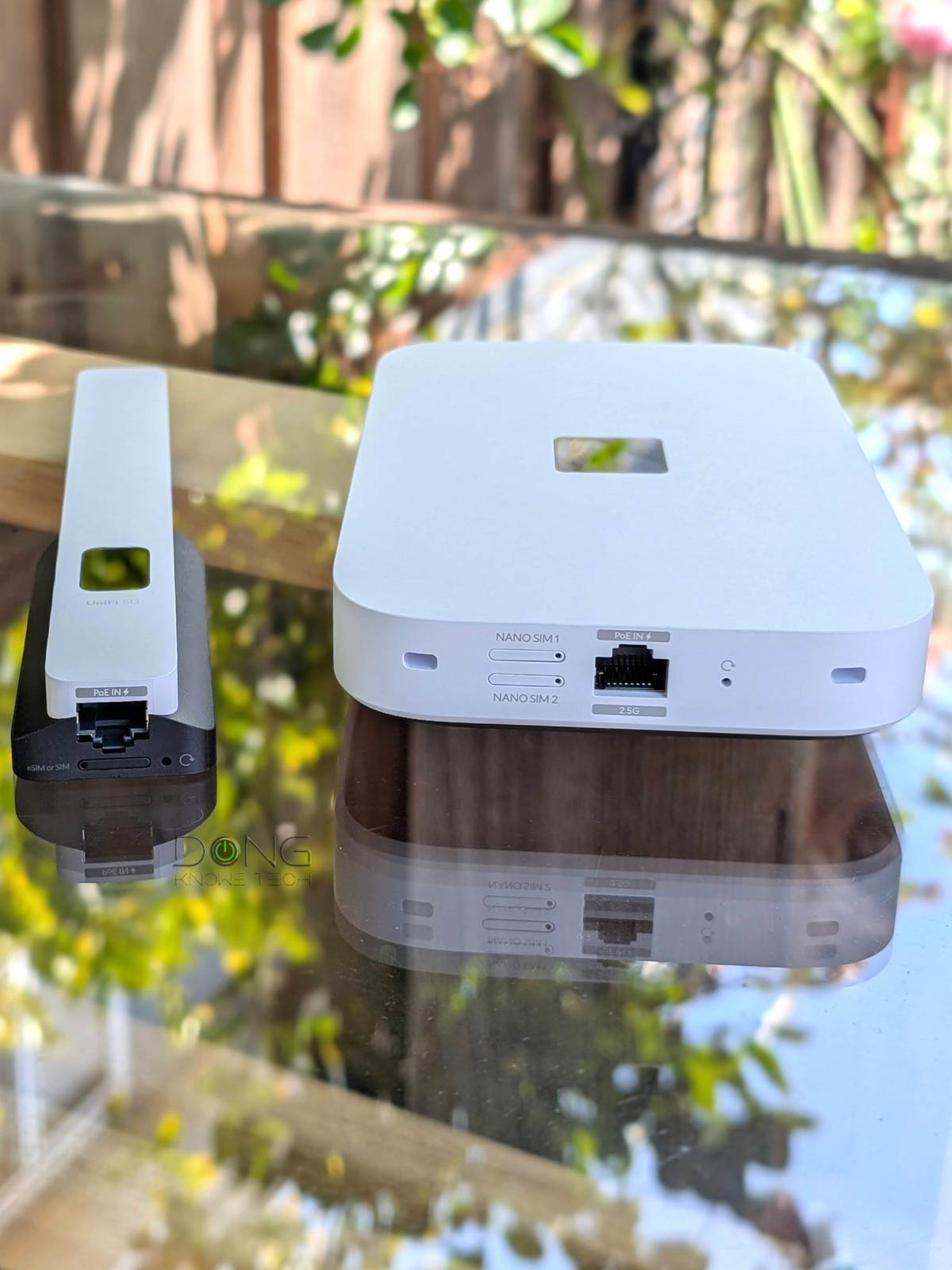
Ubiquiti U5G Backup: Well-thought-out design
Out of the box, the UniFi 5G Backup looks like a large antenna with a small non-touch screen on the front that shows its real-time status during operation. As with the screen on all UniFi devices, you can manage its brightness or on/off status via the host UniFi Cloud Gateway interface.


On the underside, the U5G Backup comes with a Gigabit PoE-in port that serves as its sole power source. Considering its modest cellular ceiling speeds, the Gigabit grade is more than fast enough. Next to the port is its sole Nano SIM slot. You can use this slot to host a physical SIM or use an e-SIM—only one at a time.
On the back, or its wall-facing side, the U5G Backup comes with a strong magnet that attaches it securely to the included form-fitting metal desktop cradle. As a result, in a well-wired home, you can easily move it around for the best cellular reception. Or you can hang it permanently on a wall using the included mounting accessories.
Overall, the UniFi 5G Backup looks great. I love the way it looks and how everything makes sense, design-wise.
Single-SIM support, super-easy to set up and manage
As mentioned, the U5G Backup can work only with one SIM at a time (physical or e-SIM). As a result, once it’s hosting a physical SIM, you can’t configure an e-SIM, and vice versa. The drawback is that if you need to replace the SIM, you’ll have to turn off cellular data, which isn’t a huge deal since it’s designed as a backup Internet source.


I tried it with a few US data SIMs, and they were all automatically recognized and configured. Note, though, that, as with most cellular modems, the U5G Backup doesn’t support SIMs from T-Mobile Home Internet plans—this is mostly an issue with T-Mobile, which wants users to use its equipment for the particular service—and at the time of this review, Verizon SIMs are not yet automatically recognized, and Ubiquiti says they will be in the future via firmware updates.
In most cases, you can expect the U5G Backup to be plug-and-play. With SIMs that are not automatically provisioned, you can likely make them work via manual configuration. That said, the U5G Backup is straightforward to use as a PoE modem: insert a physical SIM and connect it to a UniFi network via PoE, and you’re almost done.
Now, when you view the network’s UniFi Cloud Gateway interface via its web-based GUI or the UniFi mobile app, you’ll note that the U5G Backup is detected, as with any UniFi device, and can be adopted with a single tap (or click).
And that’s it! Chances are, the SIM automatically serves as a secondary Internet source via seamless Failover dual-WAN (backup mode): it immediately kicks in when the primary WAN is down and automatically resumes standby mode when things are back to normal.
If, for some reason, your SIM is not working, the U5G Backup includes all the settings for manual SIM configuration, including a specific APN value. For an e-SIM, which is only available when there’s no physical SIM, you can also use the UniFi mobile app to scan its QR code.
Ubiquiti UniFi 5G Backup: Reliable performance with modest real-world cellular speeds
I tested and used the U5G Backup for a few weeks and was happy with how reliable it worked. On this front, it proved to be the same as the U5G Max.


In terms of real-world performance, though, the U5G Backup was clearly slower. As cellular performance varies by location, provider, and data plan, for the best consistency, I tested U5G Backup using the same Google Fi data SIM with an unlimited data plan, placing it at the exact indoor location—the place has average cell reception, like most homes in an urban area.
The U5G Backup shows the same signal strength as the 5G Max (≈100 dBm), but its real-world download speeds ranged from 30 Mbps to 85 Mbps. The upload was even lower, ranging from 1 Mbps to 3 Mbps. By comparison, the U5G Max, a full-capacity 5G device, consistently achieved over 300 Mbps for downloads and higher than 15 Mbps for uploads.
That said, the difference in data rates between the two represents what you can expect from a 5G RedCap device vs. a 5G NR counterpart. It’s quite obvious that the U5G Backup, as the name suggests, is only suited as a backup connection to keep you online, and not as an Internet source for heavy applications. In that role, it’s an excellent device considering the cost.
Other than that, the PoE modem was silent and became slightly warm to the touch during operation—it was much cooler than the UniFi 5G Max and most other UniFi devices I’ve tested. And this lack of heat is always a good thing.
Conclusion
With great ease of use, reliable performance, and a friendly $99 price tag, the U5G Backup is an easy recommendation for those with a UniFi network who need a cellular backup solution. Get one today!
On the other hand, the full-capacity U5G Max is a much better option for those needing the top 5G data rates. Either PoE cellular modem will work with any UniFi Cloud Gateway.
If you’re in the market for a UniFi “router” to build your network from scratch, the list of the top 5 current options below will help. Keep in mind that, among them, the Dream Router 5G Max already has the U5G Max built in.
