

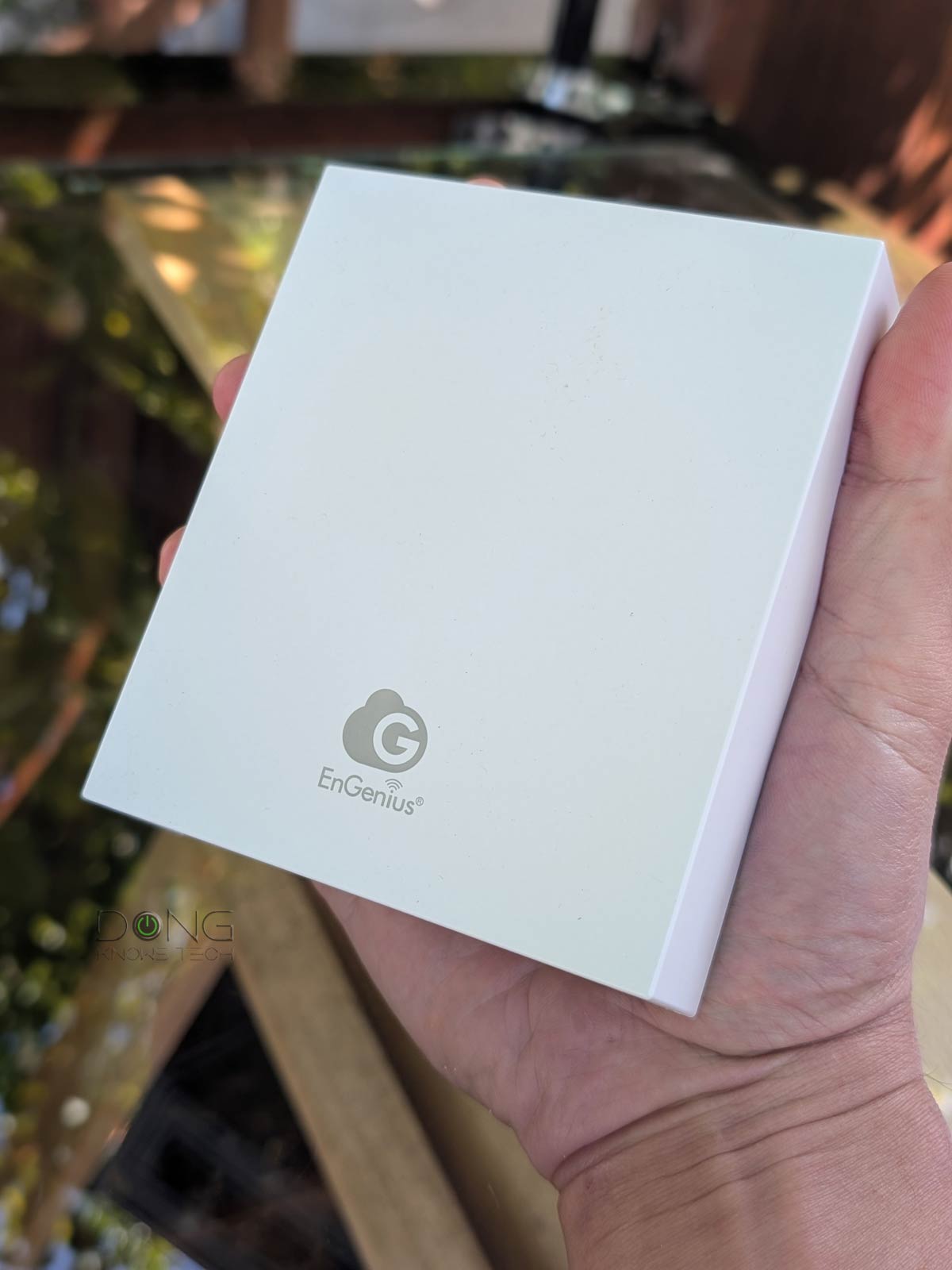

The newly released EnGenius ECW515 Cloud Managed Wi-Fi 7 2×2 Wall Plate Access Point is a compact surface-mount AP. As such, it can be handy in many situations thanks to the extra built-in LAN ports.
Here’s the bottom line: If you’re looking for a surface-mount, cloud-managed, dual-band Wi-Fi 7 access point with an integrated 4-port Gigabit switch and PoE Power Forwarding capability, the EnGenius ECW515 is worth considering at its suggested retail price of $199. It’ll work well regardless of which router you’re currently using, though the EnGenius ESG510 of the same ecosystem is the best choice. Check it out today!
On the other hand, if you’re looking for something similar but with higher real-world bandwidth and a more robust feature set, the Ubiquiti U7 In-Wall is a better alternative—that’s if you already have a UniFi “router”.
Pros
2.5Gbps uplink with reliable performance
Four-port integrated Gigabit switch with one PoE-out Power Forwarding port
Simple to set up and manage via EnGenius Cloud with lots of advanced customization
Fanless design, runs cool
Cons
No PoE injector or power adapter included
Modest dual-band Wi-Fi 7 specs, with dated Gigabit LAN ports
No local web-based user interface for Wi-Fi management, vendor account required

EnGenius ECW515: A Wi-Fi access point that can host multiple wired clients
Out of the box, the EnGenius ECW515 looks like a typical wall-plate access point. It comes with a protruding 2.5Gbps PoE+ (802.3at) uplink port right in the middle of its wall-facing side.
While the new access point is designed to be mounted on a junction box with a network cable outlet, you can place it anywhere as long as you can run a network cable to the uplink port.


Note its protruding default 2.5Gbps PoE+ uplink port and the four Gigabit LAN ports.
On the down-facing side, the EnGenius ECW515 has four Gigabit ports, numbered 2 through 4, with port #4 being a PoE-out. By default, these ports function as LAN ports, but if you use a 54V DC power adapter (not included) with the access point, the LAN2 port can serve as a non-PoE uplink. In this case, the default 2.5Gbps uplink will work as a LAN.
It’s worth noting that, like the UniFi U7 In-Wall, the ECW515 features PoE Power Forwarding, allowing users to add a PoE (802.3af) device, such as an IP camera or another Wi-Fi access point, in a daisy-chain configuration.
So, to sum it up, with a PoE+ switch or injector, the ECW515 can serve as a standard PoE-powered Wi-Fi 7 access point and a 4-port Gigabit switch with one PoE-out port, making it an excellent device for a home or small office with a mix of wired and wireless clients. On this front, it would be more exciting if it featured a higher-grade LAN port, such as 2.5Gbps, on the built-in switch.
The table below compares the ECW515’s hardware specs with its perceived rival, the Ubiquiti U7 In-Wall.
EnGenius ECW515 vs. Ubiquiti U7 In-Wall: Hardware specifications
 |
|
|
|---|---|---|
| Model | ECW515 | U7-IW |
| Name | Cloud Managed Wi-Fi 7 2×2 Wall Plate Access Point | Ubiquiti UniFi 7 In-Wall Access Point |
| Wi-Fi Standard | Dual-band BE3600 | Dual-band BE5000 |
| 1st Band 2.4GHz (channel width) |
2×2 BE: Up to 688Mbps (20/40MHz) |
|
| 2nd Band 5GHz (channel width) |
2×2 BE: Up to 2.9Gbps (20/40/80/160MHz) |
2×2 BE: Up to 4.3Gbps (20/40/80/160/240MHz) |
| 3rd Band 6GHz (channel width) |
None | |
| Backward Compatibility | 802.11ax/ac/n/g/a/b | |
| Max Concurrent Clients | 100+ | 200+ |
| Multi-Link Operation (MLO) |
Yes | |
| Automated Frequency Coordination (AFC) |
N/A | |
| Max. TX power | 2.4GHz: 21dBm 5GHz: 24dBm |
2.4GHz: 23dBm 5GHz: 24dBm |
| Antenna Gain | 2.4GHz: 5dBi 5GHz: 5dBi |
2.4GHz: 4dBi 5GHz: 8dBi |
| Estimate Wi-Fi Coverage (estimate) |
1000 ft² (92 m²) |
1250 ft² (115 m²) |
| Power over Ethernet (PoE) |
802.3at (PoE+) |
802.3af (PoE) or 802.3at (PoE+) (PoE+ is required for PoE output) |
| Max Power Consumption | 18W (excluding PoE output) |
13W (excluding PoE output) |
| PoE Power Forwarding | Yes | |
| Powering Option | PoE+ or 54V DC | PoE or PoE+ |
| Included Power Adapter or PoE injector |
None | |
| Internal Cooling Fan | No | |
| Network Port | 1x 2.5GBASE-T PoE+ (uplink) | 1x 2.5GBASE-T PoE+ (uplink), 1x 2.5GBASE-T LAN, 1x 2.5GBASE-T PoE-out LAN |
| Gigabit Port | 4x Gigabit LAN (with one being PoE-out) | None |
| Security | WPA, WPA2, WPA3 | |
| Local Web-based Management | For status and firmware update only | No |
| Cloud-Management | EnGenius Cloud (free tier available) |
UniFi (free) |
| Vendor Account | Required | Optional |
| Mobile App | EnGenius Cloud to-Go | UniFi |
| Funtionality | Access Point (Mesh Point), PoE Power Forwarding 4-port Gigabit switch |
Access Point (Mesh Point), PoE Power Forwarding 2-port 2.5Gbps switch |
| Firmware Version (for review) |
v1.9.104 | UniFi OS 5.1.8 UniFi Network 10.3.58 |
| Dimensions (W x D x H) |
5.1 x 4.3 x 1.6 in (130 x 110 x 42 mm) |
5.4 x 3.9 x 1.2 in (137 x 98.7 x 30.2 mm) |
| Weight (with mounting accessories) |
.72 lbs. (.328 Kg) | 14.1 oz (400 g) |
| LED | Color-changing LED | |
| US Launch Cost (check street prices) |
$199 | $149 |
As shown in the table, the ECW515 has two more LAN ports. In return, it doesn’t have Multi-Gig LANs and lacks support for 240 MHz channel widths on the 5GHz band.
In my real-world, hands-on experience, the access point’s 5GHz band only functioned with an 80MHz-wide channel at best, which limited its sustained rates to around a Gigabit, as you’ll note in the performance section below.
EnGenius ECW515: A fully cloud-managed access point
While EnGenius ECW515 comes with a local web-based graphic user interface, you can’t use this GUI to manage its Wi-Fi SSIDs or network ports. As a result, there’s no way to use it as an independent standalone access point.


Instead, like most other EnGenius cloud-managed access points, the ECW515 is designed to be managed via EnGenius’s engenius.ai online portal, which requires a vendor-connected login account.
EnGenius and your privacy
Generally, using the hardware via a vendor-connected account means inherent privacy risks. Depending on the hardware, EnGenius’s login account is often an option and not required.
Here’s EnGenius’s Privacy Policy.
Online privacy and security are a matter of degree. Different companies handle their users’ data differently.
Once you’ve logged in via the web portal, adding the access point to the account is quite simple. You do that manually by entering its serial number or use the EnGenious Cloud to-Go mobile app to scan the QR code on its underside. After that, when the access point is connected to an Internet-ready network, it’ll automagically be available within your EnGenius Cloud account for further customization.
Generally, that is how all cloud-managed APs work, and EnGenious’s cloud management includes a free Basic Plan with enough settings and customization for all homes and small businesses, including up to 8 SSIDs per band. Additionally, multiple supported access points can work together to provide a robust Wi-Fi mesh system.


Additionally, there’s a captive portal for each SSID, along with Quality of Service (QoS) and VLAN options. For the ECW515, you can also use the cloud-based GUI to manage its network ports, including enabling or disabling them.
It’s worth noting, however, that the EnGenious Cloud generally has a noticeable lag. Certain changes to settings and customization might take anywhere from a few seconds to a few minutes to take effect on the access point.
EnGenius ECW515: Modest but reliable performance
I tested the EnGenius ECW515 for over a week, and it proved reliable as a basic dual-band Wi-Fi 7 access point, with all its functions working as intended.
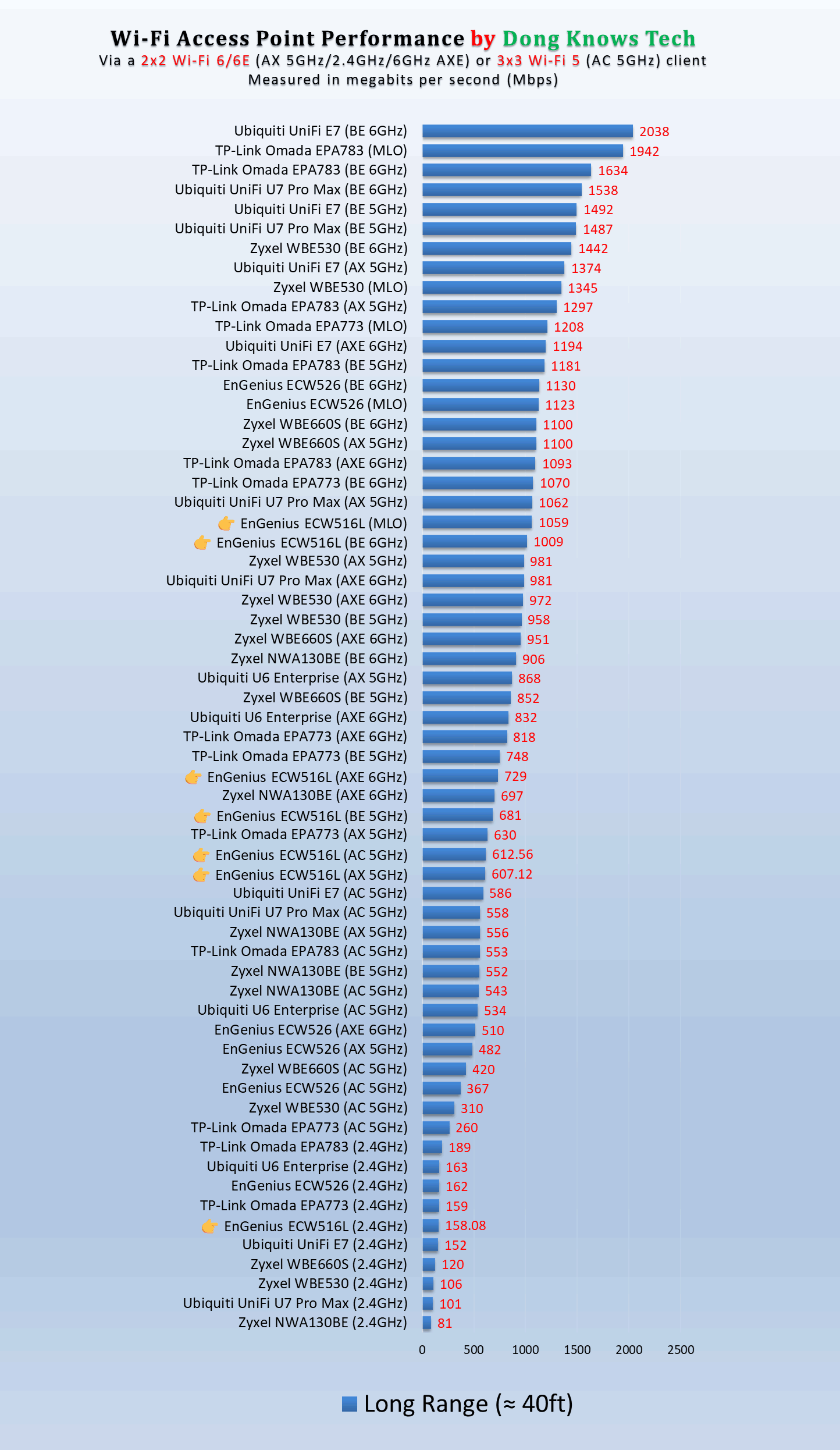
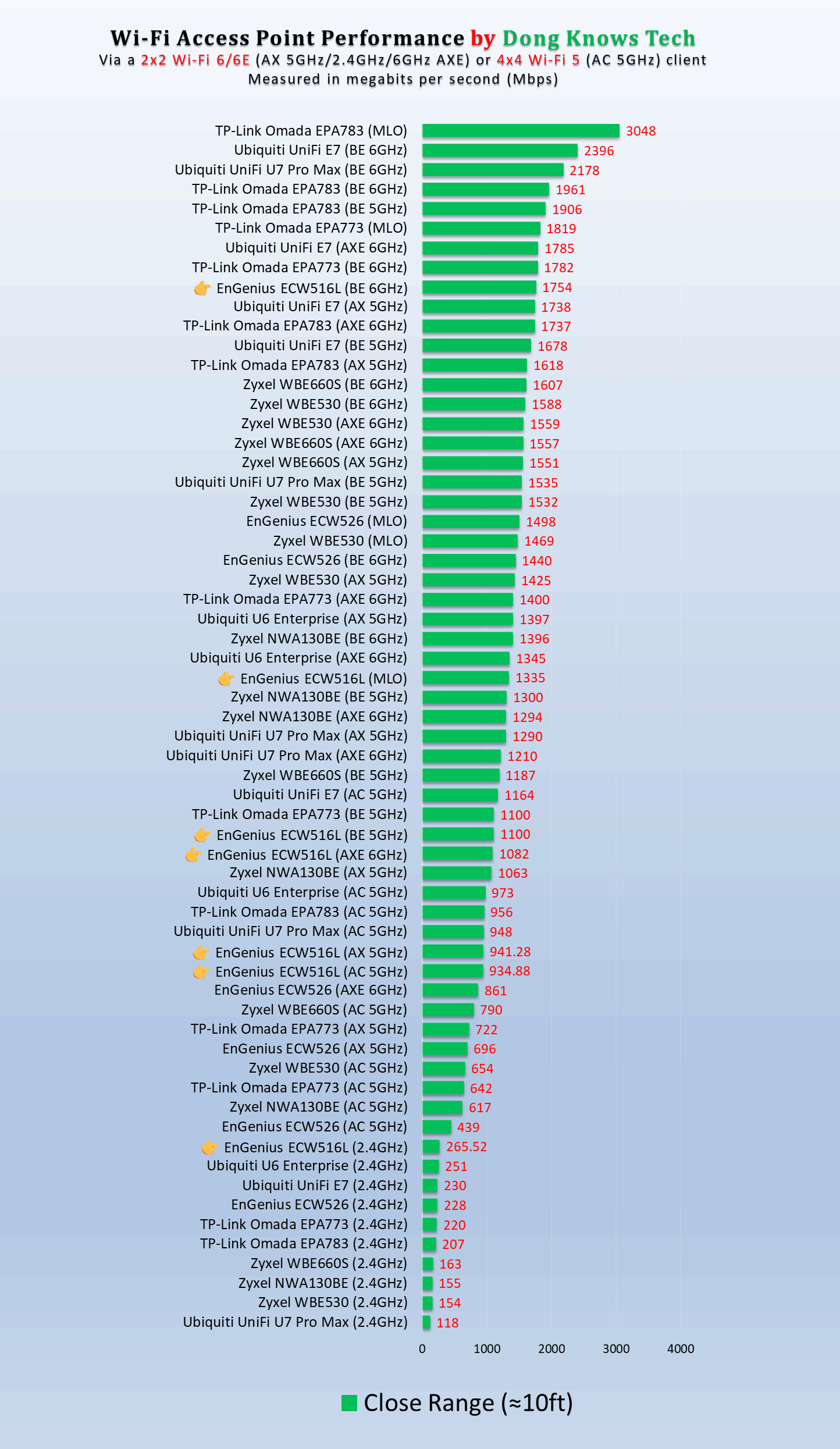
Specifically, I was able to power it via a PoE+ switch and then use it to power another PoE device, all the while its 4 LAN ports consistently deliver Gigabit-class sustained speeds. And that setup worked without any hiccups over a long period.
In terms of Wi-Fi speeds, the access point didn’t blow me away. In fact, considering its 5GHz always worked using an 80MHz channel width, its real-world sustained rates were comparatively subdued, as you can see on the charts.
Nonetheless, the ECW515 passed my 3-day stress test without disconnecting. In terms of range, which is always hard to quantify, the access point was also modest, slightly less than the U7 In-Wall. Specifically, you can expect it to cover about 1,300 ft² (120 m²) of residential space when placed at the center.
The access point, powered via a PoE+ connection, is itself powering an IP camera via its PoE-out port.
Other than that, having no internal fan, the EnGenius ECW515 was completely silent and remained cool in my trial. In fact, it didn’t even feel warm to the touch during extended use.
Conclusion
While not earthshattering in any aspect, the EnGenius ECW515 is an easy recommendation for those needing an entry-level combo unit featuring a Wi-Fi 7 access point and a 4-port PoE switch with Power Forwarding, all in a compact box. If you have a non-Wi-Fi router or one of an older Wi-Fi standard, this access point is an easy Wi-Fi 7 upgrade.
In need of a new router? The current top-five non-Wi-Fi options below will give you some pointers. On this front, note that the EnGenius ECW515 will work equally well with any third-party router, though the EnGenius ESG510 is the best option. On the other hand, if you decide to go with a UniFi Cloud Gateway, the U7 In-Wall is a much more suitable pick.
