

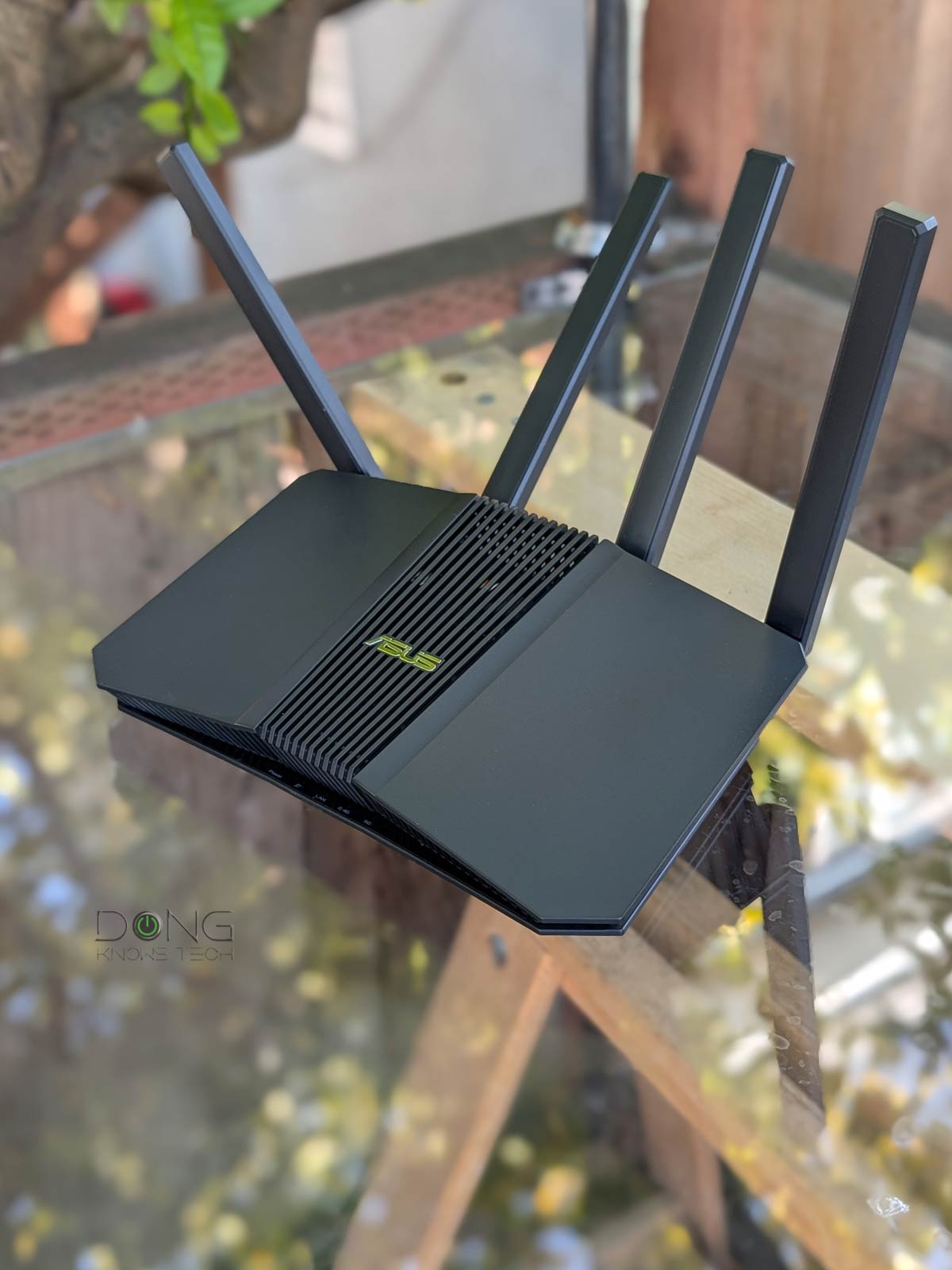

I first thought the ASUS RT-BE82U would somewhat resemble the RT-AX82U, the way the RT-BE86U and RT-BE88U continue their respective design lineages.
I thought wrong. The RT-BE8U is more of an upgrade to the RT-BE58U, with slightly higher Wi-Fi specs and all 2.5GbE ports.
Here’s the bottom line: For those needing only dual-band, the RT-BE8U proved to be a reliable Wi-Fi 7 router worthy of its suggested $219.99 retail price — the street price will vary. It has everything a small home needs for Gig+ bandwidth. After that, the ability to scale up coverage via multiple units, thanks to the support for AiMesh, doesn’t hurt.

ASUS RT-BE82U: A straightforward, entry-level Multi-Gig router
Out of the box, the ASUS RT-BE82U is identical-looking to the RT-BE58U. It’s a small flat box tapering toward the sides and front with five network ports, a USB 3.0 port, and four non-detachable antennas on the back.
All of the network ports, one WAN and four LANs by default, feature 2.5Gbps Multi-Gig, and you can swivel each antenna half a sphere around.
On the front, the router comes with an array of five tiny white status lights for power, LAN, Internet, and two of its Wi-Fi bands. Speaking of Wi-Fi, the RT-BE82U features the same specs as the TUF-BE6500 or the NETGEAR Nighthawk RS200.
Specifically, it’s a dual-band dual-stream (2×2) with the total theoretical bandwdith of both bands being 6500Mbps. As such, it’s a clear upgrade to the RT-BE58U, which is pretty much a Gigabit router with 3600Mbps of Wi-Fi bandwidth.
The table below compares the hardware specs of all the routers mentioned above.
ASUS RT-BE82U: Hardware specifications and real-world power consumption
 |
|
 |
||
|---|---|---|---|---|
| Model | RT-BE58U | 👉 RT-BE82U | TUF-BE6500 | RS200 |
| Wi-Fi Bandwidth (stream per band) |
Dual-band BE3600 | Dual-band BE6500 | ||
| 2.4GHz Band (channel width) |
2×2 BE: Up to 688 Mbps (20/40MHz) |
|||
| 5GHz Band (channel width) |
2×2 BE: Up to 2882Mbps (20/40/80/160MHz) |
4×4 BE: up to 5762Mbps (20/40/80/160MHz) |
||
| 6GHz Band | None | |||
| Network Standards | IEEE 802.11a, IEEE 802.11b, IEEE 802.11g, IEEE 802.11n, IEEE 802.11ac, IEEE 802.11ax, IEEE 802.11be, IPv4, IPv6 |
|||
| Network Features | Web user interface ASUS Router mobile app Comprehensive free features and settings |
Web user interface Nighthawk mobile app Limited free features and settings |
||
| Web-based Remote Management | Yes (via Dynamic DNS) | No | ||
| Vendor Login Account Required | No | Yes (Only for the Nighthawk Mobile app) |
||
| Premium Add-on (trial period) |
None | NETGEAR Armor ($100/year) Parental Control (70/year) (30-day) |
||
| Mesh-Ready | Yes (AiMesh) |
No | ||
| Operating Mode | Router Access Point Repeater Media Bridge AiMesh Router/Node |
Router Access Point |
||
| Multi-Gig Port | 1x 2.5Gbps WAN | 1x 2.5Gbps WAN 4x 2.5Gbps LAN |
1x 2.5Gbps WAN 3x 2.5Gbps LAN |
1x 2.5Gbps WAN 1x 2.5Gbps LAN |
| Gigabit Port | 4x LAN | None | 3x LAN | |
| Multi-Link Operation (MLO) |
Yes | No | ||
| Link Aggregation | No | Yes (WAN and LAN) |
||
| Dual-WAN | Yes | No | ||
| USB Port | 1 x USB 3.0 | |||
| Dimensions | 9.37 x 5.79 x 3.82 in (238 x 147 x 97 mm) |
11.97 x 6.85 x 8.43 in (30.4 x 17.4 x 21.4 cm) |
9.8 x 5.9 x 4 in (24.9 x 15 x 10.2 cm) |
|
| Weight | 1.02 lbs (461g) | 1.11 lb (502g) | 1.7 lb (772 g) | 2.09 lb (950 g) |
| Processing Power | 2.0GHz quad-core CPU, 512MB Flash, 1GB DDR4 RAM |
2.0 GHz quad-core CPU, 256 MB Flash, 1 GB DDR4 RAM | 1.5 GHz quad-core CPU, 256 MB Flash, 1GB DDR4 RAM |
2.0GHz quad-core CPU, 512MB Flash, 2GB DDR4 RAM |
| Power Intake | 110-240V | |||
| Firmware (at review) |
3.0.0.6.102_37090 | 3.0.0.6.102_39256 | 3.0.0.6.102_57125 | V1.0.1.60 |
| Real-World Power Consumption (measured in 24 hours) |
≈ 200 Wh | ≈ 160 Wh | ||
| US Release Date | Q1 2025 | Q4 2025 | Q1 2025 | September 24, 2024 |
| US Launch Price (check street pricing!) |
$149.99 | $219.99 | $229 | |

A standard ASUS router with a common generous set of features
The RT-BE82U is frill-free. In fact, the five 2.5Gbps ports are the only thing noteworthy about it. Thanks to those, the router, by itself, can host a wired network of up to 2.5Gbps bandwdith.
For Internet, however, when I tried with my 10Gbps fiber-optic line, it generally could pull about 2.3Gbps for download and around 1.5Gbps for upload. So, on this front, you can count it as a Gig+ router.
Tip
Gig+, or Gig Plus, denotes a speed grade between 1Gbps and 2Gbps. So, it’s 1.5Gbps, give or take a couple of hundred megabits per second, and it’s not speedy enough to qualify as Multi-Gig Ethernet or multi-Gigabit. Intel coined the term to describe its Wi-Fi 6E client chips, the AX210 and AX211, in terms of their real-world speeds.
Gig+ primarily applies to sustained Wi-Fi 6 or Wi-Fi 7 speeds via a 2×2 at 160MHz connection, or to broadband internet speeds.


Aside from that, running ASUSWRT 5.0, the RT-BE82U shares the features of all ASUS routers, with slight variations. Specifically, here’s what you can expect from it, as confirmed in my experience:
- Flexible WAN/LAN configurations: The router features dual-WAN. You can turn any of its LAN ports or the USB port into a second WAN port. The USB port can host a cellular modem or a tethered smartphone. However, there’s no Link Aggregation.
- Universal backup restoration: Like most ASUS routers, the RT-BE82U can take the settings backup file from most other ASUS routers. As a result, if you want to upgrade to it from an older model, such as the RT-AX82U or the RT-BE58U, the process is as easy as restoring that router’s backup file.
- Robust web user interface with optional ASUS Router mobile app: You can set up the RT-BE82U the way you do any standard router via its default IP address, which is 192.168.50.1.
- AiMesh support: The RT-BE82U works best with wired backhauling. If you need a wireless setup, it’s best to use multiple units. That’s also when MLO will work for the wireless backhaul link.
- Built-in Parental Controls and online protection (AiProtection) plus other traffic-related features.
- USB-based features (cellular tethering, network storage, media streaming server, etc.).
- Advanced VPN: The RT-AX82U supports advanced VPN, including WireGuard, VPN Fusion (when working as a client), and Instant Guard. It’s also one of the models that comes with 6-month NordVPN.
- Other features: Tons of helpful network/Wi-Fi settings, tools, and other features, including Quality of Service (QoS) and web-based remote management via Dynamic DNS. The router can handle up to 128 IP reservation entries and 64 port-forwarding entries.
Tip
Avoid using the ASUS mobile app for the setup process. The app is generic and lacks specifics applied to a particular Asus router. While this app might work in most cases and is convenient for monitoring your network, it can cause unknown and unexpected issues when used to set up new hardware or make specific changes to the system. If that’s your case, reset the hardware and set it up again using the web user interface before using the app if you can’t resist it.


That said, the RT-BE82U will give you everything you’d expect from a consumer-grade router, all with a self-explanatory interface. If you had an ASUS router before, you’ll feel right at home with it, not to mention time-saving thanks to the universal backup and restoration support mentioned above.
Reliable Gig+ performance, range could be better
I tested the RT-BE82U for a week, and it performed as expected for a modest dual-band Wi-Fi 7 router.
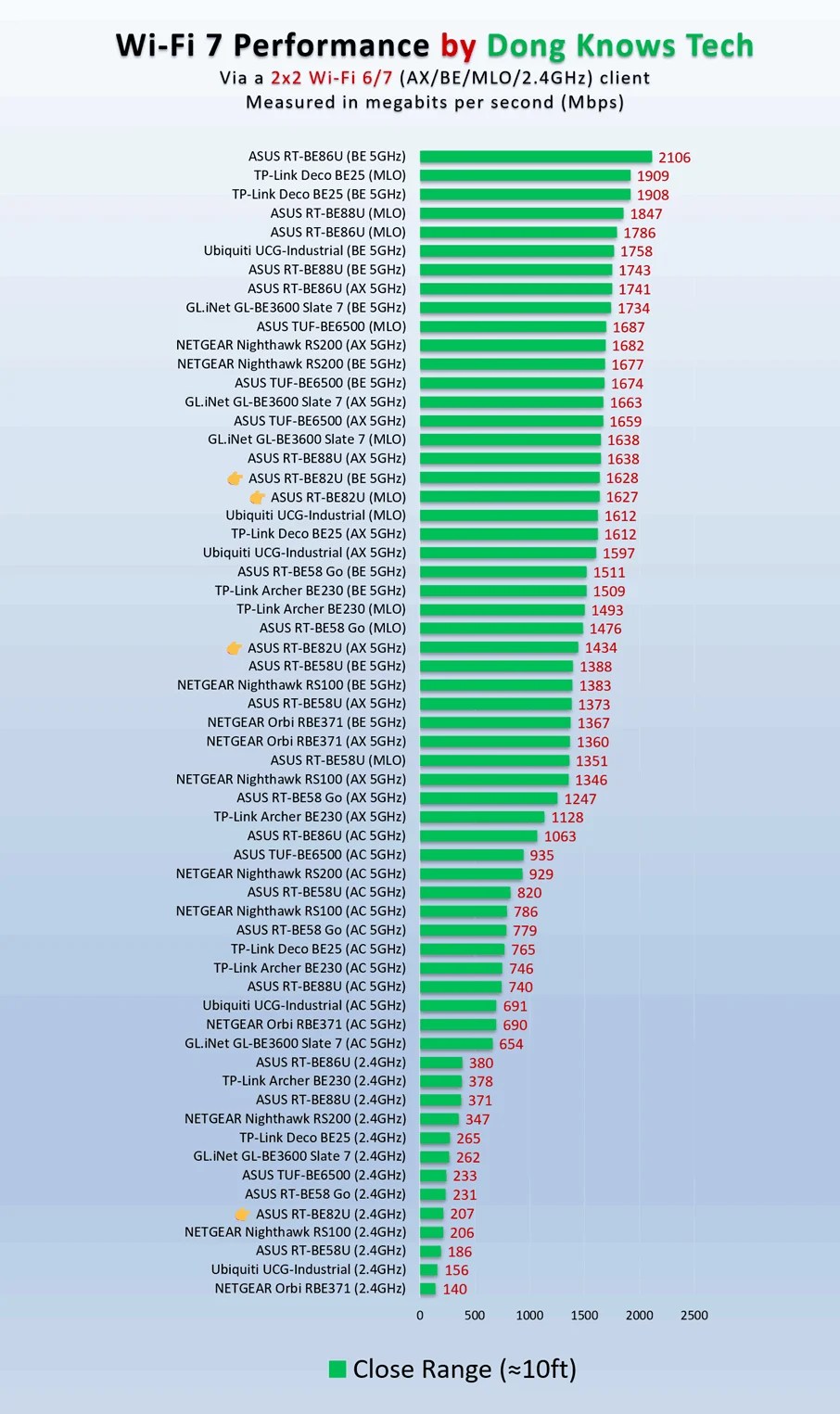
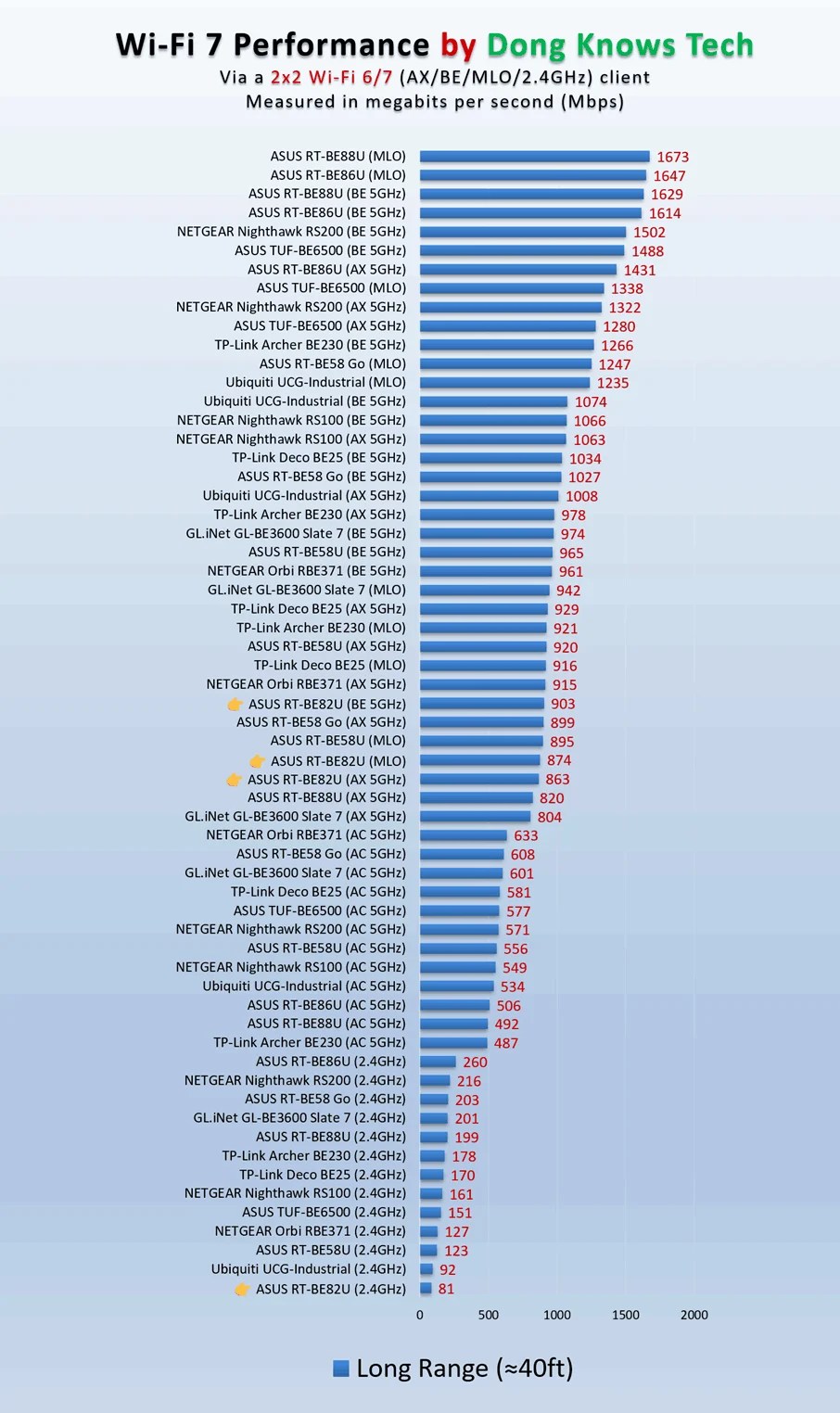
The router proved reliable, passing my stress test without any disconnection. In terms of real-world throughput, it was about the average among other dual-band Wi-Fi 7 routers, as shown in the charts above.
As you might have noted, the router’s performance over long range wasn’t impressive. It’s always tricky to put the coverage in numbers, but the RT-BE82U’s range was among the worst I’ve seen. Specifically, its 5GHz band starts losing a bar from around 40 feet away within the line of sight, and farther out only its 2.4GHz band, which is really slow, was reliable.
Still, if you live in an airy house of around 1,500 ft2 (139 m2) and can place the router near the center, the RT-BE82U will likely suffice. Otherwise, it’s a good idea to get another unit to extend the coverage via an AiMesh system. Of course, your mileage will vary.

The router’s Wired performance was better than its Wi-Fi and close to what you can expect from 2.5GbE grade. It was fairly easy for me to get sustained speeds of around 2.3Gbps out of its ports. And 2.3Gbps was also the fastest download speed I got when the RT-BE82U hosted a 10Gbps fiber-optic line. That said, this router is good enough for anyone with a 2Gbps or slower broadband.
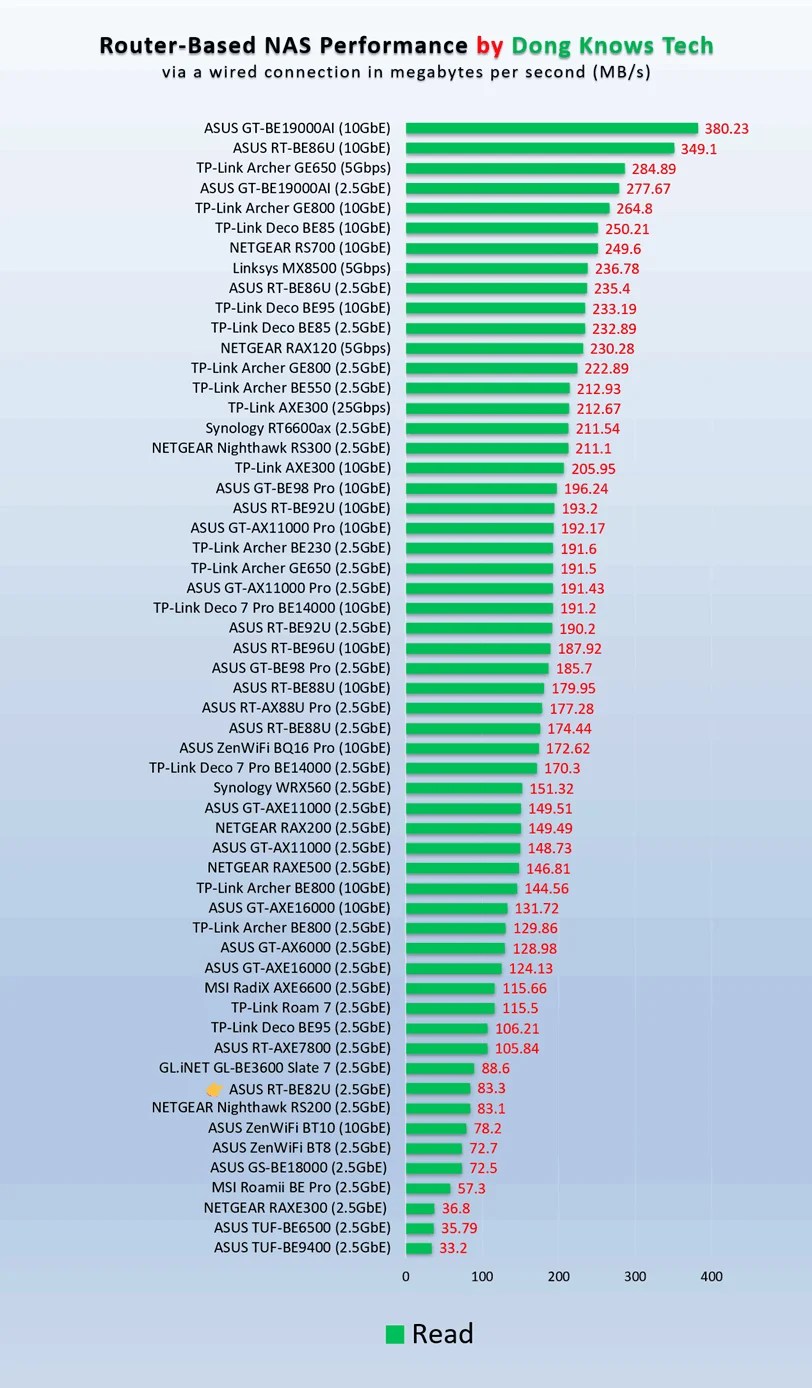
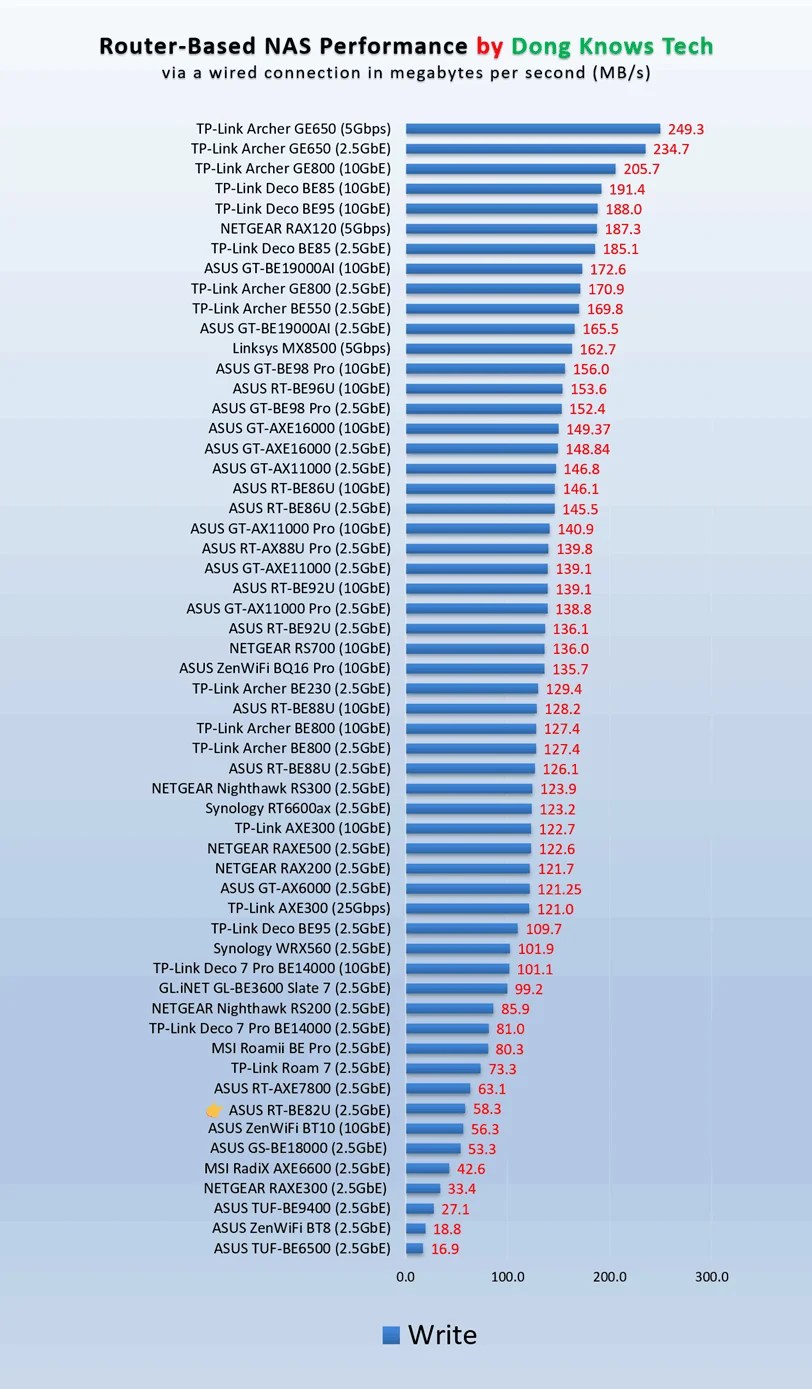
I also tested the RT-BE82U’s network-attached storage (NAS) feature using the USB 3.0 port. When hosting a portable SSD, it delivered sustained rates of around 60 MB/s for writing and over 80 MB/s for reading. These were the best I’ve seen, but better than many others, including the TUF-BE6500. On this front, the router is good enough for casual data sharing, but you should think of a real NAS server if you want anything more.
Other than that, having no internal fan, the RT-BE82U was silent during operation and remained cool during my trial — it only became a bit warm to the touch on the underside.
Conclusion
The ASUS RT-BE82U BE6500 Dual-Band Wi-Fi 7 router has nothing earth-shattering. As such, it’s not a must-have. However, it’s definitely a good option for those needing a simple Wi-Fi solution for a home with Gig+ (or maybe slightly faster) bandwdith needs. Consider it today!

