

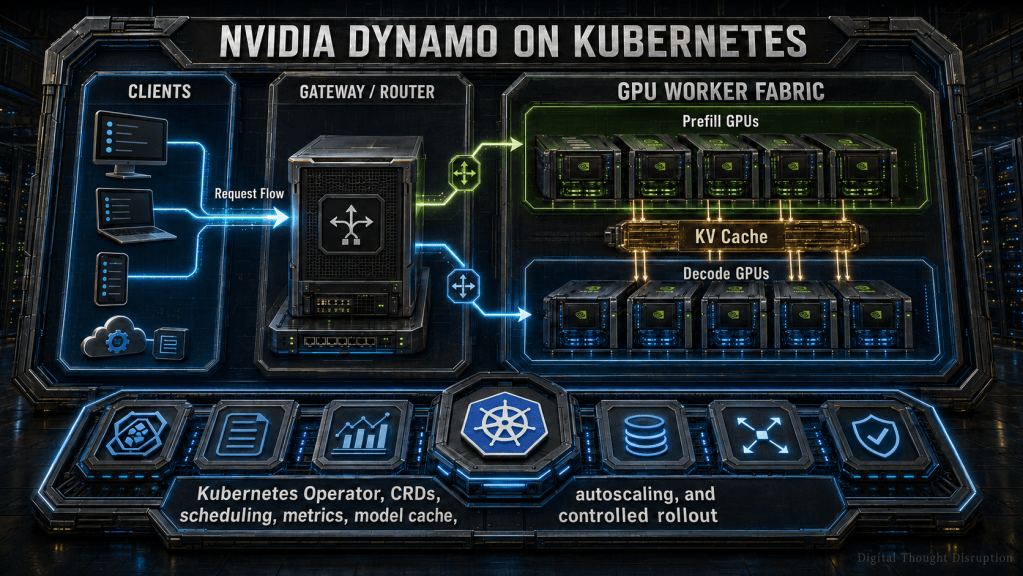


TL;DR
NVIDIA Dynamo is preferable to a standalone inference server when the serving problem extends beyond one process or one GPU node. It introduces a Kubernetes-native control plane for distributed inference graphs, separate prefill and decode workers, KV-cache-aware routing, model loading, topology-aware placement, autoscaling, fault recovery, Gateway API integration, and multi-node execution.
This tutorial uses NVIDIA Dynamo 1.3.0 and the nvidia.com/v1beta1 custom resource API. It builds a small vLLM disaggregated deployment and then expands the design into the production concerns that matter most: high-speed KV transfer, shared model caches, independent prefill and decode scaling, distributed tracing, controlled upgrades, and rollback.
The important operational lesson is that Dynamo does not replace vLLM or TensorRT-LLM. It coordinates those inference engines as parts of a larger distributed serving system.
Introduction
Deploying an LLM on Kubernetes can begin with a surprisingly small manifest. A pod starts an inference server, a service exposes it, and a GPU request places it on an accelerator node.
That approach is useful until the workload stops behaving like one server.
Long prompts and short prompts create different compute profiles. Prefill and token generation contend for the same GPU resources. Large models require tensor parallelism across nodes. Model weights take too long to download during recovery. A generic Kubernetes autoscaler sees GPU utilization but does not understand time to first token, queue pressure, or KV-cache locality. Adding more replicas can even make performance worse when requests are routed without awareness of cached context.
NVIDIA Dynamo addresses the distributed system around the inference engine. It provides a frontend, routing layer, prefill and decode separation, KV-cache transport, service discovery, profiling, model-loading workflows, autoscaling adapters, and a Kubernetes operator that turns inference graphs into managed resources.
This makes Dynamo valuable for platform teams operating shared GPU clusters. It also means deployment requires more architecture work than installing a standalone model server.
This tutorial shows both sides: how to deploy a working Dynamo graph and how to design the surrounding Kubernetes platform so the deployment remains supportable after the first successful request.
What You Will Build
By the end of the walkthrough, you will understand how to:
- Install the Dynamo platform and operator from a pinned Helm artifact.
- Use the current
v1beta1custom resource model. - Deploy frontend, prefill, and decode components with vLLM.
- Configure matching NIXL KV-transfer settings on both worker roles.
- Validate the generated component deployments and services.
- Decide between vLLM and TensorRT-LLM.
- Integrate Dynamo with Kubernetes Gateway API.
- Plan shared model caches and runtime KV-cache tiers.
- Extend the design across GPU nodes and topology domains.
- Scale prefill and decode capacity independently.
- Add metrics, logs, distributed tracing, and fault testing.
- Upgrade and roll back the serving graph without treating CRDs as disposable application resources.
When Dynamo Is Preferable to a Standalone Inference Server
A standalone vLLM, TensorRT-LLM, NVIDIA NIM, or similar inference endpoint remains appropriate when the workload fits comfortably inside one operational unit.
Dynamo becomes useful when the serving topology itself needs orchestration.
| Requirement | Standalone inference server | NVIDIA Dynamo |
|---|---|---|
| One model on one GPU or node | Strong fit | Usually unnecessary |
| Simple internal endpoint | Strong fit | Optional |
| Multiple identical replicas | Possible with Kubernetes services | Adds inference-aware routing |
| Separate prefill and decode pools | Requires custom integration | Native serving pattern |
| KV-cache-aware routing | Engine or custom implementation | Integrated routing model |
| Multi-node tensor parallelism | Engine-specific orchestration | Operator and scheduler integration |
| Independent prefill and decode scaling | Custom automation | DGD scaling adapters and Planner integration |
| Topology-aware KV movement | Custom scheduling and routing | Placement and runtime topology controls |
| Generated deployment sizing | External benchmark process | DGDR profiling and generation |
| Shared model-loading workflow | PVC or custom jobs | Integrated model-loading patterns |
| Gateway API endpoint selection | Custom integration | GAIE and Dynamo EPP integration |
| Platform-level fault handling | Kubernetes restart behavior | Request, worker, and serving-graph mechanisms |
Dynamo is not automatically the better choice because it has more features. It adds etcd, NATS, an operator, custom resources, routing state, additional worker roles, and lifecycle dependencies. Those components are justified when they replace real custom engineering or solve a measurable inference bottleneck.
For a small internal model with predictable traffic, a standalone server is often easier to operate.
For a shared platform serving large or latency-sensitive models, Dynamo provides a more useful control boundary.
The Dynamo Kubernetes Mental Model
Dynamo separates the desired inference graph from the Kubernetes resources that implement it.
The user normally creates or generates a DynamoGraphDeployment. The operator then reconciles that graph into component deployments, pods, services, discovery information, model resources, routing state, and status conditions.
The request path is separate from the reconciliation path.
The main custom resources are:
- DynamoGraphDeploymentRequest, or DGDR: Describes model, backend, hardware, workload, and optional service-level intent. Dynamo profiles the request and generates a deployment.
- DynamoGraphDeployment, or DGD: The persistent, live description of the inference graph.
- DynamoComponentDeployment, or DCD: Operator-created resources representing frontend, prefill, decode, router, EPP, or other components.
- DynamoModel: Manages model-related resources and adapter lifecycle where that workflow is used.
- DynamoGraphDeploymentScalingAdapter, or DGDSA: Exposes individual graph components to Kubernetes or Dynamo autoscaling systems.
Normal deployments should be authored at the DGD or DGDR level. Editing generated DCDs directly works against reconciliation and should be reserved for short-lived diagnosis.
Understand the Request Flow Before Deploying
Disaggregated inference separates two phases that place different pressure on the GPU system.
Prefill
Prefill processes the input prompt and generates the initial KV-cache state. It is generally the more compute-intensive phase, especially for long contexts and large batches.
Decode
Decode generates subsequent tokens using the existing KV state. It is often constrained by memory bandwidth, KV-cache capacity, batch behavior, and token scheduling.
KV transfer
A decode worker cannot continue the request until it can access the KV state created during prefill. In a disaggregated design, that state must move between workers or become accessible through a shared cache tier.
This transfer path is an architecture dependency, not a minor optimization.

For a laboratory deployment, TCP networking may be sufficient to confirm that the graph works.
For production disaggregated serving, validate RDMA, InfiniBand, RoCE, EFA, GPUDirect, or the appropriate cloud-specific high-speed transport. A deployment that technically transfers KV blocks but does so across a slow path may deliver worse latency than an aggregated server.
Prerequisites and Version Baseline
This walkthrough assumes:
- Kubernetes 1.30 or later.
kubectl1.30 or later.- Helm 3 or later.
- At least two available NVIDIA GPUs for the disaggregated example.
- NVIDIA GPU Operator or an equivalent validated GPU enablement stack.
- A supported GPU driver for the CUDA version shipped in the selected Dynamo runtime.
- Cluster-admin access for the platform installation.
- A model namespace separate from the platform namespace.
- A Hugging Face token when required by the selected model or download policy.
- A high-speed network design before moving disaggregated serving into production.
- Prometheus-compatible monitoring for autoscaling and operational dashboards.
- Grove with KAI Scheduler, or LeaderWorkerSet with Volcano, when multi-node or coordinated scheduling is required.
This tutorial pins the following release line:
| Component | Tutorial baseline |
|---|---|
| NVIDIA Dynamo | 1.3.0 |
| Kubernetes API | nvidia.com/v1beta1 |
| Dynamo platform chart | 1.3.0 |
| Dynamo operator image | 1.3.0 |
| vLLM runtime image | 1.3.0 |
| vLLM packaged in runtime | 0.23.0 |
| TensorRT-LLM runtime image | 1.3.0 |
| TensorRT-LLM packaged in runtime | 1.3.0rc19 |
| vLLM runtime CUDA | 13.0 |
| TensorRT-LLM runtime CUDA | 13.1 |
| KAI Scheduler for Dynamo 1.3.x | 0.13.4 or later |
| Grove for Dynamo 1.3.x | At least 0.1.0-alpha.8 and earlier than 0.1.0-alpha.9 |
Do not combine a current platform chart with arbitrary runtime images from another release line. The operator, API schema, backend package, NIXL version, CUDA version, and scheduling integrations form a tested compatibility set.
Dynamo 1.3.0 no longer publishes the earlier CUDA 12 runtime image line. Confirm the node driver and operating-system baseline before upgrading an existing cluster.
Prepare the Kubernetes Cluster
Verify GPU readiness
Confirm that the NVIDIA GPU stack is healthy before introducing Dynamo:
kubectl get nodes
kubectl get pods -n gpu-operator
kubectl get daemonsets -n gpu-operator
kubectl describe nodes | grep -A5 "nvidia.com/gpu"
Successful validation should show:
- GPU-capable nodes in
Readystate. - NVIDIA driver and device-plugin pods running.
nvidia.com/gpucapacity reported on the intended nodes.- No competing driver installation between the cloud provider and GPU Operator.
- DCGM metrics available when hardware discovery or GPU monitoring depends on them.
A common cloud failure is installing provider-managed GPU drivers and then allowing GPU Operator to install another driver stack. Decide which system owns the driver lifecycle before installing the operator.
Check for an existing Dynamo operator
Dynamo normally uses one cluster-wide operator. Shared-cluster teams should verify that another platform group has not already installed it:
kubectl get deployments -A | grep dynamo-operator || true
kubectl get clusterrolebindings | grep dynamo || true
Namespace-restricted operator mode is useful for development and testing, but it should not be treated as the production multi-tenant design.
Create the platform values file
For a production cluster where Grove and KAI Scheduler are managed as shared platform dependencies, create dynamo-platform-values.yaml:
global:
  grove:
    enabled: true
  kai-scheduler:
    enabled: true
Use enabled: true when these components are installed and lifecycle-managed separately.
Bundled installation is convenient for a lab, but externally managed scheduling components give the platform team a clearer version, ownership, and upgrade boundary.
Install the Dynamo Platform
Download the pinned Dynamo platform chart from the NVIDIA release artifacts collection and place it in the working directory.
Then install it into a dedicated system namespace:
export DYNAMO_VERSION=1.3.0
export DYNAMO_SYSTEM_NAMESPACE=dynamo-system

helm install dynamo-platform \
  "./dynamo-platform-${DYNAMO_VERSION}.tgz" \
  --namespace "$DYNAMO_SYSTEM_NAMESPACE" \
  --create-namespace \
  --values dynamo-platform-values.yaml \
  --wait
This installs the Dynamo platform services and operator. CRDs are managed by the operator. The older standalone CRD chart is deprecated and should not be added to a new installation.
Verify the result:
kubectl get pods -n "$DYNAMO_SYSTEM_NAMESPACE"

kubectl get crd | grep -E \
  'dynamograph|dynamocomponent|dynamomodel'

kubectl get deployments -n "$DYNAMO_SYSTEM_NAMESPACE"
Expected results include:
- A running Dynamo operator.
- Healthy etcd and NATS components.
- DGD, DCD, DGDR, and related CRDs.
- No repeated webhook or CRD conversion errors.
- No second cluster-wide operator competing for the same resources.
Create the Model Namespace and Credentials
Keep model-serving workloads outside the platform namespace:
export MODEL_NAMESPACE=llm-inference

kubectl create namespace "$MODEL_NAMESPACE"
Create the model repository secret without placing the token in a manifest:
read -s HF_TOKEN

kubectl create secret generic hf-token-secret \
  --from-literal=HF_TOKEN="$HF_TOKEN" \
  --namespace "$MODEL_NAMESPACE"

unset HF_TOKEN
For production:
- Use an external secrets controller or approved secrets manager.
- Restrict the secret to the model namespace.
- Rotate repository credentials.
- Avoid sharing one broad token across unrelated model teams.
- Use separate identities for model download, runtime access, and object storage.
- Confirm the model license and redistribution terms before caching weights in shared storage.
Deploy a Disaggregated vLLM Inference Graph
The following example deploys:
- One Dynamo frontend.
- One vLLM prefill worker.
- One vLLM decode worker.
- One GPU per worker.
- Matching NIXL KV-transfer configuration on both worker roles.
- A small model suitable for validating the graph rather than benchmarking production performance.
Save the manifest as qwen3-vllm-disagg.yaml:
apiVersion: nvidia.com/v1beta1
kind: DynamoGraphDeployment
metadata:
  name: qwen3-vllm-disagg
spec:
  components:
    - name: Frontend
      type: frontend
      replicas: 1
      podTemplate:
        spec:
          containers:
            - name: main
              image: nvcr.io/nvidia/ai-dynamo/vllm-runtime:1.3.0
              command:
                - python3
                - -m
                - dynamo.frontend
              args:
                - --http-port
                - "8000"

    - name: VllmDecodeWorker
      type: decode
      replicas: 1
      podTemplate:
        spec:
          containers:
            - name: main
              image: nvcr.io/nvidia/ai-dynamo/vllm-runtime:1.3.0
              workingDir: /workspace/examples/backends/vllm
              command:
                - python3
                - -m
                - dynamo.vllm
              args:
                - --model
                - Qwen/Qwen3-0.6B
                - --disaggregation-mode
                - decode
                - --kv-transfer-config
                - '{"kv_connector":"NixlConnector","kv_role":"kv_both"}'
              envFrom:
                - secretRef:
                    name: hf-token-secret
              env:
                - name: DYN_SYSTEM_PORT
                  value: "8081"
              resources:
                limits:
                  nvidia.com/gpu: "1"
                requests:
                  ephemeral-storage: 10Gi

    - name: VllmPrefillWorker
      type: prefill
      replicas: 1
      podTemplate:
        spec:
          containers:
            - name: main
              image: nvcr.io/nvidia/ai-dynamo/vllm-runtime:1.3.0
              workingDir: /workspace/examples/backends/vllm
              command:
                - python3
                - -m
                - dynamo.vllm
              args:
                - --model
                - Qwen/Qwen3-0.6B
                - --disaggregation-mode
                - prefill
                - --kv-transfer-config
                - '{"kv_connector":"NixlConnector","kv_role":"kv_both"}'
              envFrom:
                - secretRef:
                    name: hf-token-secret
              env:
                - name: DYN_SYSTEM_PORT
                  value: "8081"
              resources:
                limits:
                  nvidia.com/gpu: "1"
                requests:
                  ephemeral-storage: 10Gi
What you must change
Before using this manifest beyond a lab, change:
- The model name.
- Runtime image registry and image-promotion process.
- GPU count and parallelism values.
- Ephemeral-storage requests.
- CPU and memory requests and limits.
- Model-cache mounts.
- Node selectors, tolerations, and topology policy.
- Security context and service account.
- Observability configuration.
- Backend-specific engine arguments.
- Replica counts.
- NIXL and RDMA configuration.
Why the decode configuration is explicit
The decode worker must be placed in decode mode and configured with a KV-transfer connector matching the prefill worker.
Do not assume that every upstream example on every branch contains both settings. At the time of publication, an open upstream issue identifies multiple v1beta1 vLLM disaggregated examples that omit matching decode-side KV-transfer configuration.
The safest practice is to inspect both worker argument lists before deployment:
Prefill: --disaggregation-mode prefill --kv-transfer-configDecode: --disaggregation-mode decode --kv-transfer-config
A pod reaching Running does not prove that the serving graph is correctly disaggregated.
Apply and Inspect the Deployment
Apply the DGD:
kubectl apply \
  --filename qwen3-vllm-disagg.yaml \
  --namespace "$MODEL_NAMESPACE"
Watch the graph, generated components, and pods:
kubectl get \
  dynamographdeployment,dynamocomponentdeployment,pods \
  --namespace "$MODEL_NAMESPACE" \
  --watch
Inspect the DGD status:
kubectl describe dynamographdeployment \
  qwen3-vllm-disagg \
  --namespace "$MODEL_NAMESPACE"
Inspect generated component deployments:
kubectl get dynamocomponentdeployment \
  --namespace "$MODEL_NAMESPACE"

kubectl get services,endpointslices \
  --namespace "$MODEL_NAMESPACE"
What successful reconciliation looks like:
- The DGD reports healthy or ready conditions.
- DCD resources exist for frontend, prefill, and decode.
- Worker pods receive GPUs.
- The model finishes loading.
- Services and EndpointSlices contain ready endpoints.
- The frontend discovers the served model.
- Worker logs show the intended prefill and decode modes.
- No repeated KV-transfer initialization errors appear.
Send a Validation Request
Locate the generated frontend service:
FRONTEND_SERVICE=$(
  kubectl get services \
    --namespace "$MODEL_NAMESPACE" \
    --output name |
  grep frontend |
  head -1
)

echo "$FRONTEND_SERVICE"
Port-forward it:
kubectl port-forward \
  "$FRONTEND_SERVICE" \
  8000:8000 \
  --namespace "$MODEL_NAMESPACE"
From another terminal, submit a request:
curl --silent --show-error \
  localhost:8000/v1/chat/completions \
  --header "Content-Type: application/json" \
  --data '{
    "model": "Qwen/Qwen3-0.6B",
    "messages": [
      {
        "role": "user",
        "content": "Explain why prefill and decode use different GPU resources."
      }
    ],
    "max_completion_tokens": 120
  }'
A successful response proves that the frontend, routing path, worker discovery, prefill execution, KV handoff, decode execution, and streaming API can complete a request.
It does not prove that the design meets a production latency or throughput target.
Choose Between vLLM and TensorRT-LLM
Dynamo coordinates inference engines, but it does not remove backend-specific tradeoffs.
| Decision area | vLLM | TensorRT-LLM |
|---|---|---|
| Best initial use | Broad model compatibility and rapid iteration | NVIDIA-optimized production serving |
| Engine configuration | Preserves native vLLM arguments | Requires TensorRT-LLM runtime and engine discipline |
| Disaggregated serving | Supported with NIXL | Supported |
| KV-aware routing | Supported, with KV event configuration | Supported |
| Multi-node operation | Supported | Supported |
| KVBM integration | Supported | Supported |
| Model onboarding | Often quicker for experimentation | More validation and optimization work |
| Performance tuning | Flexible runtime tuning | Strong NVIDIA-specific optimization potential |
| Operational risk | Argument and feature changes across vLLM releases | Engine, model, GPU, and runtime compatibility |
| Recommended approach | Begin here when compatibility and iteration matter most | Use after validating model support and performance benefit |
For vLLM, explicitly configure KV-event publishing when event-driven cache-aware routing depends on it. A deployment can serve traffic without publishing the routing state needed for accurate KV locality decisions.
For TensorRT-LLM, use the supplied runtime container rather than assuming a Python package installation reproduces the supported environment. Treat engine generation, quantization, model compatibility, GPU architecture, and runtime version as part of the release artifact.
Do not select a backend from generic benchmark claims. Test the actual model, context distribution, concurrency, response-length profile, GPU SKU, network, and service-level objective.
Design Model Loading and Caching Deliberately
“Model cache” can refer to several different mechanisms. Mixing them together leads to poor capacity planning.
Model weight cache
This contains model files downloaded from a registry or object store.
For larger models or multiple replicas, use a shared ReadWriteMany volume, local high-performance cache, object-storage streaming workflow, or ModelExpress distribution. The goal is to prevent every replacement pod from independently downloading the complete model.
A typical pod fragment looks like this:
volumes:
  - name: model-cache
    persistentVolumeClaim:
      claimName: model-cache

containers:
  - name: main
    volumeMounts:
      - name: model-cache
        mountPath: /models
        readOnly: true
The model argument would then reference the validated path beneath /models.
Use a separate download or promotion job to populate the cache. Do not allow every runtime pod to write uncontrolled content into a shared production model directory.
Compilation and engine cache
Some backends produce compiled artifacts or engine-specific caches. Persist them only when the artifact is compatible with the exact model, backend, GPU architecture, driver, CUDA, and runtime combination.
A stale compilation cache can create harder failures than a cold start.
Runtime KV cache
The KV cache represents request state, not model weights. Dynamo can use GPU memory, CPU memory, and storage-backed tiers through KVBM and supported integrations such as LMCache or FlexKV.
KV capacity affects:
- Maximum active sequences.
- Context length.
- Cache hit behavior.
- Decode efficiency.
- Request routing.
- Memory pressure.
- Recovery behavior.
GPU-resident weight reuse
Advanced designs can use Dynamo GPU Memory Service to retain or share GPU-resident model weights between compatible worker processes. This can reduce recovery time, but it does not eliminate the need for a durable model source or node-level failure planning.
A node failure still removes everything resident on that node.
Integrate Kubernetes Gateway API
Dynamo supports two primary Kubernetes request-entry patterns.
Dynamo-native frontend routing
Client -> Dynamo Frontend -> Dynamo Router -> Worker
Use this when:
- The endpoint is internal.
- The platform does not require a shared Gateway API layer.
- You want the simplest Dynamo-native request path.
- Traffic policy is handled elsewhere.
Gateway API with the Inference Extension
Use Gateway API when the platform needs:
- Standardized ingress ownership.
- Shared authentication or authorization policy.
- Rate limiting.
- Traffic policy.
- Gateway-level telemetry.
- Namespace and route governance.
- Integration with an existing Istio or Gateway API operating model.
In this mode, the Dynamo Endpoint Picker Plugin selects the worker. The frontend sidecar must use direct routing mode so it does not make a second, conflicting routing decision.
Treat the Gateway implementation, Gateway API CRDs, Inference Extension CRDs, Dynamo EPP, platform chart, and runtime images as a tested compatibility group. Pin those versions and test the request path before broad rollout.
Generated InferencePool, EPP services, or other operator-owned objects should not become the primary configuration interface. Change the DGD and let reconciliation update the generated resources.
Extend the Deployment Across Multiple GPU Nodes
A model may require more GPUs than one node provides, or the platform may deliberately spread serving roles across failure domains.
Dynamo supports a multinode configuration on graph components. A simplified fragment is:
multinode:
  nodeCount: 2
The backend parallelism must align with that node design. For example:
args:
  - --tensor-parallel-size
  - "2"
That fragment alone is not a complete multi-node design. You must also define:
- GPUs per node.
- Worker or leader roles.
- Gang scheduling.
- Placement constraints.
- Tensor, pipeline, data, or expert parallelism.
- Network interfaces.
- NCCL behavior.
- RDMA resources.
- Failure-domain boundaries.
- Model and compilation-cache availability.
- Startup and readiness timing.
Dynamo uses Grove as its default advanced multi-node orchestration path, commonly with KAI Scheduler. LeaderWorkerSet with Volcano is an alternative.
For Dynamo 1.3.x, keep Grove within the documented compatibility range. Grove APIs are still evolving, so upgrading it independently from Dynamo can break topology resources or orchestration behavior.
Apply Topology-Aware Scheduling
Topology-aware scheduling and topology-aware KV transfer solve related but different problems.
Topology-aware scheduling
This controls where pods are initially placed.
It can pack frontend, routing, prefill, and decode components into the same rack, block, zone, or other topology domain. This reduces latency and preserves high-bandwidth locality.
It requires:
- Grove.
- KAI Scheduler.
- A cluster-admin-managed topology resource.
- Reliable node labels.
- Capacity inside the requested topology domain.
Topology-aware KV transfer
This controls the runtime handoff between an already selected prefill worker and a decode worker.
A deployment may place all pods correctly but still route a request across a slower topology boundary. Runtime transfer awareness biases or constrains the decode selection toward the same rack or zone as the prefill result.
The production pattern is:
Scheduler decision:
  Keep related pods near one another.

Router decision:
  Keep each KV transfer inside the preferred topology domain.
Use both when cross-rack or cross-zone KV movement materially affects latency or consumes scarce network bandwidth.
Monitor rejected placements and pending pods. A strict topology policy can preserve performance while also making capacity temporarily unschedulable.
Scale Prefill and Decode Independently
A disaggregated serving graph should not be autoscaled as one generic application.
| Component | Useful scaling signals | Common pressure |
|---|---|---|
| Frontend or EPP | Request rate, active connections, CPU, routing latency | Connection and routing load |
| Prefill workers | Prefill queue depth, time to first token, prompt tokens, compute utilization | Long prompts and bursts |
| Decode workers | Decode queue depth, inter-token latency, active sequences, KV utilization | Long generations and concurrency |
| Model-loading layer | Startup duration, cache hit rate, download queue | Rollout and recovery demand |
| KV cache tiers | Occupancy, eviction, transfer volume, hit rate | Context volume and locality |
Dynamo supports:
- Kubernetes HPA: Useful for simple CPU or custom-metric scaling.
- KEDA: Recommended for external and Prometheus-backed metrics.
- Dynamo Planner: Uses workload and service-level information to tune serving capacity.
- Manual scaling: Appropriate during initial validation and controlled incident response.
Use one autoscaler per graph component. Do not allow HPA, KEDA, Planner, GitOps, and an operator script to compete for the same replica field.
Scale-to-zero is not currently a safe default for request-driven DGD workers. When every worker disappears, the frontend can stop advertising the model, leaving no model-specific request signal to trigger recovery. Keep at least one required prefill and decode replica unless another external activation signal has been designed and tested.
Use stabilization windows. GPU workers take longer to start than ordinary web pods because they may need to schedule, mount storage, load weights, initialize the engine, allocate KV memory, and join service discovery.
Design Fault Recovery Beyond Pod Restart
Kubernetes can restart a failed container. That does not mean the inference service has recovered.
A practical recovery design must account for:
- Model weight reload time.
- Engine initialization.
- KV-cache loss.
- In-flight request behavior.
- Service discovery convergence.
- Replacement GPU availability.
- Gang scheduling.
- Network and RDMA initialization.
- Gateway and router endpoint updates.
- Spare capacity.
Dynamo provides mechanisms including request migration, cancellation, graceful shutdown, health checking, load shedding, and worker discovery.
Test at least these scenarios:
| Failure | Expected behavior |
|---|---|
| Worker process exits | Pod restarts or replacement becomes ready |
| Prefill worker disappears | New prompts route to healthy prefill capacity |
| Decode worker disappears | Requests migrate, retry, or fail according to policy |
| GPU reports an error | Node or GPU is removed from service and replaced |
| Network path fails | Affected worker becomes unhealthy and traffic drains |
| Model cache is unavailable | New workers fail safely without corrupting the cache |
| EPP or frontend restarts | Endpoint selection and service discovery recover |
| etcd or NATS member fails | Platform remains available according to its HA design |
Shadow Engine Failover can accelerate recovery from certain same-node engine-process failures by retaining compatible GPU-resident state. It should not be confused with node, GPU, power, or rack failure protection.
Maintain enough spare capacity to absorb a worker loss. An autoscaler cannot create usable capacity when the cluster has no available GPU, the model takes twenty minutes to load, or the scheduler cannot satisfy topology constraints.
Add Metrics, Logs, and Distributed Tracing
GPU utilization alone cannot explain an inference incident.
A production dashboard should connect four layers.
Request signals
- Request count and rate.
- Time to first token.
- Inter-token latency or time per output token.
- End-to-end latency.
- Prompt and completion token counts.
- HTTP errors, rejections, cancellations, and timeouts.
- Active and queued requests.
Inference-engine signals
- Running and waiting sequences.
- KV-cache occupancy.
- Cache hit and eviction behavior.
- Batch size.
- Prefill and decode duration.
- Scheduler delay.
- Worker health.
GPU and network signals
- GPU utilization.
- GPU memory usage.
- Power and thermal conditions.
- XID errors.
- RDMA errors and retransmissions.
- NIC throughput.
- Cross-domain transfer volume.
Kubernetes and control-plane signals
- DGD conditions.
- DCD rollout status.
- Operator reconciliation errors.
- Webhook rejections.
- Pending pods.
- EndpointSlice readiness.
- Scheduler failures.
- Model-loading duration.
For vLLM, Dynamo can expose vLLM and Dynamo metrics through the worker metrics endpoint when the system port is enabled.
Enable structured logging and OpenTelemetry export through the component environment:
env:
  - name: DYN_SYSTEM_PORT
    value: "8081"
  - name: DYN_LOGGING_JSONL
    value: "true"
  - name: OTEL_EXPORT_ENABLED
    value: "true"
  - name: OTEL_SERVICE_NAME
    value: "dynamo-prefill"
  - name: OTEL_TRACES_SAMPLE_RATIO
    value: "0.05"
Set a different service name for frontend, EPP, prefill, and decode components. Configure the OTLP collector endpoint through the platform’s approved values, ConfigMap, or secret mechanism.
A useful trace should reconstruct:
Gateway receive
   -> EPP or router selection
      -> frontend processing
         -> prefill queue
            -> prefill execution
               -> KV transfer
                  -> decode queue
                     -> token generation
                        -> streamed response
Propagate a request identifier from the gateway through every span. Without that correlation, the team may collect thousands of useful events and still be unable to reconstruct one slow request.
Use Recipes or DGDR for Production Sizing
Hand-authored YAML is valuable for understanding the resource model. It is not always the best production starting point.
Use a curated recipe when it matches:
- Model.
- Backend.
- GPU SKU.
- Serving mode.
- Parallelism.
- Cache design.
- Benchmark assumptions.
Use DGDR when you want Dynamo to:
- Discover available GPU hardware.
- Profile or simulate candidate configurations.
- Select parallelism.
- Generate a DGD.
- Recommend replica counts.
- Incorporate supported service-level targets.
- Optionally attach Planner behavior.
For production review, set generation to a reviewable mode rather than immediately applying every generated configuration. Store the generated DGD in version control, inspect it, add security and platform requirements, and promote it through the normal release pipeline.
Generated does not mean governed.
Upgrade and Roll Back Safely
Dynamo upgrades affect more than a container tag. They may change:
- CRD versions and conversion behavior.
- Operator reconciliation.
- Runtime and backend versions.
- CUDA requirements.
- NIXL compatibility.
- Gateway integration.
- Grove and scheduler compatibility.
- Model or engine artifacts.
- Metrics and configuration fields.
Use this rollout sequence.
Record the current state
Export:
- Helm release values and history.
- DGD manifests.
- DGD and DCD status.
- Runtime image digests.
- Backend and CUDA versions.
- Grove, KAI Scheduler, Gateway API, and GAIE versions.
- Model-cache and engine-cache versions.
- Baseline latency, throughput, errors, and trace completeness.
Validate the new platform line
Test the operator and CRD upgrade in a nonproduction cluster. A second namespace is not equivalent when the operator and CRDs are cluster-scoped.
Confirm that stored objects convert correctly to the current v1beta1 API.
Deploy one canary graph
Create a canary DGD with:
- The new runtime image.
- A representative model.
- Production-like cache mounts.
- The intended gateway path.
- Realistic prompt and completion distributions.
- Metrics and tracing enabled.
Update one role at a time
In a disaggregated graph, avoid changing frontend, prefill, decode, cache, and networking simultaneously.
A safer sequence is:
- Frontend or EPP compatibility.
- One prefill pool.
- One decode pool.
- Remaining worker replicas.
- Planner or autoscaling policy.
- Gateway routing.
- Advanced cache and failover features.
DGD rolling-update behavior depends on whether components are backed by Kubernetes Deployments, Grove, or LeaderWorkerSet. Maintain surge capacity and verify that readiness reflects a model that can actually serve requests.
Define rollback boundaries
The fastest rollback is usually the DGD image or configuration, not the platform CRDs.
Preserve the last known-good manifest and image digest. Roll the graph back first when the operator and CRDs remain compatible.
Use Helm rollback for the platform only after confirming:
- The older operator understands stored CRD versions.
- Conversion webhooks remain available.
- Required CRDs will not be removed.
- Grove and scheduler versions remain compatible.
- Newer DGD fields will not become unreadable.
Do not delete CRDs as part of a routine rollback. CRDs can contain the desired state and status needed to reconstruct the serving platform.
Troubleshooting Common Deployment Failures
| Symptom | Likely cause | What to check |
|---|---|---|
| DGD remains pending | Insufficient GPUs, missing scheduler, or unsatisfied topology | DGD conditions, scheduler events, node capacity |
| Multi-node worker never starts | Grove or LWS missing, gang cannot schedule | Operator errors, Grove or LWS objects, free GPUs |
| Worker repeatedly downloads model | No shared cache or mount mismatch | PVC access mode, mount path, download job |
| Worker is evicted during loading | Ephemeral storage request too small | Pod events and node disk pressure |
| Frontend does not list the model | No ready worker discovery record | Worker readiness, EndpointSlices, frontend logs |
| Prefill succeeds but decode fails | Decode mode or KV-transfer configuration missing | Decode arguments and NIXL initialization |
| Time to first token becomes extreme | Slow KV transport or poor placement | RDMA path, rack placement, transfer metrics |
| More replicas do not improve latency | Wrong role scaled or routing lacks locality | Prefill versus decode queue and KV routing |
| Autoscaler never activates | Metrics unavailable or wrong scaling target | Prometheus query, DGDSA, scaler ownership |
| Model disappears after scale down | All workers scaled to zero | Minimum replica settings |
| Gateway route is accepted but EPP is idle | Route bypasses the generated InferencePool | HTTPRoute backend and EPP service |
| Trace contains only frontend spans | Worker export disabled or collector unreachable | Worker environment and collector path |
| Upgrade causes webhook failures | CRD and operator version mismatch | Helm history, CRD storage version, conversion webhook |
| Pods restart but service stays degraded | Model reload or GPU capacity bottleneck | Cache hit rate, startup time, spare GPUs |
Production Validation Checklist
Before promoting the graph, confirm:
- The DGD and every generated DCD report healthy conditions.
- Prefill and decode workers show the intended role arguments.
- Matching KV-transfer configuration is present on both sides.
- Model weights come from the approved cache or model source.
- A cold worker can start within the recovery objective.
- The request path works through the intended production gateway.
- Time to first token and inter-token latency meet the target.
- The result holds for realistic prompt and response lengths.
- KV transfer stays within the intended topology domain.
- Metrics identify prefill and decode pressure independently.
- Distributed traces cross gateway, routing, prefill, KV transfer, and decode.
- KEDA, HPA, or Planner has sole ownership of each scaled service.
- Minimum replicas prevent an unintended scale-to-zero deadlock.
- Worker termination drains or migrates requests according to policy.
- A failed GPU or node can be replaced with available capacity.
- The last known-good DGD and image digests are retained.
- Operator and CRD rollback constraints are documented.
- Grove, KAI Scheduler, Gateway API, GAIE, and Dynamo versions are recorded.
- The support team has dashboards, alerts, logs, traces, and escalation ownership.
Conclusion
NVIDIA Dynamo should be deployed when distributed inference has become a platform problem rather than a single-server problem.
Its value comes from coordinating the complete serving graph: frontend processing, request routing, prefill, KV transfer, decode, model loading, service discovery, scheduling, autoscaling, and recovery. Kubernetes provides the resource and reconciliation foundation, while Dynamo adds inference-specific control that ordinary deployments and services do not understand.
The first successful request is only the start of the deployment.
A production design must prove that KV transfers use the intended network path, prefill and decode can scale independently, model weights can be loaded quickly during recovery, worker placement respects the cluster topology, traces reconstruct the full request path, and upgrades preserve both API compatibility and serving capacity.
Start with a small, explicit v1beta1 DGD so the team understands the resource model. Then move toward curated recipes or DGDR-generated configurations, shared model caches, topology-aware scheduling, Gateway API integration, and workload-specific autoscaling.
Dynamo can simplify distributed LLM inference, but only when the Kubernetes, network, storage, model, and operational layers are designed as one system.
