

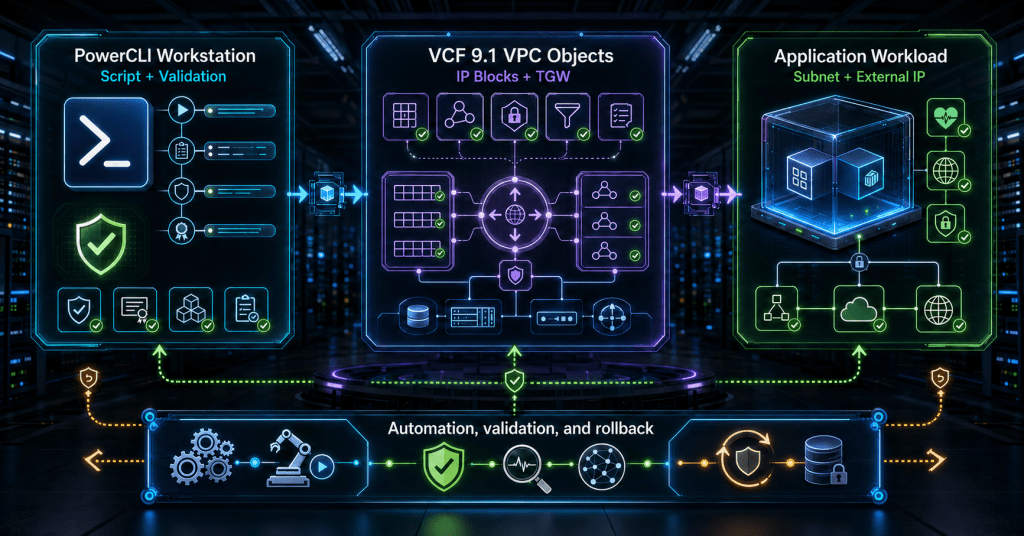


TL;DR
VCF 9.1 expands the VMware.VimAutomation.Vpc module so PowerCLI can build much more of the VPC networking foundation, including IP blocks, external connections, transit gateways, connectivity profiles, VPCs, subnets, and external-IP assignments.
The practical automation pattern is to build provider-owned connectivity first, create application-owned VPC objects second, and publish selected private workloads by assigning an external IP from the connectivity profile.
The documented high-level cmdlet set does not expose a New-VpcNatRule command. Default outbound SNAT is enabled on the connectivity profile, while external-IP assignment on a VM network adapter drives the supported workload-publishing workflow. NAT state can then be inspected with Get-VpcNatRule.
This tutorial provides an end-to-end script, validation commands, sample output, troubleshooting guidance, and a rollback script that protects shared provider networking by default.
Introduction
PowerCLI has traditionally been strongest when the infrastructure object already existed. The network team created port groups and routed VLANs, then the virtualization team automated virtual machines against those prepared networks.
VCF 9.1 changes that operating boundary. The VPC module now exposes high-level cmdlets for objects that sit below the application subnet, including IP blocks, external connections, transit gateways, and connectivity profiles. That makes it possible to automate a complete VPC path instead of stopping at New-Vpc and New-VpcSubnet.
The opportunity is significant, but so is the blast radius. An application VPC can often be treated as disposable. An external connection, transit gateway, connectivity profile, or enterprise IP block may be shared by many VPCs.
A production script therefore needs more than a sequence of New-* commands. It needs ownership boundaries, validation, deterministic naming, dependency-aware rollback, and accurate handling of NAT and external IP assignments.
This walkthrough builds those controls into the automation rather than adding them after deployment.
What You Will Build
By the end of the walkthrough, you will have a PowerCLI workflow that:
- connects to the VCF 9.1 workload-domain vCenter
- explicitly loads the VPC module
- validates the required span and edge cluster
- creates an external connection backed by a routed VLAN
- creates external and private transit-gateway IP blocks
- creates a transit gateway and connectivity profile
- enables north-south services and default outbound SNAT
- creates an application VPC with three private subnets
- connects a VM network adapter to a private VPC subnet
- assigns either a requested or automatically allocated external IP
- validates subnet status and NAT state
- rolls back application objects without deleting shared provider constructs
The script is intentionally opinionated. It separates provider-owned networking from application-owned networking because those layers usually have different owners, approval paths, privileges, and lifecycles.
How the VPC Networking Objects Fit Together
The most important detail is dependency order. A VPC cannot consume a connectivity profile that does not exist, and a connectivity profile cannot provide external IPs or default SNAT without the required transit, IP, and service objects beneath it.
The divider is an operational boundary, not only a technical one.
Provider objects should normally be created by a network-platform pipeline and reused by application pipelines. This article creates both layers in one script so the full dependency chain is visible, but the rollback script does not delete provider objects unless an explicit switch is supplied.
The NAT Automation Boundary
VCF VPC networking supports default outbound SNAT and external-IP-based workload publishing, but the high-level PowerCLI surface does not treat every NAT rule as a directly authored object.
The supported pattern used here is:
- Enable default outbound SNAT on the connectivity profile.
- Associate an external IP block with that profile.
- Connect a VM adapter to a VPC subnet.
- Assign a specific external IP or request automatic allocation.
- Inspect the resulting NAT state with
Get-VpcNatRule.
This distinction matters because a script that invents New-VpcNatRule would look plausible but would not match the documented command set.
For custom NAT policies beyond the high-level workflow, use the appropriate supported API or SDK surface after validating the exact VCF 9.1 endpoint and object model.
Public subnets and external-IP assignments also solve different problems.
A public subnet is directly routed through the VPC architecture. An external IP assigned to a workload on a private subnet provides translated reachability without changing the private subnet’s access mode.
The script uses private subnets and publishes the sample VM from the private web tier so the external-IP and NAT behavior is explicit.
Prerequisites and Assumptions
Platform Prerequisites
You need:
- a VCF 9.1 environment with VPC networking enabled
- a workload-domain vCenter reachable from the PowerShell host
- the current VCF.PowerCLI package installed
- the VMware.VimAutomation.Vpc module available
- permission to create VPC provider and application objects
- an existing VPC span
- an existing VPC edge cluster for centralized north-south services
- an upstream VLAN, gateway, and routing configuration for the external network
- a test VM with a network adapter that can be moved to the VPC subnet
- a rollback port group if you plan to test the teardown script
Explicitly import VMware.VimAutomation.Vpc. Broadcom has documented environments where the module does not autoload even though VCF PowerCLI is installed.
Addressing Assumptions
| Purpose | Example value | Ownership |
|---|---|---|
| External VLAN | 3100 | Physical or network platform team |
| External gateway | 198.51.100.1/24 | Upstream routing team |
| External allocation range | 198.51.100.100-198.51.100.150 | Network platform team |
| Requested VM external IP | 198.51.100.120 | Application allocation from approved pool |
| Transit subnet | 100.64.16.0/21 | Network platform team |
| Private TGW block | 172.20.0.0/24 | Network platform or project team |
| VPC private CIDR | 10.42.0.0/16 | Application or VPC owner |
The 198.51.100.0/24 range is reserved for documentation and will not provide real enterprise connectivity.
Replace every sample value with addresses approved for your environment. Confirm upstream routing, VLAN reachability, overlap checks, address reservations, and ownership before execution.
Preflight Commands
Run these commands before the deployment script:
Get-Module VCF.PowerCLI -ListAvailable |
    Sort-Object Version -Descending |
    Select-Object -First 1 Name, Version

Import-Module VMware.VimAutomation.Vpc -ErrorAction Stop

Get-Command New-VpcIpBlock,
            New-VpcExternalConnection,
            New-VpcTransitGateway,
            New-VpcConnectivityProfile,
            New-Vpc,
            New-VpcSubnet,
            Get-VpcNatRule,
            Get-VpcSubnetStatus
Successful output confirms that the advanced VPC cmdlets are available in the current session. It does not confirm that the connected account has permission to use them.
Confirm the Required Existing Objects
The deployment assumes that the span and edge cluster already exist.
Connect-VIServer -Server 'vcsa01.corp.example'

Get-VpcSpan |
    Select-Object Name, Id |
    Format-Table -AutoSize

Get-VpcEdgeCluster |
    Select-Object Name, Id |
    Format-Table -AutoSize
Do not let the deployment script select an arbitrary span or edge cluster. Use exact names, validate that only one object matches, and confirm that the selected objects belong to the intended VCF networking design.
End-to-End PowerCLI Deployment Script
What You Must Change
Review every value in the configuration block.
At minimum, change:
- the vCenter name
- span name
- edge cluster name
- external VLAN
- external gateway
- external IP ranges
- transit subnet
- VPC private CIDR
- VM name
- fallback assumptions
- requested external IP
The object-creation functions are rerunnable by name. If exactly one matching object exists, the script reuses it. If more than one object matches, the script stops rather than guessing.
Reuse is not full reconciliation. The helper does not automatically modify an existing object when its settings differ from the configuration block. The validation stage must detect that drift.
The final VM publishing action is deliberately not treated as blindly idempotent because changing an external IP or subnet can interrupt active workload connectivity.
Set-StrictMode -Version Latest
$ErrorActionPreference="Stop"

$Config = [ordered]@ Out-Null

        $externalIpRequest="Automatic allocation"


function Get-ExactlyOneObject  Out-Null

        $externalIpRequest = $requestedExternalIp.IPAddressToString


function Get-OrCreateObject  Out-Null

        $externalIpRequest="Automatic allocation"


if (-not (Get-Module -ListAvailable -Name VCF.PowerCLI))  Out-Null

                $fallbackPortGroup = Get-VDPortgroup `
                    -Name $Config.FallbackPortGroupName `
                    -ErrorAction Stop

                Write-Host '[ROLLBACK] Moving VM adapter to fallback port group'

                Set-NetworkAdapter `
                    -NetworkAdapter $networkAdapter `
                    -Portgroup $fallbackPortGroup `
                    -Confirm:$false

Import-Module VCF.PowerCLI -ErrorAction Stop
Import-Module VMware.VimAutomation.Vpc -ErrorAction Stop

$credential = Get-Credential -Message "Credentials for $($Config.VCenter)"
$viServer = $null

try {
    $viServer = Connect-VIServer `
        -Server $Config.VCenter `
        -Credential $credential

    $span = Get-ExactlyOneObject `
        -Label "Span '$($Config.SpanName)'" `
        -Lookup
        Disconnect-VIServer `
            -Server $viServer `
            -Confirm:$false

    $edgeCluster = Get-ExactlyOneObject `
        -Label "Edge cluster '$($Config.EdgeClusterName)'" `
        -Lookup
        $requestedExternalIp = [ipaddress]$Config.ExternalIp

        Write-Host "[PUBLISH] Assigning external IP $requestedExternalIp to $($vm.Name)"

        Set-NetworkAdapter `
            -NetworkAdapter $networkAdapter `
            -Subnet $publishedSubnet `
            -ExternalIp $requestedExternalIp `
            -Confirm:$false

    $externalConnection = Get-OrCreateObject `
        -Label "External connection '$($Config.ExternalConnectionName)'" `
        -Lookup  Out-Null
     `
        -Create  Out-Null

                $fallbackPortGroup = Get-VDPortgroup `
                    -Name $Config.FallbackPortGroupName `
                    -ErrorAction Stop

                Write-Host '[ROLLBACK] Moving VM adapter to fallback port group'

                Set-NetworkAdapter `
                    -NetworkAdapter $networkAdapter `
                    -Portgroup $fallbackPortGroup `
                    -Confirm:$false

    $externalIpBlock = Get-OrCreateObject `
        -Label "External IP block '$($Config.ExternalIpBlockName)'" `
        -Lookup  Out-Null
     `
        -Create {
            New-VpcIpBlock `
                -Name $Config.ExternalIpBlockName `
                -Cidr $Config.ExternalIpCidr `
                -IpRange $Config.ExternalIpRange `
                -ReservedIp $Config.ExternalReservedIp `
                -Visibility External `
                -Description 'Externally routed addresses for VPC services'
        }

    $privateTgwIpBlock = Get-OrCreateObject `
        -Label "Private TGW IP block '$($Config.PrivateTgwIpBlockName)'" `
        -Lookup {
            Get-VpcIpBlock `
                -Name $Config.PrivateTgwIpBlockName `
                -ErrorAction SilentlyContinue
        } `
        -Create {
            New-VpcIpBlock `
                -Name $Config.PrivateTgwIpBlockName `
                -Cidr $Config.PrivateTgwCidr `
                -IpRange $Config.PrivateTgwIpRange `
                -Visibility Private `
                -Description 'Private transit-gateway addressing for VPCs'
        }

    $transitGateway = Get-OrCreateObject `
        -Label "Transit gateway '$($Config.TransitGatewayName)'" `
        -Lookup {
            Get-VpcTransitGateway `
                -Name $Config.TransitGatewayName `
                -ErrorAction SilentlyContinue
        } `
        -Create {
            New-VpcTransitGateway `
                -Name $Config.TransitGatewayName `
                -TransitSubnet $Config.TransitSubnet `
                -ExternalConnection $externalConnection `
                -Span $span `
                -Description 'Transit gateway for the DTD application VPC pattern'
        }

    $connectivityProfile = Get-OrCreateObject `
        -Label "Connectivity profile '$($Config.ConnectivityProfileName)'" `
        -Lookup {
            Get-VpcConnectivityProfile `
                -Name $Config.ConnectivityProfileName `
                -ErrorAction SilentlyContinue
        } `
        -Create {
            New-VpcConnectivityProfile `
                -Name $Config.ConnectivityProfileName `
                -TransitGateway $transitGateway `
                -ExternalIpBlock $externalIpBlock `
                -PrivateTgwIpBlock $privateTgwIpBlock `
                -EnableServiceGateway $true `
                -EdgeCluster $edgeCluster `
                -EnableDefaultSnat $true `
                -Description 'N-S services, external IP allocation, and default SNAT'
        }

    $vpc = Get-OrCreateObject `
        -Label "VPC '$($Config.VpcName)'" `
        -Lookup {
            Get-Vpc `
                -Name $Config.VpcName `
                -ErrorAction SilentlyContinue
        } `
        -Create {
            New-Vpc `
                -Name $Config.VpcName `
                -PrivateIp $Config.VpcPrivateCidr `
                -ConnectivityProfile $connectivityProfile `
                -Description 'Application VPC created by PowerCLI'
        }

    $subnetObjects = @{}

    foreach ($subnetSpec in $Config.Subnets) {
        $subnet = Get-OrCreateObject `
            -Label "Subnet '$($subnetSpec.Name)'" `
            -Lookup {
                Get-VpcSubnet `
                    -Vpc $vpc `
                    -Name $subnetSpec.Name `
                    -ErrorAction SilentlyContinue
            } `
            -Create {
                $subnetParameters = @{
                    Vpc         = $vpc
                    Name        = $subnetSpec.Name
                    AccessMode  = $subnetSpec.AccessMode
                    DhcpMode="Server"
                    Description = "Application subnet $($subnetSpec.Name)"
                }

                if ($subnetSpec.Cidr) {
                    $subnetParameters.IpAddress = $subnetSpec.Cidr
                }
                else {
                    $subnetParameters.Ipv4Size = $subnetSpec.Ipv4Size
                }

                New-VpcSubnet @subnetParameters
            }

        $subnetObjects[$subnetSpec.Name] = $subnet
    }

    $vm = Get-ExactlyOneObject `
        -Label "VM '$($Config.PublishedVmName)'" `
        -Lookup {
            Get-VM `
                -Name $Config.PublishedVmName `
                -ErrorAction SilentlyContinue
        }

    $networkAdapter = Get-ExactlyOneObject `
        -Label "Adapter '$($Config.PublishedAdapterName)' on '$($Config.PublishedVmName)'" `
        -Lookup {
            Get-NetworkAdapter `
                -VM $vm `
                -Name $Config.PublishedAdapterName `
                -ErrorAction SilentlyContinue
        }

    $publishedSubnet = $subnetObjects[$Config.PublishedSubnetName]

    if (-not $publishedSubnet) {
        throw "Published subnet '$($Config.PublishedSubnetName)' was not created."
    }

    if ([string]::IsNullOrWhiteSpace([string]$Config.ExternalIp)) {
        Write-Host "[PUBLISH] Requesting an automatic external IP for $($vm.Name)"

        Set-NetworkAdapter `
            -NetworkAdapter $networkAdapter `
            -Subnet $publishedSubnet `
            -AutoAssignExternalIp `
            -Confirm:$false | Out-Null

        $externalIpRequest="Automatic allocation"
    }
    else {
        $requestedExternalIp = [ipaddress]$Config.ExternalIp

        Write-Host "[PUBLISH] Assigning external IP $requestedExternalIp to $($vm.Name)"

        Set-NetworkAdapter `
            -NetworkAdapter $networkAdapter `
            -Subnet $publishedSubnet `
            -ExternalIp $requestedExternalIp `
            -Confirm:$false | Out-Null

        $externalIpRequest = $requestedExternalIp.IPAddressToString
    }

    Start-Sleep -Seconds 5

    $subnetStatus = @(Get-VpcSubnetStatus -Vpc $vpc)
    $natRules = @(Get-VpcNatRule -Vpc $vpc)

    [pscustomobject]@{
        VCenter             = $viServer.Name
        Vpc                 = $vpc.Name
        ConnectivityProfile = $connectivityProfile.Name
        TransitGateway      = $transitGateway.Name
        SubnetCount         = @($subnetObjects.Values).Count
        SubnetStatusCount   = $subnetStatus.Count
        PublishedVm         = $vm.Name
        PublishedSubnet     = $publishedSubnet.Name
        ExternalIpRequest   = $externalIpRequest
        NatRuleCount        = $natRules.Count
    } | Format-List
}
finally {
    if ($viServer) {
        Disconnect-VIServer `
            -Server $viServer `
            -Confirm:$false | Out-Null
    }
}
What the Script Does
The workflow follows the platform dependency chain rather than creating objects in an arbitrary order.
The external connection defines the VLAN and gateway-facing CIDR. The transit gateway binds that connection to an existing span and receives its own transit subnet.
The two IP blocks then describe:
- external address allocation
- private transit-gateway addressing
The connectivity profile combines those resources with an edge cluster, enables north-south services, and enables default outbound SNAT.
The application layer starts only after that provider foundation exists.
New-Vpc creates the private VPC address space. New-VpcSubnet creates three explicit Private access-mode subnets from the VPC-owned CIDR.
Those subnets consume space from 10.42.0.0/16. They do not consume the private TGW IP block. The private TGW block is attached to the provider profile so the same profile can support Private-TGW subnet allocation when that access mode is needed.
The VM adapter is then attached to web-private and receives either the requested external IP or an automatically allocated address.
The helper functions are intentionally strict. Reusing one exact object is reasonable. Silently selecting one of several identically named objects is not.
Validate the Deployment
A successful cmdlet return does not prove end-to-end connectivity.
Validation should cover:
- object existence
- object configuration
- realized subnet status
- VM attachment
- NAT state
- address ownership
- upstream reachability
- security policy
- return routing
Validate the Provider Foundation
Import-Module VMware.VimAutomation.Vpc -ErrorAction Stop
Connect-VIServer -Server 'vcsa01.corp.example'

Get-VpcIpBlock -Name 'dtd-external-ip' |
    Format-List *

Get-VpcIpBlock -Name 'dtd-private-tgw' |
    Format-List *

Get-VpcExternalConnection -Name 'dtd-ext-3100' |
    Format-List *

Get-VpcTransitGateway -Name 'dtd-tgw' |
    Format-List *

Get-VpcConnectivityProfile -Name 'dtd-vpc-profile' |
    Format-List *
Check that:
- the external block uses External visibility
- the private TGW block uses Private visibility
- the external range and reserved addresses are correct
- the transit gateway references the intended span
- the transit gateway references the expected external connection
- the profile references the intended edge cluster
- the profile references both IP blocks
- north-south services are enabled
- default outbound SNAT is enabled
Validate the VPC and Subnets
$vpc = Get-Vpc -Name 'dtd-app-vpc'

$vpc |
    Format-List *

Get-VpcSubnet -Vpc $vpc |
    Select-Object Name, Id |
    Format-Table -AutoSize

Get-VpcSubnetStatus -Vpc $vpc |
    Format-List *
The status objects are more useful than inventory alone.
Inventory confirms that the desired objects exist. Status helps determine whether those objects were realized successfully by the underlying networking platform.
Validate the VM Attachment and NAT State
Get-VM -Name 'api01' |
    Get-NetworkAdapter -Name 'Network adapter 1' |
    Format-List Name, NetworkName, ConnectionState

Get-VpcNatRule -Vpc $vpc |
    Format-List *
The NAT query is deliberately read-only. It confirms the platform-managed rules associated with default outbound SNAT and the workload external-IP assignment.
Rule names, identifiers, and the total rule count can vary by deployment and implementation state.
Add NAT Statistics to Validation
Where NAT statistics are available, add them to the evidence collection:
Get-VpcNatRule -Vpc $vpc |
    Get-VpcNatRuleStatistics |
    Format-List *
Statistics are useful after test traffic has been generated. A rule that exists but has no matching traffic may indicate that the test path, security policy, routing, or workload addressing is incorrect.
Expected Script Output
A fresh deployment should produce progress similar to this:
[CREATE] External connection 'dtd-ext-3100'
[CREATE] External IP block 'dtd-external-ip'
[CREATE] Private TGW IP block 'dtd-private-tgw'
[CREATE] Transit gateway 'dtd-tgw'
[CREATE] Connectivity profile 'dtd-vpc-profile'
[CREATE] VPC 'dtd-app-vpc'
[CREATE] Subnet 'web-private'
[CREATE] Subnet 'app-private'
[CREATE] Subnet 'db-private'
[PUBLISH] Assigning external IP 198.51.100.120 to api01

VCenter             : vcsa01.corp.example
Vpc                 : dtd-app-vpc
ConnectivityProfile : dtd-vpc-profile
TransitGateway      : dtd-tgw
SubnetCount         : 3
SubnetStatusCount   : 3
PublishedVm         : api01
PublishedSubnet     : web-private
ExternalIpRequest   : 198.51.100.120
NatRuleCount        : 2
The NAT rule count above is illustrative, not a pass criterion.
Validate the actual rule objects and their translated addresses instead of expecting a fixed count.
Validate Data-Plane Connectivity
Complete the workflow with tests outside PowerCLI:
- confirm the guest receives an address from
web-private - confirm the expected default gateway and DNS settings
- test communication between the application and database subnets
- test outbound connectivity through default SNAT
- test reachability to the assigned external IP from an approved upstream test point
- confirm upstream routing or adjacency for the external block
- confirm gateway firewall policy permits the required traffic
- confirm distributed firewall policy permits the required traffic
- verify return-path routing
- verify that the external IP is recorded in the enterprise IPAM system
Object realization and packet forwarding are separate validation stages. Do not close the change based only on successful object creation.
Capture Deployment Evidence
A useful production script should preserve evidence rather than displaying everything only in the terminal.
$evidencePath = Join-Path `
    -Path $PWD `
    -ChildPath "vpc-evidence-$($Config.VpcName)-$(Get-Date -Format 'yyyyMMdd-HHmmss')"

New-Item `
    -Path $evidencePath `
    -ItemType Directory `
    -Force | Out-Null

Get-Vpc -Name $Config.VpcName |
    ConvertTo-Json -Depth 10 |
    Set-Content -Path (Join-Path $evidencePath 'vpc.json')

Get-VpcSubnet -Vpc $vpc |
    ConvertTo-Json -Depth 10 |
    Set-Content -Path (Join-Path $evidencePath 'subnets.json')

Get-VpcSubnetStatus -Vpc $vpc |
    ConvertTo-Json -Depth 10 |
    Set-Content -Path (Join-Path $evidencePath 'subnet-status.json')

Get-VpcNatRule -Vpc $vpc |
    ConvertTo-Json -Depth 10 |
    Set-Content -Path (Join-Path $evidencePath 'nat-rules.json')

Get-VM -Name $Config.PublishedVmName |
    Get-NetworkAdapter -Name $Config.PublishedAdapterName |
    ConvertTo-Json -Depth 10 |
    Set-Content -Path (Join-Path $evidencePath 'network-adapter.json')
Store the resulting evidence with the change ticket, pipeline run, or Git-controlled deployment record.
That evidence becomes valuable when troubleshooting drift, reviewing an incident, or proving which objects were created by a specific automation run.
Roll Back Safely
Rollback should reverse dependencies from the workload upward.
It should also preserve shared provider infrastructure unless the operator explicitly chooses a full teardown.
Default Rollback Behavior
The rollback script below:
- removes the VM’s external IP assignment
- moves the VM adapter to a fallback distributed port group
- removes the application subnets
- removes the application VPC
- leaves the connectivity profile intact
- leaves the transit gateway intact
- leaves the external connection intact
- leaves the provider IP blocks intact
- never removes the existing span or edge cluster
Supplying -RemoveProviderObjects extends the rollback to provider objects created by the deployment script.
Before running rollback, confirm that no other VM uses the VPC subnets and no other VPC depends on the provider objects.
[CmdletBinding()]
param(
    [switch]$RemoveProviderObjects
)

Set-StrictMode -Version Latest
$ErrorActionPreference="Stop"

$Config = [ordered]@{
    VCenter="vcsa01.corp.example"

    VpcName="dtd-app-vpc"
    PublishedVmName="api01"
    PublishedAdapterName="Network adapter 1"
    PublishedSubnetName="web-private"
    FallbackPortGroupName="VM-Network-Fallback"

    ConnectivityProfileName="dtd-vpc-profile"
    TransitGatewayName="dtd-tgw"
    ExternalConnectionName="dtd-ext-3100"
    ExternalIpBlockName="dtd-external-ip"
    PrivateTgwIpBlockName="dtd-private-tgw"
}

Import-Module VCF.PowerCLI -ErrorAction Stop
Import-Module VMware.VimAutomation.Vpc -ErrorAction Stop

$credential = Get-Credential -Message "Credentials for $($Config.VCenter)"
$viServer = $null

try {
    $viServer = Connect-VIServer `
        -Server $Config.VCenter `
        -Credential $credential

    $vpc = Get-Vpc `
        -Name $Config.VpcName `
        -ErrorAction SilentlyContinue

    if ($vpc) {
        $publishedSubnet = Get-VpcSubnet `
            -Vpc $vpc `
            -Name $Config.PublishedSubnetName `
            -ErrorAction SilentlyContinue

        $vm = Get-VM `
            -Name $Config.PublishedVmName `
            -ErrorAction SilentlyContinue

        if ($vm -and $publishedSubnet) {
            $networkAdapter = Get-NetworkAdapter `
                -VM $vm `
                -Name $Config.PublishedAdapterName `
                -ErrorAction SilentlyContinue

            if ($networkAdapter) {
                Write-Host '[ROLLBACK] Removing external IP assignment'

                Set-NetworkAdapter `
                    -NetworkAdapter $networkAdapter `
                    -Subnet $publishedSubnet `
                    -UnassignExternalIp `
                    -Confirm:$false | Out-Null

                $fallbackPortGroup = Get-VDPortgroup `
                    -Name $Config.FallbackPortGroupName `
                    -ErrorAction Stop

                Write-Host '[ROLLBACK] Moving VM adapter to fallback port group'

                Set-NetworkAdapter `
                    -NetworkAdapter $networkAdapter `
                    -Portgroup $fallbackPortGroup `
                    -Confirm:$false | Out-Null
            }
        }

        Write-Host '[ROLLBACK] Removing application subnets'

        @(Get-VpcSubnet `
            -Vpc $vpc `
            -ErrorAction SilentlyContinue) |
            ForEach-Object {
                Remove-VpcSubnet -Subnet $_
            }

        Write-Host '[ROLLBACK] Removing application VPC'

        Remove-Vpc -Vpc $vpc
    }

    if ($RemoveProviderObjects) {
        $confirmation = Read-Host `
            'Type REMOVE-PROVIDER to delete shared provider objects'

        if ($confirmation -ne 'REMOVE-PROVIDER') {
            throw 'Provider-object removal was not confirmed.'
        }

        Write-Host '[ROLLBACK] Removing connectivity profile'

        @(Get-VpcConnectivityProfile `
            -Name $Config.ConnectivityProfileName `
            -ErrorAction SilentlyContinue) |
            ForEach-Object {
                Remove-VpcConnectivityProfile `
                    -ConnectivityProfile $_
            }

        Write-Host '[ROLLBACK] Removing transit gateway'

        @(Get-VpcTransitGateway `
            -Name $Config.TransitGatewayName `
            -ErrorAction SilentlyContinue) |
            ForEach-Object {
                Remove-VpcTransitGateway `
                    -TransitGateway $_
            }

        Write-Host '[ROLLBACK] Removing external connection'

        @(Get-VpcExternalConnection `
            -Name $Config.ExternalConnectionName `
            -ErrorAction SilentlyContinue) |
            ForEach-Object {
                Remove-VpcExternalConnection `
                    -ExternalConnection $_
            }

        Write-Host '[ROLLBACK] Removing IP blocks'

        @(
            Get-VpcIpBlock `
                -Name $Config.ExternalIpBlockName `
                -ErrorAction SilentlyContinue

            Get-VpcIpBlock `
                -Name $Config.PrivateTgwIpBlockName `
                -ErrorAction SilentlyContinue
        ) | ForEach-Object {
            Remove-VpcIpBlock -IpBlock $_
        }
    }
}
finally {
    if ($viServer) {
        Disconnect-VIServer `
            -Server $viServer `
            -Confirm:$false | Out-Null
    }
}
Run the default application-only rollback as follows:
./Remove-DtdVpc.ps1
Run a full teardown only after dependency review:
./Remove-DtdVpc.ps1 -RemoveProviderObjects
A rollback failure is often a useful safety signal.
It may indicate that:
- a subnet still has attached workloads
- a VPC still has dependent objects
- a connectivity profile is still referenced
- a transit gateway supports other VPCs
- an external IP is still allocated
- a supposedly dedicated provider object is actually shared
Do not respond to those failures by adding wildcard deletion or forced cleanup without understanding the remaining dependencies.
Troubleshooting Common Failures
VPC Cmdlets Are Not Recognized
Explicitly import the VPC module and verify the installed VCF.PowerCLI version.
Import-Module VMware.VimAutomation.Vpc -Force

Get-Command New-VpcIpBlock,
            New-VpcTransitGateway,
            New-VpcConnectivityProfile
Do not assume that importing only the umbrella module made every VPC cmdlet available in the current session.
The Script Finds More Than One Named Object
Do not remove the ambiguity check.
Duplicate names can exist across scopes, projects, or connected servers. Use unique naming, connect to one vCenter at a time, or extend the lookup with an appropriate server, project, or object-ID boundary.
An Existing Object Has the Correct Name but the Wrong Configuration
The helper functions reuse a single matching object. They do not reconcile every property.
Compare the existing object’s settings against the configuration block before proceeding:
Get-VpcExternalConnection -Name 'dtd-ext-3100' |
    Format-List *

Get-VpcTransitGateway -Name 'dtd-tgw' |
    Format-List *

Get-VpcConnectivityProfile -Name 'dtd-vpc-profile' |
    Format-List *
In a production pipeline, detect drift and stop unless the operator has explicitly approved a change.
IP Block Creation Fails
Validate:
- CIDR syntax
- start and end addresses
- reserved-address ranges
- address overlap
- visibility
- upstream ownership
- whether the requested block already exists under a different name
The platform can reject an invalid object, but it cannot determine whether the enterprise network team has approved the address space.
Transit Gateway Creation Fails
Validate that:
- the span exists
- the external connection exists
- the transit subnet is valid
- the transit subnet does not overlap another reserved range
- the external connection belongs to the intended design
- the current account has provider-level permissions
Connectivity Profile Creation Fails
Validate that:
- the transit gateway is realized
- the external IP block exists
- the private TGW block exists
- the edge cluster exists
- the edge cluster supports the requested service path
- the environment supports the selected centralized north-south design
EdgeClusterandServiceClusterare not supplied together
Enabling north-south services with an edge cluster is a centralized-services pattern. Confirm that it matches the deployed VCF architecture before running the script.
Subnet Creation Fails
Check that each private subnet:
- falls within the VPC private CIDR
- does not overlap another subnet
- uses a supported access mode
- uses a valid DHCP mode
- has enough available address space
- can be realized by the selected connectivity profile
If adapting the example to create a public or private-TGW subnet, confirm that the correct provider IP block is associated with the connectivity profile and has sufficient free capacity.
External IP Assignment Fails
Check all of the following:
- the requested IP is inside the associated external IP block
- the IP falls within the configured allocation range
- the IP is not reserved
- the IP is not already assigned
- the VM adapter is attached to the intended VPC subnet
- the connectivity profile has north-south services enabled
- only one of
ExternalIporAutoAssignExternalIpis used - the external address block is routed and operational upstream
To remove an existing assignment during controlled reconciliation, use UnassignExternalIp before requesting another address.
Get-VpcNatRule Returns Rules but Traffic Still Fails
NAT object presence does not prove packet delivery.
Validate:
- guest IP configuration
- guest default gateway
- guest firewall
- upstream routing
- external VLAN reachability
- gateway firewall policy
- distributed firewall policy
- physical firewall policy
- return-path routing
- source and destination port expectations
- whether the application is actually listening
Generate test traffic, then inspect NAT statistics where supported.
Get-VpcNatRule Returns No Rules
Check that:
- the VPC uses the expected connectivity profile
- default outbound SNAT is enabled
- the VM adapter is connected to the VPC subnet
- an external IP was actually assigned
- the requested address allocation completed successfully
- the networking objects have finished realizing
Do not assume that an empty result means a missing PowerCLI module. It can also mean that no NAT state has been created for the VPC.
You Need a Custom NAT Rule
The documented high-level VPC cmdlet index exposes Get-VpcNatRule and Get-VpcNatRuleStatistics, but not a high-level New-VpcNatRule cmdlet.
Use connectivity-profile default SNAT and network-adapter external-IP assignment for the supported workflows shown here.
For a custom NAT rule, validate and use the relevant VCF 9.1 API or generated PowerCLI SDK binding rather than fabricating a high-level cmdlet.
Rollback Cannot Remove a Subnet or Provider Object
Treat the dependency error as a reason to stop.
Inventory:
- attached VMs
- external-IP assignments
- connected VPCs
- connectivity profiles
- connectivity policies
- shared IP pools
- transit-gateway consumers
- external-connection consumers
Never add wildcard removal merely to make the rollback script appear successful.
Production Improvements Beyond the Example
The single script is useful for learning and lab validation, but production automation should separate responsibilities.
Split Provider and Application Pipelines
The network-platform pipeline should own:
- external connections
- transit gateways
- spans
- edge-backed connectivity profiles
- enterprise IP blocks
- upstream routing coordination
Application pipelines should normally consume approved profiles and create:
- VPCs
- application subnets
- workload attachments
- approved external-IP assignments
This split reduces privilege, clarifies rollback, and allows provider objects to be lifecycle-managed independently of application releases.
Persist Desired State and Object IDs
Names are readable, but IDs are safer for long-term reconciliation.
Export a deployment manifest containing:
- object names
- object IDs
- input CIDRs
- allocated subnet ranges
- external-IP assignments
- connected VM adapters
- module versions
- execution timestamps
- pipeline run identifiers
- change-ticket identifiers
Store the manifest with the change record or pipeline artifact.
Add Preflight Address Validation
Before creating anything, validate:
- CIDR overlap against existing VPCs
- CIDR overlap against provider pools
- requested external-IP membership
- requested external-IP availability
- reserved-address exclusions
- transit-subnet uniqueness
- upstream route ownership
- IPAM approval
- DNS requirements
The cmdlets can reject invalid platform state, but they cannot enforce every enterprise address-management rule.
Use Non-Interactive Authentication
Get-Credential is appropriate for an operator-run tutorial.
A production pipeline should use:
- an approved secret store
- a supported OAuth workflow
- workload identity where available
- short-lived tokens
- scoped service identities
- auditable credential rotation
Do not embed usernames, passwords, refresh tokens, or API tokens directly in the script.
Add WhatIf and Approval Boundaries
Where the cmdlet supports WhatIf, use it during planning and change review.
For cmdlets without a useful WhatIf path, add your own preview stage that prints:
- objects that will be created
- objects that will be reused
- objects that differ from desired state
- workloads that will be moved
- external IPs that will be allocated
- objects that rollback would remove
The preview should be generated before any state-changing command runs.
Create Evidence for Every Change
Capture before-and-after output from:
Get-VpcIpBlockGet-VpcExternalConnectionGet-VpcTransitGatewayGet-VpcConnectivityProfileGet-VpcGet-VpcSubnetGet-VpcSubnetStatusGet-VpcNatRuleGet-VpcNatRuleStatisticsGet-NetworkAdapter
Export the evidence as JSON so operators can compare desired state with realized state and preserve an audit trail.
Separate Control-Plane and Data-Plane Validation
A complete deployment has two validation gates.
Do not treat a successful control-plane deployment as proof that application traffic works.
The final acceptance gate should require both platform evidence and packet-flow evidence.
Conclusion
VCF 9.1 makes VPC networking a serious PowerCLI automation target rather than a small extension to VM provisioning.
The expanded VPC module can build the provider connectivity chain, allocate application networking, attach workloads, enable default outbound SNAT, and assign external IPs without leaving the PowerShell workflow.
The key is to automate the platform model accurately.
Default SNAT belongs on the connectivity profile. Workload publishing is requested through the VM network adapter. NAT state is validated with Get-VpcNatRule. Provider objects and application objects should have separate owners and separate rollback policies.
The end-to-end script in this article is a strong lab and implementation starting point, but the production pattern is modular:
- establish a governed provider baseline once
- let application pipelines consume it repeatedly
- validate both control-plane state and packet flow
- preserve evidence
- remove only the objects the application pipeline truly owns
That approach turns PowerCLI from a collection of provisioning commands into a repeatable VCF networking operating model.
