


AI agents are moving from one-time assistants to persistent workers that can repeat tasks, monitor changes, run checks, update workflows, and return with results. Instead of prompting an LLM once and deciding every next step manually, teams can now use AI agents that keep working (on a Loop) until a goal or stop condition is met.
This matters because real work is rarely a single prompt. Pull requests need repeated checks, deployments need monitoring, inboxes need daily triage, and research often needs multiple passes. In this article, we’ll look at how loops help AI agent’s work and why they are becoming useful for real-world workflows.
What Are Agent Loops?
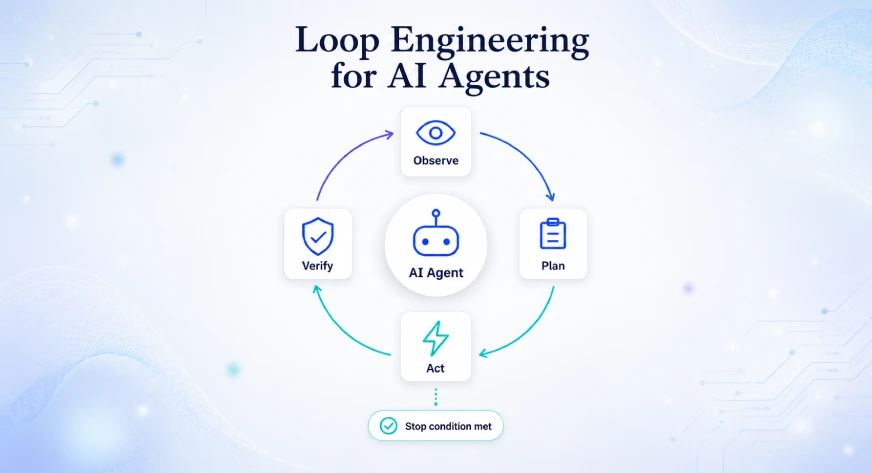
An agent loop is a repeated cycle where an AI agent observes the current context, decides what to do next, uses tools, checks the outcome, and either continues or stops.
A basic agent loop usually follows these steps:
- Observe the context
- Plan the next action
- Use a tool or take action
- Inspect the result
- Verify progress
- Continue, stop, or ask for approval
In a normal chatbot interaction, this loop often ends after one response. In an agentic workflow, it can continue across multiple tool calls, turns, or scheduled runs. For example, an agent can check a pull request every 15 minutes until CI passes, summarize the result, and suggest the next step.
Anthropic describes loops as agents that repeat work until a stop condition is met, and classifies them by trigger, stop condition and task type. Claude Code’s /loop applies this idea inside an active terminal session, while OpenAI Codex Automations support similar scheduled workflows, such as polling GitHub or Slack and reporting results in a triage inbox.
Why /loop Matters Now
The main value of /loop is not that it repeats a prompt. Cron jobs have done scheduled execution for decades. The difference is that loop-based agents can reason during each run.
A cron job can run a script every 10 minutes. A loop agent can inspect the output, decide whether the failure is flaky, search related logs, compare the current state with the previous run, update a task, and draft a human-readable summary.
This is a major step in the evolution of AI assistants. We are moving through three stages:
| Stage | User Experience | Limitation |
| Prompting | Ask once, get one answer | User must manage next steps |
| Agentic tools | Ask agent to use tools | User still often supervises manually |
| Loop engineering | Agent repeats work until a stop condition | Requires governance, cost control, and safe permissions |
Recent agent platforms are adding loop primitives because software development, operations, research, customer support, and business workflows often require repeated checks. Claude Code now supports /loop and scheduled tasks. OpenAI Codex supports automations attached to threads or standalone scheduled runs. Workspace Agents can run longer cloud-based workflows and use connected apps with approval controls.
From Prompt Engineering to Loop Engineering
Prompt engineering focuses on writing a good instruction for one response. Loop engineering focuses on designing a repeatable agent system.
A loop engineer thinks about questions such as:
- What should trigger the agent?
- What tools can it use?
- What should it verify?
- What is the stopping condition?
- What actions need human approval?
Addy Osmani describes this shift as replacing manual prompting with small systems that find work, hand it to agents, check outputs, and repeat. He frames loop engineering around automations, worktrees, skills, plugins or connectors, subagents, and memory.
This is especially relevant for developers because modern coding agents already follow internal loops. A recent analysis of Claude Code describes a simple core loop where the model receives context, calls tools, observes results, and repeats, surrounded by systems such as permissions, compaction, MCP, plugins, skills, hooks, subagents, worktree isolation, and session storage.
Core Architecture of a Loop-Based Agent
A production-ready loop agent usually has the following architecture.

1. Trigger Layer
The trigger starts the loop. It can be manual, time-based, event-based, or goal-based.
Examples:
- Manual:
/loop5m check the deployment - Time-based: Every weekday at 9 AM
- Event-based: When a new GitHub issue appears
- Goal-based: Continue until Lighthouse score is above 95
Claude Code supports /loop for repeated prompts in an active session and /schedule for scheduled tasks. Anthropic also describes /goal as a pattern for goal-based execution.
OpenAI Codex Automations support standalone scheduled runs and thread-based recurring wake-ups. A thread automation keeps returning to the same context, while a standalone automation starts a fresh run on a schedule.
2. Loop Orchestrator
The orchestrator decides what happens in every cycle. It manages the order of operations and controls whether the loop should continue.
In simple setups, the orchestrator is just the agent runtime. In advanced systems, it may be a LangGraph flow, a custom workflow engine, a queue worker, or a scheduler.
A good orchestrator should know:
- Current task state
- Previous loop result
- Available tools
- Allowed actions
- Stop criteria
- Escalation rules
3. Context Builder
A loop agent needs fresh context on every run. This may include code diffs, build logs, issue comments, customer messages, calendar entries, Slack threads, product metrics, or database records.
Claude Code can use built-in tools such as Read, Write, Edit, Bash, Monitor, Glob, Grep, WebSearch, and WebFetch through its Agent SDK. It also supports subagents, MCP, permissions, hooks, and sessions.
Claude Code can also connect to external systems through Model Context Protocol. Anthropic lists examples such as Jira, GitHub, Sentry, Statsig, PostgreSQL, Figma, Slack, and Gmail.
4. Tool Layer
The tool layer is where the agent takes action. Examples include:
- Reading files
- Running tests
- Checking logs
- Calling APIs
- Searching documentation
The tool layer should be permissioned carefully. A loop that can only read logs is much safer than a loop that can deploy code, delete files, or send emails.
5. Verifier or Judge
The verifier checks whether the loop made progress. This can be deterministic or AI-based.
Examples:
Deterministic verification:
- Did tests pass?
- Did API return 200?
- Did latency stay below 300 ms?
- Did the file compile?AI-based verification:
- Is the customer reply complete?
- Does the PR summary match the diff?
- Is the recommendation grounded in evidence?
Anthropic recommends clear stop criteria, self-verification steps, a second agent for review, and scripts for deterministic checks wherever possible.
6. State Store and Memory
Loops need memory to avoid repeating the same work blindly.
A state store may contain:
- Last run timestamp
- Last observed status
- Previous errors
- Open decisions
- Human approvals
- Current goal state
- Cost spent so far
Without state, loops can become noisy and repetitive.
7. Human Review Layer
The safest loop systems keep humans in charge of irreversible decisions.
Examples:
Allowed automatically:
- Read logs
- Draft a summary
- Run tests
- Comment with statusNeeds approval:
- Merge PR
- Deploy to production
- Send email
- Modify customer data
- Delete records
OpenAI Workspace Agents include permission controls, approval flows, analytics, monitoring, and enterprise governance features.
Types of Agent Loops
Agent loops can be grouped into four major types.
| Loop Type | What Starts It | What Stops It | Best For | Main Risk |
| Turn-based loop | User prompt | Agent finishes answer | Coding, research, debugging | May stop too early |
| Goal-based loop | Clear objective | Goal achieved or max turns | Performance tuning, bug fixing | Needs strong success criteria |
| Time-based loop | Interval or schedule | User stops it or expiry | Monitoring, reminders, polling | Can waste tokens |
| Proactive loop | Event or external trigger | Task complete or approval needed | Support, operations, triage | Permission and safety risk |
Claude’s /loop is mainly a time-based local loop. Claude’s /schedule is more suitable for reliable recurring work. Codex Automations also support recurring runs, while Workspace Agents are designed for longer-running cloud workflows across connected tools.
Claude Code /loop: Capabilities, Access, and Limits
Claude Code’s /loop lets you run a prompt repeatedly while the current session stays open.
Example:
/loop 5m check the deploy and tell me if errors appear
You can also omit the interval and let Claude choose one:
/loop monitor the PR until CI passes
If you do not provide a prompt, Claude Code runs a built-in maintenance prompt that continues unfinished work, checks the current branch and pull request, and performs cleanup tasks without starting unrelated new initiatives.
Access Requirements
To use /loop, you need Claude Code version 2.1.72 or later. Anthropic’s scheduled task documentation states that Claude Code’s /loop and cron scheduling tools require Claude Code v2.1.72 or newer.
A simple access flow is:
# Update Claude Code
claude update

# Start Claude Code in your project
claude

# Run a loop
/loop 5m check CI status and summarize only meaningful changes
Main Capabilities
Claude Code /loop can be used for:
- Polling deployments
- Watching a pull request
- Checking test output
- Monitoring logs
- Running repeated local maintenance
- Continuing unfinished work
- Calling a skill in each iteration
- Streaming background process output through the Monitor tool
Anthropic’s docs show /loop 5m check the deploy, prompt-only loops where Claude chooses the interval, and skill-based loops such as passing a deployment monitor skill.
Limits and Behavior
Claude Code /loop has several limits.
| Area | Behavior |
| Session dependency | /loop needs the machine on and the session open |
| Minimum interval | Seconds are rounded up to minutes |
| Expiry | Fixed interval loops run until stopped or seven days elapse |
| Task cap | A session can hold up to 50 scheduled tasks |
| Stop control | Press Esc to stop the loop |
| Timezone | Tasks use the local timezone |
| Customization | .claude/loop.md or ~/.claude/loop.md can customize the built-in loop prompt |
Anthropic’s docs state that /loop is session-scoped, stops when the session ends, and can be restored on resume only if unexpired. They also state that /loop is best for quick polling, while cloud scheduled tasks are better when the machine may be off.
How Claude Skills Improve Loops
Skills are reusable instruction bundles that can include markdown instructions, scripts, agents, hooks, and MCP servers. A skill can make a loop more reliable because the loop does not need to rediscover the process every time.
For example, a deployment monitoring skill could define:
- Check GitHub Actions
- Check Sentry errors
- Check API health endpoint
- Compare current status with previous status
- Escalate only if there is a meaningful regression
Claude skills use a SKILL.md file with YAML frontmatter and markdown instructions. They can also use dynamic context injection and can live at enterprise, personal, project, or plugin level.
OpenAI Codex: Automations and Workspace Agents
OpenAI does not use the exact same /loop command as Claude Code. Its closest equivalents are Codex Automations and Workspace Agents.
Codex Automations
Codex Automations let Codex run recurring or scheduled tasks. They can be standalone or attached to a thread.
Standalone automations start fresh runs on a schedule and report findings to the Triage inbox. Thread automations wake up the same thread repeatedly and are useful for long-running commands, polling Slack or GitHub, review loops, and research or triage work.
Examples:
- Every morning, review open bug reports and group them by severity.
- Every 30 minutes, check whether the build is fixed and summarize changes.
- Every weekday, inspect new customer feedback and draft top product issues.
OpenAI’s Codex use cases include bug triage from systems such as Sentry, Slack, Linear, and GitHub. Codex can inspect issues, classify problems, and prepare triage summaries.
OpenAI also describes inbox triage workflows where Codex can summarize emails, pull context from sources, and draft replies for review without sending them automatically.
Workspace Agents
Workspace Agents are shared agents inside ChatGPT for Business, Enterprise, Edu, and Teachers plans in research preview. They are designed for longer-running business workflows, can gather context, use connected apps, follow shared processes, ask for approval, and run in the cloud.
Powered by Codex in a cloud workspace, they can use files, code, tools, memory, and connected apps. OpenAI also describes use through ChatGPT and Slack deployment.
This makes Workspace Agents more suitable for business workflows such as:
- Weekly business reporting
- Sales account preparation
- Internal knowledge synthesis
- Policy review
- Support triage
Hands-on Example 1: PR Babysitter and Release Guard
This example is useful for AI developers and engineering managers.
Problem
A developer opens a pull request before a release. The team must watch CI, test failures, Sentry errors, deployment status, and review comments. This work is repetitive and easy to miss.
Claude Code Version
Inside the repository and in the terminal:
claude 
Then run:
/loop 15m check the current PR, CI status, deployment status, and recent production errors. Only report meaningful changes. Do not modify code unless I explicitly ask. Stop recommending action once all checks are green. 
You can make a better Version with a Skill
Create a skill file:
.claude/skills/release-guard/SKILL.mdAdd:
---
name: release-guard
description: Monitor release readiness for pull requests and deployments.
---You are a release guard.
Every time you run:
1. Check the active branch and current pull request.
2. Check CI status.
3. Check deployment status if available.
4. Check recent errors from logs or Sentry if configured.
5. Compare with the previous run.
6. Report only meaningful changes.
7. Do not edit files, merge PRs, deploy, or send messages unless explicitly approved.Output format:
- Current status
- What changed since last check
- Blockers
- Recommended next action
- Confidence level
Then run:
/loop 15m use the release-guard skill for the current branch
Claude Code supports skills, and skills can bundle instructions, scripts, hooks, agents, and MCP servers. This makes repeated work more consistent than rewriting a long prompt every time.
OpenAI Codex Version
In Codex, you can create a thread automation:

Every 15 minutes, check the current PR, CI status, and related issue comments. Do not change files. If the status changes, summarize what changed and recommend the next action. If everything is unchanged, keep the update short.

Codex thread automations are useful for repeated wake-up calls attached to the same thread. They can poll GitHub or Slack, continue a review loop, and report results back to the user.
Hands-on Example 2: AI Workday Briefing and Inbox Triage
This example is useful for technical leaders, product managers, founders, and AI developers who handle many messages.
Problem
Every morning, leaders check email, Slack, calendar, dashboards, project tickets, and open decisions. This consumes mental energy before deep work even begins.
For this:
- Choose the platform: Workspace Agent, Codex Automation, or Claude with MCP/connectors.
- Connect the tools needed for the demo:
- Gmail or email
- Slack
- Calendar
- GitHub
Codex Inbox Triage Version
Codex can also support inbox triage workflows. OpenAI describes examples where Codex summarizes emails, pulls context, and drafts replies for review without sending them automatically.
Prompt:
Every weekday morning, review my unread work emails and draft replies for messages that require action.Rules:
- Do not send any email.
- Group messages into urgent, waiting, informational, and ignore.
- Draft replies only where the next action is clear.
- Pull context from related docs or previous threads where available.
- End with a 5-minute action plan.
Claude MCP Version
Claude Code can connect to tools through MCP servers. If your organization has Gmail, Slack, GitHub, or internal database MCP servers, a similar workflow can be built in Claude.
Example:
/schedule every weekday at 9 A.M. summarize my engineering inbox, Slack blockers, and open PR reviews. Draft replies only. Do not send or approve anything.

For local quick checks, /loop can be used, but Anthropic recommends cloud scheduling when the task should run reliably without keeping the local machine and session active.
Read more: Claude Code vs OpenAI Codex
Conclusion
/loop represents a shift in how AI agents work: from one-time responders to persistent workflow assistants that can repeat tasks, monitor systems, and report progress.
Claude Code’s /loop is useful for local developer workflows, while Claude’s /schedule, OpenAI Codex Automations, and Workspace Agents extend the same idea to scheduled, recurring, and business-critical tasks. For developers and technical teams, loop agents can help with PR checks, deployments, testing, triage, research, and daily operations.
The key is careful design. Keep loops scoped, define clear stop conditions, start read-only, add approval gates, monitor cost, and require evidence. Done well, loop engineering can turn AI agents into reliable operational partners.
Frequently Asked Questions
A. The exact /loop command is a Claude Code feature. OpenAI does not use the same command name, but Codex Automations and Workspace Agents support similar recurring and long-running agent workflows.
A. No. Cron runs commands on a schedule. /loop runs an AI prompt repeatedly and allows the agent to reason, inspect tools, summarize results, and decide what changed. It is closer to an agentic monitoring loop than a normal scheduler.
A. No. Anthropic states that /loop needs the machine on and the session open. For reliable tasks that should run without your machine, use cloud scheduled tasks or another durable automation setup.

Harsh Mishra is an AI/ML Engineer who spends more time talking to Large Language Models than actual humans. Passionate about GenAI, NLP, and making machines smarter (so they don’t replace him just yet). When not optimizing models, he’s probably optimizing his coffee intake. 🚀☕
Login to continue reading and enjoy expert-curated content.
