


Introduction
The first article in this series focused on multicloud control-plane sprawl.
Azure, AWS, Google Cloud, and VMware Cloud Foundation each bring their own identity model, policy engine, network architecture, observability stack, automation surface, and lifecycle model. That is already enough to create governance fragmentation.
AI agents add another layer.
An agent is not just a model call. An agent can receive instructions, reason over context, retrieve data, call tools, invoke APIs, trigger workflows, summarize sensitive information, and sometimes take action on behalf of a user or system.
That makes agent governance a control-plane problem.
If agents are built separately inside Azure, AWS, Google Cloud, SaaS platforms, and private cloud environments without a shared governance model, the enterprise will not just have cloud sprawl. It will have delegated decision-making sprawl.
This article focuses on how to govern agent identity, tool access, data boundaries, network egress, observability, human approval, and exceptions across Azure, AWS, Google Cloud, and VCF.
Why Agent Governance Changes the Multicloud Conversation
Traditional governance assumes a fairly predictable actor.
A human administrator signs in. A pipeline deploys infrastructure. A workload calls another service. A scheduled task runs a job. Those patterns can still be complex, but they are usually bounded by known identities, known permissions, and known workflows.
Agents blur those lines.
An agent might:
- answer a user question
- search enterprise knowledge
- retrieve records from a database
- call a ticketing API
- summarize logs
- recommend a remediation step
- execute a runbook
- create a firewall request
- invoke a cloud API
- trigger a deployment
- hand off to another agent
That means agent governance cannot live only in the AI platform.
It has to connect to enterprise identity, cloud policy, observability, networking, data governance, automation, and change control.
Agent Control-Plane Model at a Glance
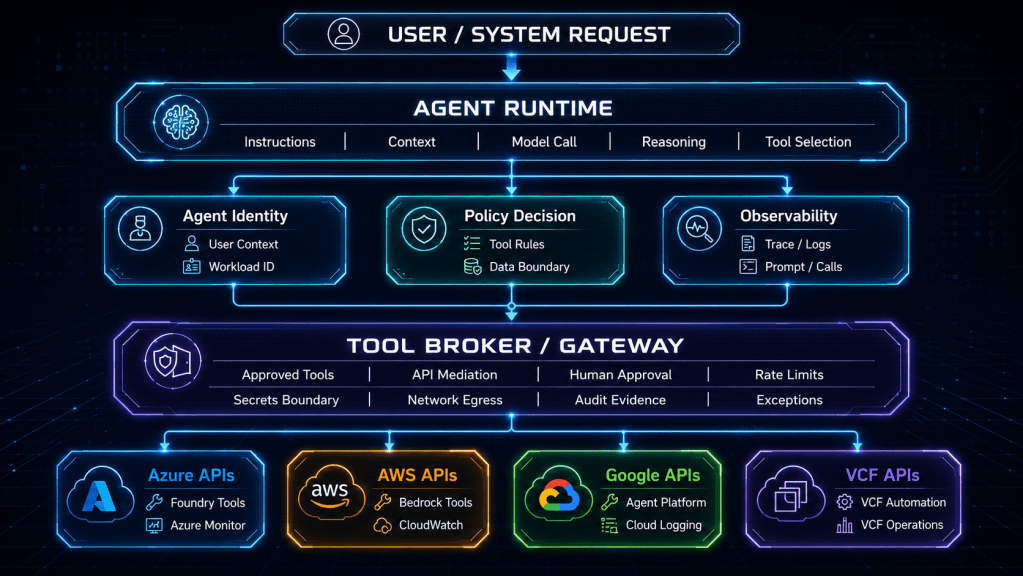
The diagram below shows the pattern. The agent runtime should not be the only place where policy lives. The agent should operate through controlled identities, tool brokers, policy checks, approval gates, and telemetry pipelines.

The key point is that the agent does not get direct, unlimited access to enterprise systems just because it can reason.
Reasoning is not authorization.
Treat Agents as Workloads With Additional Risk
A useful mental model is to treat agents as workloads with extra risk.
They need the normal workload controls:
| Workload Control | Agent Equivalent |
|---|---|
| Runtime identity | Agent identity and execution context |
| API permissions | Tool permissions and API scopes |
| Network rules | Agent egress and tool access boundaries |
| Logging | Prompt, response, trace, tool-call, and policy-decision telemetry |
| Change control | Agent versioning, prompt updates, tool changes, and approval workflows |
| Data governance | Retrieval boundaries, memory controls, and data classification limits |
| Incident response | Agent disablement, session review, tool revocation, and audit trail |
But agents also need controls that traditional workloads often do not:
| Agent-Specific Control | Why It Matters |
|---|---|
| Instruction governance | System prompts and developer instructions shape behavior |
| Tool selection policy | The agent may choose which action path to take |
| Retrieval policy | The agent may pull context from sensitive sources |
| Memory policy | The agent may retain session or user context |
| Human approval gates | Some actions require review before execution |
| Response safety | Output may reveal sensitive or misleading information |
| Delegation limits | The agent may act on behalf of a user, system, or workflow |
| Multi-agent boundaries | Agents may call other agents or shared tools |
The risk is not that every agent is dangerous.
The risk is that every agent is a new actor in the enterprise control model.
Agent governance should start with identity.
Before asking what tools an agent can use, ask what identity it runs as and whose authority it carries.
There are several common patterns:
| Agent Identity Pattern | Use Case | Risk |
|---|---|---|
| Agent-owned identity | The agent runs with a dedicated service identity | Easier to audit, but can become over-permissioned |
| User-delegated identity | The agent acts within the user’s approved scope | Stronger least privilege, but harder to implement consistently |
| Workflow identity | The agent triggers approved automation through a pipeline or broker | Good for controlled operations, but requires strong workflow design |
| Break-glass identity | The agent participates in emergency operations | High risk and should require strict approval and review |
| Read-only identity | The agent retrieves knowledge or observability data only | Lower risk, but still needs data boundary controls |
The worst pattern is shared invisible authority.
If multiple agents use the same privileged identity, and that identity can call cloud APIs, ticketing systems, code repositories, and VCF automation endpoints, the enterprise has created a new privileged control plane without the normal review discipline.
Each production agent should have:
- a named owner
- a business purpose
- a runtime identity
- an approved user population
- an approved tool list
- an approved data boundary
- an approved network boundary
- an observability requirement
- an exception process
- a disablement path
That list may look heavy, but it is lighter than trying to explain an unbounded agent after an incident.
The most important agent design decision is not the model.
It is the tool boundary.
A model that can only answer questions has one risk profile. A model that can call APIs, update tickets, change firewall rules, create cloud resources, or trigger automation has a very different risk profile.
A practical agent tool model should classify tools into tiers:
| Tool Tier | Example | Default Control |
|---|---|---|
| Tier 0: No external tool | General response generation | Standard logging and content review |
| Tier 1: Read-only knowledge | Search documentation, retrieve approved KB articles | Data classification and query logging |
| Tier 2: Read-only operations | Query logs, metrics, inventory, configuration state | Identity scoping and observability |
| Tier 3: Workflow initiation | Create ticket, request change, open approval | Human review and workflow evidence |
| Tier 4: Controlled execution | Run approved remediation, restart service, update config | Approval gate, rollback path, full audit |
| Tier 5: Privileged platform action | Modify IAM, networking, policy, production deployment | Deny by default; exception and break-glass only |
This tiering matters across all platforms.
An Azure-hosted agent might call an AWS API. A Google Cloud agent might retrieve information from a VCF-hosted application. A private AI workflow on VCF might call a SaaS API or public cloud service. The policy cannot stop at the runtime boundary.
The tool is where intent becomes action.
For production agents, direct access to sensitive APIs should be the exception.
A better pattern is a tool broker or gateway.
The broker sits between the agent and enterprise systems. It enforces tool policy, validates inputs, applies rate limits, checks data boundaries, records tool calls, handles approvals, and sends evidence into the observability pipeline.
The broker pattern gives the enterprise several advantages:
| Broker Capability | Governance Value |
|---|---|
| Tool registry | Shows which tools exist and who owns them |
| Policy check | Validates whether the agent can use the tool |
| Input validation | Reduces malformed or risky tool calls |
| Approval gate | Stops sensitive actions until a human approves |
| Credential boundary | Prevents the agent from directly handling secrets |
| Network mediation | Controls where agent traffic can go |
| Audit trail | Records who asked, what happened, and why |
| Revocation | Allows fast removal of a tool without rebuilding the agent |
This is especially important in multicloud environments because every platform has different API semantics and permission models.
A broker can present a controlled enterprise tool surface while platform teams translate the back-end implementation into Azure, AWS, Google Cloud, VCF, ITSM, Git, or monitoring systems.
Observability Must Capture Decisions, Not Just Messages
Agent observability needs to go beyond input and output.
A normal application trace shows request flow, latency, error state, and dependency calls. Agent traces need that, but they also need decision context.
A useful agent telemetry record should include:
| Telemetry Field | Why It Matters |
|---|---|
| agent_id | Identifies the agent that acted |
| agent_version | Shows which version of instructions, tools, and code was active |
| user_context | Captures the requesting user or system context |
| runtime_identity | Shows which identity executed the action |
| tool_name | Identifies the tool selected |
| tool_tier | Maps the action to risk |
| policy_decision | Shows allow, deny, approval required, or exception used |
| data_sources | Identifies retrieval sources used for context |
| model_endpoint | Shows model/provider boundary |
| approval_id | Connects action to human approval when required |
| exception_id | Connects deviation to approved exception |
| downstream_action | Records what changed or was requested |
| correlation_id | Links agent activity to logs, traces, tickets, and cloud events |
Without this, the enterprise may know that an agent responded, but not why it acted, what it touched, or which policy allowed it.
That is not enough for production operations.
Policy-as-Intent for Agent Controls
Agent policy should be written as enterprise intent first, then mapped into the runtime, broker, identity, and platform enforcement layers.
The following YAML is not meant to be pasted directly into one vendor tool. It is a governance contract that platform and AI teams can translate into their native controls.
control_id: AGENT-TOOL-004
name: Require approval for privileged platform actions
owner: Enterprise AI Governance
risk_domain: Agentic Operations
applies_to:
  environments:
    - production
    - regulated
  platforms:
    - azure
    - aws
    - google-cloud
    - vcf

intent:
  description: >
    AI agents must not execute privileged platform actions directly
    without an approved workflow, scoped identity, policy decision,
    and human approval record.
  default_action: deny
  exception_required: true

agent_requirements:
  required_metadata:
    - agent_id
    - agent_owner
    - business_purpose
    - runtime_identity
    - tool_tier
    - data_classification
    - environment
    - approval_id
    - correlation_id

tool_policy:
  tier_1_read_only_knowledge:
    default_action: allow_with_logging
  tier_2_read_only_operations:
    default_action: allow_with_scoped_identity
  tier_3_workflow_initiation:
    default_action: allow_with_ticket_evidence
  tier_4_controlled_execution:
    default_action: require_human_approval
  tier_5_privileged_platform_action:
    default_action: deny_without_exception

platform_mappings:
  azure:
    examples:
      - Microsoft Foundry Agent Service policy and tool configuration
      - managed identity or workload identity boundary
      - Azure Monitor and Log Analytics telemetry
      - Azure Policy or deployment pipeline validation

  aws:
    examples:
      - Amazon Bedrock Guardrails or AgentCore policy boundary
      - IAM role scoping for agent and tool execution
      - CloudWatch, CloudTrail, and workflow evidence
      - AWS Organizations controls where appropriate

  google_cloud:
    examples:
      - Gemini Enterprise Agent Platform governance and observability
      - service account or workload identity boundary
      - Cloud Logging, Cloud Trace, and Cloud Monitoring evidence
      - Organization Policy where applicable

  vcf:
    examples:
      - VCF Automation catalog and approval policy
      - NSX or vCenter role boundary
      - VCF Operations evidence
      - change record and rollback validation

approval:
  required_for:
    - firewall_rule_change
    - iam_change
    - production_deployment
    - vcf_lifecycle_action
    - privileged_runbook_execution
  approver_role: Platform Risk Approver
  max_approval_duration_minutes: 60

observability:
  required_events:
    - agent_invocation
    - policy_decision
    - tool_selection
    - tool_invocation
    - approval_result
    - downstream_action
    - exception_use
  retention_class: regulated_operations

exception_model:
  max_duration_days: 30
  requires_risk_owner: true
  renewal_requires_review: true
The value of this artifact is not the syntax.
The value is that it separates enterprise policy from runtime-specific configuration.
Map Agent Patterns to Default Controls
Not every agent needs the same governance model.
The enterprise should define common agent patterns and assign default controls before teams start building one-off agents.
| Agent Pattern | Example | Default Governance |
|---|---|---|
| Knowledge assistant | Answers questions from approved documentation | Read-only retrieval, content logging, no privileged tools |
| Operations analyst | Summarizes logs, alerts, and inventory | Read-only observability access, scoped identity, trace logging |
| Ticket assistant | Drafts or updates tickets | ITSM tool broker, user context, change evidence |
| Workflow assistant | Starts approved workflows | Human approval for sensitive workflow classes |
| Deployment assistant | Generates or validates infrastructure changes | CI/CD integration, no direct production write access |
| Incident triage agent | Correlates telemetry and recommends action | Read-only by default, controlled runbook execution |
| Remediation agent | Executes approved corrective actions | Strong approval, rollback, audit, and kill switch |
| Platform admin agent | Performs privileged operations | Deny by default; highly restricted exception model |
This prevents every team from negotiating governance from scratch.
It also helps architecture review boards ask better questions. Instead of asking “Is this agent safe?” they can ask “Which approved agent pattern does this follow, and where does it deviate?”
Human Approval Should Be Designed Into the Workflow
Human approval is often bolted on too late.
For agentic systems, approval should be part of the architecture.
A good approval design should define:
- which actions require approval
- who can approve them
- what context the approver sees
- how long approval remains valid
- whether approval is single-use or reusable
- what happens when approval expires
- how the approval is recorded
- how rollback is triggered
- how the agent behaves after denial
This matters because agents can generate plausible action plans.
A plausible action plan is not the same as an approved change.
For production systems, the agent should not be allowed to convert reasoning directly into impact without the right control gate.
Network Egress Is an Agent Safety Control
Agent governance often focuses on prompts, models, and guardrails.
Those matter, but network egress is just as important.
An agent that can reach arbitrary internet endpoints, SaaS APIs, internal APIs, and cloud control-plane endpoints has a large blast radius. Even if the model is behaving correctly, the access path may be too broad.
A production agent should have a defined egress profile:
| Egress Profile | Use Case |
|---|---|
| No external egress | Offline or tightly controlled internal reasoning |
| Approved retrieval only | Knowledge agent with approved search or document access |
| Approved SaaS APIs | Ticketing, collaboration, or workflow integration |
| Private API only | Internal service integration through private endpoints |
| Tool broker only | Agent cannot call systems directly |
| Privileged platform APIs | Exception-based, tightly monitored, approval required |
For high-risk agents, the safest design is often simple:
The agent talks to the broker. The broker talks to the enterprise systems.
That creates a clean enforcement point.
VCF and Private AI Need the Same Agent Discipline
Private AI does not remove agent governance requirements.
Running models, retrieval systems, or automation workflows closer to VCF may improve locality, data control, latency, or operational alignment. But the agent still needs identity, tool policy, observability, network boundaries, approvals, and exception handling.
In a VCF-connected agent design, pay special attention to:
| Area | VCF Governance Question |
|---|---|
| VCF Automation | Can the agent request or execute catalog items? |
| vCenter | Can the agent read inventory, modify VMs, or affect clusters? |
| NSX | Can the agent request firewall or segment changes? |
| VCF Operations | Can the agent query alerts, capacity, or compliance evidence? |
| Identity | Which role mapping allows agent or broker access? |
| Lifecycle | Can the agent influence upgrades, certificates, passwords, or maintenance workflows? |
| Evidence | Where are agent actions correlated with VCF events and change records? |
The private cloud does not get a weaker control model because it is private.
If anything, agent access to private infrastructure needs a stronger one because the blast radius often includes core enterprise systems.
A Practical Implementation Sequence
The operating model should start small and become enforceable.
Phase 1: Build the Agent Inventory
Document all known agents, assistants, copilots, workflow bots, automation helpers, and model-driven tools.
Track owner, runtime, identity, users, tools, data sources, model endpoints, environment, and business purpose.
Phase 2: Define Agent Risk Tiers
Classify agents by action capability, not by branding.
A chatbot with no tools is different from an incident agent that can run remediation. A knowledge assistant is different from a deployment assistant.
Use tool tier and data classification as the first risk signals.
Phase 3: Create the Tool Registry
Create a registry of approved tools and APIs.
Each tool should have an owner, risk tier, allowed agent patterns, required identity, approval requirement, logging requirement, and revocation path.
Phase 4: Add the Broker Pattern for Sensitive Tools
Do not let early agents connect directly to high-impact APIs.
Start with a broker for ITSM, observability queries, deployment workflows, and platform operations. Add stricter controls for identity, networking, production change, and VCF automation.
Phase 5: Standardize Agent Telemetry
Make prompt, response, trace, tool call, policy decision, approval, and downstream action telemetry part of the production requirement.
Do not wait for an incident to discover that no one can reconstruct what the agent did.
Phase 6: Review Exceptions and Drift
Agent exceptions should expire.
Review agents regularly for new tools, broadened permissions, changed instructions, new data sources, model endpoint changes, and unreviewed workflow paths.
Agent drift is real. Treat it like platform drift.

Conclusion
AI agents are becoming a new enterprise control plane.
They do not just generate content. They can retrieve data, choose tools, call APIs, initiate workflows, and influence production operations. That makes them part of the same governance conversation as identity, policy, observability, networking, automation, and lifecycle management.
The right answer is not to block every agent or trust every platform default.
The right answer is to define enterprise intent, classify agent patterns, control tool access, standardize telemetry, require approval for high-impact actions, and map the model into Azure, AWS, Google Cloud, and VCF using native capabilities.
Agents should make operations faster.
They should not make authority invisible.
