Skip to content
Close Menu

    Subscribe to Updates

    Get the latest news from tastytech.

    What's Hot

    Valve Deletes 4K 60FPS Claim From Steam Page After Reviews

    June 26, 2026

    Lord Of The Rings Officially Returns August 2026 With Fan Favorite Characters

    June 26, 2026

    5 BMW M Cars That Hold Their Value Best in 2026

    June 26, 2026
    Facebook X (Twitter) Instagram
    Facebook X (Twitter) Instagram
    tastytech.intastytech.in
    Subscribe
    • AI News & Trends
    • Tech News
    • AI Tools
    • Business & Startups
    • Guides & Tutorials
    • Tech Reviews
    • Automobiles
    • Gaming
    • movies
    tastytech.intastytech.in
    Home»Tech Reviews»UniFi Network 10.5: Better PPPoE Support and More
    UniFi Network 10.5: Better PPPoE Support and More
    Tech Reviews

    UniFi Network 10.5: Better PPPoE Support and More

    gvfx00@gmail.comBy gvfx00@gmail.comJune 26, 2026No Comments3 Mins Read
    Share
    Facebook Twitter LinkedIn Pinterest Email


    Ubiquiti today released UniFi Network 10.5, an incremental version for its many UniFi Cloud Gateways (a.k.a. “routers”).

    While the new release doesn’t have as many big improvements or features as the previous version, it has one thing that might be the game-changer for EU and Asian users: better support for PPPoE broadband.

    Related stories on Ubiquiti and Wi-Fi

    Ubiquiti 2025 UniFi Cloud Gateways UDR7 UX7 and UCG-Fiber Front are among the best UniFi consoles
    UniFi Network 10.5 will make Ubiquiti’s UniFi Cloud Gateways (a.k.a. routers) even more powerful and reliable.

    Table of Contents

    Toggle
    • UniFi Network 10.5: RFC4638 PPPoE, Safe Ops, better update management
      • UniFi Network 10.5’s complete list of improvements and bug fixes
        • Improvements
        • Bugfixes
    • A fast update
      • Related posts:
    • Does Anthropic believe its AI is conscious, or is that just what it wants Claude to think?
    • xAI's trade secret lawsuit against OpenAI has been dismissed
    • What is the release date for Virgin River season 7 on Netflix?

    UniFi Network 10.5: RFC4638 PPPoE, Safe Ops, better update management

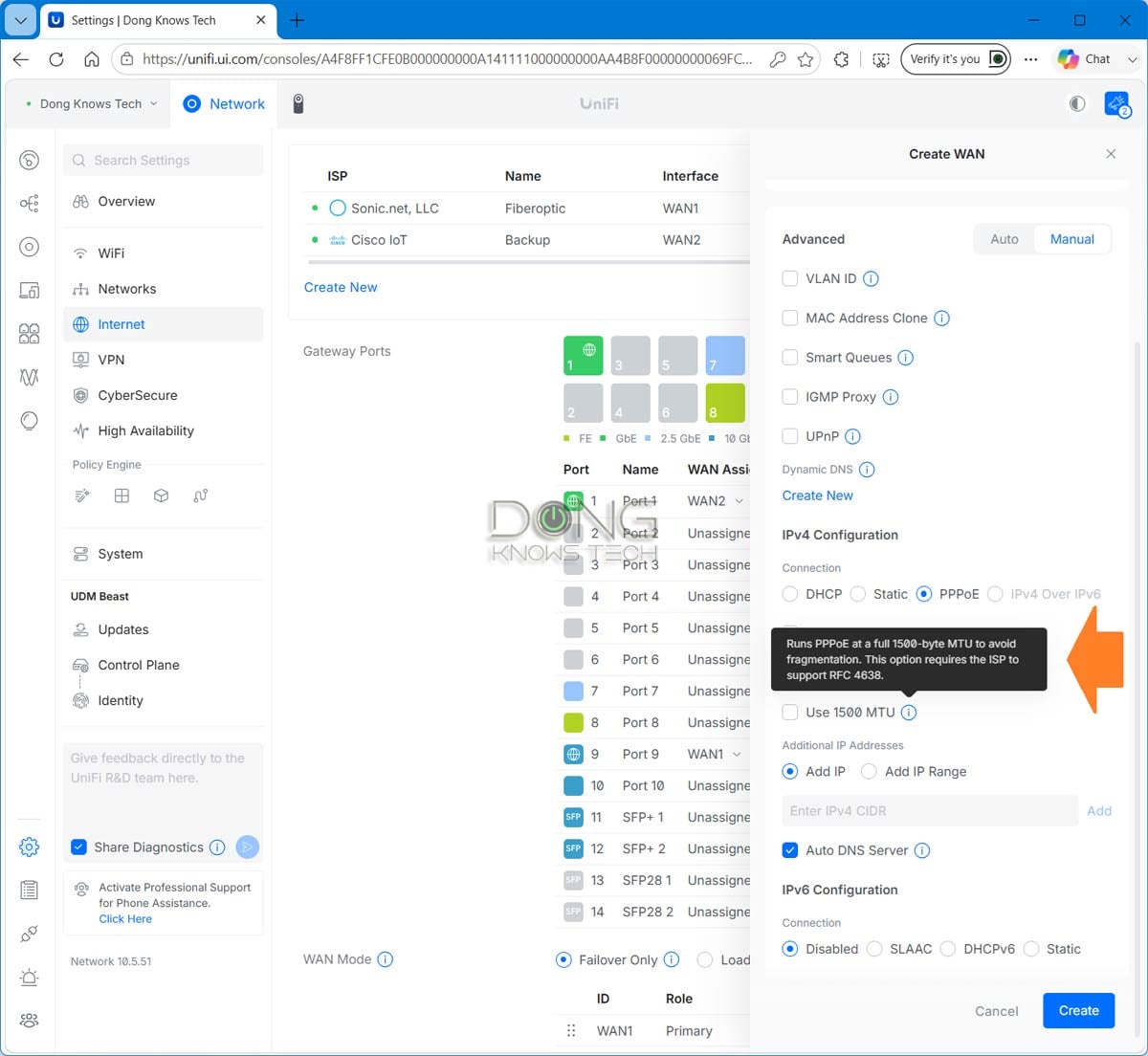
    The new UniFi Network 10.5 now supports the Maximum Packet Size for a PPPoE connection, as defined in RFC 4638. This option, common in many PPPoE broadband services, means the router must use an MTU of 1500 bytes for the Internet connection to work optimally. In the previous UniFi Network version, the only option for a PPPoE connection was to enter a username and password.

    Additionally, the new version introduces Safe Ops and Test & Commit, ensuring that admin users can test a new configuration before permanently confirming it. The system can also automatically roll back to a previous configuration if a change causes issues.
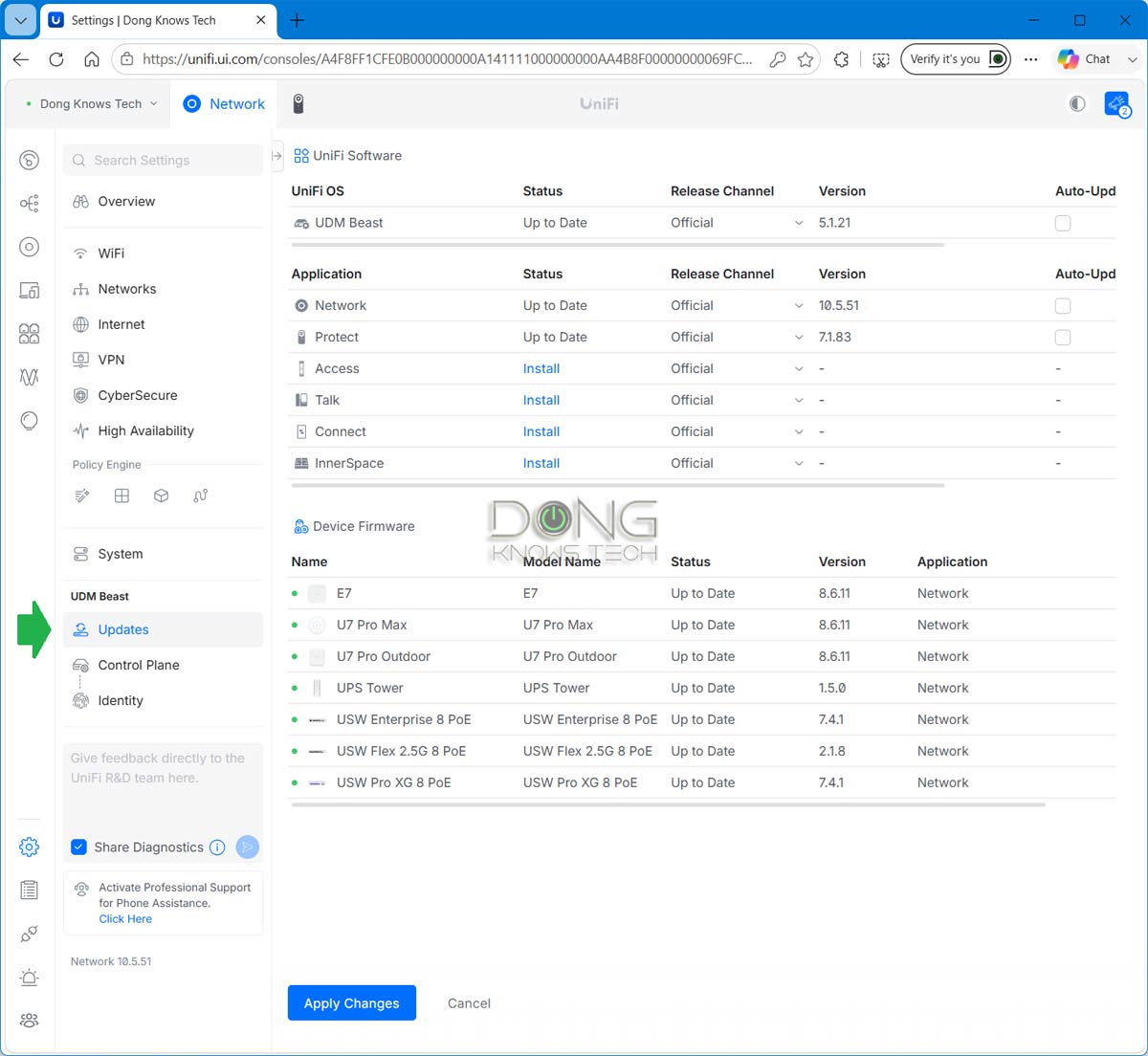
    With UniFi Network 10.5 the firmware Update has its own section making mangaging hardware updates a much easier job
    Among other things, UniFi Network 10.5 makes managing hardware updates easier and now has the 1500 MTU option for a PPPoE broadband connection.

    UniFi Network 10.5’s complete list of improvements and bug fixes

    Below is the complete list of what the new UniFi Network 10.5 (currently available in build 10.5.51) brings.

    Improvements

    • Added SD-WAN Underlay support in Port Manager, allowing direct underlay connections between SD-WAN hubs for low-latency traffic when available.
    • Configuration support will be available in a future Site Manager release.
    • Added PPPoE 1500 MTU support.
    • Added migration support from Suricata 6 to Suricata 8.
    • Requires UniFi OS 5.1.20 or newer.
    • The upgrade may take up to 1 hour after updating the Network Application.
    • On consoles with high resource usage, the automatic upgrade is skipped, and a manual upgrade option is available in CyberSecure settings.
    • Added an infrared status indicator for EAV Bridge.
    • Requires firmware version 1.0.9 or newer.
    • Added Last Seen information to anomaly tooltips in Port Manager.
    • Added Hits and Last Hits columns to the Policy Table and predefined policy side panel.
    • Added a Person filter to the Clients page.
    • Requires One-Click WiFi.
    • Added Data Plane Protection option under SafeOps.
    • Improved device adoption resiliency.
    • Improved Safe Mode triggering logic.
    • Improved Network Application stability under high load.
    • Improved IPsec Policy-Based Routing configuration by excluding WireGuard and OpenVPN clients from Local Network selection.
    • Improved the Observability user experience.
    • Improved Auto STP Edge behavior by excluding Sonos devices from automatic BPDU Guard assignment.

    Bugfixes

    • Fixed an issue where the WiFi Speed Limit appeared as selected in the WiFi Broadcast settings when it was not enabled.
    • Fixed an issue in which turning off a LAN port on the UX7 could prevent configuration from being provisioned to other meshed access points.
    • Fixed an issue where Port Profiles were not respected when using Auto STP Edge.
    • Fixed an issue where AV Manager was not displayed when no switches were adopted on the site.
    • Fixed an issue where jumbo frames were not correctly applied to EF-Core LAG ports.
    • Fixed an issue where switches could fail to adopt in rare cases.

    A fast update

    I upgraded my UniFi Dream Machine Beast to the latest version, and the process took just less than 10 minutes. After that, everything works. If you set your UniFi Cloud Gateways to auto-update, the new version will be applied within a day or two.

    Related posts:

    Best AiMesh Combo: The 100% Tested Rules

    Apple's iPhone Air MagSafe battery is cheaper than ever right now

    A Solid AFC-Ready Wi-Fi 7 Access Point| Dong Knows Tech

    Share. Facebook Twitter Pinterest LinkedIn Tumblr Email
    Previous ArticleWatch 1995’s Johnny Mnemonic before it leaves Netflix on June 30
    Next Article The Roadmap to Becoming an AI Architect in 2026
    gvfx00@gmail.com
    • Website

    Related Posts

    Tech Reviews

    Notion killing Skiff-influenced email app since most users use AI agents instead

    June 25, 2026
    Tech Reviews

    Samsung’s Latest Budget Phone Has Mild Upgrades And A $50 Price Hike

    June 25, 2026
    Tech Reviews

    I Tried 17 BBQ Sauces. These 7 Are So Good You’ll Find Excuses to Use Them

    June 25, 2026
    Add A Comment
    Leave A Reply Cancel Reply

    Top Posts

    Black Swans in Artificial Intelligence — Dan Rose AI

    October 2, 2025205 Views

    Every Clue That Tony Stark Was Always Doctor Doom

    October 20, 2025129 Views

    We let ChatGPT judge impossible superhero debates — here’s how it ruled

    December 31, 202599 Views
    Stay In Touch
    • Facebook
    • YouTube
    • TikTok
    • WhatsApp
    • Twitter
    • Instagram

    Subscribe to Updates

    Get the latest tech news from tastytech.

    About Us
    About Us

    TastyTech.in brings you the latest AI, tech news, cybersecurity tips, and gadget insights all in one place. Stay informed, stay secure, and stay ahead with us!

    Most Popular

    Black Swans in Artificial Intelligence — Dan Rose AI

    October 2, 2025205 Views

    Every Clue That Tony Stark Was Always Doctor Doom

    October 20, 2025129 Views

    We let ChatGPT judge impossible superhero debates — here’s how it ruled

    December 31, 202599 Views

    Subscribe to Updates

    Get the latest news from tastytech.

    Facebook X (Twitter) Instagram Pinterest
    • Homepage
    • About Us
    • Contact Us
    • Privacy Policy
    © 2026 TastyTech. Designed by TastyTech.

    Type above and press Enter to search. Press Esc to cancel.

    Ad Blocker Enabled!
    Ad Blocker Enabled!
    Our website is made possible by displaying online advertisements to our visitors. Please support us by disabling your Ad Blocker.