Close Menu

    Subscribe to Updates

    Get the latest news from tastytech.

    What's Hot

    Trump Endorses Halo Composer Who Once Called Him An Idiot

    April 15, 2026

    ‘The Hunt For Gollum’ Reveals Cast, Including New Aragorn

    April 15, 2026

    Read This Performance Driving Guide!

    April 15, 2026
    Facebook X (Twitter) Instagram
    Facebook X (Twitter) Instagram
    tastytech.intastytech.in
    Subscribe
    • AI News & Trends
    • Tech News
    • AI Tools
    • Business & Startups
    • Guides & Tutorials
    • Tech Reviews
    • Automobiles
    • Gaming
    • movies
    tastytech.intastytech.in
    Home»Tech Reviews»Best Wi-Fi 7 Adapters: 2026’s Top 5 Options
    Best Wi-Fi 7 Adapters: 2026’s Top 5 Options
    Tech Reviews

    Best Wi-Fi 7 Adapters: 2026’s Top 5 Options

    gvfx00@gmail.comBy gvfx00@gmail.comApril 15, 2026No Comments6 Mins Read
    Share
    Facebook Twitter LinkedIn Pinterest Email


    This post includes the five best Wi-Fi 7 adapters I’ve tested and used extensively.

    Wi-Fi 7 has been available for a couple of years, and if you buy a new computer today, chances are it’ll come with this standard built in. However, if you have an older machine, such as one not compatible with Windows 11, it defenitely an older Wi-Fi adapter or no Wi-Fi at all.

    As you can install Windows 11 on unsupported hardware that can run Windows 10, you can add Wi-Fi 7 to any computer. And at least one of the options below will fit in your current situation.

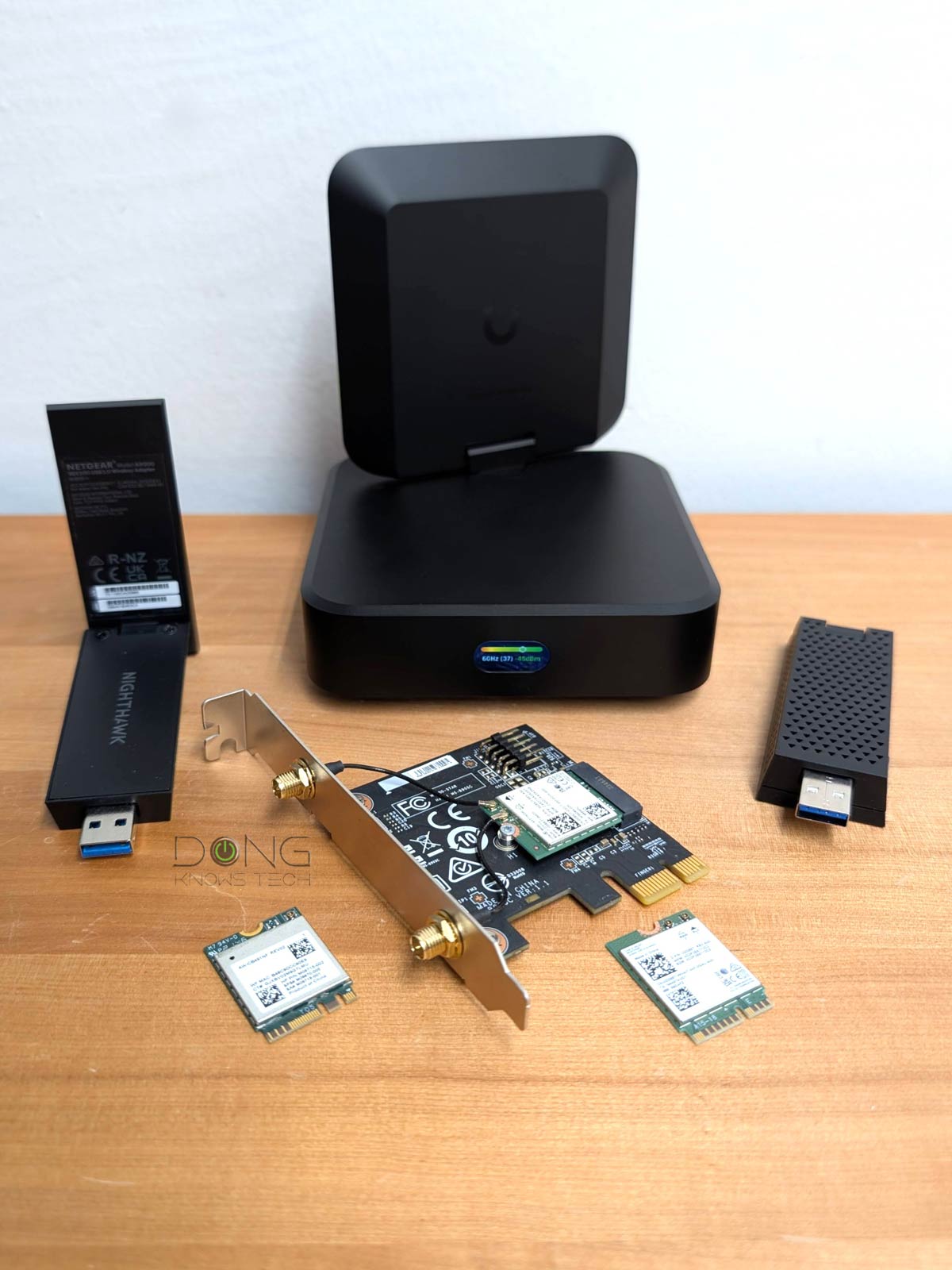
    Best Wi-Fi 7 adapters these devices come in different shapes, sizes and designs
    Best Wi-Fi 7 adapters: These devices come in various shapes, sizes, and designs to suit different hardware installation options.

    Related stories on home networking basics and troubleshooting

    Table of Contents

    Toggle
    • Best Wi-Fi 7 adapter: 2026’s top options
      • 1. Intel BE200 (M.2 or PCIe)
      • Pros
      • Cons
      • 2. Qualcomm NCM865 (M.2 or PCIe)
      • Pros
      • Cons
      • 3. ASUS ROG USB-BE92 (USB-A)
      • Pros
      • Cons
      • 4. NETGEAR A9000 (USB-A)
      • Pros
      • Cons
      • 5. Ubiquiti AirWire (USB-C)
      • Pros
      • Cons
      • Best Wi-Fi 7 adapters: The real-world performance chart
    • The final thoughts
      • Related posts:
    • OpenClaw gives users yet another reason to be freaked out about security
    • Compact and comprehensive video production
    • BOXROOM lets you build a cozy game room for your Steam library

    Best Wi-Fi 7 adapter: 2026’s top options

    You can add Wi-Fi 7 to a computer via an M.2 slot, a PCIe slot, or a USB port. For the first two, I detailed the process in my takes on the Intel BE200 and Qualcomm NCM865 (links below).

    As for the USB adapter, all you have to do is plug it in like a thumb drive. The only thing to keep in mind is to use a USB 3.2 Gen 2 (5Gbps) or faster standard—all computers have at least one of these ports nowadays.

    With that, here are the current top five options and their performance chart.

    The list below is sorted by rating, with #1 being the highest rated. However, any of the adapters below will work, and each is suited to a particular situation. In other words, not all of them can work interchangeably in hardware installation alone.


    1. Intel BE200 (M.2 or PCIe)

    Intel BE200 Wi-Fi ChipAn Intel BE200 Wi-Fi 7 Card on a PCIe adapter ready to be instsalled
    Best Wi-Fi 7 adapters: The Intel BE200 is generally available as a standalone internal M.2 adapter, but you can easily turn it into a PCIe adapter using a generic card.

    The Intel BE200 is the first Wi-Fi 7 on the market. Available as an internal M.2 adapter, it can be installed in any computer with an E-Key M.2 slot. Alternatively, you can add it to a generic PCIe card for use with a computer via a PCIe slot. This card, as well as its other variant (Intel BE202, etc.), generally only works on a computer powered by an Intel CPU.

    Pros

    Adds Wi-Fi 7 to a computer with up to 320MHz channel width; affordable

    Flexible application via E-key M.2 or PCIe adapter; widely available

    Backward compatible with Wi-Fi 6E and older broadcasters

    Cons

    No 6GHz band for Windows 10; finicky AMD support


    2. Qualcomm NCM865 (M.2 or PCIe)

    The Qualcomm NCM865 is for now available only as the MSI Herald BE PCIe adapter cardQualcomm NCM865 Wi-Fi 7 PCIe add on adapter
    Best Wi-Fi 7 adapter: The Qualcomm NCM865 is first available as part of the MSI Herald Wi-Fi 7 PCIe adapter, but you can remove the chip from the card to use it in a computer with an M.2 slot.

    The Qualcomm NCM865 was first available as part of a PCIe adapter, but is now also available as a standalone E-Key M.2 card. You can use it on any computer, AMD or Intel.

    Pros

    Adds Wi-Fi 7 to a computer with up to 320MHz channel width; supports both Intel and AMD platforms

    Flexible application via E-key M.2 or PCIe adapter

    Backward compatible with Wi-Fi 6E and older broadcasters

    Cons

    Limited availability; Windows 11 (and later) required


    3. ASUS ROG USB-BE92 (USB-A)

    ASUS ROG USB BE92 Wi-Fi 7 Adapter
    Best Wi-Fi 7 adapters: The ASUS ROG USB BE92 Wi-Fi 7 Adapter is about the size of a large USB-A thumb drive and comes with a cradle to use with a desktop. It does not include a USB-C-to-USB-A adapter.

    The ROG USB-BE92 is a USB Wi-Fi 7 adapter. It comes with a USB-A connector but will also work with a USB-C port via an adapter (not included). You can use it with any computer as long as there’s a software driver for it (Windows driver embedded).

    Pros

    Quickly adds Wi-Fi 7 to a Windows computer with fast and reliable real-world performance

    Built-in software driver for true plug-and-play

    Cons

    No 240MHz or wider channel support


    4. NETGEAR A9000 (USB-A)

    The NETGEAR Nighthawk A9000 Wi-Fi 7 Adapter use USB A port and has no USB to USB-C adapter
    Best Wi-Fi 7 adapters: The NETGEAR Nighthawk A9000 Wi-Fi 7 Adapter uses a USB-A port and does not include a USB-C-to-USB-A adapter. It comes with a cradle for flexible placement when used with a desktop computer.

    The ROG USB-BE92 is another USB Wi-Fi 7 adapter with a USB-A connector. It’ll also work with any computer that has compatible software drivers (Windows driver thumb drive included).

    Pros

    Quickly adds Wi-Fi 7 to a Windows computer

    Fast and reliable Gig+ real-world performance

    Cons

    Only works with Windows (for now)

    No 240MHz or wider channel support, no USB-C adapter included


    5. Ubiquiti AirWire (USB-C)

    The Ubiquiti AirWire (U AirWire) Wi-Fi 7 client adapter in action
    Best Wi-Fi 7 adapters: The Ubiquiti AirWire (U AirWire) Wi-Fi 7 client adapter is super bulky and comes with a front-facing screen to show the signal strength of its Wi-Fi connection in real-time.

    The AirWire is a unique USB Wi-Fi 7 adapter for two reasons: It uses USB-C, and it only works within Ubiquiti’s UniFi ecosystem.

    Additionally, it’s also the only Wi-Fi 7 adapter that features STR MLO for ultra-fast uplink connection. Still, its performance is limited to its USB 32. Gen 1 connection, which theoretically supports 5 Gbps.

    Pros

    Fast Wi-Fi uplink, STR MLO support

    Plug-and-play, up to 5Gbps USB connection

    Flexible high-range uplink antenna with optional auxiliary USB PD power input, USB-C cable included

    Cons

    Uplink requires a Wi-Fi 7-enabled UniFi network, no 2.4GHz band

    Auxiliary power and an updated driver (not included) are required for top performance

    Raw speeds limited to 5Gbps (USB 3.2 Gen 1)


    Best Wi-Fi 7 adapters: The real-world performance chart

    Generally, a PCIe or M.2 adapter has better performance than a USB adapter. In return, a USB adapter is much more convenient to use as you don’t need to open up a computer to install it. In any case, most Wi-Fi 7 adapters can deliver sustained multi-gigabit real-world rates at a reasonable distance from the access point.

    Best Wi-Fi 7 adapters performance chart
    Best Wi-Fi 7 adapters: The real-world performance

    Note that the MLO performance on the chart are those of eMLSR MLO. The Ubiquiti AirWire features STR MLO, which wasn’t yet available at the time of publication.

    The final thoughts

    Wi-Fi 7 is not a must-have. If your computer has a wired connection, it’s best to use that instead of Wi-Fi. Also, if it has Wi-Fi 6 or 6E, you won’t see a huge improvement when upgraded to Wi-Fi 7. However, if Wi-Fi is what you need, and you already have a Wi-Fi 7 access point (or router), it never hurts to upgrade your computers to Wi-Fi 7.

    Related posts:

    Today's NYT Mini Crossword Answers for April 6

    Best 2.5Gbps Multi-Gig Routers: 2026's Top Five

    X is also launching Bluesky-like starter packs

    Share. Facebook Twitter Pinterest LinkedIn Tumblr Email
    Previous ArticleAnimal Crossing: New Horizons Update Adds Anniversary Gift And Bug Fixes
    Next Article MiniMax M2.7 Goes Open-Weight to Let You Run Agents Locally
    gvfx00@gmail.com
    • Website

    Related Posts

    Tech Reviews

    What to expect from Google I/O 2026

    April 14, 2026
    Tech Reviews

    Your Old Fridge Is Costing You. Here’s How Much Energy a New Model Saves Each Year

    April 14, 2026
    Tech Reviews

    What 2025 taught us about the importance of resilience in retail

    April 14, 2026
    Add A Comment
    Leave A Reply Cancel Reply

    Top Posts

    Black Swans in Artificial Intelligence — Dan Rose AI

    October 2, 2025138 Views

    BMW Will Put eFuel In Cars Made In Germany From 2028

    October 14, 202511 Views

    Best Sonic Lego Deals – Dr. Eggman’s Drillster Gets Big Price Cut

    December 16, 20259 Views
    Stay In Touch
    • Facebook
    • YouTube
    • TikTok
    • WhatsApp
    • Twitter
    • Instagram

    Subscribe to Updates

    Get the latest tech news from tastytech.

    About Us
    About Us

    TastyTech.in brings you the latest AI, tech news, cybersecurity tips, and gadget insights all in one place. Stay informed, stay secure, and stay ahead with us!

    Most Popular

    Black Swans in Artificial Intelligence — Dan Rose AI

    October 2, 2025138 Views

    BMW Will Put eFuel In Cars Made In Germany From 2028

    October 14, 202511 Views

    Best Sonic Lego Deals – Dr. Eggman’s Drillster Gets Big Price Cut

    December 16, 20259 Views

    Subscribe to Updates

    Get the latest news from tastytech.

    Facebook X (Twitter) Instagram Pinterest
    • Homepage
    • About Us
    • Contact Us
    • Privacy Policy
    © 2026 TastyTech. Designed by TastyTech.

    Type above and press Enter to search. Press Esc to cancel.

    Ad Blocker Enabled!
    Ad Blocker Enabled!
    Our website is made possible by displaying online advertisements to our visitors. Please support us by disabling your Ad Blocker.