

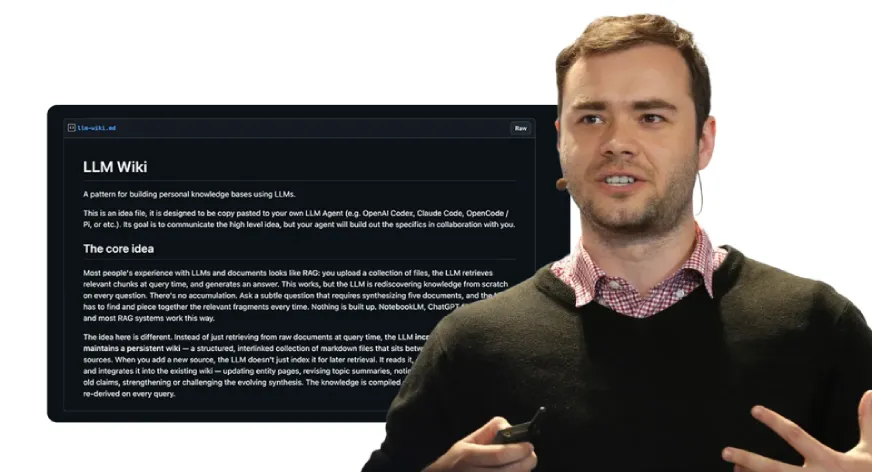

Most AI workflows follow the same loop: you upload files, ask a question, get an answer, and then everything resets. Nothing sticks. For large codebases or research collections, this becomes inefficient fast. Even when you revisit the same material, the model rereads it from scratch instead of building on prior context or insights.
Andrej Karpathy highlighted this gap and proposed an LLM Wiki, a persistent knowledge layer that evolves with use. The idea quickly materialized as Graphify. In this article, we explore how this approach reshapes long-context AI workflows and what it unlocks next.
What is Graphify?
The Graphify system functions as an AI coding assistant which enables users to transform any directory into a searchable knowledge graph. The system functions as an independent entity and not just as a chatbot system. The system operates within AI coding environments which include Claude Code, Cursor, Codex, Gemini CLI and additional platforms.
The installation process requires a single command which needs to be executed:
pip install graphify && graphify installYou must launch your AI assistant and enter the following command:
/graphifyYou need to direct the system toward any folder which can be a codebase or research directory, or notes dump and then leave the area. The system generates a knowledge graph which users can explore after they point it toward any folder.
What Gets Built (And Why It Matters)
When you finish executing Graphify, you will receive four outputs in your graphify-out/ folder:
- The graph.html file is an interactive, clickable representation of your knowledge graph that allows you to filter searches and find communities
- The GRAPH_REPORT.md file is a plain-language summary of your god nodes, any unexpected links you may discover, and some suggested questions that arise as a result of your analysis.
- The graph.json file is a persistent representation of your graph that you can query through weeks later without reading the original data sources to generate your results.
- The cache/ directory contains a SHA256-based cache file to ensure that only files that have changed since the last time you ran Graphify are reprocessed.
All of this becomes part of your memory layer. You will no longer read raw data; instead, you will read structured data.
The token efficiency benchmark tells the real story: on a mixed corpus of Karpathy repos, research papers, and images, Graphify delivers 71.5x fewer tokens per query compared to reading raw files directly.
How It Works Under the Hood?
The operation of Graphify requires two distinct execution phases. The process needs to be understood because its operational mechanism depends on this knowledge:
The Graphify system extracts code structure through tree-sitter which analyzes code files to identify their components. It includes classes, functions, imports, call graphs, docstrings and rationale comments. The system operates without any LLM component. Your machine retains all file contents without any data transmission. The system operates with three advantages because it achieves high speed while delivering accurate results and safeguarding user privacy.
The Claude subagents execute their tasks simultaneously across documents which include PDFs and markdown content and images. They extract concepts, relationships, and design rationale from unstructured content. The process results in the creation of a unified NetworkX graph.
The clustering process employs Leiden community detection which functions as a graph-topology-based method that does not require embeddings or a vector database. Claude Pass 2 extraction generates semantic similarity edges that already exist as embedded elements within the graph which directly affect the clustering process. The graph structure functions as the signal that indicates similarity between items.
One of the most beneficial aspects of Graphify is its method for assigning confidence levels. Each relationship will be tagged:
- EXTRACTED – found in the source with a confidence level of one.
- INFERRED – reasonable inference based on a degree of confidence (number).
- AMBIGUOUS – needs human review.
This allows you to differentiate between found and inferred data which provides a level of transparency that is not found in most AI tools and will help you to develop the best architecture based on graph output.
What You Can Actually Query?
The process of querying the system becomes more intuitive after the graph construction is completed. Users can execute commands through their terminal or their AI assistant:
graphify query "what connects attention to the optimizer?
graphify query "show the auth flow" --dfs
graphify path "DigestAuth" "Response"
graphify explain "SwinTransformer"
The system requires users to perform searches by using specific terms. Graphify follows the actual connections in the graph through each connection point while showing the connection types and confidence levels and source points. The --budget flag enables you to limit output to a certain token amount, which becomes essential when you need to transfer subgraph data to your next prompt.
The correct workflow proceeds according to these steps:
- Begin with the document GRAPH_REPORT.md which provides essential information about the main topics
- Use graphify query to pull a focused subgraph for your specific question
- You should send the compact output to your AI assistant instead of using the complete file
The system requires you to navigate through the graph instead of presenting its entire content within a single prompt.
Always-On Mode: Making Your AI Smarter by Default
System-level modifications to your AI assistant can be made using graphify. After creating a graph, you can run this in a terminal:
graphify claude install This creates a CLAUDE.md file in the Claude Code directory that tells Claude to use the GRAPH_REPORT.md file before responding about architecture. Also, it puts a PreToolUse hook in your settings.json file that fires before every Glob and Grep call. If a knowledge graph exists, Claude should see the prompt to navigate via graph structure instead of searching for individual files.
The effect of this change is that your assistant will stop scanning files randomly and will use the structure of the data to navigate. As a result, you should receive faster responses to everyday questions and improved responses for more involved questions.
File Type Support
Due to its multi-modal capabilities, Graphify is a valuable tool for research and data gathering. Graphify supports:
- Tree processing of 20 programming languages: Python, JavaScript, TypeScript, Go, Rust, Java, C, C++, Ruby, C#, Kotlin, Scala, PHP, Swift, Lua, Zig, PowerShell, Elixir, Objective C, and Julia
- Citation mining and concepts from PDF documents
- Process Images (PNG, JPG, WebP, GIF) using Claude Vision. Diagrams, screenshots, whiteboards, and material that is not based in English.
- Extract full relationships and concepts from Markdown, .txt, .rst
- Process Microsoft Office documents (.docx and .xlsx) by setting up an optional dependency:
pip install graphifyy[office] Simply drop a folder containing mixed types of files into Graphify, and it will process each file according to the appropriate processing method.
Additional Capabilities Worth Knowing
Graphify includes several features for use in a production environment, in addition to its main functionality producing graphs from code files.
- Auto-sync with –watch: Running Graphify in a terminal can automatically rebuild the graph as code files are edited. When you edit a code file, an Abstract Syntax Tree (AST) is automatically rebuilt to reflect your change. When you edit a doc or image, you are notified to run –update so an LLM can re-pass over the graph to reflect all the changes.
- Git hooks: You can create a Git commit to rebuild the graph whenever you switch branches or make a commit by running graphify hook install. You do not need to run a background process to run Graphify.
- Wiki export with –wiki: You can export a Wiki-style markdown with an index.md entry point for every god node and by community within the Graphify database. Any agent can crawl the database by reading the exported files.
- MCP server: You can start an MCP server on your local machine and have your assistant reference structured graph data for repeated queries (
query_graph,get_node,get_neighbors,shortest_path) by runningpython -m graphify.serve graphify-out/graph.json. - Export options: You can export from Graphify to SVG, GraphML (for Gephi or yEd), and Cypher (for Neo4j).
Conclusion
Your AI assistant’s memory layer means it can hold onto ideas for future sessions. Currently, all AI coding is stateless, so every time you run your assistant it starts from scratch. Each time you ask the same question, it will read all the same files as before. This means every time you ask a question you are also using tokens to send your previous context into the system.
Graphify provides you with a way to break out of this cycle. Rather than have to constantly rebuild your graph, you can simply use the SHA256 cache to only regenerate what has changed in your last session. Your queries will now use a compact representation of the structure instead of reading from the uncompiled source.
With the GRAPH_REPORT.md, your assistant will have a map of the entire graph and the /graphify commands will allow your assistant to move through that graph. Using your assistant in this manner will completely change the way that you do your work.
Frequently Asked Questions
A. It prevents repeated file by creating a persistent, structured knowledge graph.
A. It combines AST extraction with parallel AI-based concept extraction to build a unified graph.
A. It uses structured graph data, reducing token usage versus repeatedly processing raw files.

Data Science Trainee at Analytics Vidhya
I am currently working as a Data Science Trainee at Analytics Vidhya, where I focus on building data-driven solutions and applying AI/ML techniques to solve real-world business problems. My work allows me to explore advanced analytics, machine learning, and AI applications that empower organizations to make smarter, evidence-based decisions.
With a strong foundation in computer science, software development, and data analytics, I am passionate about leveraging AI to create impactful, scalable solutions that bridge the gap between technology and business.
📩 You can also reach out to me at [email protected]
Login to continue reading and enjoy expert-curated content.
